
Introduction
If you run a small or medium business in Australia, you’ve probably tested a few AI tools already. Maybe your team is using AI writing assistants, or your CRM has an “AI insights” tab. But when those tools hit their limits, the next question is: do we need an AI development company, or can we keep configuring what we already have?
This article explains what an AI development company actually does, what they build (custom models, automation systems, AI agents), and how that’s different from simply setting up features inside existing software. You’ll see where AI development makes commercial sense for Australian SMBs, what a typical project looks like with a partner like Sync Stream, and how to compare options—pre‑built tools vs custom, internal team vs external partner.
By the end, you’ll be able to decide whether you’re still in “experimenting with tools” mode, or ready to engage a specialist partner to design and implement production‑grade AI in your business.
What is an AI development company
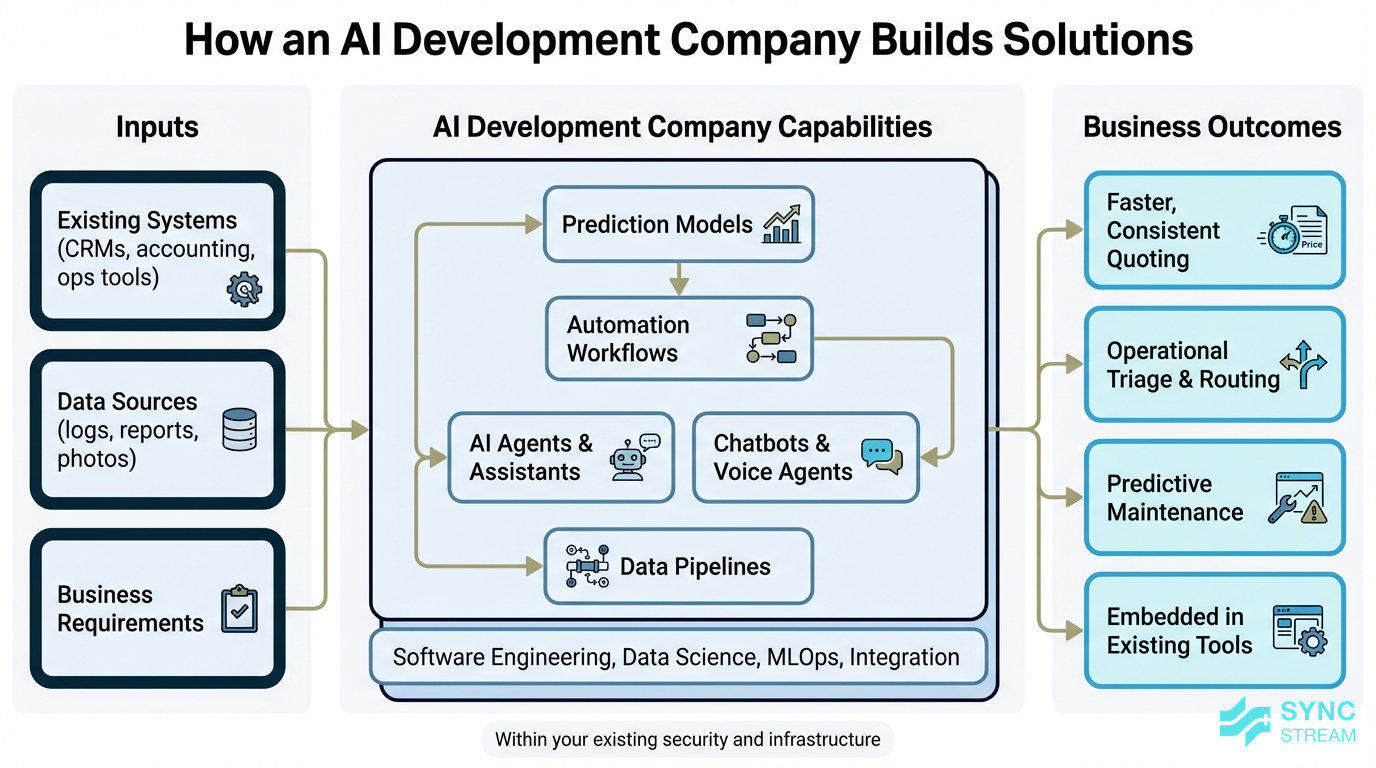
How AI developers build solutions
An AI development company designs, builds, and maintains custom AI systems that are tailored to a specific business and its existing systems. That work typically includes:
- Prediction models (e.g., forecasting demand or risk)
- Automation workflows that orchestrate tasks across multiple apps
- AI agents and assistants that can take actions, not just answer questions
- Chatbots and voice agents that plug into your data and systems
- Data pipelines that collect, clean, and move data where it needs to go
Instead of just switching on a feature in a SaaS tool, an AI development company combines software engineering, data science, MLOps, and systems integration. This is very different to simply “using ChatGPT” or tweaking a few settings in an app.
For Australian SMBs, the outcomes are concrete:
- A medical clinic running a custom intake triage model that routes patients based on symptoms, availability, and urgency, integrated with its practice management software.
- A trades or maintenance business using an AI quoting assistant that analyses photos and job notes, checks pricing rules in the accounting system, and produces consistent quotes within minutes.
- A mining services or heavy equipment firm using a predictive maintenance model that analyses sensor readings, service history, and operating conditions to flag issues before breakdowns.
Firms like Sync Stream focus on embedding these solutions inside your existing CRMs, accounting platforms, operations tools, and communication platforms, so you keep control over data, security, and infrastructure while gaining reliable, repeatable AI‑driven workflows.
Development work vs tool setup
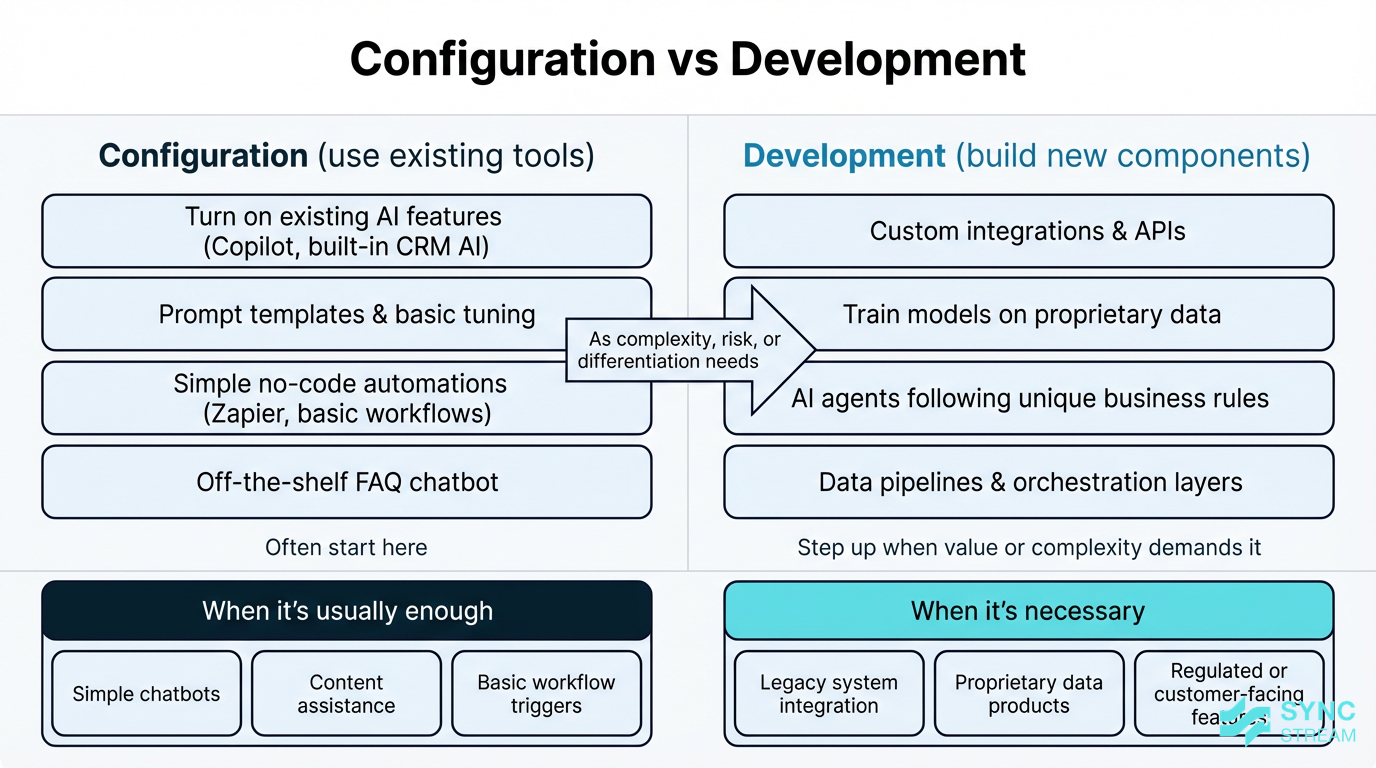
Comparison of AI configuration tasks versus custom development and when each is appropriate.
It’s useful to separate configuration from development:
- Configuration means turning on and tuning existing AI features. That might include:
- Enabling Microsoft 365 Copilot or Google’s AI features and creating prompts and templates
- Using built‑in AI inside your accounting or CRM software
- Connecting apps through no‑code tools like Zapier, Make, or simple workflow builders
- Setting up an off‑the‑shelf website chatbot that answers basic FAQs
- Development means designing and building new components. That can include:
- Writing code for custom integrations and APIs
- Designing and training models on your proprietary data
- Creating AI agents that follow your unique business rules and workflows
- Building data pipelines, orchestration layers, and monitoring to keep everything running
Configuration is usually enough when:
- You want a simple website chatbot that answers common questions and hands off to email or phone for anything complex.
- Your team needs AI writing and image tools to speed up content creation.
- You’re setting up basic workflow triggers between well‑known apps (for example, form → CRM → confirmation email).
- You’re trialling internal AI helpers to see what sticks.
Development becomes necessary when:
- You need heavy integration across legacy or industry‑specific systems, where off‑the‑shelf connectors don’t exist or are unreliable.
- You want to turn proprietary data (years of reports, maintenance logs, or client files) into a real asset via search, prediction, or specialised assistants.
- You operate with strict security or compliance needs and must control data flows, logging, and access.
- You’re building customer‑facing features competitors don’t offer (for example, a quoting tool, risk calculator, or portal feature).
A good AI development company won’t push custom build for everything. Partners like Sync Stream often start with smart configuration of the tools you already pay for, then step into development only when there is clear, measurable business value in doing so.
Why it Matters for Australian SMBs
Where Australian SMEs gain from AI
Australia’s AI sector has grown rapidly, and AI capability is now accessible well beyond big banks and miners.
For SMBs, the opportunities are practical and immediate:
- Healthcare and clinics: AI for clinical documentation, intake triage, and secure messaging can reduce admin and improve patient flow.
- Professional services: Document review, drafting proposals, and summarising research can be partly automated while keeping humans in control.
- Retail and e‑commerce: Recommendation engines, personalised marketing, and support chat can increase conversion and reduce returns.
- Trades, construction, and field services: Automating quoting, scheduling, job documentation, and safety checks can lift margin and reduce rework.
- Agriculture and regional operations: Yield prediction, monitoring, and alerting systems can inform decisions without adding headcount.
At the same time, AI hiring in Australia has more than tripled since 2015, with competition especially intense in Sydney and Melbourne. Working with an AI development company lets you tap into that scarce skill set without needing to build a full internal data science and engineering team. Partners like Sync Stream bring workflow automation (for example, n8n), AI agents, and systems integration experience that most SMBs can’t justify hiring full‑time.
Signs you’re ready for development
You’re likely moving beyond “experimenting with tools” and into “needing development” if you recognise several of these signals:
- Repeated manual data work: staff constantly exporting, cleaning, and re‑entering data between systems.
- Complex workflows across multiple systems: jobs touch your CRM, scheduling tool, accounting platform, and email—none of which talk to each other properly.
- Untapped proprietary data: shelves (or servers) full of reports, photos, drawings, or service logs that no one can search or analyse efficiently.
- Competitive pressure for new features: you want to offer customer‑facing tools—such as self‑service portals or real‑time quoting—that off‑the‑shelf software can’t provide.
Business‑specific triggers often look like:
- Volume bottlenecks: too many leads or enquiries to qualify manually without hiring more staff.
- Error‑prone manual processing: frequent mistakes in invoicing, quoting, or data entry that cost time and money.
- Need for 24/7 responsiveness: customers expect round‑the‑clock responses that your team cannot realistically provide.
Once AI starts touching regulated data (health, finance, legal) or mission‑critical operations, DIY configuration becomes risky. At that point, partnering with an AI development company that understands Australian regulations, privacy, and operational reliability is far more important than experimenting alone.
Key Components / Features
Core services an AI firm offers
Most serious AI development firms provide services across the full lifecycle:
- Discovery and scoping: clarify business goals, map processes, and decide whether configuration or custom development makes sense.
- Data engineering: assess, clean, and structure data; build pipelines to move data between CRMs, ERPs, databases, and apps.
- Model selection and training: choose between existing models (for example, large language models) and custom models, then train and tune them on your data where needed.
- AI agent and workflow design: create AI assistants and orchestrated workflows that follow your business rules and escalation paths.
- Integration with existing software: connect to your CRM, accounting platform, operations tools, and internal databases via APIs or middleware.
- User interface development: build the screens, chat interfaces, or portals staff and customers will actually use.
- Monitoring and maintenance: track performance, manage updates, and document workflows to reduce vendor lock‑in.
In practice, a large portion of many “AI projects” is data and integration work, not just model training. Sync Stream often spends significant effort cleaning data, connecting disparate systems, and designing robust workflows using orchestration tools like n8n so that the AI component can operate reliably.
A typical engagement for an Australian SMB might look like:
- 4–8 week discovery and prototype phase: workshops, process mapping, data assessment, and a working proof‑of‑concept in a limited part of the business.
- Phased rollout: extend the solution across more teams, harden integrations, add monitoring, and document everything.
- Ongoing support: incremental improvements based on real‑world usage, plus updates as your systems or regulations change.
Capabilities that set partners apart
When comparing AI development partners, look at both technical and non‑technical capabilities.
Technical capabilities that matter:
- Experience with major cloud platforms (AWS, Azure, or GCP) and their security models
- Familiarity with modern ML frameworks and large language models
- Use of vector databases and retrieval techniques for document‑heavy use cases
- Solid MLOps practices—version control, automated testing, monitoring, and rollback plans
- Strong integration skills with CRMs, accounting systems, and operations tools
Non‑technical capabilities that are critical for SMBs:
- Ability to translate business problems into technical designs without jargon
- Clear documentation so your team isn’t locked out of understanding the system
- Transparent scoping and pricing (fixed‑scope discovery phases, then well‑defined milestones)
- Familiarity with Australian industries and regulations, especially in health, finance, or government‑adjacent sectors
Helpful questions to ask a prospective AI development company include:
- “Can you show me a similar project you’ve delivered for a business like ours?”
- “How do you handle data security, privacy, and ongoing model updates?”
- “What parts of the solution will we own, and what will rely on third‑party services?”
- “How will you document workflows so we’re not dependent on you for every small change?”
Data, security and compliance focus
Effective AI projects start with data. A capable partner will:
- Assess data quality, access, and structure
- Identify gaps (missing fields, inconsistent formats, unstructured files)
- Confirm you own or are allowed to use the data for AI training and automation
- Design pipelines that minimise duplication and keep a clear system of record
In Australia, your AI systems also need to respect local privacy and regulatory frameworks, including:
- The Privacy Act and guidance from the Office of the Australian Information Commissioner (OAIC)
- Sector rules such as APRA standards for finance, or AHPRA/TGA‑related expectations in health
- Contractual obligations with clients and suppliers regarding data handling and residency
Practically, you should expect an AI development company to implement measures like:
- Data encryption in transit and at rest where appropriate
- Role‑based access controls, ideally integrated with your identity systems
- Audit logging for key actions and data access
- Clear data residency policies and use of Australian data centres where required
- Explicit agreements on IP ownership for models, workflows, and code developed for you
Sync Stream designs AI and automation systems on top of your existing infrastructure, with documentation and controls that support compliance and audit needs.
Implementation Strategy
Clarify your goals and use cases

Process for defining AI goals and mapping them to processes, systems, and data.
Before speaking to any AI development company, define 1–3 specific business outcomes, such as:
- Reduce average response time to enquiries by 40%
- Cut manual processing hours in invoicing by 50%
- Increase quote‑to‑win conversion rate by 10%
- Reduce unplanned equipment downtime by a measurable percentage
Then map your current processes. For each priority process:
- Inputs: list the steps (for example, lead comes in, data captured, qualified, scheduled, quoted). Action: write them in order on a page or whiteboard. Output: a clear end‑to‑end view of how work currently flows.
- Inputs: note the systems used at each step (CRM, spreadsheets, email, accounting, job management). Action: add system names next to each step. Output: a list of where data lives and which tools are involved.
- Inputs: existing records, files, and reports. Action: identify data locations (databases, file shares, paper, cloud tools) and mark the pain points—delays, errors, re‑keying, manual checks. Output: a short list of bottlenecks and risks.
This simple mapping helps a partner like Sync Stream quickly assess whether configuration of existing tools is enough, or whether custom development will be required.
As a quick filter:
- If your needs are mostly document drafting, email replies, and simple FAQs, start with internal experiments and configuration.
- If you’re trying to link multiple core systems or build a feature customers will use directly, talk to a development partner early.
- If regulated or highly sensitive data is involved, get professional input before you move data into any AI tool.
- If your team is already stretched and can’t lead technical experiments, you’ll gain from external help sooner.
Turning a concept into production AI

The typical eight-step path from AI concept to a live, monitored solution.
A practical path from idea to live solution typically follows these stages:
- Discovery workshop
- Inputs: your business model, current processes, pain points, target outcomes.
- Action: 1–2 focused sessions with an AI development company to prioritise use cases.
- Output: a shortlist of high‑value, realistic AI opportunities.
- Data and systems audit
- Inputs: access to key systems and sample data.
- Action: partner reviews data quality, integration options, and constraints.
- Output: a short report on feasibility, risks, and prerequisites.
- Decide configuration vs custom build
- Inputs: audit findings, budget, and timeline.
- Action: partner proposes which parts can use existing tools and which need development.
- Output: a solution outline and high‑level estimate.
- Prototype or MVP
- Inputs: agreed use case and limited data set or team.
- Action: build a small, testable version with clear success criteria.
- Output: working prototype for real‑world validation.
- User testing and refinement
- Inputs: prototype in day‑to‑day use.
- Action: capture feedback, edge cases, and performance data.
- Output: refined workflows, prompts, and rules that fit reality.
- Security, compliance, and sign‑off
- Inputs: documented data flows and controls.
- Action: review against internal policies and relevant Australian regulations.
- Output: approved design ready for production.
- Deployment and training
- Inputs: finalised solution and user group.
- Action: deploy, train staff, and update procedures.
- Output: system live in production with trained users.
- Monitoring and iteration
- Inputs: usage metrics and business KPIs.
- Action: track performance, adjust models or workflows, and plan next phases.
- Output: stable, improving AI system tied to measurable outcomes.
For Australian SMBs with limited budgets, it’s especially important to run a contained pilot first—for example in one branch or team—before scaling across the whole organisation.
Planning budget, timelines and ROI
Indicative ranges will vary, but as a rough guide:
- Configuration‑only projects (turning on and tuning existing features, simple automations) are often measured in days to a few weeks, with modest budgets.
- Custom development with integrations (new agents, data pipelines, deep system integration) is more likely measured in several weeks to a few months, with investment driven by the number of systems involved and the quality of your existing data.
To estimate ROI in simple terms, consider:
- Time saved: (\text{Hours saved per month} \times \text{fully loaded hourly cost})
- Error reduction: (\text{Number of errors avoided} \times \text{average cost per error})
- Increased throughput or revenue: Additional jobs, sales, or contracts you can handle without extra headcount
For example, if an AI‑driven workflow saves 200 hours of admin per month at an average cost of $40/hour, that’s $8,000/month of capacity you can redeploy.
To manage financial risk when working with an AI development company:
- Start with a fixed‑price discovery and prototype phase
- Agree on clear success metrics (time saved, error reduction, revenue impact) before full rollout
- Use milestone‑based payments tied to tangible deliverables
- Ensure the partner delivers documentation and training, so your team can operate the system day‑to‑day
Sync Stream commonly structures engagements this way, focusing on defined business cases and ROI rather than open‑ended experimentation.
Options Comparison
Pre-built AI tools vs custom builds
Both pre‑built tools and custom builds have their place.
Pre‑built tools:
- Pros: fast to deploy, low upfront cost, minimal technical overhead. Good for standard tasks like content generation, simple chatbots, or basic reporting.
- Cons: limited customisation, shallow integration with complex or legacy systems, and little control over how models are updated or trained.
Custom builds:
- Pros: can encode your unique processes, deeply integrate with your systems, and create defensible advantages that competitors can’t easily copy.
- Cons: slower to design and implement, requires more involvement from your team, and higher upfront investment.
A sensible hybrid approach is to:
- Start with pre‑built tools to learn what works and validate value.
- Document where those tools hit limits (integration, security, custom logic).
- Engage an AI development company to extend, integrate, or replace them once constraints begin blocking growth.
Internal team vs external partner
You can either hire an internal AI team or work with an external partner.
Internal AI team:
- Typically involves at least one data scientist, ML engineer, and data or integration engineer.
- In Australia, these roles often attract six‑figure salaries plus on‑costs, and are in high demand.
- Makes sense for larger mid‑market firms with a steady pipeline of AI initiatives.
External AI development company:
- Brings a breadth of skills (data, ML, integration, UI, MLOps) without long‑term headcount.
- Offers flexibility—you can scale effort up or down by project.
- Well‑suited to SMBs that need strong implementation depth a few times a year rather than every day.
A practical model for many SMBs:
- An external partner like Sync Stream designs and builds the initial systems, including documentation and training.
- You nominate an internal “AI champion”—often an ops or finance leader—to own the process and day‑to‑day decisions.
- Over time, internal staff learn to operate and lightly extend the system, while the partner remains available for major upgrades, new use cases, and monitoring.
Common Pitfalls
Frequent mistakes SMBs make with AI
Some recurring issues in Australian SMBs include:
- Jumping straight into expensive custom development when a configured off‑the‑shelf solution would deliver most of the value
- Clinging to simple tools that can’t meet security, reliability, or integration needs as usage grows
- Poor or inaccessible data: messy spreadsheets, PDFs, or unstructured notes that make AI unreliable
- Underestimating change management: rolling out tools without training, leading to low adoption
- Ignoring privacy and regulatory requirements: especially when using overseas tools with unclear data handling
- No budget for ongoing monitoring and updates: assuming AI is “set and forget”
A capable AI development company helps avoid these pitfalls by:
- Testing value with small, low‑risk pilots
- Designing clear escalation paths and human‑in‑the‑loop steps
- Auditing data sources and privacy implications up front
- Documenting workflows and training staff, not just handing over code
Partners like Sync Stream focus on operational reliability and documentation, so your AI systems support the business rather than becoming another source of risk.
Conclusion
Choosing the right mix of configuration and custom build is one of the most important decisions you’ll make on your AI journey. Understanding what an AI development company actually does—and when you genuinely need one—helps you avoid both over‑engineering and under‑investing.
For Australian SMBs, the sweet spot is usually to start with targeted, measurable use cases, leverage the tools you already have, and then work with a specialist partner when integration, data, or compliance requirements become too complex to handle internally.
If you’re hitting process bottlenecks, struggling with manual data work, or considering AI for regulated or mission‑critical operations, it may be time to talk to a partner like Sync Stream. Together, you can scope a low‑risk pilot, document the workflows, and build AI and automation that fits your existing systems and delivers clear commercial outcomes.
FAQ
What does an AI development company actually do?
It designs, builds, and maintains custom AI systems—such as models, automations, agents, and integrations—tailored to your business and existing software stack. That includes discovery, data engineering, development, deployment, and ongoing monitoring.
How is this different from just using ChatGPT or Copilot?
Using ChatGPT or Copilot is configuration: you’re using existing models and features. An AI development company goes further by integrating AI into your systems, training models on your data, and designing reliable workflows that match your processes and compliance needs.
How do I know if my business is ready for custom AI development?
You’re likely ready when you have repetitive manual data work, complex workflows across multiple systems, valuable proprietary data you want to leverage, or customer‑facing features that off‑the‑shelf tools can’t provide. If AI will touch regulated data or mission‑critical operations, you should involve a development partner.
How long do AI projects usually take for an SMB?
Simple, configuration‑only projects can often be delivered in days to a few weeks. More complex projects involving custom models and deep integrations typically take several weeks to a few months, depending on scope and data quality.
Do I need to hire an internal AI team?
Most SMBs don’t. It’s usually more cost‑effective to work with an external AI development company and appoint an internal “AI champion” who understands the business and can coordinate with the partner. Larger mid‑market firms with ongoing AI programs may eventually justify building internal teams.
Will we lose control of our data if we work with an AI partner?
You shouldn’t. A good partner will design systems so that data stays in your controlled environments where possible, with clear agreements about data use, residency, and IP ownership. Firms like Sync Stream specialise in working inside your existing systems so you retain control.
What’s the first step if we want to explore this?
Start by defining 1–3 clear business outcomes and mapping the key processes you’d like to improve. Then speak with an AI development company such as Sync Stream to run a focused discovery and prototype phase, so you can test value before committing to wider rollout.