

Introduction
Running a small or mid-sized fleet in Australia keeps getting harder: fuel costs, tolls, wages, compliance, and customer expectations are all rising. At the same time, you still need to keep vehicles on the road, drivers safe, and jobs on schedule.
That’s why AI fleet management is getting so much attention. But for most Australian SMBs, the question isn’t “Is AI the future?” It’s “What can I use right now that plugs into my existing telematics and actually improves day-to-day operations?”
This article breaks down how modern AI fleet management works in plain language, how it builds on the GPS and telematics tools you already know, and where it can realistically improve efficiency, safety, and profitability for fleets of 10–50+ vehicles.
We’ll look at key components (telematics, AI analytics, assistants, automation), implementation strategy, option comparisons, and common pitfalls to avoid—so you can make a practical, commercially sound decision.
What is AI fleet management
Defining AI in fleet operations
In fleet operations, AI is not a robot taking over your depot—it’s software that learns from your telematics and operational data to make better decisions, faster.
Put simply, AI tools:
- Continuously ingest data from GPS units, engine modules, cameras, and job systems.
- Learn patterns in behaviour (routes, driving style, failures, delays).
- Turn those patterns into alerts, predictions, and recommendations you can act on.
Instead of a manager manually digging through reports, AI surfaces what matters:
- “These three vehicles are trending toward a maintenance issue.”
- “This driver’s fatigue risk is increasing on afternoon shifts.”
- “These runs could be reorganised to save fuel and time.”
This is different from traditional GPS or basic telematics, which mostly show you where vehicles are and how fast they’re going. AI-enabled systems add:
- Pattern recognition – spotting recurring harsh braking, idling, or late starts.
- Prediction – estimating when components will likely fail or when a route will run late.
- Real-time coaching – in-cab alerts when a driver is distracted or following too closely.
- Natural-language analytics – systems you can ask questions like “Which vehicles are under-utilised?” and get a clear answer.
For Australian SMBs, this is playing out across:
- Delivery vans and courier fleets trying to cut wasted kilometres and hit ETAs.
- Trades and service vehicles juggling multiple jobs per day across traffic-heavy cities.
- Small trucking fleets working long-distance linehaul and regional runs.
- Construction and equipment fleets managing mixed assets, from utes to heavy plant.
How AI differs from basic telematics
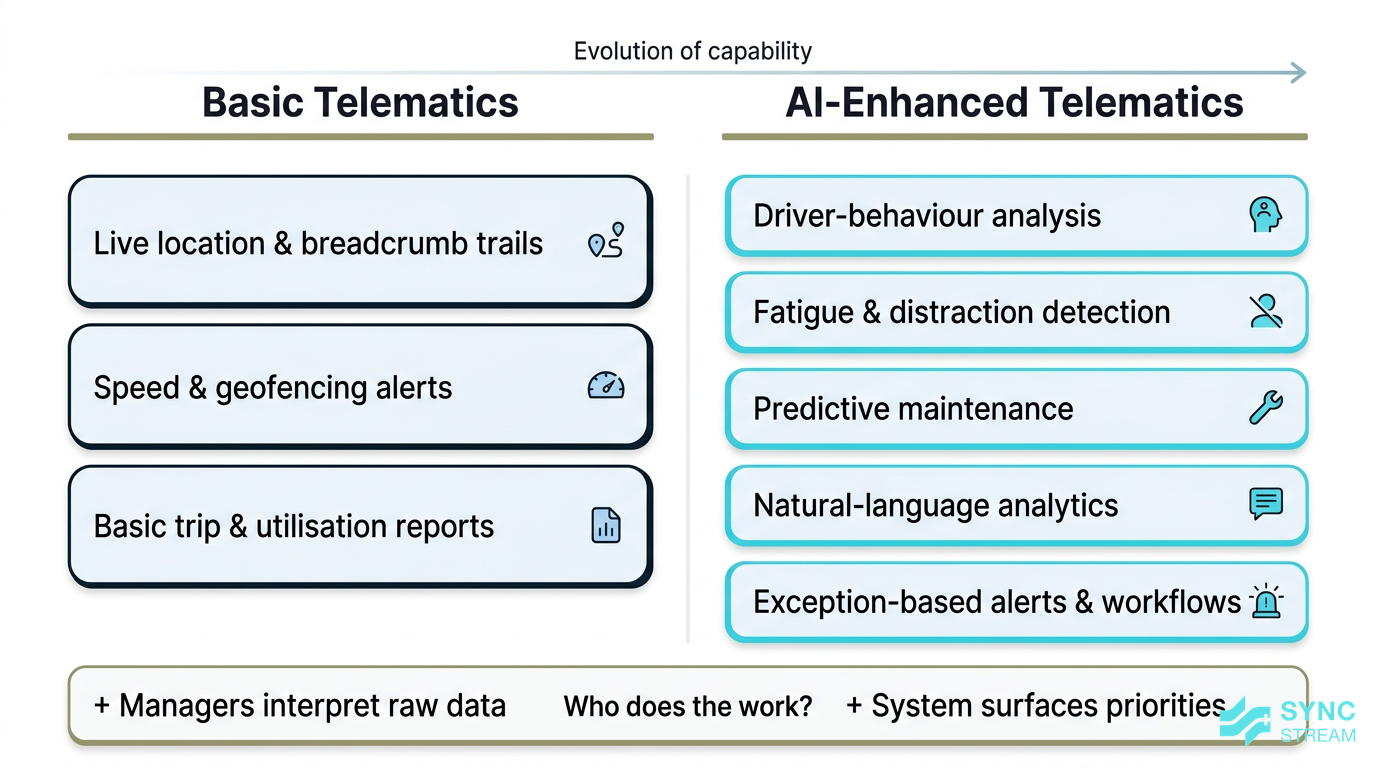
Most fleets already use some form of track and trace:
- Live location and breadcrumb trails.
- Speed and geofencing alerts.
- Basic trip and utilisation reports.
These are valuable, but they rely on people to interpret the data and chase issues. AI shifts this from passive data to active decisions.
Examples of AI capabilities include:
- Driver-behaviour analysis – automatically flagging harsh events, tailgating, or speeding patterns across trips, not just one-off alerts.
- Fatigue detection – camera-based systems like FleetCAM monitoring eye closure, yawning, and distraction to warn drivers in real time.
- Predictive maintenance – platforms such as Smartquip using engine and usage data to estimate when maintenance should be done before a breakdown.
The key point: AI works on top of your existing telematics data. It doesn’t replace GPS or engine monitoring—it consumes that data and:
- Reduces noise by focusing on exceptions.
- Prioritises actions (which drivers to coach, which vehicles to service first).
- Sends clear alerts and workflows rather than raw numbers and spreadsheets.
Core problems AI aims to solve
For Australian SMB fleets, the same pain points come up again and again:
- Fuel spend – high fuel prices, congestion, and idling all eat margin.
- Unexpected breakdowns – vehicles off the road mean missed jobs and expensive hire vehicles.
- Compliance – Chain of Responsibility, fatigue rules, logbooks, and defect reporting.
- Driver safety – distraction, speeding, and fatigue on long or repetitive runs.
- Manual admin and reporting – staff exporting CSVs, building reports, and reconciling trips by hand.
AI tools tackle these by:
- Optimising routes and schedules to reduce kilometres, idling, and time spent in peak traffic.
- Using predictive maintenance to surface likely failures early, reducing roadside breakdowns and workshop surprises.
- Automating compliance reporting with logbooks, defect reports, and trip data pulled automatically into consistent reports.
- Monitoring and coaching driver behaviour via in-cab alerts and post-trip reviews, lowering incident rates.
- Using AI assistants (like conversational analytics in platforms such as Geotab Ace) to answer questions in seconds that used to require hours in Excel.
The outcome lens matters. For a business owner or director, the real benefits are:
- Improved profitability – lower cost per kilometre, better utilisation, and fewer non-billable hours.
- Fewer operational headaches – less firefighting around breakdowns, complaints, and missing data.
- Better customer service – more accurate ETAs, fewer cancellations, and more reliable delivery windows.
Why it matters for Australian SMBs
Cost and efficiency pressures in Australia
Australian fleets operate in a tough environment:
- High fuel prices and variable regional fuel access.
- Labour shortages, especially for experienced drivers and schedulers.
- Long distances between jobs or depots in regional and interstate work.
- Urban congestion in Sydney, Melbourne, Brisbane, and Perth.
- Tolls and parking constraints adding hidden cost and time.
Even small efficiency gains compound at fleet scale. If you operate 20 vehicles, shaving just 15–20 minutes of wasted time per vehicle per day adds up to:
- More completed jobs without extra staff.
- Lower overtime and penalty rates.
- Reduced fuel consumption and wear.
AI features connect directly to these pressures:
- Fuel optimisation – smarter routing, reduced idling, and coaching on harsh acceleration or speeding.
- Better asset utilisation – identifying under-used vehicles so you can redeploy or retire them.
- Less downtime – maintenance scheduled around actual usage and early warning signs instead of waiting for faults.
- Leaner back office – automated report creation, faster invoice support, and fewer hours reconciling trips and timesheets.
For many SMBs, the business case isn’t theoretical. Well-implemented AI fleet management can be the difference between holding margin and watching it disappear into untracked delays and avoidable costs.
Safety, compliance and Chain of Responsibility
Under Australian law, Chain of Responsibility (CoR) means anyone who influences road transport—directors, schedulers, loaders, managers—shares responsibility for safety and compliance.
Alongside CoR, you have:
- Fatigue management rules dictating driving and rest time.
- NHVR and Work Health & Safety expectations that you take “reasonable steps” to keep people safe.
AI safety tools help demonstrate and operationalise those reasonable steps:
- Driver monitoring and fatigue detection – systems that alert drivers when they’re drowsy or distracted, and log events for follow-up.
- In-cab alerts – real-time warnings for tailgating, phone use, lane departure, or speeding.
- Video evidence – dashcams that capture context around incidents, helping distinguish between reckless behaviour and unavoidable events.
Used well, this supports:
- A stronger safety culture, with objective data to back coaching conversations.
- Fewer incidents and claims, which can positively influence insurance discussions over time.
- Clearer visibility when something goes wrong, so you can respond quickly, support drivers, and demonstrate due diligence to regulators.
Competitive edge and customer service
Your customers care about on-time, accurate, reliable service. AI-enabled fleets can:
- Provide more accurate ETAs using real-time traffic and historical trip data.
- Trigger proactive updates when a delivery or crew is running late.
- Reduce last-minute cancellations caused by avoidable breakdowns or planning errors.
AI-driven routing and scheduling help SMBs run tighter operations with the same resources:
- Dispatchers get clearer options and can re-plan quickly when jobs change.
- Drivers spend less time on inefficient routes or backtracking.
- Management sees which customers and routes are truly profitable.
This is not just cost-cutting—it’s a way to scale without adding headcount. With better automation and visibility, you can grow your customer base and job volume without a proportional increase in admin staff or middle management.
Key components and features
Telematics and sensor data foundation
AI fleet management sits on top of a data foundation. Typical sources include:
- GPS tracking units for location, speed, routes, and geofencing.
- Engine control module (ECM) data for fuel use, fault codes, and operating hours.
- Dashcams and in-cab cameras for driver behaviour and incident recording.
- Temperature sensors for refrigerated transport.
- Trailer and equipment trackers for non-powered assets such as trailers, containers, and plant.
The quality of AI output depends on the quality of this input. Poorly installed devices, missing assets, or inconsistent setups will lead to noisy or misleading insights.
Tools like Smartquip combine real-time tracking with maintenance and utilisation data, giving AI models the information they need to recommend service intervals and highlight under-used equipment. Many other AI platforms integrate with similar telematics setups.
For SMBs, this means hardware choices and installation standards matter. Reliable data today is what enables useful automation tomorrow.
AI analytics, assistants and automation
Once your data is flowing, AI analytics engines and assistants start to add value by:
- Detecting patterns like harsh braking, speeding, and excessive idling.
- Identifying maintenance needs based on fault codes and usage patterns.
- Flagging exceptions such as repeated late departures or unplanned stops.
These insights can trigger alerts or automated workflows. For example:
- Emailing a supervisor when a driver’s weekly safety score drops below a threshold.
- Automatically creating a maintenance ticket when a certain fault code appears.
- Sending a summary of under-utilised vehicles to management each month.
Conversational AI assistants (similar in concept to Geotab Ace) go a step further. They allow managers to ask operational questions in plain English, such as:
- “Which vehicles are most expensive to run per kilometre?”
- “Show me drivers with the biggest improvement in safety scores this month.”
- “Which routes consistently run late compared to the schedule?”
Instead of exporting data and building manual spreadsheets, the assistant handles the heavy lifting and presents clear answers.
On top of this, automated reporting replaces many repetitive admin tasks:
- Weekly driver scorecards sent automatically to drivers and supervisors.
- Exception reports focusing attention on the 5–10% of trips that need review.
- Compliance logs and audit trails generated directly from telematics and job data.
Driver safety and coaching tools
AI-powered safety tools use cameras and sensors to detect and respond to risk in real time. Systems like FleetCAM or Saphyroo typically offer:
- Distraction detection – eyes off the road, phone use, or looking down for too long.
- Tailgating and lane departure alerts – based on distance to the vehicle ahead and lane markings.
- Speeding and harsh event monitoring – with context via video clips.
Drivers receive in-cab alerts—audio or visual prompts—to correct behaviour in the moment. Post-trip, managers can review:
- Short video clips of risky events.
- Driver safety scores over time.
- Trends across the fleet (e.g., particular routes or customers linked to higher risk).
The most effective fleets treat this as coaching, not punishment:
- Use video and data to have calm, specific conversations.
- Recognise improvement, not just highlight issues.
- Focus on helping drivers get home safely and avoid unfair blame.
These tools can also protect drivers. When an incident isn’t their fault, clear footage and data provide a strong defence against incorrect accusations and unfair liability.
Implementation strategy
Clarify goals and success metrics
Before looking at vendors, be clear on 2–3 priorities you want AI to impact. For example:
- Reduce fuel cost per kilometre by a set percentage.
- Cut preventable incidents and infringements by a certain amount.
- Lower unplanned downtime or breakdowns.
- Improve on-time delivery percentage.
- Increase vehicle utilisation across the fleet.
Choose simple, measurable KPIs, such as:
- Fuel per kilometre or fuel per job.
- Preventable incident rate per 100,000 km.
- On-time delivery percentage by customer or route.
- Vehicle utilisation rate (hours or kilometres used vs available).
- Average days between unplanned breakdowns.
Align these with your business model:
- Couriers and last-mile delivery may focus on on-time performance, stop density, and fuel per drop.
- Construction and trades may focus on equipment availability and reducing time wasted travelling between sites.
- Service and maintenance fleets may prioritise first-time fix rates and technician productivity.
Clear goals make it much easier to choose tools and later judge if your AI fleet management system is delivering a return.
From trial to full rollout
Treat AI adoption as a structured project. A practical process is:
- Audit current systems and data
- Inputs: list of current telematics, dashcams, job management, payroll, and invoicing tools; sample reports and exports.
- Action: document what data each system holds (locations, engine data, hours, logbooks, defects) and how often it’s updated; note gaps and pain points.
- Expected output: a simple system map and a shortlist of data issues to fix before or during rollout.
- Shortlist vendors
- Inputs: your goals/KPIs, system map, integration needs, preferred budget range.
- Action: identify 3–5 providers that can either integrate with your existing stack or replace clear weak spots; speak with them about use cases similar to yours.
- Expected output: a comparison of vendors covering features, integrations, pricing, contract terms, and reference customers.
- Design a targeted pilot
- Inputs: chosen vendor(s), fleet profile, routes, and driver mix.
- Action: select 5–10 vehicles that represent typical work (mix of routes, customers, and drivers); define pilot scope (features enabled, alerts, reports) and a clear start/end date.
- Expected output: a pilot plan outlining participants, configuration, training schedule, and how success will be measured.
- Run the pilot and train users
- Inputs: pilot plan, training materials, configured system.
- Action:
- Train dispatchers, supervisors, and drivers on how the tools work and what’s expected.
- Monitor data quality daily in the first fortnight (GPS, driver assignments, events).
- Expected output: stable data flow from pilot vehicles and staff who understand how to use the new tools in their day-to-day work.
- Review results against your KPIs
- Inputs: before/after KPI data (fuel, incidents, delays, admin hours), user feedback.
- Action: compare pilot period to a similar previous period, focusing on trends rather than one-off events; collect structured feedback from drivers and staff.
- Expected output: a clear view of whether the pilot met targets, which features drove value, and what needs adjusting.
- Scale in phases and refine configuration
- Inputs: pilot learnings, refined alert/report settings, rollout schedule.
- Action:
- Add vehicles in waves (e.g., by depot or business unit).
- Standardise configurations, then fine-tune alert thresholds and report frequency to avoid noise.
- Expected output: a fleet-wide rollout plan, with high adoption and manageable alert volumes.
During the pilot, test:
- Data quality – are locations, events, and timestamps accurate and consistent?
- Usability – can dispatch and managers quickly find what they need?
- Integrations – does data flow smoothly to payroll, invoicing, or job systems?
- Real-world KPI impact – are you actually seeing improvements, not just more dashboards?
Keep tight feedback loops with drivers and supervisors—short weekly check-ins are often enough to surface issues before they become blockers.
Change management and driver buy‑in
Technology fails when people don’t understand or trust it. To get driver buy-in:
- Explain the “why” clearly – focus on safety, less paperwork, fewer disputes, and protection against unfair claims. Make it clear this is not surveillance for its own sake.
- Keep training short and practical – small group sessions or toolbox talks, plus in-cab cheat sheets that show what alerts mean and how to respond.
- Use real trip examples – review footage or reports from actual runs to demonstrate how the system helps, not just how it catches mistakes.
Set clear policies around:
- When cameras are on and how audio/inside-cab footage is used.
- Who can access data and for what purposes.
- How events feed into coaching, rewards, or disciplinary processes.
Document these policies and discuss them openly. When drivers see consistent behaviour over time—coaching first, fair treatment, and recognition of good performance—trust builds and adoption improves.
Options comparison
All‑in‑one vs best‑of‑breed platforms
You’ll encounter two broad approaches:
- All-in-one platforms – single-vendor suites that cover tracking, cameras, compliance, job management, and sometimes billing (similar in concept to platforms like Allotrac.io).
- Best-of-breed combinations – selecting separate tools for telematics, cameras, maintenance, and analytics, then integrating them.
All-in-one pros:
- Simpler vendor management and one main support contact.
- Tighter native integration across modules out of the box.
- One user interface for staff to learn.
All-in-one cons:
- Some modules may be weaker than specialist tools.
- Less flexibility to swap components if your needs change.
- You may pay for features you don’t fully use.
Best-of-breed pros:
- Deeper functionality in critical areas (e.g., advanced cameras or maintenance).
- Flexibility to upgrade components independently.
- Potential cost control by only paying for what you need.
Best-of-breed cons:
- More moving parts to integrate and support.
- Higher reliance on internal or external IT capability.
- Staff may need to use multiple systems.
When choosing, consider your internal capacity to manage integrations and system complexity. If you’re light on IT resources, a strong all-in-one or a tightly integrated bundle, implemented by a partner, can be more realistic.
Local Australian providers vs global players
Another decision point is local vs global platforms.
Australian-focused providers typically offer:
- Support in Australian time zones.
- Better understanding of NHVR, CoR, and local fatigue rules.
- Reporting formats aligned to Australian regulators and insurers.
Global platforms may provide:
- More advanced AI assistants and analytics features.
- Larger ecosystems of integrations and third-party apps.
- Strong R&D investment and frequent feature updates.
However, global tools can feel less tailored to Australian regulation or terminology.
Useful questions to ask any vendor:
- Where is data hosted? (and does that align with your governance needs?)
- What experience do you have with fleets of our size and industry in Australia?
- Can you provide local references we can speak to?
- How quickly do you typically respond to support tickets during Australian business hours?
Build, buy, or augment existing systems
Most SMBs do not need to build custom AI from scratch. It’s costly, risky, and hard to maintain.
A more practical path is to augment what you already have:
- Many providers (including platforms like Smartquip, Saphyroo, or AI assistants similar to Geotab Ace) can sit on top of your existing tracking hardware or data feeds.
- You can often add AI-based cameras or analytics modules without replacing your entire telematics stack.
Before assuming a full rip-and-replace is required:
- Map your current hardware and software – telematics devices, dashcams, job management, payroll, and ERP.
- Identify what’s working well and where the friction and manual work live.
- Explore add-ons and integrations that target those friction points first.
This incremental approach reduces risk and protects previous investments while still delivering meaningful improvements.
Common pitfalls for SMB fleets
Overbuying features and underusing them
One of the most common traps is buying the biggest package because it “does everything,” then barely using it.
The typical pattern looks like this:
- Big launch, lots of enthusiasm, multiple dashboards switched on.
- Staff overwhelmed by alerts and reports they don’t have time to interpret.
- Over a few months, people stop logging in except when something goes wrong.
To avoid this:
- Start with a small set of high-impact features, such as core safety alerts, simple fuel and utilisation reporting, and a handful of key compliance reports.
- Turn off or delay advanced analytics until the basics are embedded.
- Regularly review which reports and alerts are genuinely used and cut the rest.
You can always expand later once your team is comfortable and seeing clear value.
Poor data quality and integration issues
AI outputs are only as good as the underlying data. Problems like:
- Inconsistent GPS connections or dropouts.
- Incorrect vehicle or driver assignments.
- Weak or unreliable integrations to job management or billing systems.
…can make insights unreliable, leading to:
- Wrong assumptions about which drivers or vehicles are causing cost or risk.
- Duplicate data entry and reconciliation work.
- Frustration and loss of trust from drivers and managers.
Key safeguards include:
- Ensuring quality installations by qualified technicians.
- Using clear, consistent asset naming across systems.
- Thoroughly testing integrations with real jobs, invoices, and payroll runs before full roll-out.
- Assigning ownership for data hygiene—someone responsible for keeping the system tidy.
Good data makes AI insights boringly reliable, which is exactly what you want.
Ignoring privacy, policies and culture
Introducing cameras and detailed monitoring without proper communication is a recipe for backlash.
Risks include:
- Rumours about “spying” and misusing footage.
- Declining morale and higher staff turnover.
- Formal complaints or disputes about privacy.
Mitigate this by:
- Creating a simple written policy that covers what is recorded, how long it’s retained, and who can view it.
- Being explicit about how data will and won’t be used (e.g., safety and training first, not nitpicking minor issues).
- Involving driver representatives early, asking for feedback, and incorporating reasonable suggestions.
Position AI tools as a way to improve safety and fairness—helping resolve disputes, defend against false claims, and support drivers in difficult situations.
Conclusion
AI fleet management is no longer a future concept; it’s a practical layer you can add on top of GPS and telematics to reduce cost, improve safety, and run a tighter operation.
For Australian SMB fleets, the real value lies in:
- Turning noisy data into clear decisions and alerts.
- Reducing fuel, downtime, and manual admin.
- Supporting Chain of Responsibility and safety obligations with better visibility.
- Delivering more reliable service to customers without adding headcount.
The most successful implementations start with clear goals, a focused pilot, and strong driver engagement, then scale what works.
If you’d like help designing AI and automation that works inside your existing telematics, job management, and finance systems—without losing control of your data or being locked into a black-box vendor—Sync Stream can help scope, implement, and document a solution that fits your fleet.
FAQ
What is AI fleet management in simple terms?
It’s software that learns from your telematics and operational data to automate routine decisions and highlight issues, such as risky driving, inefficient routes, or emerging maintenance problems, so you can act faster and with better information.
Do I need to replace my existing GPS or telematics system to use AI?
Often, no. Many AI tools can sit on top of your current hardware or integrate with your existing telematics platform. The first step is mapping what you already have and seeing where add-ons or integrations can deliver value.
How quickly can a small fleet see results from AI?
If data and installations are in good shape, fleets often see early wins—like clearer visibility and reduced manual reporting—within a few weeks of a pilot. More substantial improvements in fuel use, incidents, or downtime typically become clear over a few months as patterns emerge.
Will drivers accept cameras and monitoring?
Acceptance depends on how the system is introduced. Transparent communication, clear policies, practical training, and a coaching-first approach are critical. When drivers see the technology preventing incidents and protecting them in disputes, resistance tends to drop.
Is AI fleet management only for larger fleets?
No. Fleets of 10–50 vehicles can benefit significantly because small percentage gains per vehicle add up across the fleet. The key is not to overbuy—start with a focused set of features tied to clear business goals.
How does Sync Stream fit into AI fleet management projects?
Sync Stream works alongside your existing systems and providers to design AI and automation workflows with a clear commercial case. We integrate data from telematics, job management, accounting, and communication tools, then build AI assistants and automations that reduce manual admin, improve visibility, and support compliance—without forcing you into new core platforms or creating long-term vendor lock-in.