

Introduction
Transport and logistics in Australia are under pressure: long distances, fuel volatility, driver shortages, and customers who now expect live tracking and tight ETAs on every job.
AI transportation logistics offers a way to get more out of the fleet and systems you already have. Instead of hiring a data science team or ripping out your TMS, AI can sit on top of your existing tools to optimise routes, reduce breakdowns, automate admin, and improve customer communication.
This guide walks through what AI in transport and logistics actually means, where it fits across the freight lifecycle, and how small to medium operators in Australia can adopt it in a controlled, ROI-focused way. You’ll see concrete examples of route optimisation, predictive maintenance, warehouse/back-office automation, and real-time visibility, plus an implementation roadmap and common pitfalls to avoid.
What Is AI Transportation Logistics?
Defining AI in transport and logistics
In practical terms, AI in transport and logistics is software that learns from data to make predictions and recommendations about your operations. It’s not just robots in warehouses; it’s the logic behind smarter routing apps, telematics alerts, automated scheduling, and warehouse decisioning.
Traditional systems rely on fixed rules: “If delivery window is AM, then allocate to this run,” or “If odometer > X, then send a reminder.” Those rules only change when a human edits them.
AI-driven systems behave differently:
- They absorb historical and real-time data (routes, delays, fuel use, breakdowns, customer time windows).
- They learn patterns, such as which suburbs always run late on Fridays or which engines tend to fail after certain fault code combinations.
- They update their recommendations automatically as more data flows in.
For an Australian SMB, AI usually shows up inside familiar tools:
- Routing and dispatch apps that suggest multi-drop sequences and re-optimise when jobs change.
- Telematics platforms that not only log GPS and engine data, but flag risky driving, likely component failures, or unusual fuel burn.
- Scheduling tools that automatically assign jobs to drivers based on skills, location, hours-of-service, and fatigue rules.
- Warehouse and inventory tools that predict stock-outs or sequence picks to reduce travel time.
The key difference is that AI transportation logistics systems are dynamic and data-driven, not static rule books.
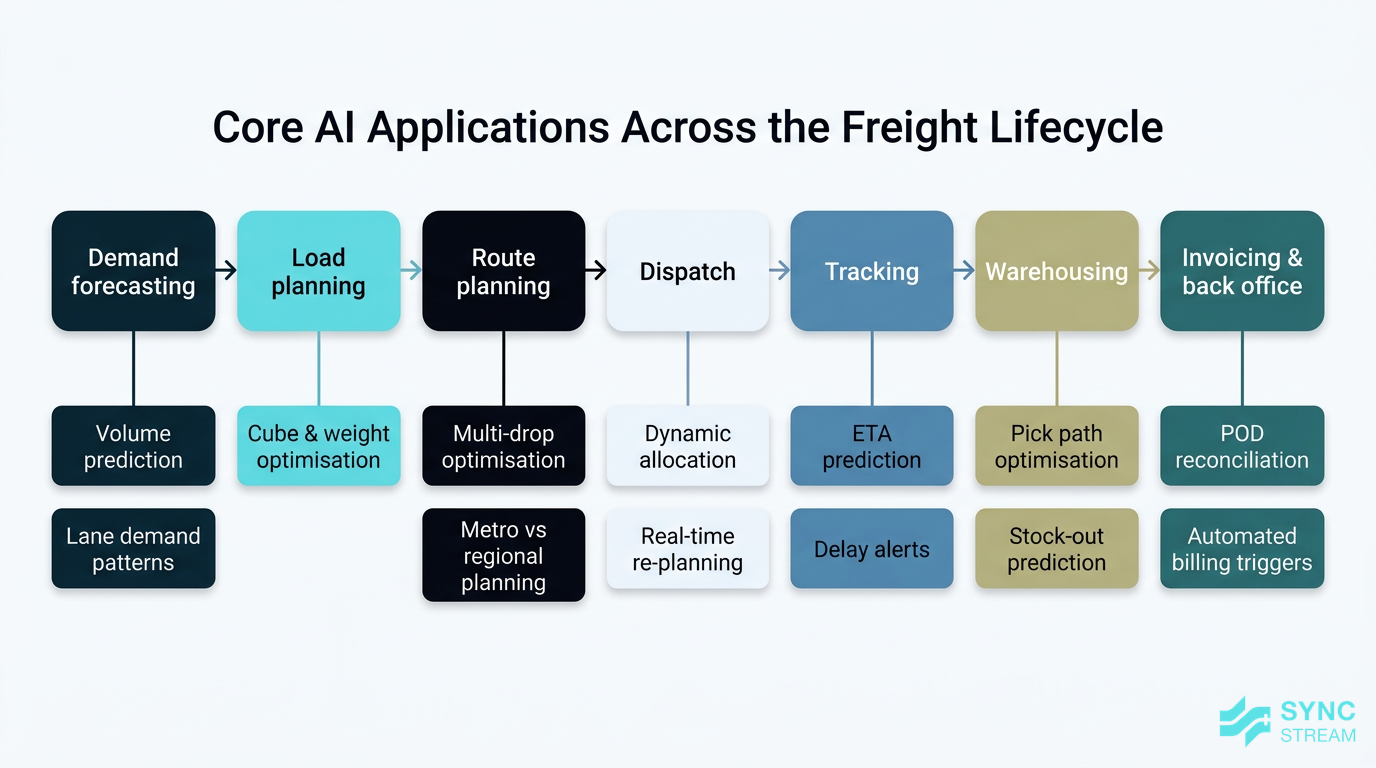
Core applications across the freight lifecycle
Most Australian SMB operators follow a similar freight lifecycle, whether you run 10 utes or 50 prime movers:
- Demand forecasting – anticipating volumes by lane, customer, and day of week.
- Load planning – matching freight to vehicles and trailers, managing cube and weight.
- Route planning – sequencing stops, assigning runs, and mapping metro vs regional legs.
- Dispatch – allocating jobs to drivers and vehicles, handling last-minute changes.
- Tracking – monitoring vehicles and freight in real time.
- Warehousing – receiving, storing, picking, packing, and cross-docking.
- Invoicing and back office – pricing, billing, POD reconciliation, and reporting.
AI can add value at each stage. The main application clusters are:
- Route optimisation – AI evaluates traffic, road restrictions, service windows, vehicle capacities, and historical performance to produce better routes than manual planning.
- Predictive maintenance – models look at telematics and engine data to predict component failures before they cause breakdowns.
- Warehouse automation – AI and automation tools streamline receiving, put-away, picking, and inventory accuracy.
- Real-time tracking and ETA prediction – AI ingests GPS, congestion, and historical run times to produce accurate ETAs and alert you to likely delays.
- Risk analysis – systems analyse weather, bushfire risk, port congestion, industrial action, or global events and highlight potential disruptions.
Crucially for SMBs, these capabilities usually come as modules inside tools you already use—your TMS, telematics platform, WMS, or as focused add-ons—not as a single giant “replace everything” platform. A pragmatic path is to switch on or integrate specific AI modules where they clearly improve existing workflows.
Why It Matters for Australian SMBs
Cost, time, and fuel savings
Research into AI transportation logistics shows potential benefits like up to 30% cost reduction, 25% faster deliveries, and expectations that AI and digital innovations will reduce freight costs by at least 5% by 2030. Those are headline numbers; what matters is what they could mean for your fleet.
Consider a small operator with 20 vehicles:
- If each vehicle does 80,000 km per year at an average fuel cost of $0.30 per km, that’s $480,000 in annual fuel spend.
- A 5% fuel efficiency improvement through better routing and fewer idle kilometres is $24,000 per year saved on fuel alone.
- If drivers currently lose 30 minutes per shift to inefficient routing and paperwork, saving even 15 minutes per shift across 20 drivers could free up the equivalent of hundreds of hours per year in productive time.
- Predictive maintenance that avoids just a handful of roadside breakdowns per year can save thousands in towing, emergency repairs, missed-delivery penalties, and reputational damage.
For Australian operators, these gains are amplified by local realities:
- Long distances and regional runs – every avoided detour or empty backhaul compounds over thousands of kilometres.
- Fuel price volatility – even small efficiency gains help offset price spikes.
- Driver shortages – doing more with the drivers you already have is often more realistic than rapid hiring.
- Tight margins – shaving a few percentage points off your cost base can be the difference between treading water and being able to reinvest.
AI doesn’t eliminate these pressures, but it gives you levers to manage them more proactively.
Competing with bigger operators
Large national carriers have long used advanced optimisation, bespoke systems, and big planning teams to win on reliability and visibility. AI levels the playing field by making similar capabilities available as SaaS features, without needing in-house data scientists.
For smaller operators, AI can help you:
- Offer tighter and more accurate ETAs, especially on metro and last-mile runs.
- Provide proactive customer communication—automatic alerts when a delivery is running early or late.
- Improve on-time performance through better routing, fewer unplanned breakdowns, and smarter loading.
This can translate into:
- Winning work from buyers who need reliability and clear communication more than the absolute lowest price.
- Justifying premium pricing by backing it with service-level data (on-time rates, low damage and incident rates).
- Being a credible partner to larger shippers who demand visibility and reporting that used to be out of reach for smaller fleets.
Because AI capabilities are now embedded in off-the-shelf tools, smaller firms can “punch above their weight” instead of being permanently outgunned by the majors.
Regulatory, safety, and ESG pressures
Australian transport operators work under Chain of Responsibility (CoR) obligations, fatigue management rules, and strict vehicle roadworthiness requirements. AI can support these areas by:
- Analysing telematics data to flag risky driving patterns (e.g., harsh braking, speeding on certain routes) and helping you intervene early.
- Monitoring hours-of-service and fatigue indicators to suggest safer rostering and rest breaks.
- Using predictive maintenance to keep vehicles in better condition, supporting roadworthiness.
On the ESG side, larger customers and government contracts are increasingly asking about emissions and sustainability:
- Route optimisation and better load planning help reduce total kilometres and empty running, directly cutting fuel use and emissions.
- Data from AI-driven tools can feed into simple ESG or sustainability reports, showing improvements in fuel per tonne-km or reduced idling.
Improved safety, compliance, and ESG performance can also:
- Lower the risk of incidents, fines, or prosecutions.
- Support better insurance outcomes over time.
- Strengthen your position in tenders where safety and sustainability are weighted alongside price.
Key Components and Features
Route optimisation and dispatch intelligence
AI-driven route optimisation takes into account far more variables than a manual planner realistically can, including:
- Traffic patterns and congestion at different times of day
- Road restrictions, low bridges, and heavy-vehicle limitations
- Customer time windows and service level commitments
- Vehicle capacities, load types, and driver skills
- Historical run times by route, day, and season
Instead of a dispatcher manually dragging jobs onto a map and hoping it works, an AI engine can:
- Collect job and constraint data (inputs).
- Inputs: All jobs, locations, time windows, vehicle capacities, driver constraints.
- Action: Import or sync this data from your TMS or planning spreadsheets into the AI routing tool.
- Expected output: A complete, up-to-date job list with constraints ready for optimisation.
- Generate optimised runs.
- Inputs: Clean job list and constraints from step 1.
- Action: Run the optimisation engine to create runs across your fleet.
- Expected output: A proposed set of routes with stop sequences, timings, and vehicle assignments.
- Review and adjust for local realities.
- Inputs: AI-generated routes plus dispatcher knowledge (customer quirks, local access issues).
- Action: Dispatchers review, make justified tweaks, and approve runs.
- Expected output: Final, agreed routes that balance AI efficiency with practical experience.
- Re-optimise when conditions change.
- Inputs: New or cancelled jobs, vehicle breakdowns, live traffic changes.
- Action: Trigger re-optimisation for affected runs only, keeping the rest stable.
- Expected output: Updated routes with minimal disruption and clear new ETAs.
Providers in the market have demonstrated that this kind of functionality can contribute to cost reductions and faster deliveries; the real point for an SMB is that you can move from “best guess” routing to data-backed decisions.
In an Australian context, route optimisation often needs to juggle:
- Regional vs metro routing – planning long highway legs with fuel stops and driver changes, then handing over to local fleets for last mile.
- CBD congestion – scheduling deliveries to the Sydney or Melbourne CBD outside peak times or coordinating dock access and lift bookings.
- Multi-drop runs – accommodating customers who may only accept deliveries in specific windows or who frequently change availability.
When integrated properly, route intelligence can flow straight into dispatch screens, driver apps, and customer notifications instead of being a separate planning exercise.
Predictive maintenance and fleet health
Predictive maintenance uses AI models to forecast when parts are likely to fail, based on patterns hidden in telematics and workshop data. Rather than relying solely on fixed intervals (e.g., “service every 20,000 km”), these systems:
- Monitor telematics inputs like engine hours, temperatures, fault codes, fuel burn, and vibration.
- Compare them against historical failure data.
- Assign a risk score to vehicles or components.
For Australian carriers already using such models, the payoff is straightforward:
- Fewer roadside breakdowns because issues are caught earlier.
- Better workshop planning—you can group maintenance tasks when vehicles are already back at base, reducing vehicle off-road time.
- Longer asset life by fixing issues before they cause secondary damage.
- Fewer cancelled or missed deliveries due to unexpected failures.
To embed predictive maintenance into your operation:
- Connect data sources.
- Inputs: Telematics feeds, workshop history, fault-code logs.
- Action: Integrate these into a single maintenance or analytics platform.
- Expected output: A unified data view per vehicle/trailer.
- Set alert thresholds and workflows.
- Inputs: Risk scores or alerts from the predictive models.
- Action: Define rules such as “high risk = inspection before next regional trip” and link them to workshop scheduling.
- Expected output: Clear, actionable alerts tied to booking processes.
- Review outcomes monthly.
- Inputs: Breakdown incidents, completed inspections, false positives.
- Action: Compare predicted vs actual failures and adjust thresholds.
- Expected output: Fewer nuisance alerts and better-targeted maintenance.
Practical alerts an SMB might see include:
- “This truck has a high risk of alternator failure in the next 2 weeks based on recent voltage patterns—schedule a check at its next return.”
- “Trailer 14 is showing tyre pressure anomalies on the rear axle—inspect before its next regional trip.”
When implemented thoughtfully, predictive maintenance becomes part of your standard maintenance workflow rather than yet another dashboard to watch.
Warehouse and back-office automation
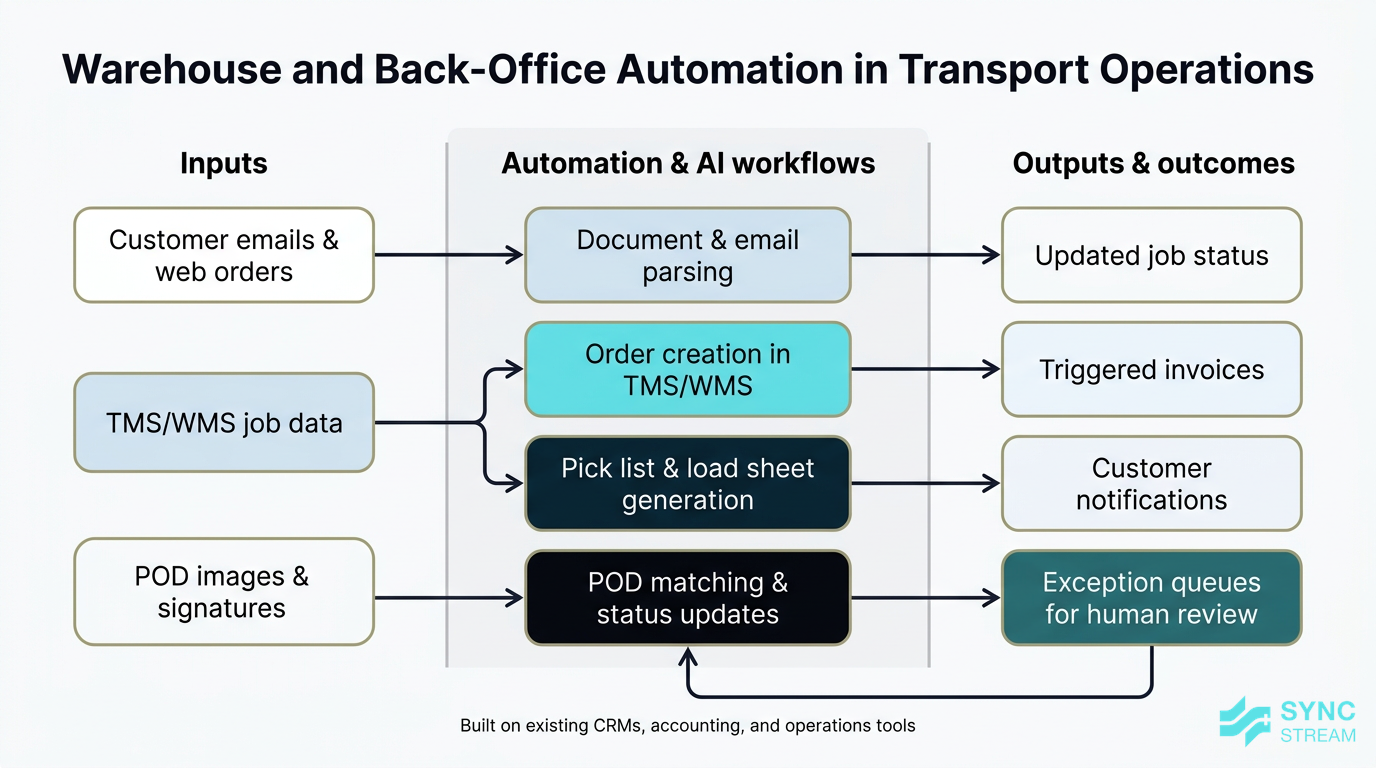
How AI and automation reduce manual order entry, paperwork, and POD reconciliation in logistics operations.
AI and automation are just as powerful in the warehouse and office as on the road. Many logistics teams still spend hours each day on repetitive, error-prone tasks such as:
- Creating consignments and labels from emailed orders
- Printing and sorting paperwork for drivers
- Reconciling proof of delivery (POD) and updating status in multiple systems
- Manually sending basic customer updates and invoices
Larger operators have shown that Robotic Process Automation (RPA) can streamline these processes. At an SMB scale, similar approaches can:
- Automate order entry from email, web forms, or customer portals into your TMS or WMS.
- Generate pick lists and load sheets automatically based on cut-off times and priorities.
- Capture POD images or e-signatures and automatically update job status and trigger invoicing.
- Send routine customer notifications (e.g., “out for delivery”, “delivered”) without staff intervention.
To make this concrete in your business:
- Map manual workflows.
- Inputs: Current steps for order entry, paperwork, POD handling, invoicing.
- Action: Document each step with who does it, systems used, and time taken.
- Expected output: A clear list of repetitive tasks suitable for automation.
- Prioritise 1–2 high-friction processes.
- Inputs: Mapped workflows plus pain points (delays, errors, staff frustration).
- Action: Choose the tasks with the highest volume and error impact, such as POD reconciliation.
- Expected output: A shortlist of candidate processes for automation.
- Design automation flows.
- Inputs: Process steps and system access (email, TMS/WMS, accounting).
- Action: Use workflow tools (such as n8n, which Sync Stream implements) to configure triggers, data extraction, and updates.
- Expected output: Tested workflows that move data between systems with minimal manual intervention.
The benefit isn’t just speed; it’s also:
- Fewer keying errors and lost paperwork
- Consistent processes that support audit and compliance
- Staff freed up to focus on exceptions, customer relationships, and planning, rather than copy-paste work
Partners like Sync Stream specialise in building these automations on top of your existing systems—CRMs, accounting platforms, operations tools, and communications channels—so you don’t need to replace your whole stack to get the benefits.
Real-time visibility, ETA prediction, and risk analysis
Real-time visibility comes from the combination of IoT devices (GPS trackers, sensors, telematics) and AI models that interpret the data. Together, they can:
- Feed live locations and statuses into a central dashboard.
- Predict accurate ETAs based on actual run progress, traffic, and historical performance.
- Trigger alerts when something isn’t going to plan.
For example, an AI system might:
- Notice that a vehicle is stuck in unexpected congestion and recalculate the ETA for all remaining drops.
- Flag that a port is experiencing delays or that a key arterial route has been closed due to an incident.
- Suggest alternatives, such as rerouting via a different highway, changing time slots, or swapping loads between vehicles or depots.
To turn this into a usable workflow:
- Connect tracking data to a single view.
- Inputs: GPS/telematics feeds, TMS job data.
- Action: Integrate these into a shared dashboard that links vehicles to jobs and consignments.
- Expected output: A live “control tower” view of your fleet and loads.
- Set up ETA rules and alerts.
- Inputs: Historical run times, service expectations by customer or lane.
- Action: Configure the AI to generate ETAs and trigger alerts when variance exceeds a set threshold (e.g., >15 minutes late).
- Expected output: Timely alerts for operations teams and, where appropriate, customers.
- Define response playbooks.
- Inputs: Common disruption scenarios (road closures, port delays, weather).
- Action: Document standard responses—reroute, reschedule, communicate—so staff act consistently when alerts fire.
- Expected output: Faster, more predictable responses to disruptions.
Customer-facing benefits include:
- Proactive notifications when deliveries will be early or late, not after the fact.
- Self-service tracking portals that reduce “where is my order?” calls.
- Better communication with consignees, enabling them to plan labour and dock space.
Internally, richer risk analysis helps managers respond quickly to weather events, bushfires, industrial action, or supply chain shocks, rather than discovering the impact only when customers complain.
Implementation Strategy
Prioritising use cases for your business
The most important decision isn’t which AI tool to buy; it’s where to apply it first. For most SMBs, the right starting point is 1–2 high-impact areas, not a full overhaul.
A practical sequence is:
- Identify your biggest pain points. Common ones include unpredictable ETAs, high fuel spend, frequent breakdowns, manual paperwork, or overtime blowouts.
- Map those pains to AI use cases. For example:
- High fuel and overtime → route optimisation and better dispatch.
- Frequent breakdowns → predictive maintenance.
- Admin bottlenecks → warehouse and back-office automation.
- Poor customer communication → real-time visibility and ETA prediction.
- Quantify your baseline metrics before you start:
- On-time delivery rate
- Fuel per km or per tonne-km
- Average maintenance-related downtime per vehicle
- Number of “where is my order?” calls per week
- Average time from delivery to invoice
- Select 1–2 focus areas with a clear link to revenue, cost, or risk. Avoid chasing a use case just because it sounds impressive.
Once you’ve chosen the focus, design a small, controlled pilot rather than trying to “AI everything” at once.
From pilot to full rollout (practical sequence)
A structured progression from idea to full rollout could look like this:
- Define goals and KPIs.
- Inputs: Current performance metrics, business priorities.
- Action: Set specific targets such as “Lift on-time delivery from 93% to 97% on metro routes within 3 months” or “Reduce unplanned roadside breakdowns by 30% over 12 months.”
- Expected output: A short list of measurable goals that guide tool selection and configuration.
- Clean and centralise data.
- Inputs: Routes, job histories, telematics feeds, customer addresses, warehouse data.
- Action: Consolidate into agreed “source of truth” systems; standardise address formats, job codes, and status codes.
- Expected output: Reliable datasets your AI transportation logistics tools can act on.
- Select vendors and tools.
- Inputs: Requirements, integration needs, budget.
- Action: Shortlist options that integrate well with your TMS, WMS, or telematics; assess against ROI potential and support.
- Expected output: One or two preferred tools for pilot.
- Run a time-bound pilot.
- Inputs: Selected tools, defined scope (lanes, vehicles, or one warehouse).
- Action: Implement for a defined period (e.g., 8–12 weeks) with limited scope and clear metrics.
- Expected output: Pilot results data plus staff feedback.
- Review results and refine.
- Inputs: Pilot metrics vs baseline, qualitative feedback.
- Action: Analyse where targets were met or missed; adjust configurations, processes, and training.
- Expected output: A refined setup ready for wider rollout, or a clear decision not to proceed.
- Train staff and embed changes.
- Inputs: Finalised workflows, system interfaces.
- Action: Deliver role-specific training to dispatchers, drivers, and warehouse teams; update SOPs and job descriptions where needed.
- Expected output: Confident users and documented, auditable processes.
- Scale up carefully.
- Inputs: Proven pilot configuration.
- Action: Extend the solution to more routes, vehicles, or sites while continuing to monitor KPIs and adoption.
- Expected output: Gradual expansion with controlled risk and compounding benefits.
Change management is critical. Drivers and dispatchers who don’t trust the system will ignore it. Involving them in testing, listening to their feedback, and adjusting the tools accordingly dramatically improves adoption.
Underlying all of this is integration. AI that doesn’t talk to your TMS, WMS, or accounting system will create more manual work, not less. Often, simple, well-supported integrations using structured workflow tools (like n8n, which Sync Stream uses) deliver more value than “clever” features locked in a silo.
Data, integration, and change readiness
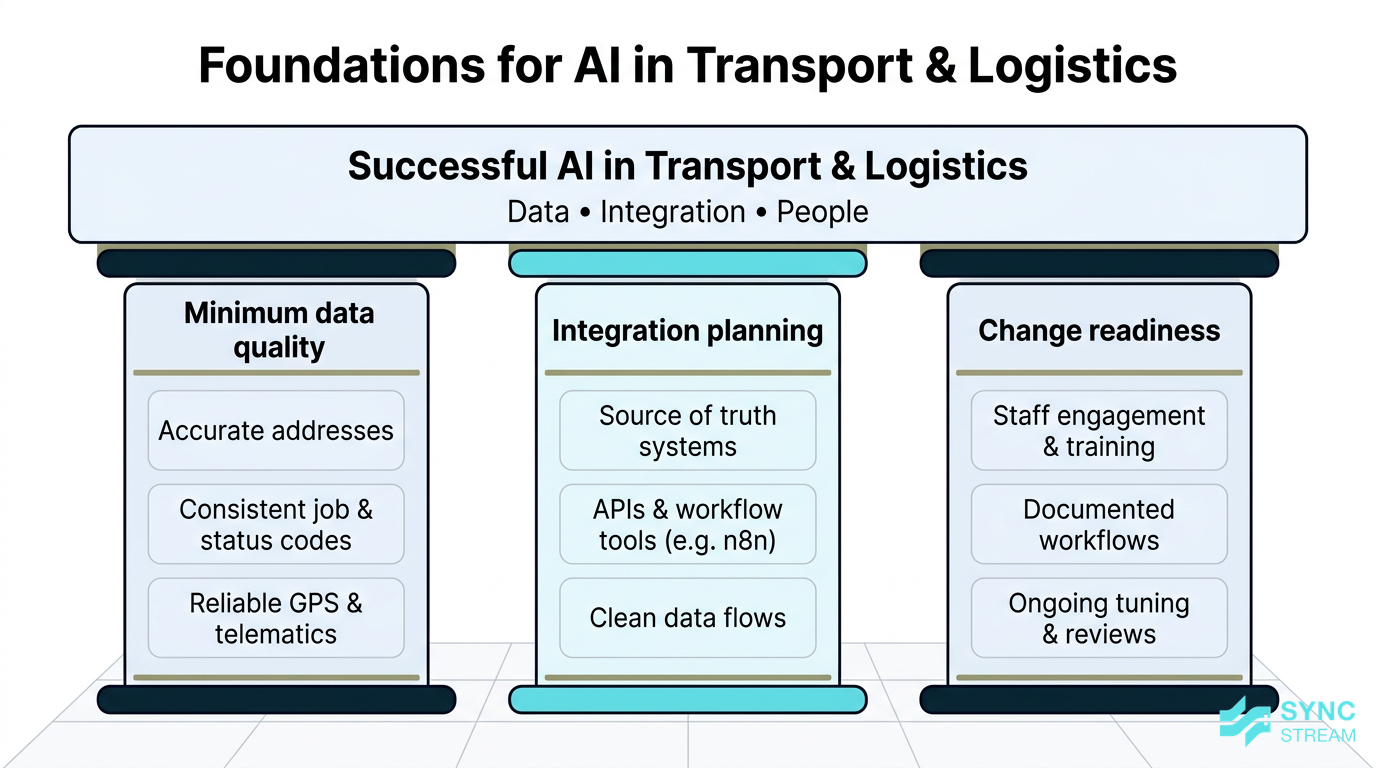
The three pillars—data quality, integration, and change readiness—that underpin successful AI projects.
AI systems are only as good as the data and processes they sit on. Before and during implementation, focus on:
- Minimum data quality.
- Accurate, standardised addresses (suburb, state, postcode).
- Consistent job codes and status codes.
- Reliable GPS and telematics data (devices installed correctly, drivers logging in consistently).
- Pragmatic data improvement.
- Fix address issues as part of booking or onboarding new customers.
- Clean up master data in bursts (e.g., one lane or region at a time), not as a giant project.
- Integration planning.
- Decide which system should be the “source of truth” for jobs, vehicles, and customers.
- Use APIs and structured automation tools so data flows cleanly between systems instead of relying on manual exports and imports.
Working with an implementation partner like Sync Stream, who understands both AI and Australian logistics operations, helps bridge the gap between theory and working reality. Sync Stream focuses on:
- Designing automations and AI agents around clear commercial use cases.
- Implementing them on top of your existing CRMs, accounting platforms, operations tools, and databases.
- Documenting every workflow so your team retains control and isn’t locked into a black box.
Finally, treat AI as a living system, not “set and forget”. Plan for ongoing model tuning and process tweaks after go-live:
- Review performance monthly or quarterly.
- Adjust configurations as your network, customers, or fleet change.
- Incorporate feedback from front-line staff into system updates.
Options Comparison
Build vs buy vs partner
When you decide to adopt AI transportation logistics, there are three main paths:
- Build – Develop your own AI tools in-house.
- Buy – Use off-the-shelf SaaS products with AI features.
- Partner – Work with a specialist like Sync Stream to configure, integrate, and manage AI solutions on top of your systems.
Build
- Pros: Full control, tailored exactly to your needs, potential IP advantages.
- Cons: Requires data scientists, engineers, and product management; high upfront cost; long time-to-value; ongoing maintenance burden.
- Best when: You’re a large operator with in-house tech capability and a strategic reason to own unique optimisation or planning tools.
Buy (off-the-shelf SaaS)
- Pros: Fast to get started; proven functionality; usually per-vehicle or per-user pricing; regular updates.
- Cons: May not fit your processes perfectly; integration can be limited; features you don’t need may clutter workflows.
- Best when: You have standard needs and can adapt processes to the product, or you’re adding a discrete capability (e.g., routing optimisation) with minimal customisation.
Partner (configure and integrate)
- Pros: Combines the speed of SaaS with tailored workflows and robust integrations; you don’t need in-house AI expertise; workflows are designed around your actual operations.
- Cons: Involves implementation fees and some dependency on the partner (which is why documentation and transparency are important).
- Best when: You’re an SMB wanting meaningful impact in months, not years, and you need systems that work with your current TMS, telematics, WMS, and accounting tools.
For most Australian SMBs, buying and partnering is the realistic option. You get:
- Predictable costs (often per-vehicle, per-user, or per-warehouse fees, plus implementation and integration work).
- Faster time-to-value.
- Less risk of failed IT projects.
When assessing total cost of ownership, look beyond subscription price to include:
- Integration and configuration.
- Training and change management.
- Ongoing support, maintenance, and incremental improvements.
Evaluating AI vendors and platforms
Choosing vendors and platforms is as much about fit and support as it is about features. Criteria to consider include:
- Australian logistics experience.
- Have they worked with freight, warehousing, or fleet operators in Australia?
- Do they understand CoR, fatigue rules, and local operating conditions?
- Integration capabilities.
- Do they offer robust APIs?
- Can they connect to your TMS, WMS, accounting, and telematics systems without brittle workarounds?
- Local support and responsiveness.
- Is support in a compatible time zone?
- How quickly do they respond to issues or configuration requests?
- Compliance and data handling.
- Do they comply with Australian privacy and data regulations?
- Where is data stored, and how is it secured?
- Clarity of ROI.
- Can they estimate expected percentage improvements (e.g., fuel, on-time rate, admin hours saved) for businesses like yours?
- Do they provide realistic timelines to first measurable results?
When talking to vendors, ask for:
- Concrete case studies or references in similar environments.
- A clear pilot plan with defined metrics.
- Explainable models, or at least understandable recommendations, rather than complete black boxes.
- Clear service-level agreements (SLAs) for uptime, support, and response times.
Favor vendors and partners who are transparent about what their tools can and can’t do, and who will work with you on incremental improvement rather than promising instant transformation.
Cloud tools, telematics add-ons, and niche apps
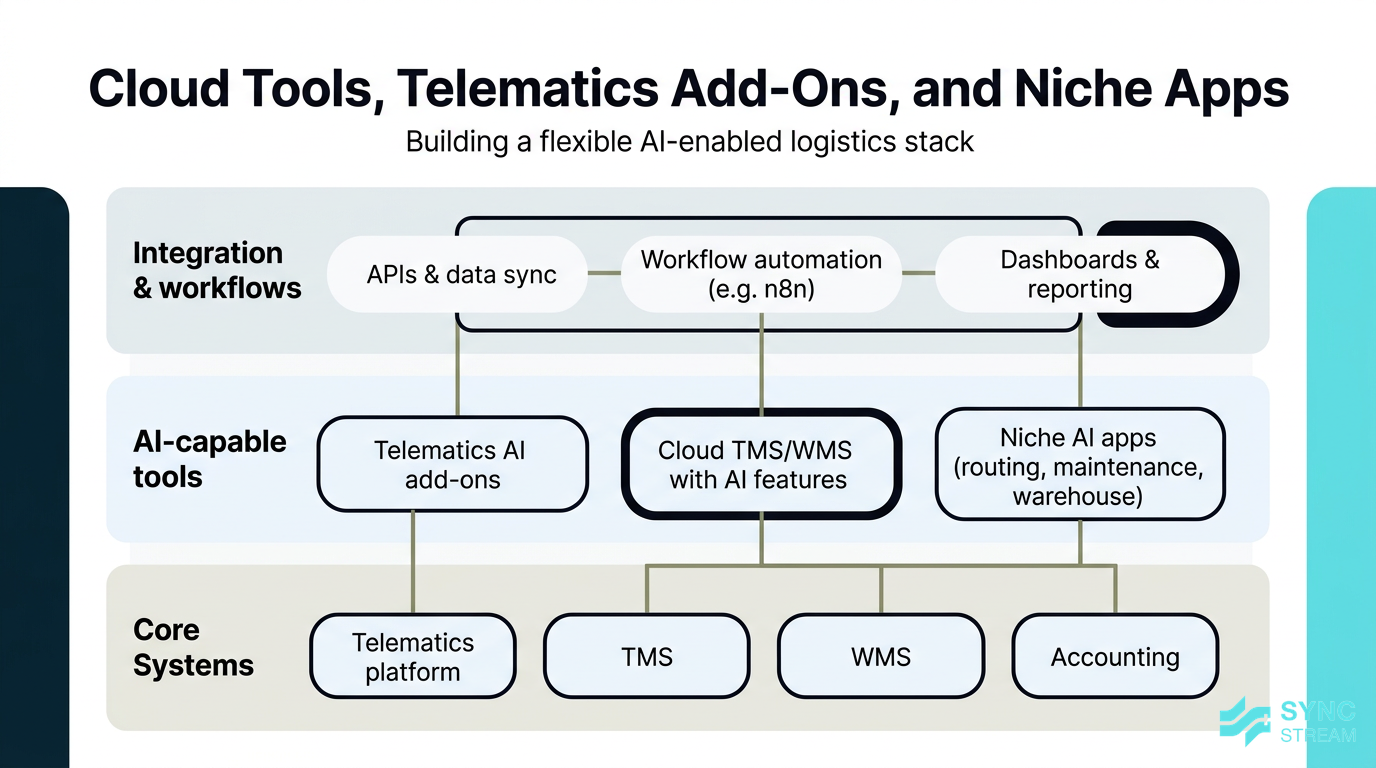
How telematics add-ons, cloud TMS/WMS platforms, and niche AI apps fit together in an SMB logistics tech stack.
Most SMBs end up using a mix of:
- Telematics add-ons – AI features embedded in existing tracking platforms.
- Cloud TMS/WMS with AI features – broader systems with optimisation, automation, and reporting built in.
- Niche apps – focused tools for routing, maintenance, or warehouse tasks.
Telematics add-ons
- Pros: Easy to switch on; already integrated with your vehicles; familiar interface.
- Cons: May be limited to a specific vendor’s ecosystem; less flexibility in how data is used elsewhere.
- Best when: You want quick wins in areas like driver behaviour, basic ETA improvements, and maintenance alerts.
Cloud TMS/WMS with AI features
- Pros: Centralises planning, execution, and reporting; often includes routing, rate management, and warehouse workflows.
- Cons: Can be complex to implement; may require process change; risk of being locked in.
- Best when: You’re already considering a system upgrade or consolidation and want AI capabilities as part of that move.
Niche apps
- Pros: Deep functionality in a focused area; often best-in-class algorithms; can be layered on top of existing systems.
- Cons: More integration work; multiple vendors to manage; potential data silos if not well connected.
- Best when: You have a specific, high-value problem (like complex routing or predictive maintenance) and your core systems are otherwise fit for purpose.
When deciding, consider your future roadmap:
- Are you likely to expand into new regions, services, or modes (road, rail, sea, air)?
- Will you need more advanced optimisation or reporting in a few years?
- Do you want the option to add AI assistants or chatbots for customer service later?
Choosing flexible tools and integration-friendly architectures today helps ensure you’re not locked out of tomorrow’s capabilities.
Avoiding Common Pitfalls
Misaligned expectations and “AI magic”
It’s easy to be drawn to claims of “up to 30% savings” and assume AI will fix everything overnight. In reality, those numbers are potential, not guaranteed.
Common expectation traps include:
- Expecting big savings without cleaning up data, changing processes, or training staff.
- Taking vendor case studies at face value without considering how similar those conditions are to your operation.
- Underestimating the time required to see meaningful impact (often weeks to months, not days).
To avoid these pitfalls:
- Define success metrics before signing contracts. Be specific about what success looks like.
- Insist on a pilot. Validate claims in your network, with your drivers and customers.
- Run reference checks. Speak with other operators who have implemented similar tools.
- Plan for incremental gains. Aim for steady improvements rather than a one-time miracle.
AI works best as part of a considered, data-backed effort to improve operations—not as “magic dust” sprinkled on top.
Overlooking people and process changes
No matter how good the algorithm is, your dispatchers, drivers, and warehouse staff ultimately decide whether AI recommendations get used.
If people don’t understand or trust the system, they will:
- Override routes without good reason.
- Ignore maintenance alerts until it’s too late.
- Continue using old spreadsheets or manual workarounds.
Practical approaches to avoid this include:
- Involve front-line staff early. Ask drivers and dispatchers where the current process breaks, and show how AI tools might help.
- Capture their know-how. Many planners and drivers have invaluable route and customer knowledge. Build that into the configuration and rules around the AI.
- Create feedback loops. If a recommended route doesn’t work in practice, capture the reason and adjust settings—don’t just tell staff to “follow the system.”
- Address job security concerns. Be clear that AI is there to eliminate tedious admin, reduce stress, and improve safety, not to replace good staff.
When people see that AI makes their jobs easier and safer, adoption rises and results follow.
Data, privacy, and operational blind spots
Even sophisticated AI transportation logistics systems fail if they’re working with poor data or incomplete visibility.
Typical data issues include:
- Messy or incorrect addresses leading to misrouted deliveries.
- Inconsistent job codes and status updates, making it hard to interpret performance.
- GPS devices not being used correctly or losing signal in remote areas.
On the privacy and security side in Australia, you need to:
- Handle driver and customer data in line with the Privacy Act and relevant state regulations.
- Choose vendors with strong security practices and clear data-handling policies.
- Ensure data sharing with subcontractors or partners is appropriately governed.
Operational blind spots also undermine results, for example:
- Subcontractor legs where you have limited tracking or status data.
- Intermodal segments (road-rail, road-sea) where data sits in separate systems.
- Partner warehouses where inventory or status updates are delayed.
To manage these, identify where visibility currently drops and design processes or integrations to bridge the gaps—whether through data-sharing agreements, standardised status updates, or simple automation to capture and sync key events.
Conclusion
AI transportation logistics is no longer reserved for the largest carriers. Australian SMB operators can use AI today to optimise routes, reduce breakdowns, automate admin, and deliver a level of visibility and reliability that wins and retains customers.
The most effective path is pragmatic: start with 1–2 use cases tied to clear business outcomes, run a structured pilot, and build from there. Focus on good data, tight integrations with your existing systems, and genuine engagement with drivers, dispatchers, and warehouse teams.
Sync Stream specialises in exactly this kind of grounded implementation. We work inside your current CRMs, accounting platforms, operations tools, and telematics systems to design AI and automation workflows that reduce manual admin, improve visibility, and support compliance—without locking you into a black box.
If you’re ready to explore where AI and automation can have the biggest impact in your transport or logistics operation, book a consultation with Sync Stream and we’ll help you define a practical, ROI-focused roadmap.
FAQ
What is AI transportation logistics in simple terms?
It’s the use of software that learns from your operational data—routes, telematics, warehouse activity—to make smarter decisions about planning, routing, maintenance, and admin. Instead of rigid rules, it continuously adjusts based on what’s actually happening in your network.
Do I need to replace my TMS or telematics system to use AI?
Usually not. Many AI capabilities are available as modules or add-ons to existing systems, or as separate tools that integrate via APIs and workflow automation. A partner like Sync Stream can help you layer AI and automation on top of what you already use.
How quickly can an Australian SMB see results from AI in transport and logistics?
With a well-scoped pilot and decent data, you can often see early signs of improvement—such as better ETA accuracy or reduced manual admin—within a few weeks. More substantial gains in cost, on-time performance, or breakdown reduction typically become clear over several months.
Is AI transportation logistics affordable for small fleets?
Yes. Most tools are priced on a per-vehicle, per-user, or per-site basis, so smaller fleets only pay for what they use. The key is to focus on use cases where expected savings or productivity gains outweigh the subscription and implementation costs.
How does AI help with Chain of Responsibility and safety?
AI analyses telematics data for signs of fatigue, speeding, harsh events, and maintenance risks. It can highlight high-risk patterns early, support safer rostering, and keep vehicles in better condition, all of which support your CoR obligations and overall safety performance.
What if my data is messy or incomplete?
You can still start, but you should plan a short data clean-up phase as part of implementation. Begin with the basics—accurate addresses, consistent job codes, reliable GPS data—and improve over time. Tools and partners that focus on integration and workflow can help automate better data capture.
Will AI replace my dispatchers or drivers?
No. AI is best used as a decision-support and automation layer. It takes over repetitive calculations and admin so dispatchers and drivers can focus on what humans do best: handling exceptions, managing relationships, and making judgement calls in complex situations.
How is Sync Stream different from generic IT providers?
Sync Stream focuses on AI and automation for operationally intensive businesses like transport and logistics. We work inside your existing systems, scope every project against a clear business case and ROI, and fully document workflows so your team retains control and can operate reliably long term.