

Introduction
If your phones never stop ringing, your team is flat out on the tools, and yet you’re still buried in admin, you’re not alone. Many Australian trade and service businesses reach a point where the real bottleneck isn’t finding work—it’s managing it.
ServiceM8 is built to help, but the real gains come when you automate ServiceM8 instead of treating it like a digital notepad. When jobs, messages, and invoices move themselves through your system, you free up office staff, reduce errors, and give customers a much smoother experience.
In this guide, we’ll walk through:
- Why automating ServiceM8 has such a big impact on admin, cash flow, and customer experience
- The first workflows most businesses should automate
- How to plan, build, and roll out ServiceM8 automations
- System architecture options as your business grows
- Common pitfalls to watch out for
This is written for Australian small to medium trade and field service businesses—plumbing, electrical, HVAC, maintenance, and similar—who are ready to move from manual effort to reliable, documented workflows.
Why automate ServiceM8
Benefits and real‑world results
For most trade and service businesses, the admin pain points are the same: manual scheduling, chasing paperwork, typing the same information into multiple systems, and slow invoicing. Automating ServiceM8 targets these exact issues.
In plain terms, automation helps you:
- Answer more calls and convert more enquiries into jobs
- Cut back-and-forth phone tag for bookings and updates
- Get invoices out faster and get paid sooner
- Reduce mistakes in job details, pricing, and compliance
- Scale without needing to double the office team
Condensed real-world results from Australian businesses show what’s possible when ServiceM8 is tied into a well-designed automation setup:
- Perth plumbing contractor – Integrated ServiceM8 with other systems and automated scheduling, dispatch, and compliance forms for a 78% efficiency gain and about 150 admin hours saved each month.
- Melbourne Plumbing Group – Automated job intake with ServiceM8 and AI voice agents, achieving a 40% increase in bookings, a 100% call answer rate, and saving roughly 15 admin hours per week.
- Climate Plus Air Conditioning – Cleaned and centralised client data, then integrated ServiceM8 with a marketing CRM to book 1,000+ jobs from a single email campaign, with ongoing automated reminders driving repeat work.
For owners and directors, the value shows up in the numbers that matter:
- Cash flow – Same-day invoicing and automated payment nudges improve how quickly money hits your account.
- Fewer mistakes – Standardised workflows and forms mean better job costing, fewer missed items on quotes, and more reliable compliance records.
- Customer experience – Proactive SMS/email updates reduce “where is my tradie?” calls and make your business look more professional.
- Scalability – You can add more crews and more work without needing to double your admin headcount.
This is the kind of outcome-focused automation Sync Stream designs: practical workflows, not tech for tech’s sake.
Workflows worth automating first
Job intake, booking and confirmations

A process flow of how calls and web enquiries feed into ServiceM8 jobs with automated confirmations and reschedule options.
The “messy reality” in many businesses looks like this: calls coming to a mobile that can’t always be answered, voicemails stacking up, paper notes on the dash, and someone in the office trying to turn all of that into proper jobs in ServiceM8. Add double entry into accounting or spreadsheets, and it’s easy to lose track.
You can clean this up by automating job capture and booking:
- Online booking forms that feed straight into ServiceM8 as new jobs or quotes
- Call handling routes that direct calls to the right person or overflow to an AI voice agent that can answer, capture job details, and book directly into ServiceM8
- Automatic job creation with the correct client, address, and problem description recorded once, at the source
Once a job or quote is in ServiceM8, you can:
- Trigger confirmation SMS or emails when:
- A booking is made
- A quote is accepted
- Include key details customers care about:
- Date and time window
- Technician name (or at least a first name)
- What they should do to prepare (clear access, pets secured, etc.)
- A simple link or phone number to reschedule or update details
The Melbourne Plumbing Group example shows the impact of getting this front-end process right. By automating intake and booking, they achieved 40% more bookings and a 100% answer rate without simply throwing more staff at the problem.
For most small to medium service businesses, automating job intake and confirmations should be the first priority when you start to automate ServiceM8. It directly affects revenue, customer experience, and how much manual work hits the office.
Scheduling, dispatch and field updates
A typical manual scheduling setup involves a whiteboard, a shared spreadsheet, and a lot of calls or texts to techs: “Where are you now?” “Can you squeeze in another job?” “Have you finished at Smith Street yet?” This is fragile and heavily dependent on one or two people.
ServiceM8’s built-in tools let you automate much of this:
- Job queues and calendars show what’s booked and what’s pending in real time.
- Assignment rules can help route jobs based on:
- Region or postcode
- Technician skills or licences
- Availability and current workload
- Push notifications to technicians’ mobiles keep them updated without office staff chasing them.
From the customer’s perspective, you can automate:
- “On the way” messages when a tech starts travel
- “Job started” or “Job completed” notifications
These messages mean the office doesn’t need to manually call or text every update. Customers feel informed and you reduce inbound calls asking for ETAs.
The Perth plumbing contractor’s results are a good illustration: by leaning on ServiceM8’s scheduling, dispatch, and forms—and tying them into other systems—they reduced scheduling conflicts, minimised downtime between jobs, and lifted compliance documentation rates because techs completed ServiceM8 forms on-site as part of the workflow.
Invoicing, payments and repeat work
Slow or inconsistent invoicing is one of the biggest hidden drags on cash flow. Jobs get finished, paperwork sits in a pile, and invoices go out days or weeks later.
Integrating ServiceM8 with Xero or QuickBooks changes this:
- When a job is marked complete, an invoice is automatically created and synced to your accounting system.
- Line items, customer details, and taxes are already in place—no double entry.
From there, you can set up automations such as:
- Auto-sending invoices by email when jobs reach a “Ready to Invoice” or “Completed” status
- Including online payment links or mobile payment options so customers can pay on the spot or within a few clicks
- Sending gentle reminder emails or SMS for unpaid invoices at set intervals (e.g. 7, 14, 30 days)
For repeat and ongoing work, ServiceM8 can:
- Create recurring jobs for maintenance contracts
- Trigger service reminders before due dates
- Feed customer and job history into a marketing automation CRM
That’s how Climate Plus Air Conditioning turned a cleaned, centralised database plus ServiceM8 + CRM integration into 1,000+ jobs from a single email campaign. Once the data and automations were in place, follow-up and maintenance reminders ran on autopilot.
Plan your automation rollout
Map and document current processes
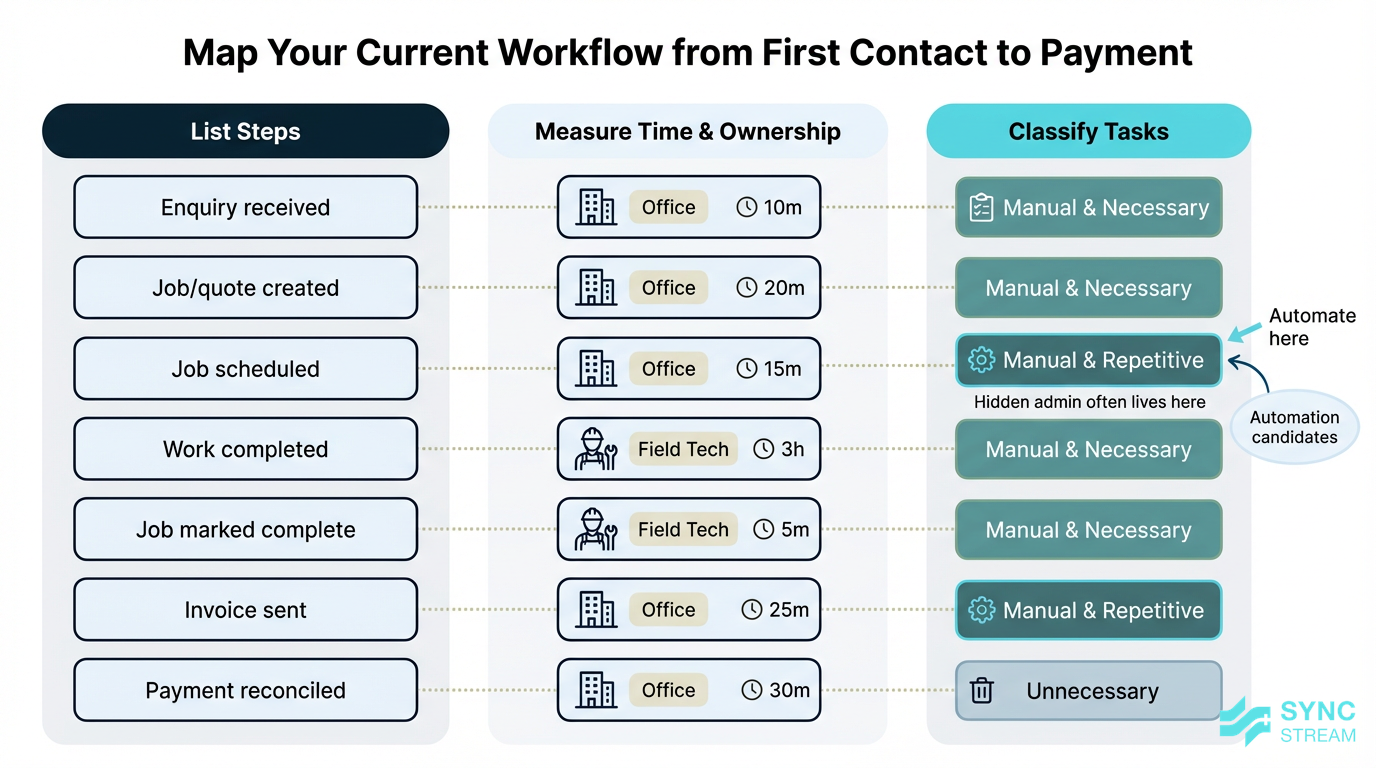
A framework showing how to list, time, and classify steps from first contact to payment to identify automation opportunities.
Before switching on new automations, you need a clear picture of how work actually flows today—from first contact through to money in the bank.
Use this simple mini-framework:
- List all steps from enquiry to payment
- Inputs → 5–10 recent jobs and the people who touched them.
- Action → Walk through each job and write down every step:
- Customer calls or submits a web form
- Staff capture details and create a job/quote
- Job is scheduled and assigned
- Tech attends, completes work and forms
- Job is marked complete
- Invoice is created and sent
- Payment is received and reconciled
- Output → A one-page list of steps in rough order.
- Time each step and note who does it
- Inputs → Your step list and rough time estimates.
- Action → For each step, note average duration and who does it (owner, office, field).
- Output → A view of where time and salary cost are being spent.
- Classify each step
- Inputs → The timed, owned step list.
- Action → Mark steps as:
- Manual and necessary – e.g. diagnosing complex issues on-site
- Manual and repetitive – e.g. typing the same confirmation email 20 times a day
- Unnecessary – steps that add no value (e.g. copying data between systems)
- Output → A shortlist of manual and repetitive tasks—your primary automation candidates.
This exercise often reveals a lot of hidden admin that can be removed, simplified, or automated in ServiceM8 or your connected systems.
Prioritise automations and set targets
Trying to automate everything at once usually ends in confusion and half-finished setups. Instead, choose 3–5 high-impact automations that will make a visible difference quickly.
Good starting candidates include:
- Booking and quote confirmation messages
- Job completion → invoice creation and sending
- Service reminders or maintenance follow-ups
Turn this into a simple, practical plan:
- Score your candidates
- Inputs → Your list of manual-and-repetitive steps.
- Action → For each candidate, rate:
- Admin time saved per week or month
- Impact on customer experience
- Impact on cash flow or revenue
- Output → A ranked list with clear “quick wins” at the top.
- Pick a first-phase set
- Inputs → The ranked list.
- Action → Select 3–5 automations that are high impact but low-to-medium complexity (e.g. confirmations and invoicing).
- Output → A defined Phase 1 scope you can deliver in weeks, not months.
- Set simple, numeric targets
- Inputs → Current baseline metrics (e.g. average days to invoice).
- Action → Define goals such as:
- Reduce time from job completion to invoice from 3 days to same day
- Cut “where is my tradie?” calls by 50%
- Free 10 admin hours per week
- Output → A short list of KPIs you can measure against once you automate ServiceM8 around these steps.
- Outline later phases
- Inputs → Remaining candidates.
- Action → Group more complex items into Phase 2 (scheduling/dispatch) and Phase 3 (CRM/marketing and repeat work).
- Output → A simple roadmap so you’re not rebuilding from scratch every time.
This approach lets you get quick wins, learn, and then build more sophisticated automation safely.
Build and deploy automations
Configure ServiceM8 rules and templates
There’s a lot you can do purely inside ServiceM8 before adding any external tools. This includes:
- SMS and email templates for common messages
- Job status change rules that trigger communications or internal alerts
- Recurring jobs for maintenance contracts
- Checklists and forms that ensure compliance steps are followed
Here’s a clear, concrete process to set up one useful automation: sending a completion email and invoice link when a job is ready.
- Define the trigger status
- Inputs → Your existing job statuses and invoicing process.
- Action → Create or choose a status such as
Job Complete – Ready to Invoice. - Output → A single, consistent status that means “work done, customer can be notified”.
- Write a reusable message template
- Inputs → Your branding, contact details, and typical job wording.
- Action → Create an email/SMS template that:
- Thanks the customer
- Confirms what work was done (using merge fields where helpful)
- Explains what happens next (invoice attached or on the way, payment options)
- Provides contact details for questions
- Output → A saved template that can be attached to a status rule.
- Attach the template to the status
- Inputs → The trigger status and message template.
- Action → Configure ServiceM8 so that when a job is moved to
Job Complete – Ready to Invoice, the template is sent automatically. - Output → An automated completion message tied to a simple status change.
- Test on a dummy job
- Inputs → A test client/job in ServiceM8.
- Action → Move the dummy job through statuses, check:
- Wording and merge fields (name, address, job details)
- Attachments or links
- Timing (sent once, not multiple times)
- Output → Confidence that customers will receive the right message at the right time.
- Roll out and document
- Inputs → The tested rule.
- Action → Enable it for live jobs and document in a short internal guide:
- When staff should use the status
- What the customer will receive
- Output → A live, documented automation that removes repetitive admin with minimal risk.
Keep templates plain, branded, and clear so they work across many job types and can be maintained easily as your business changes.
Integrate accounting, CRM and phones
To go beyond basic automation, you’ll usually connect ServiceM8 to a few key systems.
Accounting (Xero, QuickBooks)
ServiceM8 can sync customers, invoices, and items with your accounting software so data flows automatically. Before turning the sync on:
- Make sure tax codes, item names, and contacts are aligned between systems.
- Decide where new customers should be created first (ServiceM8 or accounting) so you don’t end up with duplicates.
Once configured, finishing a job in ServiceM8 can create and push an invoice straight into Xero or QuickBooks, with minimal manual intervention.
CRM and marketing platforms
Connecting a CRM or marketing tool to ServiceM8 lets you:
- Automatically follow up on quotes that haven’t been accepted
- Send service reminders and maintenance notices based on last job date
- Run campaigns targeted to specific customer segments using job history
This is how Climate Plus Air Conditioning turned their existing client base into over 1,000 jobs from one email campaign—the integration made it easy to target the right customers with the right offer at the right time.
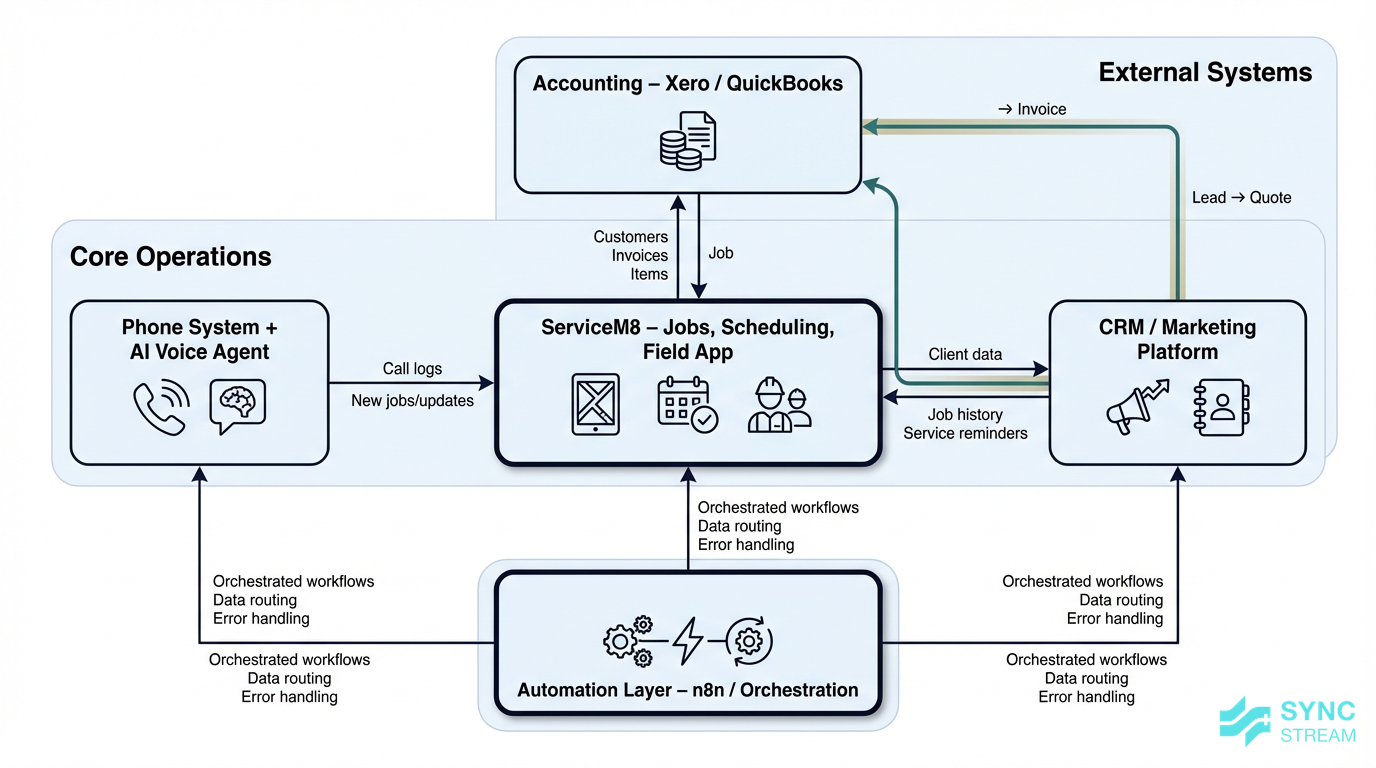
Sync Stream commonly uses structured automation tools like n8n (a central workflow tool) to sit between ServiceM8, CRMs, and accounting systems, orchestrating these flows in a way that stays transparent and maintainable.
Phones and call handling
You can also integrate your phone system so:
- Calls are routed intelligently based on time of day or staff availability
- An AI voice agent answers overflow or after-hours calls
- The system logs calls, captures job details, and creates or updates ServiceM8 jobs 24/7
The key is that from the caller’s point of view, they speak to a helpful, responsive “front desk” every time, without requiring a human to be on duty around the clock.
Pilot, train your team and refine
Treat each new automation as a controlled pilot rather than a big-bang change.
- Select your pilot scope
- Inputs → Your prioritised automation list.
- Action → Choose one team or job type (e.g. residential maintenance) and a 2–4 week period to trial changes.
- Output → A clear test window with limited risk.
- Implement and train
- Inputs → The configured automations.
- Action →
- Show field techs and office staff what’s changed in their ServiceM8 app.
- Explain which actions trigger automations (e.g. changing a job to a certain status, completing a form).
- Emphasise that this reduces paperwork and interruptions, not their value.
- Output → Staff who know what will happen when they follow the new process.
- Measure and review
- Inputs → Your KPIs (admin time, error rates, customer feedback).
- Action → After the pilot period, compare before/after numbers and collect quick feedback from staff and a few customers.
- Output → A simple view of what’s working and what needs refinement.
- Refine and roll out wider
- Inputs → Pilot lessons.
- Action → Tweak templates and rules, document the final workflow, then expand to more teams or job types.
- Output → A stable automation that the whole business can rely on.
This is how Sync Stream approaches implementations: start with a defined business case, run a pilot, document the workflow, and refine based on real-world use rather than theory.
System architecture choices
Architecture options for growing firms
As your business grows, you’ll need to think about how ServiceM8 fits into a wider system architecture. In simple terms: which system does what, and how do they talk to each other?
You can think in terms of three common patterns:
- ServiceM8‑centric
- ServiceM8 is the main operational system.
- You use built-in features plus direct integration to Xero or QuickBooks.
- Best for smaller teams with straightforward jobs and simple compliance.
- ServiceM8 + automation layer
- ServiceM8 remains the core job system.
- You add an automation/orchestration tool (such as n8n) to connect ServiceM8 with CRM, phones, and marketing platforms.
- Ideal for businesses with multiple crews, regions, or more complex communication needs but who still like ServiceM8’s field tools.
- ServiceM8 + specialist platforms
- You may introduce specialist tools (e.g. for advanced estimation, complex project scheduling, or deep compliance) and integrate them with ServiceM8.
- Jobs might start in one system and hand over to ServiceM8 for field execution, or vice versa.
- Suitable for larger or more complex operations that have outgrown a single-system approach.
Whichever pattern you choose, decide:
- Where the “source of truth” for customer data lives (often a CRM or accounting system).
- How jobs move between systems (e.g. lead → quote in CRM → job in ServiceM8 → invoice in accounting).
- How to minimise double entry and system hopping so staff aren’t retyping the same data in three places.
Good architecture decisions upfront keep your ServiceM8 automation maintainable and make it easier to keep control of data, security, and compliance as you grow.
What to watch out for
Data quality, exceptions and edge cases
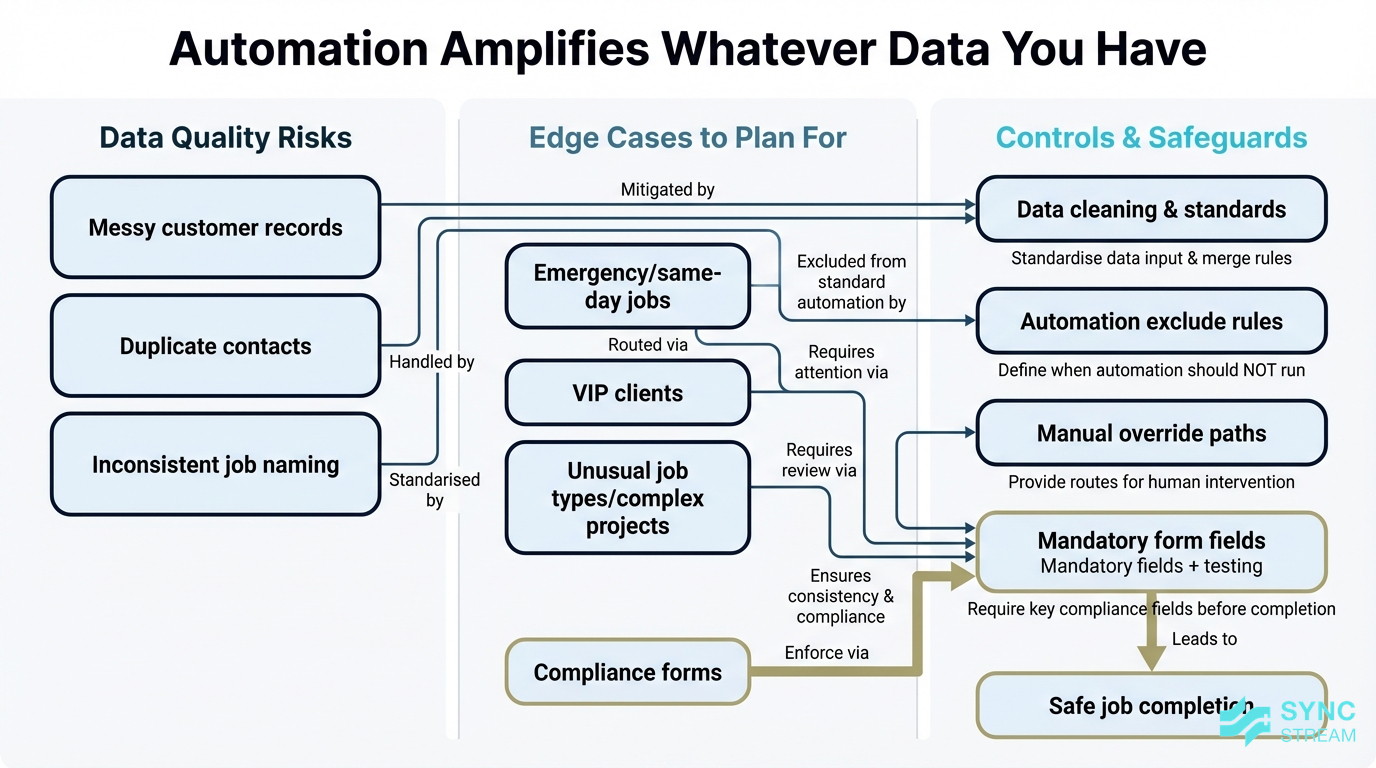
A framework showing how messy data and unplanned edge cases can undermine ServiceM8 automations and how to mitigate them.
Automation is an amplifier. If your data is clean and consistent, automation makes everything smoother. If it’s messy, automation just spreads the mess faster.
Key risks to watch:
- Messy customer records – duplicate entries, wrong names, old emails, or missing phone numbers will lead to failed or misdirected messages.
- Inconsistent job naming – vague or inconsistent descriptions make reporting and follow-up harder.
Plan consciously for edge cases, such as:
- Emergency or same-day jobs
- VIP or high-value clients
- Unusual job types or complex projects
Decide which automations should not apply in these cases, and build simple ways for staff to override or bypass standard automations so customers don’t get inappropriate messages.
For compliance and safety documentation:
- Test automated forms, certificates, and photo requirements carefully.
- Make sure nothing critical can be skipped simply because the process is faster.
- Consider built-in checks (e.g. mandatory fields) before a job can be marked complete.
Team adoption and ongoing ownership
Even the best automation can fail if people don’t trust or understand it.
Human factors to consider:
- Some staff may resist change or worry automation is about cutting hours.
- Others may be nervous about “breaking” the system.
Communicate clearly that automation is there to:
- Remove boring, repetitive admin
- Reduce errors and lost paperwork
- Make it easier for everyone to do their job well
Someone in the business should own ServiceM8 and its automations. This doesn’t need to be a full-time role, but they should:
- Understand the main rules and templates
- Know which systems integrate with ServiceM8 and how
- Be able to pause or adjust key automations when the business changes
Watch for red flags that it’s time to review your setup:
- No one can explain how automations are configured
- Multiple people change rules ad hoc without documentation
- Staff start building workarounds outside ServiceM8 (spreadsheets, personal diaries, side apps)
When you see these signs, it’s time to step back, document workflows, and, if needed, bring in structured help.
Conclusion
Automating ServiceM8 isn’t about adding flashy tech; it’s about removing friction from the way your business already runs. When job intake, scheduling, invoicing, and follow-up happen reliably in the background, your office team can focus on higher-value work, your techs can stay on the tools, and your customers feel looked after.
By starting with high-impact workflows, mapping your current processes, and rolling out automation in controlled phases, you can significantly cut admin time, speed up cash flow, and create a platform that will scale with you. Done well, the decision to automate ServiceM8 becomes a straightforward way to boost margins without adding more headcount.
If you’d like help designing and implementing reliable ServiceM8 automations—across job workflows, accounting, phones, and marketing—Sync Stream specialises in building documented, ROI-focused systems on top of the tools you already use.
FAQ
How do I decide what to automate in ServiceM8 first?
Map your current workflow from first contact to payment, highlight steps that are manual and repetitive (like confirmations, invoicing, and reminders), then pick 3–5 that will save the most admin time or improve customer experience. Start there before tackling more complex flows.
Do I need a developer to automate ServiceM8?
You can do a lot inside ServiceM8 without any coding—templates, status rules, recurring jobs, and basic accounting integration. As your needs grow (e.g. CRM integration, AI voice agents, complex routing), working with a specialist implementation partner like Sync Stream helps you design something robust without you needing to become a developer.
Will automation replace my office staff?
In most trade and service businesses, automation doesn’t remove people—it removes low-value tasks. Your admin team spend less time on data entry and chasing paperwork and more time on customer service, problem solving, and supporting the field.
Is my business too small to benefit from automating ServiceM8?
Even a small team can benefit from automation, especially for confirmations, simple scheduling, and invoicing. Getting these foundations right early makes it much easier to scale later without drowning in admin.
How long does it take to see results from ServiceM8 automation?
Many businesses see quick wins within a few weeks once core automations—like job intake, confirmations, and invoicing—are live. Larger or more complex setups may take longer to design and refine, but improvements to cash flow, error rates, and admin time usually show up quickly.
What if something goes wrong with an automation?
Keep things simple to start, test changes on dummy jobs, and document your rules. Make sure at least one person in your business knows how to pause or adjust key automations. With a structured setup, issues can usually be corrected quickly and improvements rolled into your standard workflow.