


Introduction
Coordinating large commercial contracts has never been simple for Australian pest providers. One multi-site client can span hundreds of locations, each with different service frequencies, audit requirements, and pest risks. Add technician shortages, fuel costs, and growing reporting expectations, and it’s easy for profit to disappear into admin and travel time.
Commercial pest services AI is emerging as a practical way to bring order to this complexity. Used well, it helps providers coordinate multi-site contracts, automate reporting, and optimise technician routing without replacing existing systems or people.
This article explains what commercial pest services AI actually means, how it’s already being used in and around the industry, and how Australian SMBs can apply it to multi-site work. You’ll see the key components, implementation steps, options to compare, and common pitfalls to avoid—so you can make informed decisions rather than chase hype.
What is Commercial Pest Services AI
Defining AI for commercial pest work
In plain terms, commercial pest services AI refers to software and tools that use data, algorithms, and automation to improve how pest contracts are planned, delivered, and reported.
It’s less about robots walking around a warehouse and more about:
- Systems that analyse historical service data and seasonality to suggest the right visit patterns.
- Routing engines that calculate the most efficient technician runs across dozens or hundreds of sites.
- Tools that convert technician notes and device readings into clear, audit-ready reports.
These tools sit on top of your existing CRMs, job management platforms, and technician apps. They use techniques such as:
- Routing algorithms that minimise drive time and overtime.
- Predictive models that forecast where and when pest pressure is likely to spike.
- Image recognition that can help verify pests from trap photos or site images.
- Chatbots and virtual agents that handle simple customer queries or booking flows.
- Automated reporting systems that assemble and format visit data for clients and auditors.
For Australian providers, this is immediately relevant to environments like shopping centres, food manufacturing plants, healthcare facilities, logistics depots, multi-site retail chains, and strata portfolios. Anywhere you’re servicing many sites with compliance expectations, commercial pest services AI can help you coordinate the moving parts more reliably.
Current AI use cases in pest management
AI is already being used around Australia’s pest and broader biosecurity landscape.
- The Australian Plague Locust Commission (APLC) uses predictive models that combine decades of locust data with weather, vegetation, and soil information to forecast outbreaks and plan interventions.
- AI-powered smart traps are being developed with Australian researchers to automatically detect pests like fruit and banana spotting bugs and send alerts for timely action.
- Image-based detection systems have been used for feral pig monitoring, automatically processing trap images instead of relying on manual review.
- Some Australian pest businesses have deployed AI chatbots and virtual agents to handle common customer queries and booking steps, freeing staff for higher-value tasks.
For commercial pest providers, these examples translate into more directly applicable use cases such as:
- Trend forecasting per site or portfolio: Using historical infestation data, climate, and site type to flag likely problem periods before complaints arise.
- Digital monitoring in commercial kitchens and warehouses: Smart devices that detect rodent or insect activity and push alerts into your existing workflows.
- Automated image-based verification: Attaching photos to visits and using AI to help classify pests or confirm activity, improving evidence in reports.
- AI-assisted customer communication: Chatbots on your website or within email that can answer basic questions, share safety information, or schedule follow-ups.
Even with these proven examples, surveys suggest that the majority of pest businesses—around 84%—have not yet adopted any form of AI. For commercial-focused providers, that gap represents an opportunity: early movers can offer more data-rich, reliable service on multi-site contracts while competitors are still stuck in spreadsheets and manual routing.
Why it Matters for Australian SMBs
Multi-site contract complexity in Australia
Australian SMB pest providers managing multi-site clients face a specific set of challenges:
- Differing service frequencies: One contract might mix fortnightly services for high-risk food production with quarterly visits for low-risk storage or office spaces.
- Compliance layers: Clients may need to meet HACCP, AQIS, state health regulations, retailer-specific standards, or internal audit requirements—all at once.
- Geographic spread: Contracts often span metro, regional, and sometimes remote sites, each with different travel times and access challenges.
- Climate-driven pest pressure: Tropical, temperate, and arid zones present very different pest risks and seasonality, even within a single national contract.
These factors create real operational strain:
- Scheduling technicians efficiently across large territories while respecting skills, licenses, and availability is complex.
- Keeping service quality consistent across dozens or hundreds of locations is difficult without strong systems.
- Producing site-specific, compliant documentation for every visit can swallow huge amounts of admin time.
AI helps by improving visibility, coordination, and decision-making across the entire contract portfolio:
- Centralising contract rules and frequencies so they don’t live in one scheduler’s head.
- Highlighting sites at risk of missed SLAs before they become issues.
- Helping planners choose the best technician and route for each day or week.
- Automating parts of the reporting workload so your team can focus on exceptions.
Commercial expectations and compliance pressure
National and regional brands are steadily raising expectations of their pest providers. Many now expect:
- Data-rich reporting with clear trends, findings, and actions—not just signed dockets.
- Audit-ready records that can be pulled quickly during food safety or retailer audits.
- Fast response times for issues, backed by a clear digital trail of communications and actions.
This is driven by food safety standards, health regulations, and major retailer requirements, which often call for:
- Detailed logs of inspections, findings, treatments, and follow-up visits.
- Evidence of trend analysis (e.g., rising rodent activity in a loading dock over three months).
- Demonstrable risk management for sensitive environments such as hospitals and aged care.
Commercial pest services AI offers a practical way for SMBs to deliver “enterprise-level” reporting and responsiveness without hiring a large back-office team:
- Automated systems can assemble visit data, device readings, and technician notes into structured reports.
- Alerts can be triggered when non-conformances are logged, ensuring the right people act quickly.
- Dashboards and summaries can be shared with clients for audits and periodic reviews.
This level of capability makes smaller providers more credible in tenders and renewals, particularly against larger competitors that already operate with strong data and reporting.
Competitive advantage and profitability
Used thoughtfully, AI can support higher-margin, value-based contracts by:
- Improving route utilisation: Intelligent routing means less dead travel and overtime, freeing capacity for additional billable work.
- Reducing non-billable admin: Automated data capture and reporting shrink time spent on manual documentation.
- Lowering missed or late services: Systems can flag risks early, reducing penalties, rework, and client dissatisfaction.
AI-generated insights—such as pest trend dashboards or site risk scores—also help you stand out in:
- Tender responses (showing how you monitor and mitigate risk across portfolios).
- Quarterly or annual account reviews (demonstrating value beyond “we did the visits”).
Importantly, AI should be seen as an incremental capability layered onto your current systems, not a total technology overhaul. For most Australian SMBs, the path looks like:
- Digitise key processes fully (if they aren’t already).
- Turn on or integrate AI-enabled routing and reporting where it fits.
- Refine workflows around these tools as they prove their value.
This staged approach reduces perceived risk and cost while still moving you ahead of slower adopters.
Key Components / Features
Contract and portfolio intelligence
One of the most impactful areas for commercial pest services AI is what you can think of as contract and portfolio intelligence.
Here, AI-enabled tools ingest data such as:
- Contract terms and SLAs.
- Service intervals per site or zone.
- Site risk levels (e.g., high-risk food processing versus low-risk office space).
- Technician capacity, qualifications, and locations.
From this, they can suggest optimal service calendars, for example:
- Balancing technician loads by week or month.
- Grouping nearby sites to reduce travel.
- Adjusting seasonal visit intensity where contracts allow.
A centralised “contract cockpit” becomes the control room for your portfolio. It can:
- Flag upcoming SLA breaches or overdue visits.
- Highlight under-serviced sites compared to agreed frequencies.
- Surface unusual spikes in pest activity at specific locations.
Even basic machine learning can support prioritisation, by combining factors such as:
- Historical infestation levels and call-backs.
- Site type and environment (e.g., food production, healthcare, logistics yard).
- Seasonality and local climate data.
- Compliance risk and audit history.
The result is a ranked view of which sites need attention first, enabling schedulers and account managers to focus on real risk rather than managing purely by due dates.

Automated flow from field data and sensors into AI-generated, audit-ready commercial pest reports.
Automated reporting and compliance outputs
Reporting is often where margin is lost on complex contracts. AI can help by automating the flow from field data to client-ready documents.
In practice, systems can:
- Pull structured data from technician apps: pests identified, locations, treatments, products used, and follow-up needs.
- Ingest readings from smart devices: trap counts, temperature or humidity, motion events.
- Attach and interpret site photos to provide visual evidence in reports.
From this, AI can automatically generate:
- Visit reports with findings, actions taken, and recommendations.
- Trend graphs that show activity by zone, pest type, or time period.
- Non-conformance alerts and logs for issues that breach agreed thresholds.
- Compliance certificates or statements aligned with client requirements.
A key capability here is natural language generation (NLG). In simple terms, NLG is software that takes structured data (like “3 rodent captures in loading dock over last 4 weeks”) and turns it into human-readable text such as:
“Rodent activity has increased in the loading dock over the past month, with three captures recorded. We recommend reviewing door seals and waste handling practices, and will conduct an additional inspection in four weeks.”
For Australian providers, outputs can be structured to match common audit and compliance needs, such as:
- Monthly summary reports for food processing sites, showing trends by area.
- Quarterly or annual review packs for national retailers, collating key metrics across all locations.
- Healthcare and aged care formats that clearly document risk controls and follow-up actions.
By designing these templates once and letting AI populate them, you reduce manual admin effort while increasing consistency and audit readiness.
Routing, dispatch, and field optimisation
Routing and dispatch is where AI can deliver quick, measurable wins.
AI-driven routing uses algorithms to:
- Minimise travel time and fuel use while hitting required visit windows.
- Respect technician skills, licenses, and site access requirements.
- Balance workloads across technicians and days.
Instead of manual run building in spreadsheets, your team can:
- Generate optimised daily or weekly schedules at the click of a button.
- See the impact of adding or moving visits before committing.
When emergencies or cancellations occur, dynamic re-routing can:
- Recalculate the best updated schedule in minutes, not hours.
- Notify technicians of changes via their mobile apps.
- Update clients automatically about new ETAs where appropriate.
Integration with technician mobile apps is crucial. Effective systems provide:
- Maps and turn-by-turn directions for each job.
- Digital service notes and checklists aligned to your SOPs.
- Capture of timestamps, photos, and signatures for reporting.
Optimised routing doesn’t just cut fuel and overtime—it also improves technician satisfaction by reducing chaotic days, last-minute reshuffles, and unnecessary backtracking. For commercial contracts, that stability flows through to more reliable service for clients.
Implementation Strategy
Laying the data and process foundation
Successful use of commercial pest services AI starts with strong data and processes. A practical sequence looks like this:
- Map current processes Inputs: existing scheduling methods, dispatch routines, reporting workflows, storage locations for data (whiteboards, spreadsheets, apps, email). Action: document each step from booking to job completion and reporting, noting tools used and handovers. Expected output: a clear process map that shows how work currently flows and where data is captured or lost.
- Audit data sources Inputs: access to your CRM, job management system, accounting platform, monitoring devices, and any spreadsheets used for contracts. Action: list what fields each system captures (e.g., pest types, site IDs, visit dates, treatments) and how reliable they are. Expected output: an inventory of data sources with gaps and overlaps identified.
- Standardise fields and forms Inputs: current forms and field lists from technician apps and admin systems. Action: define standard drop-down lists and mandatory fields for pests, site zones, treatments, severity, and follow-up actions, then update digital forms accordingly. Expected output: consistent data structures across systems so the same concept (e.g., “rear loading dock”) is recorded the same way every time.
- Set clear objectives Inputs: current KPIs (if any) for travel time, admin effort, SLA performance, and client satisfaction. Action: agree on specific, measurable targets for your first AI use cases, such as “reduce report-writing time per visit by 50% within six months”. Expected output: a short objective statement that will guide tool selection, configuration, and ROI tracking.
AI is only as reliable as the data it sees. That means digitising paper processes is a necessary precursor:
- Replace handwritten site sheets with mobile forms on technician devices.
- Enforce mandatory fields such as pest type, location, treatment, severity, and follow-up date.
- Capture photos consistently where they add value for audits or problem-solving.
With this foundation in place, AI tools have clean, consistent input to work with, which dramatically improves the quality of their recommendations and outputs.
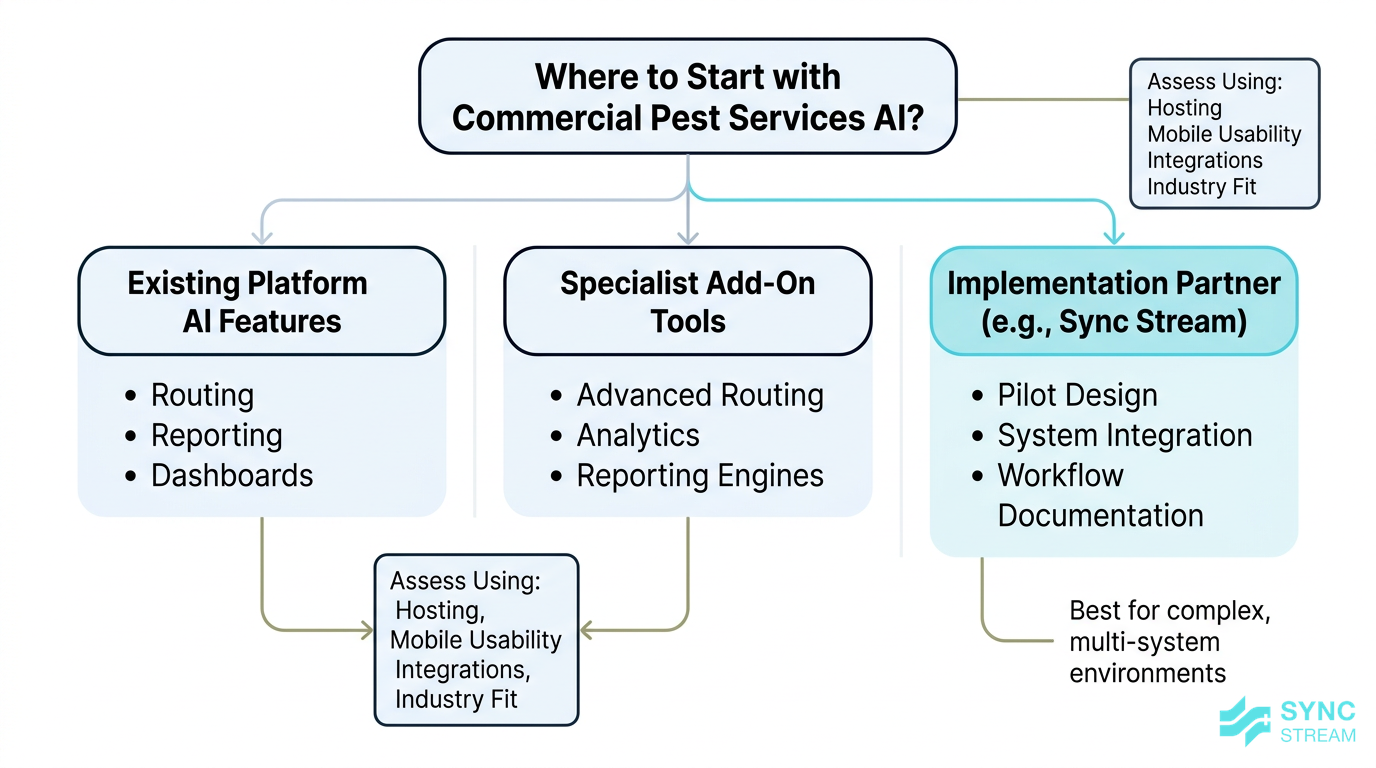
A simple decision framework for choosing AI tools and implementation partners for commercial pest operations.
Choosing the right tools and partners
Most commercial pest providers don’t need to start from scratch. A sensible path is to:
- Start with existing platforms Inputs: current pest or field service software logins and documentation. Action: review vendor materials and settings to identify any built-in AI or optimisation features (routing, reporting, dashboards) and trial them in a test environment or on a small group of jobs. Expected output: a shortlist of in-platform capabilities you can enable quickly, plus any gaps.
- Evaluate options using clear criteria Inputs: feature lists and pricing from potential tools; your data/process objectives. Action: score each option against criteria such as Australian hosting, mobile usability for technicians, integration strength with Xero/MYOB/CRMs, and track record in field services. Expected output: a ranked comparison that highlights 1–2 realistic candidates for routing, reporting, or contract intelligence.
- Run small, focused pilots Inputs: chosen tool, one major multi-site client or region, baseline metrics (current travel time, admin hours, SLA performance). Action: configure the tool for that contract, train the directly involved staff, run it for a defined period (e.g., 8–12 weeks), and measure changes against the baseline. Expected output: a pilot report showing impact on travel, admin, error rates, and client feedback, plus a go/no-go decision for broader rollout.
Working with an implementation partner like Sync Stream can help you design these pilots on top of your existing systems, ensuring data stays where you want it and workflows are documented for long-term maintainability.
Training teams and embedding change
Even the best tools fail if people don’t change how they work. Embedding commercial pest services AI into operations requires deliberate change management.
Key elements include:
- Role-specific training
- Technicians: Inputs: updated mobile app, new forms, photo requirements. Action: run short, hands-on sessions covering how to complete each form, capture required photos, and close jobs correctly. Expected output: technicians consistently submitting complete, structured job records that feed reporting and routing.
- Schedulers / dispatch: Inputs: routing dashboards, contract cockpit views. Action: train schedulers to interpret route suggestions, apply local knowledge to adjust them, and log overrides with reasons. Expected output: schedules that combine AI optimisation with on-the-ground reality, plus feedback data to improve settings.
- Account managers: Inputs: new dashboards and report templates. Action: show how to pull portfolio summaries, interpret trends, and use them in client reviews and renewals. Expected output: more data-backed conversations with clients and clearer identification of risk or upsell opportunities.
- Change management practices
- Appoint champion users in each team who can answer questions and provide feedback.
- Create simple SOPs and checklists for new processes (e.g., steps for closing a job in the field app, how to respond to non-conformance alerts).
- Hold regular review meetings in the early months to refine system settings and address issues.
- Keeping humans in the loop
- In the early stages, dispatchers should review and approve AI route suggestions rather than accepting them automatically.
- Technicians should be encouraged to flag when recommendations don’t fit on-the-ground realities.
This approach builds trust in the system, catches errors early, and ensures the AI supports your people rather than dictating to them.
Options Comparison
Built-in platform AI vs add-ons
When introducing commercial pest services AI, you’ll often choose between using features bundled with your core platform or adding specialist tools.
Built-in platform AI (within your existing job management or pest-specific system):
- Pros
- Simpler integration—data is already in one place.
- One support contact for issues and training.
- Consistent user experience for technicians and office staff.
- Cons
- Less customisation for unique workflows or reporting formats.
- Innovation speed depends on the platform’s roadmap, which may not prioritise pest-specific needs.
Add-on tools (separate routing, analytics, or reporting engines):
- Pros
- Deeper capability in targeted areas such as routing optimisation or advanced analytics.
- Flexibility to choose best-of-breed solutions for each function.
- Cons
- Integration complexity, especially if APIs are limited.
- Risk of double data entry if systems don’t sync cleanly.
A practical approach is to start with built-in AI where it meets your needs, then layer on specialised tools only where you can see a clear commercial benefit.
Off-the-shelf vs custom AI solutions
Another decision is whether to rely on configurable, off-the-shelf SaaS tools or commission fully bespoke AI systems.
Off-the-shelf tools:
- Pros
- Lower upfront cost and faster deployment.
- Regular updates and improvements spread across the user base.
- Typically sufficient for the needs of most SMBs.
- Cons
- Limited ability to match every nuance of your internal processes.
- You may need to adapt some workflows to fit the tool.
Custom-built AI solutions:
- Pros
- Designed around your exact workflows, data, and reporting formats.
- Potential to integrate deeply with complex or legacy systems.
- Cons
- Higher cost and longer implementation timelines.
- Greater responsibility for ongoing maintenance and support.
For most Australian SMB pest providers, 80–90% of the value comes from good process design combined with capable off-the-shelf tools. Custom builds usually make sense only for very large or highly specialised providers once they’ve squeezed most value from standard solutions.
Local vs global vendors
Your choice of vendor also matters.
Local (Australian) vendors and partners typically offer:
- Easier data residency assurance where Australian hosting is required.
- Support hours aligned with AEST, reducing downtime.
- Better understanding of local regulations, pests, and audit formats.
Global vendors may provide:
- More mature AI feature sets due to larger R&D budgets.
- Broader ecosystems of integrations and add-ons.
A balanced approach is often best: choose the mix that fits your risk, compliance, and capability needs. When evaluating vendors, use a simple checklist:
- Do they have a clear roadmap for AI features relevant to multi-site commercial contracts?
- Can they provide reference customers in Australia or similar markets?
- Do they integrate with any smart trap or monitoring hardware you plan to use?
- How well do they connect with your existing CRM, job management, and accounting platforms?
Common Pitfalls
Over-automation and loss of oversight
One of the biggest risks with commercial pest services AI is over-automation—allowing systems to make important decisions without human oversight.
Examples include:
- Automatically adjusting service intervals based on incomplete or skewed data, potentially breaching contract or compliance requirements.
- Generating generic, boilerplate reports that miss critical site-specific nuances, such as particular client protocols or historical issues.
To avoid this, implement governance practices such as:
- Periodic audits of AI-generated recommendations and reports.
- Clear thresholds where technicians or managers must review or override suggestions.
- Defined escalation paths when anomalies are detected, such as sudden drops in recorded activity that may indicate a data capture issue rather than a real improvement.
The aim is to keep humans in control while letting AI handle the heavy lifting.
Poor data quality and inconsistent inputs
AI depends on reliable input. Messy or inconsistent data will lead to poor suggestions and low trust.
Common issues include:
- Different names for the same pest or area across systems.
- Missing site IDs or mismatched records between CRM, job system, and devices.
- Incomplete visit records, such as missing treatments or incorrect timestamps.
Practical steps to improve data quality:
- Use controlled lists for pests, treatment types, and site zones instead of free text.
- Enforce mandatory geocoding of sites so routing and mapping are accurate.
- Maintain consistent site IDs across all systems and devices.
Implement basic data hygiene routines:
- Regular reviews to identify and correct duplicates or inconsistent entries.
- Technician training on accurate data entry, supported by simple field app designs.
Improving data quality may not feel like “AI work”, but it is often the single biggest factor in the success of AI-enabled initiatives.

The balance of upfront investment and gradual return when implementing AI in commercial pest operations.
Underestimating cost and change effort
AI is rarely a plug-and-play fix. Underestimating the investment and effort required is a frequent pitfall.
Ongoing costs can include:
- Software subscriptions for AI-enabled tools.
- Integration work to connect platforms and devices.
- Training time for technicians, schedulers, and managers.
- Internal project time for process mapping and redesign.
Meaningful improvements in multi-site coordination and reporting typically take months, not weeks, especially if you’re digitising and standardising processes along the way.
A simple ROI narrative helps set expectations:
- Savings and benefits may come from reduced travel and overtime, lower admin time per visit, fewer missed services, and better client retention on key contracts.
- Investment includes tooling, training, and change management.
- The risk of doing nothing is being left behind by competitors who can service complex contracts more efficiently and transparently.
By framing AI initiatives as structured projects with clear goals and payoffs, you can gain buy-in from owners and managers while avoiding under-resourced half-implementations.
Conclusion
Commercial pest services AI offers Australian providers a practical way to get control of complex, multi-site contracts. By layering intelligent scheduling, automated reporting, and optimised routing onto your existing systems, you can reduce admin, protect margins, and deliver the data-rich service commercial clients now expect.
The path forward doesn’t require a wholesale technology overhaul. It starts with digitising and standardising your processes, choosing tools that integrate with your current platforms, and running focused pilots for key clients. From there, you refine, expand, and embed AI into everyday workflows.
If you want to explore how AI and automation could coordinate your multi-site contracts, streamline reporting, and optimise technician routing—using the systems you already rely on—Sync Stream can help scope and implement grounded, ROI-focused solutions.
FAQ
What is commercial pest services AI in simple terms?
It’s a set of software tools that use data and algorithms to plan visits, route technicians, and generate reports more efficiently for commercial pest contracts, especially when you’re managing many sites.
Do I need to replace my existing job management system to use AI?
Usually not. Most providers start by turning on AI-enabled features in their current platforms or integrating specialised tools via APIs. The aim is to enhance your existing systems, not replace them.
How quickly can AI improve my routing and scheduling?
Routing improvements can be seen within weeks if your site data is accurate and you have digital scheduling in place. The larger your service area and contract portfolio, the more noticeable the gains.
Will AI-generated reports meet food safety and audit requirements?
They can, provided you design templates around the specific standards your clients must meet and ensure technicians capture the right data in the field. AI helps assemble and explain the data; you still define the compliance rules.
Is AI only worthwhile for large pest companies?
No. SMBs often see strong benefits because they have limited admin capacity. Even modest gains in routing efficiency and report automation can free significant time and improve profitability on key contracts.
What’s the biggest prerequisite before starting with AI?
Consistent, digital records of visits, findings, and outcomes. If your processes still rely on paper or inconsistent spreadsheets, digitising and standardising them is the first step.
How can Sync Stream help with commercial pest services AI?
Sync Stream works within your existing CRMs, job management, and accounting systems to design and implement AI-enabled workflows. That includes routing optimisation, automated reporting, and contract intelligence built against clear commercial objectives and documented for long-term reliability.