


Introduction
Running a domestic electrical business in Australia is a juggling act.
You’re quoting jobs, fielding calls and texts, driving across town, filling out certificates, and chasing invoices – often after hours. Most sparkies know there’s a better way, but don’t want to disappear into tech jargon or rebuild their whole business system just to test some new tool.
This is where electrician AI is starting to make a real difference. Not sci‑fi robots, but practical software that quietly handles quoting, scheduling, invoices, customer messages, and compliance paperwork in the background while you stay on the tools.
In this article, we’ll break down what electrician-focused AI actually is, why it matters for Australian domestic electricians, the key features to look for, how to roll it out safely, and the common pitfalls to avoid. The goal: help you compare options and decide where AI automation can genuinely save hours each week without losing control of your business.
What is electrician AI
Defining electrician-focused AI tools
When people talk about “electrician AI”, they’re not talking about robots wiring a switchboard. For domestic electrical businesses, AI usually means:
- Software and mobile apps that can read, sort, and respond to information the way a person would
- Automation tools that move data between systems and trigger actions without you touching a keyboard
In practice, that looks like:
- Turning a messy SMS enquiry into a structured job request
- Drafting a quote based on your price list and past jobs
- Filling in invoice details and sending reminders automatically
Most of these tools are cloud-based or mobile apps that plug into systems you already use – job management software, quoting tools, Xero or MYOB, Google Calendar, Outlook, and SMS platforms. You’re usually not commissioning a fully custom AI system; you’re configuring off‑the‑shelf tools to work with your workflows.
Under the hood, a few key technologies do the heavy lifting:
- OCR (Optical Character Recognition): lets software read PDFs or photos of supplier invoices, compliance forms, or handwritten notes and turn them into usable data.
- Natural language tools: process emails, SMS messages, and web enquiries so the system can understand what the customer wants and draft clear responses.
- Optimisation engines: crunch job locations, time windows, and travel times to suggest efficient daily routes and schedules.
The important part: you don’t need to understand the algorithms. You just need to know what they can reliably do for you and how they plug into the tools you already trust.
How AI fits into a domestic electrical business
Picture a typical day for a domestic sparky:
- Overnight: a few web form enquiries and Facebook messages come in.
- Morning: calls and texts about no power, safety switch tripping, EV charger quotes.
- During the day: you’re on the road doing jobs, trying to fit in site photos, certs, and job notes.
- Evening: you’re knocking out quotes, sending invoices, and updating your schedule for tomorrow.
AI can sit quietly in the background at each stage:
- Enquiries: capture web, email, and SMS enquiries, extract address, job type, and urgency, and create draft jobs in your system.
- Quoting: suggest line items and pricing based on similar past jobs so you’re editing, not typing from scratch.
- Scheduling: allocate jobs to available techs, group nearby jobs, and push appointments into your calendar with SMS confirmations.
- On-site: pre‑fill job details on your mobile app, so you just add notes, photos, and test results.
- Wrap-up: generate invoices from completed jobs, attach compliance certs, and send payment links and follow‑ups automatically.
It helps to think in terms of two levels:
- Assistive AI: suggests actions or drafts content for you to approve. Examples: draft quote emails, suggested materials list, proposed schedule for the day.
- Fully automated workflows: run end to end once configured. Examples: automatic quote follow‑up SMS after 48 hours, invoice reminders at 7/14 days overdue, or auto-filing supplier invoices into Xero.
For Australian domestic electricians, the goal isn’t to replace professional judgement or licensed work. AI should support your existing processes and Australian standards, not override them. You still decide:
- How a job is scoped
- What’s included or excluded
- When a compliance cert is signed
AI simply removes the repetitive admin around those decisions.
Why it matters for Australian SMBs
Efficiency and profitability gains
Across Australia, AI is no longer a fringe experiment. More than half of businesses are now using some form of AI, and the broader utilities and electrical sector is making significant investments. That means domestic electricians adopting AI aren’t early guinea pigs – you’re joining a wider shift across trades, utilities, and services.
For a small electrical business, the benefits show up in very practical ways:
- Hours back each week:
- Less time re‑typing job details into quotes and invoices
- Fewer phone calls to confirm times and addresses
- Faster compliance paperwork with pre‑filled fields
- Fewer no‑shows and gaps:
- Automatic reminders and confirmations reduce wasted trips
- Cancellations can be filled with auto-suggested slots for other nearby jobs
- More jobs completed per week:
- Better routing cuts dead driving time
- Clearer job info reduces on‑site delays and callbacks
Freeing up just 1–2 hours a day on admin can:
- Increase your billable hours on the tools
- Improve cash flow with faster, more consistent invoicing
- Delay or reduce the need to hire extra admin staff as you grow
The key is linking each electrician AI feature to a clear business outcome – more revenue, fewer errors, faster payments – not just using tech for the sake of it.
Customer experience and responsiveness
Homeowners generally don’t care whether you use AI or not. They care about:
- How fast you respond
- How clear your quotes are
- Whether you show up when you say you will
- How easy it is to pay
Electrician AI helps you deliver a smoother experience without adding manual work:
- AI-powered booking: web forms and chat widgets that collect the right information upfront and slot enquiries into your schedule or callback list.
- Instant quote responses: pre‑built templates and suggested pricing let you send ballpark estimates or formal quotes quickly, even for after‑hours enquiries.
- Automated updates: SMS and email confirmations, day‑before reminders, and “on our way” ETA messages reduce no‑shows and confusion.
For urgent jobs – power out, safety concerns, kids at home – being able to respond quickly and confidently is a big trust signal. Clear digital quotes, reminders before arrival, and simple payment links make you look organised and professional, even if you’re a one‑ or two‑person team.
Better communication also feeds straight into reviews and referrals. Automated post‑job messages that politely ask for a Google review or quick survey can lift your online profile in competitive suburbs without you having to remember to ask each time.
Compliance, safety, and Australian context
Domestic electricians in Australia juggle:
- National and state-based electrical standards
- Safety checks and test results
- Compliance certificates and job reports
- ATO expectations for clean, digital records
AI can help by:
- Standardising templates: pre‑configured forms for common job types reduce the risk of missing required fields.
- Reducing re-entry errors: once customer and job data is captured, it flows into quotes, job cards, certs, and invoices automatically.
- Keeping records tidy: storing photos, signatures, and documents in a structured way makes audits and disputes less stressful.
Good documentation isn’t just for regulators. It protects you during:
- Warranty claims
- Insurance issues
- Disputes over scope or pricing
The Australian Government is also actively encouraging small trades businesses to adopt AI through initiatives like the National AI Centre and emerging AI Adopt Centres, designed to help SMEs understand and implement AI safely. This backing is a strong signal that AI, used properly, is seen as a positive step for compliance, productivity, and competitiveness.
Key components and features
Quoting and job estimation automation

The workflow from customer enquiry to AI-assisted quote drafting and electrician approval.
Quoting is where many domestic electricians lose evenings and weekends. AI-driven tools aim to turn it into a faster, more consistent process.
Common capabilities include:
- Turning enquiries into structured jobs:
- Reading SMS, emails, or web forms
- Extracting address, job type, and urgency
- Creating a draft job or quote in your system
- Suggesting line items:
- Pulling from your existing price list
- Re-using popular bundles for common tasks (e.g., standard GPO install)
- Generating quote templates:
- Auto‑filling your logo, terms, and standard inclusions/exclusions
- Allowing quick tweaks for special conditions
AI can also look at previous, similar jobs to:
- Suggest typical materials and labour time
- Flag anything unusual that warrants a closer look
For example:
- Simple power point install:
- AI pre‑fills: supply and install standard double GPO, approximate labour (e.g., up to X hours), standard cable run within limits, basic make‑good.
- You adjust for access issues or customer preferences, then send.
- Switchboard upgrade:
- AI pre‑fills: upgrade existing switchboard to current standards, RCDs on all circuits, labelling, testing, and certs.
- It also prompts for items that often get missed: surge protection, asbestos backboard handling, potential mains upgrades.
- You review carefully, adjust scope, and confirm pricing before sending.
Used this way, AI turns quoting into an edit and approve task instead of writing everything from scratch, while still leaving the final judgement with you.
Smart scheduling and route optimisation
Scheduling is another area where electrician AI can have an immediate impact on your day.
Smart scheduling features typically include:
- Job allocation: matching jobs to available electricians based on skills, location, and workload.
- Route optimisation: grouping nearby jobs and planning the most efficient route to cut driving time and fuel costs.
- Time window handling: factoring in:
- Customer availability (e.g., work from home, school runs)
- Strata or body corporate rules
- Noise or access restrictions
Better tools also use traffic and travel time predictions to:
- Suggest realistic appointment windows
- Highlight when you’re overbooked
- Auto‑suggest reschedule slots when a customer cancels
Integration is key. The most useful systems:
- Sync with Google or Outlook calendars so you see all commitments in one place
- Send SMS reminders and confirmations to customers to reduce no‑shows
- Help avoid double‑bookings across multiple techs and vehicles
In practice, you might:
- Set your availability and constraints
- Input standard working hours and blocked-out personal commitments.
- Add regular tasks like supplier runs or toolbox talks.
- Mark high-priority or fixed-time jobs that can’t move.
- Load jobs to be scheduled
- Import new enquiries and unscheduled work from your job system.
- Confirm job locations, estimated durations, and any access limits.
- Tag urgent jobs or those with narrow customer time windows.
- Generate and review an optimised run
- Let the system propose a daily or weekly schedule and routes.
- Check that travel times and job order make sense.
- Adjust for local knowledge (traffic hotspots, tricky sites).
- Confirm and communicate
- Approve the schedule for each electrician.
- Push confirmed bookings into calendars and mobile apps.
- Trigger confirmation and reminder messages to customers.
This keeps you in control of the day while removing the mental load of constantly reshuffling your schedule.
Invoicing, payments, and paperwork handling
Cash flow suffers when invoicing is slow or inconsistent. AI can help you get invoices out the door faster and keep paperwork aligned with your accounting.
Typical features include:
- Invoice creation from completed jobs:
- Pulling through labour hours and call‑out fees from your job system
- Adding materials from job records or supplier invoices
- Applying your standard terms and tax settings
- Payment links:
- Automatically including card, bank transfer, or online payment options
- Reducing back‑and‑forth and delays
OCR and data extraction shine when dealing with supplier invoices from businesses like Reece, Middy’s, and other wholesalers:
- You or your admin upload or forward the invoice.
- OCR reads line items, quantities, and prices.
- The system matches them to jobs and updates costs.
- Data flows into Xero or MYOB without manual re‑typing.
For recurring jobs and maintenance plans, AI-driven systems can:
- Schedule recurring visits
- Generate invoices on each visit or on a set cycle
- Send automatic reminders for overdue invoices
That steady, predictable follow‑up supports smoother cash flow and means less awkward chasing of unpaid bills.
Customer communication and follow-up
Good communication is often the difference between a one‑off job and a repeat customer.
AI can streamline this with:
- Chatbots or message assistants on your website, Facebook, or SMS that:
- Answer common questions about availability, service areas, and basic pricing ranges
- Capture name, address, and job details 24/7
- Route complex enquiries to you for a callback
- Automated follow-ups that are still personalised:
- Quote follow‑up messages after a set number of days
- Job confirmations and reminder messages
- Day‑of ETA updates when you’re on the way
- Post‑job review or feedback requests
For local Aussie customers, tone matters. You want:
- Straightforward, friendly language
- Messages written in your style, with your business name and sign‑off
- No stiff corporate jargon or overseas call-centre vibe
Most modern tools let you create electrician‑branded templates, so even automated messages feel like they’re genuinely from you or your office.
Compliance documentation and record-keeping
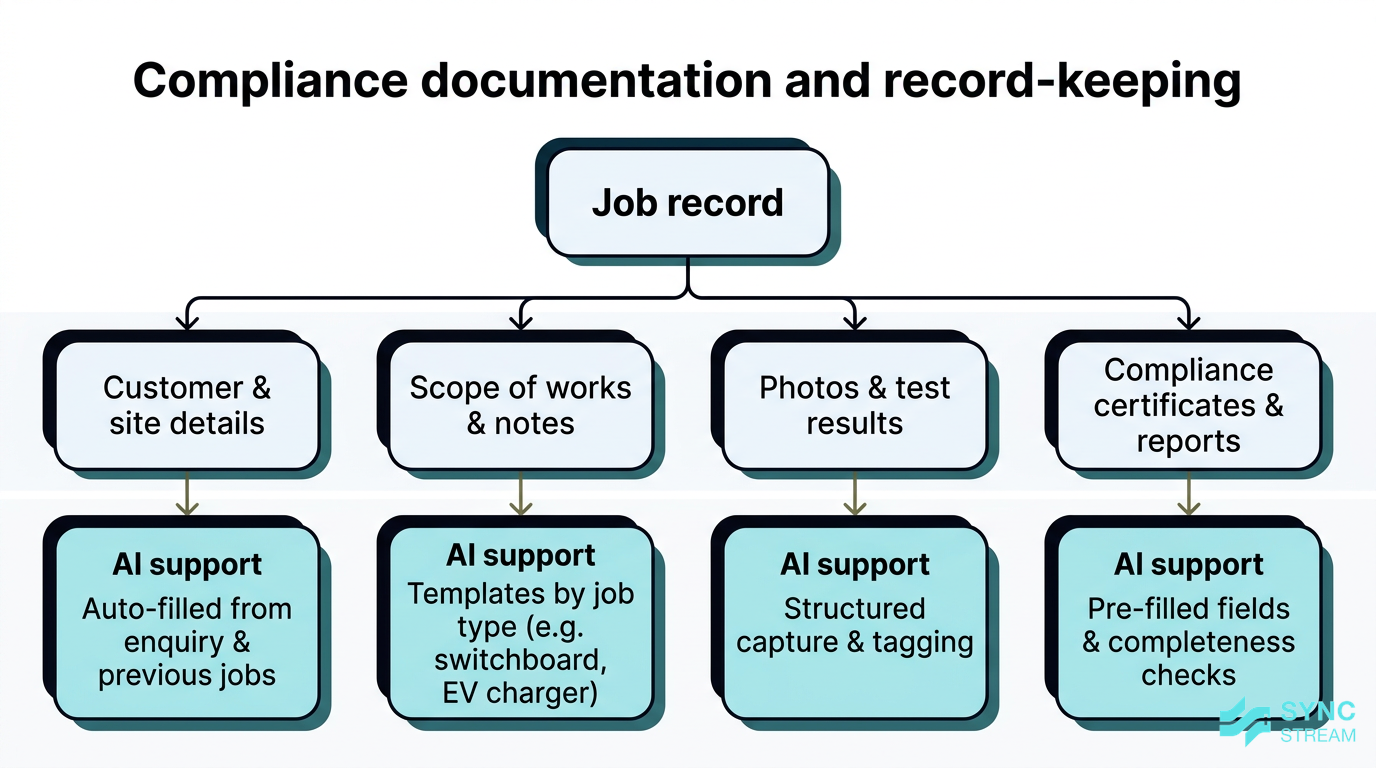
The structure of job records, compliance documents, and how AI helps capture and organise them.
Compliance paperwork is unavoidable, but it doesn’t have to be painful.
AI can help by:
- Pre-filling certificates and reports based on:
- Job type (e.g., switchboard upgrade, EV charger, safety inspection)
- Location and relevant state requirements
- Previous templates you’ve approved
- Prompting for required details so you’re less likely to miss a field that matters for Australian standards.
Behind the scenes, structured record‑keeping is just as important:
- Photos, test results, signatures, and documents are attached to job records.
- Everything is searchable and exportable for regulators, insurers, or legal queries.
- You can quickly show what was done, when, and by whom.
Because requirements differ across NSW, VIC, QLD, and other states, it’s crucial to:
- Check that the tools you pick support state-based forms and workflows.
- Confirm that templates either match or can be configured to match local regulatory requirements.
- Keep ultimate responsibility for verifying that documents meet the standards for your licence and jurisdiction.
AI reduces the admin burden, but you stay accountable for the quality and completeness of what’s submitted.
Implementation strategy
Mapping your workflows and priorities
Before jumping into tools, it’s worth mapping how your business actually runs today.
- List your current admin tasks
- Inputs: recent week’s jobs, emails, messages, and paperwork.
- Action: write down every step from enquiry through to payment and certs (who does it, in what system).
- Expected output: a simple list of tasks such as enquiries, quotes, scheduling, on-site notes, invoices, and follow‑ups.
- Identify where you lose the most time or make the most errors
- Inputs: that task list plus your own observations and staff feedback.
- Action: circle tasks that are slow, frustrating, or often wrong/late (e.g., quoting backlog, missed certs).
- Expected output: a short “top 3–5 problems” list.
- Group tasks into categories
- Inputs: marked-up task list.
- Action: group related tasks into four buckets – lead handling; job planning and scheduling; on‑site admin; wrap‑up and back office.
- Expected output: a simple map of your workflows by category.
- Mark “quick wins” vs “complex changes”
- Inputs: workflow map plus rough sense of system changes needed.
- Action: tag each task as a quick win (templates, reminders, basic automation) or a complex change (system migration, deep integrations).
- Expected output: a prioritised view of where electrician AI can help first, without ripping out core systems.
For most domestic electricians, it’s smarter to start with one or two high‑impact areas – often quoting and scheduling – rather than trying to automate everything in one hit. This reduces risk and gives you early wins the team can see.
Practical rollout sequence for electricians
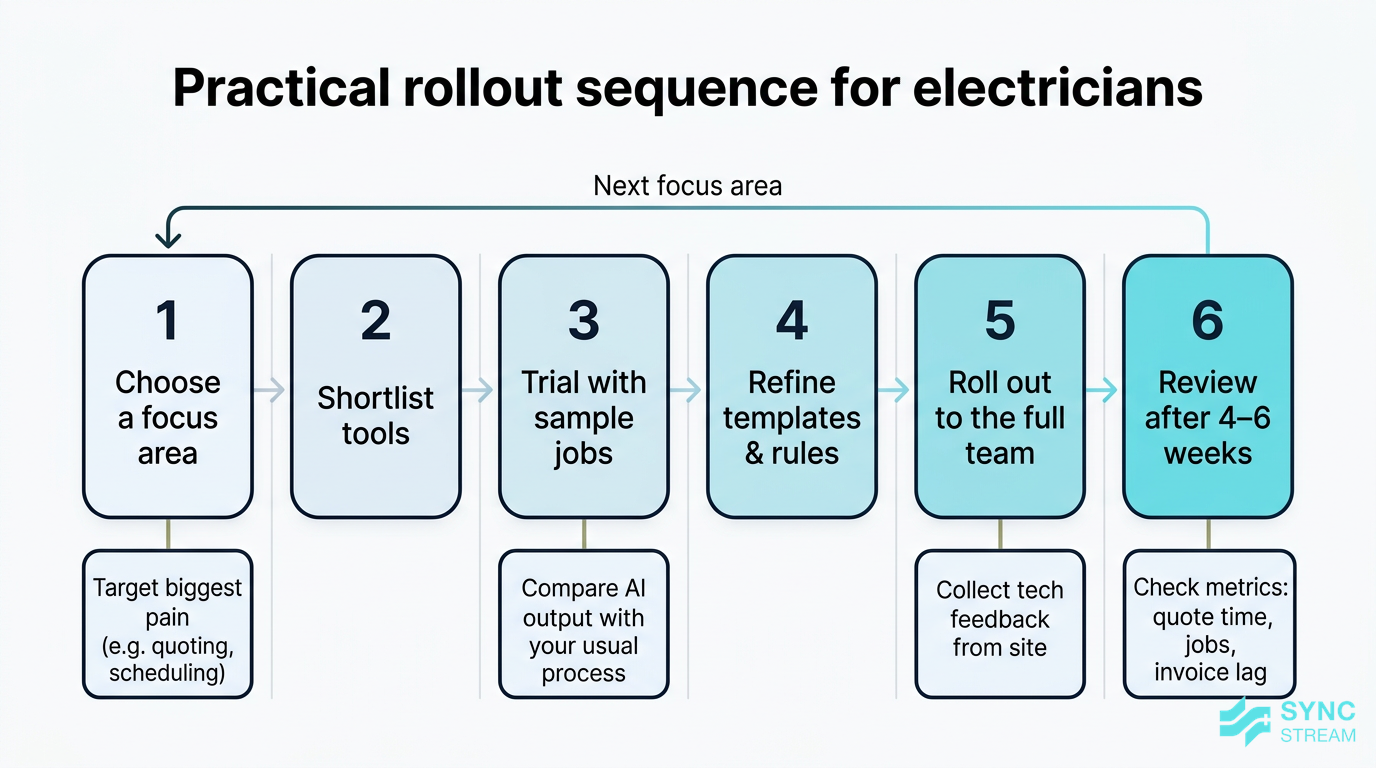
A staged rollout roadmap for introducing AI into a domestic electrical workflow.
A structured rollout helps you avoid disruption while you’re still learning the tools. A simple sequence:
- Choose a focus area
- Inputs: your “top problems” list and workflow map.
- Action: pick one high-impact process (e.g., quoting turnaround, job scheduling, or invoicing lag) as the first AI target.
- Expected output: a clear, written focus like “reduce quote turnaround from 3 days to same-day”.
- Shortlist tools
- Inputs: focus area, existing systems (job management, Xero/MYOB), budget range.
- Action: research 3–5 tools that:
- Are designed for trades or service businesses
- Integrate with your current systems
- Offer Australian support where possible
- Expected output: a shortlist of 2–3 tools to trial, with notes on pros/cons and pricing.
- Trial with sample jobs
- Inputs: 5–10 recent jobs that represent your normal work mix.
- Action: run each sample job through the new tool:
- Create the enquiry or job
- Generate the AI-assisted quote/schedule/invoice
- Compare against how you handled it originally
- Expected output: side‑by‑side examples showing where AI saves time and where it needs adjustment.
- Refine templates and rules
- Inputs: trial results plus your existing quote, cert, and message templates.
- Action:
- Edit templates to match your language, pricing structure, and compliance wording.
- Set rules for what the system can send automatically versus what needs approval.
- Expected output: a small set of “live” templates and clear rules documented for your team.
- Roll out to the full team
- Inputs: refined templates, rules, user list (techs and admin).
- Action:
- Train staff on the new steps with 2–3 simple walkthroughs.
- Start using the system on real jobs, starting with low-risk or standard work.
- Gather feedback weekly from techs and office staff.
- Expected output: most day-to-day work in the focus area now runs through the new tool, with issues noted.
- Review after 4–6 weeks
- Inputs: tool usage data, staff feedback, basic metrics (quote time, completed jobs, invoice delay).
- Action:
- Compare before/after for time spent, errors, and cash flow.
- Decide whether to keep, change, or drop the tool.
- Choose the next area to automate if results are solid.
- Expected output: a decision on continuing and an updated roadmap for extending electrician AI into other workflows.
Throughout the first few weeks, keep backup processes in place:
- A manual quoting template you can fall back on
- A shared calendar or whiteboard for scheduling if the system has issues
This ensures your business keeps running even if a new tool hiccups.
Integrating with existing software and systems
The best electrician AI setup is usually built on top of the systems you already use, not instead of them.
Most tools will need to connect to:
- Your job management platform (if you have one)
- Your accounting package (Xero or MYOB)
- Calendars (Google, Outlook, Apple)
- Email and SMS tools
When assessing integrations, consider:
- Native integrations: built‑in connections are generally more stable and easier to maintain.
- Australian support and data residency: local support hours and the option to store data in Australia are strong pluses.
- Avoiding overly complex custom setups: if you or your team can’t maintain an integration, you’re likely to abandon it when something breaks.
Use free trials and sandbox environments wherever possible to test:
- Enquiry → quote → job → invoice → payment flow
- Data passing from job management into accounting and back
- How changes in one system show up in another
The goal is to avoid double data entry and unexpected gaps in the process before you commit.
Options comparison
All-in-one platforms vs point solutions
When you start looking at electrician AI options, you’ll quickly see two main approaches:
- All-in-one trade platforms: job management, quoting, invoicing, scheduling, and communication in a single system, often with AI features built in.
- Point solutions: single-purpose AI tools focused on one function (e.g., quoting, routing, or document processing) that plug into your existing stack.
Each has pros and cons.
All-in-one platforms:
- Pros:
- One login and a single source of truth for jobs and customers
- Fewer integrations to manage
- Consistent workflows for the whole team
- Cons:
- Less flexibility if you want to customise everything
- Can be a bigger commitment to switch over
- Subscription cost per user can add up as you grow
Point solutions:
- Pros:
- Lets you target the exact pain point (e.g., quoting) without changing everything
- Often quicker to trial and turn off if it doesn’t suit
- Can mix and match best‑of‑breed tools
- Cons:
- More integrations to keep working
- Risk of data living in different places
- Workflows can become messy if not planned well
As a rule of thumb:
- Solo or very small teams might start with point tools to fix the biggest headaches quickly.
- Growing businesses with multiple techs and vehicles usually benefit from an integrated platform that keeps everyone on the same page.
Locally-focused vs global tools
You’ll also be choosing between:
- Tools built or tailored for Australian electricians, and
- Global AI tools with broader feature sets.
Locally-focused tools often provide:
- Pre‑built compliance forms for Australian states
- ATO-ready invoicing and GST handling
- AUD pricing
- Support teams operating in Australian time zones
Global tools may:
- Be cheaper or offer more advanced AI features
- Have a larger ecosystem of add-ons and integrations
- Support multiple countries and currencies if you operate across borders
The trade‑off is that global tools may not:
- Match Australian standards and terminology out of the box
- Include the forms and templates you need without customisation
When comparing, weigh support, reliability, and localisation against headline AI features. Good questions to ask vendors include:
- Do you support Australian data storage options?
- How do you handle Australian compliance requirements for trades?
- What other Australian electrical businesses use your product?
Customisation, pricing, and scalability
Electrician AI tools use a few common pricing models:
- Per user, per month: you pay for each electrician or admin who uses the system.
- Per feature or module: core job management included, with extra fees for AI features like document processing or advanced routing.
- Usage-based: charges based on the number of documents processed, messages sent, or AI calls made.
When assessing options, look closely at:
- Customisable templates and fields: can you set up quotes, certs, and invoices to match how you price and describe work?
- Workflow flexibility: can you define your own stages (enquiry, quote, scheduled, in progress, completed, invoiced) and approvals?
Scalability matters even if you’re small today. Ask:
- Can this tool handle more jobs per day as we grow?
- Is it easy to add more users, vans, or service areas?
- Will we face a painful migration in a year or two if we outgrow it?
Choosing tools with room to grow helps you avoid rebuilding your tech stack every time you add another electrician or expand your service area.
Common pitfalls with electrician AI
Over-automation and loss of control
It’s tempting to automate everything once you see what’s possible. That’s where many businesses go wrong.
You should be cautious about letting AI:
- Send complex quotes without human review
- Issue compliance documents that carry legal obligations
- Make commitments on scope or timeframes without context
Manual review is essential for jobs like:
- Switchboard upgrades
- EV charger installs
- Solar and battery integrations
- Any job with unusual site conditions or safety concerns
A simple way to stay in control is to set clear rules:
- Fully automated tasks: appointment reminders, simple invoice chasers, standard follow‑ups.
- Requires approval: quotes over a certain value, complex or high‑risk jobs, compliance documents.
- Electrician must override: when AI suggestions don’t match site reality or customer discussions.
Used well, AI takes care of the repetitive tasks while you remain the decision‑maker.
Data quality, accuracy, and compliance issues
AI is only as good as the data and templates you give it. If your:
- Price lists are out of date
- Labour rates are wrong
- Job notes are sloppy or incomplete
…then the outputs – quotes, invoices, and certs – will be wrong too.
There’s also a real risk around compliance if:
- Staff rush through forms
- Generic templates don’t match Australian or state‑based standards
- Required fields are left blank or mis‑used
Simple quality controls help avoid bigger problems:
- Regular price list updates: review materials and labour rates at least quarterly.
- Spot checks: sample AI‑generated quotes and invoices each week to ensure they match your expectations.
- Periodic audits: pick a set of completed jobs each quarter and check that certs, photos, and notes are complete and consistent.
This doesn’t eliminate risk, but it keeps issues small and manageable.
Security, privacy, and customer trust
Domestic electricians collect a lot of sensitive information:
- Customer contact and payment details
- Property layouts and switchboard photos
- Notes about safety defects and previous work
Storing this in cloud tools raises fair questions about security and privacy.
When evaluating vendors, look for basics like:
- Secure logins (ideally with multi‑factor authentication)
- Role-based access: apprentices, techs, and office staff only see what they need to
- Data backups and recovery plans
- Clear policies on whether the vendor uses your data to train their AI models, and how that data is protected
With customers, transparency builds trust:
- It’s fine to use automated messages, but don’t pretend a bot is a person.
- Make sure sensitive discussions – safety defects, major works, pricing disputes – still involve a real person.
Handled well, AI and automation become part of a professional, secure, and responsive service rather than a risk.
Conclusion
Electrician AI isn’t about replacing sparkies with robots. It’s about using practical software and automation to clear the admin clutter so you can spend more time on the tools, respond faster to customers, and stay on top of compliance without burning out.
For Australian domestic electricians, the biggest wins usually come from:
- Automating quoting and job estimation
- Smart scheduling and route optimisation
- Faster invoicing and payment follow‑up
- Consistent, branded customer communication
- Streamlined compliance documentation and record‑keeping
The key is to start small, focus on one or two high‑impact areas, and build on top of the systems you already trust – with clear rules about what AI can and can’t do.
If you want help mapping your workflows, scoping realistic AI use cases, and implementing reliable automations inside your existing CRM, accounting, and job management tools, Sync Stream specialises in exactly this. We design and document AI‑powered workflows for Australian trades so you keep control of your data, your compliance, and your margins.
FAQ
What is electrician AI in simple terms?
Electrician AI is practical software and mobile apps that use automation and machine learning to handle admin tasks for electrical businesses – things like quoting, scheduling, invoicing, customer messages, and compliance paperwork. It sits on top of the systems you already use rather than replacing licensed electrical work.
Do I need to replace my current job management or accounting system to use AI?
Not usually. Most AI tools are designed to integrate with existing platforms like job management systems, Xero, or MYOB. You can often add AI features for quoting, routing, or document processing without a full system changeover.
Where should a small domestic electrical business start with AI?
Start with the biggest pain point – often quoting or scheduling. Map your current process, trial one or two tools on sample jobs, refine your templates, then roll it out slowly. Avoid trying to automate every part of your business at once.
Is AI safe to use for compliance documents and certificates?
AI can safely pre-fill compliance certificates and reports and help ensure required fields aren’t missed. However, a qualified electrician should always review and approve anything with legal or safety implications, especially for complex or high‑risk jobs.
How much does electrician AI typically cost?
Pricing varies. Many tools charge per user per month, sometimes with extra fees for AI features like OCR or advanced routing. Others use usage‑based pricing for document processing or messages sent. The important thing is to match costs to clear savings in time, errors, or improved cash flow.
Will my customers notice or care that I’m using AI?
Most homeowners won’t care about the technology; they care that you respond quickly, turn up on time, and provide clear quotes and easy payment options. If AI helps you do that more reliably, it improves their experience. Just ensure sensitive discussions are handled by a person, not a bot.
How can Sync Stream help with AI for electricians?
Sync Stream works with Australian trades and service businesses to design and implement AI and automation on top of existing CRMs, accounting platforms, and operations tools. For domestic electricians, that can include automated quoting, job scheduling, invoice processing, customer communication, and compliance workflows – all documented for long‑term reliability and reduced vendor lock‑in.