

Introduction
Commercial electrical contractors across Australia are under pressure: tight margins, labour shortages, complex standards, and clients who expect faster responses on every tender, RFI, and variation.
At the same time, electrician AI contractors tooling has moved from buzzword to practical toolkit. What used to be reserved for tier‑1 builders and large facility managers is now accessible to SMB contractors on monthly subscriptions, often plugged straight into the systems you already use.
This article breaks down how commercial electrical businesses can use AI to:
- Reduce project admin and documentation workload
- Track and respond to tenders more effectively
- Improve job costing analysis and margin control
- Optimise workforce scheduling across multiple sites
You’ll see where AI fits into a typical commercial workflow, what to look for in tools, how to roll them out safely, and how an implementation partner like Sync Stream can help you get real operational value instead of “AI experiments.”
What is electrician AI for contractors
Defining electrician-specific AI tools
In plain terms, AI is software that can learn from data and patterns to make predictions, automate decisions, and handle repetitive admin without needing step‑by‑step instructions each time.
For commercial electricians, that does not mean robots on site running cables. It usually looks like:
- Systems that read plans, specs, and emails and extract the information you care about
- Assistants that suggest labour units, flag risky contract clauses, or draft responses to RFIs
- Automations that push data between your existing systems without re‑keying
It’s important to distinguish between:
- Generic AI tools – such as ChatGPT, which can draft emails or explain technical concepts but doesn’t understand your jobs, cost codes, or systems.
- Trade‑focused AI tools – built around estimating, scheduling, safety, and job management for commercial electrical work, drawing on structured data like BOQs, timesheets, cost codes, and programmes.
Electrician‑specific AI is usually designed to plug into the platforms you already run—job management, accounting, email, tender portals—rather than replace them. That might mean:
- Reading tenders that arrive via email and logging them in your tender register
- Pulling data from your accounting system to analyse job margins
- Connecting to SharePoint or other cloud storage to index project documentation
This is also where Sync Stream focuses: implementing AI and automation on top of your current CRMs, accounting platforms, and operations tools so you retain control of data, security, and infrastructure.
How AI fits into commercial electrical workflows
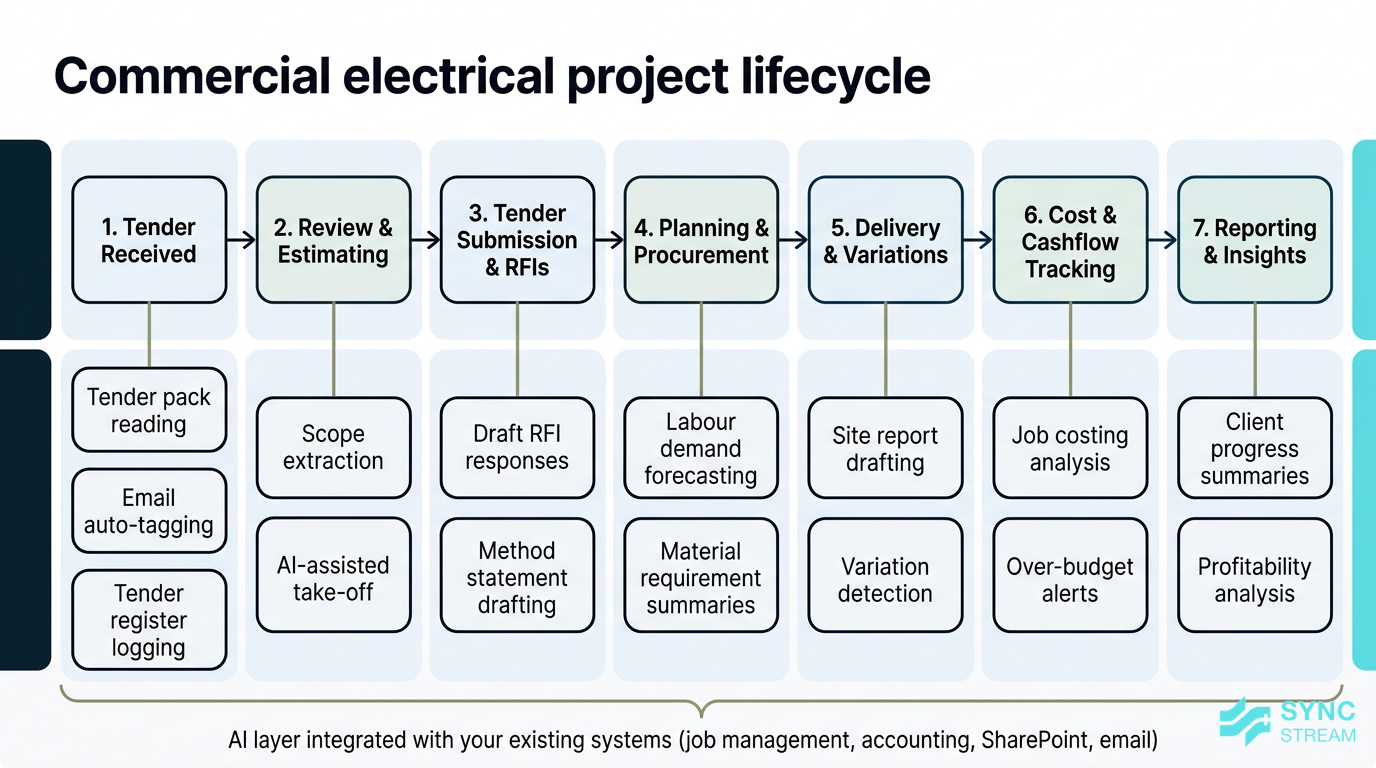
A typical commercial electrical contractor’s workflow runs roughly like this:
- Receive tenders via portals or email
- Review documents and scope, complete take‑offs, and build estimates
- Submit tenders and respond to RFIs
- Plan procurement and workforce for awarded projects
- Deliver works, manage variations and claims
- Track costs, cashflow, and progress
- Report to head contractors, clients, and internally
AI can plug into each stage:
- Project admin reduction – AI tools can:
- Read 200‑page tender packs overnight and extract scope items into your estimating template
- Auto‑tag and route project emails to the right job or folder
- Draft site reports from dot‑point notes or voice memos
- Tender tracking – AI agents can:
- Monitor tender portals and shared inboxes
- Log new opportunities, deadlines, and mandatory site visits
- Flag addenda and scope changes automatically
- Job costing analysis – AI can:
- Analyse timesheets, purchase orders, and claims against budget
- Highlight cost codes or tasks trending over budget early
- Identify which clients, project types, or builders are most/least profitable
- Workforce scheduling optimisation – AI schedulers can:
- Balance labour across multiple jobs based on programme, skills, location, and overtime
- Check licences and fatigue rules before assigning shifts
- Forecast labour needs weeks ahead using historical productivity
In practice, AI is another layer on your existing tech stack, helping project managers, estimators, and operations teams make faster, better‑informed decisions with less manual admin.
Why it matters for Australian SMBs
Industry pressures and opportunity in Australia
Australian electrical contractors are dealing with a mix of structural and day‑to‑day pressures:
- Ongoing labour shortages and wage pressures
- Increasing compliance requirements under AS/NZS standards, WHS, and client‑specific safety systems
- Builders and facility managers demanding faster responses and tighter budgets
Against that backdrop, the research indicates that around 34% of construction businesses (including electricians) are already using AI, with an 8% jump in a single quarter. That points to a competitive shift, not a passing fad.
The good news for SMB contractors is that AI capabilities once limited to tier‑1 contractors—like automated tender analysis, predictive job costing, and advanced scheduling—are now accessible via:
- SaaS tools with monthly per‑user pricing
- Add‑ons to job management or estimating platforms
- Custom automations built on low‑code orchestration tools like n8n
You no longer need a large IT department to benefit. What you do need is clarity on where AI will help your business most and partners who can deploy it inside your existing systems.
Impact on margins, cashflow, and growth
In commercial electrical work, a few percentage points on margin and a few days on cashflow timing can be the difference between a solid year and a painful one.
AI impacts those numbers in several ways:
- Reducing admin time on tenders, RFIs, and variations
- If a project manager currently spends 5–8 hours a week on manual document review, email triage, and basic reporting, automating half of that effectively adds 2–4 hours of extra capacity—without extra headcount.
- Across three PMs, that’s like gaining an extra day of project management each week.
- Better job costing analysis and quoting accuracy
- Analysing historical jobs to see where labour and materials routinely blow out helps you adjust allowances and margins on future bids.
- Cleaner costing reduces under‑pricing and supports healthier profit on fixed‑price contracts.
- Cashflow stability
- Faster, more accurate claims and variation submissions lead to fewer disputes and delays in payment.
- AI‑assisted checks can ensure all completed work and approved variations are included in claims.
Even modest improvements compound. For example:
- Lifting average gross margin by just 2 percentage points on $5M of annual revenue adds $100k before overheads.
- Saving 5 hours/week per PM across four PMs equates to 20 hours/week—effectively half an FTE worth of senior time freed to manage more projects or higher value tasks.
Client expectations and winning work
Commercial clients, councils, and facility managers increasingly expect their subcontractors to be:
- Highly responsive on tenders and RFIs
- Transparent on costs and programme
- Comfortable working within digital procurement and reporting systems
AI can support this by enabling:
- Faster tenders – Pre‑populating item lists from drawings and BOQs, and drafting method statements or clarifications from templates, helps you submit more competitive tenders on time.
- Quicker RFI responses – AI search across drawings, specs, and email threads makes it easier to answer queries accurately without trawling through folders.
- Clearer reporting – Auto‑generated progress snapshots, cost summaries, and forecast vs actual comparisons help you present a professional, data‑backed picture to clients.
Many larger builders and government clients are digitising procurement, using portals and structured data formats. Subcontractors that can keep up—with consistent rates, structured responses, and reliable reporting—stand out.
Used well, AI can even become part of your capability story: for example, highlighting data‑backed cost control and scheduling in capability statements and EOI responses.
Key components and features
AI for project admin and documentation
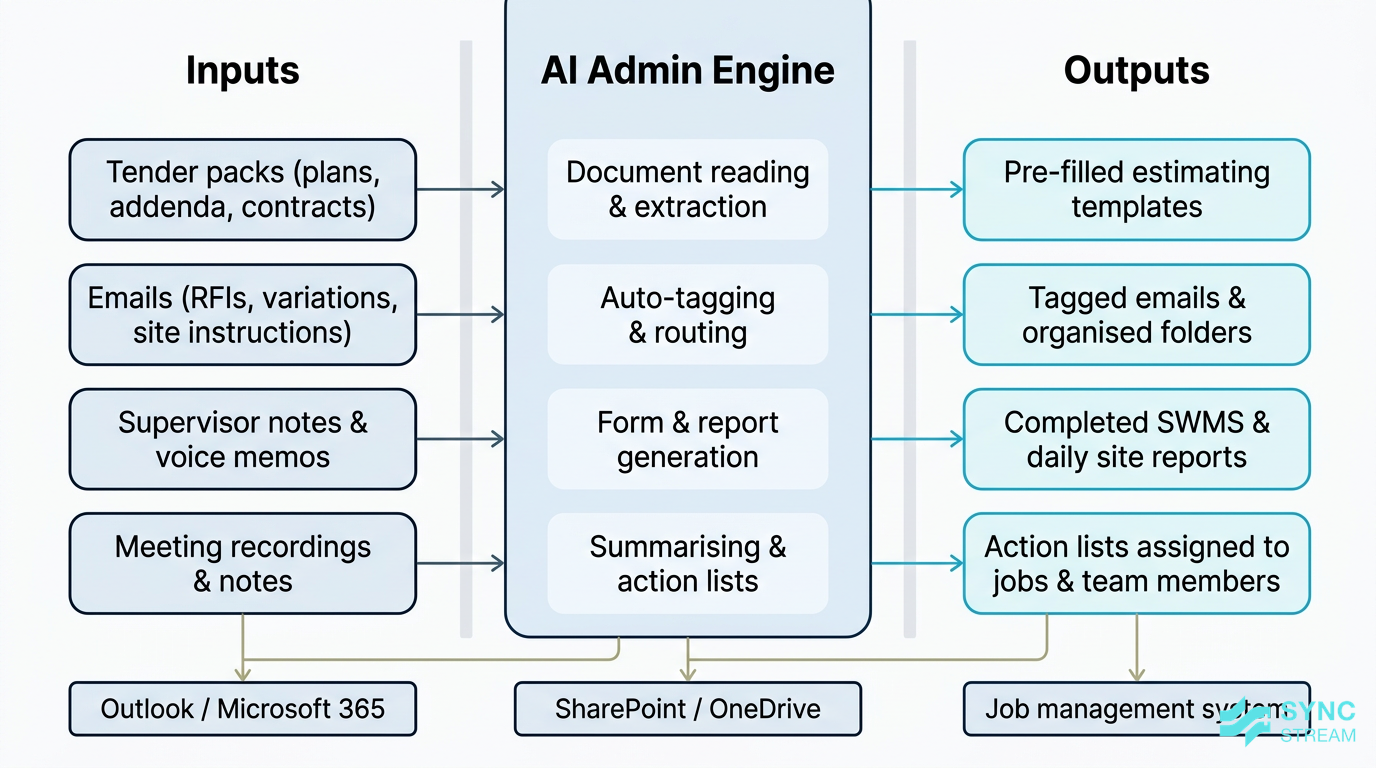
How AI automates key project admin and documentation workflows for commercial electrical contractors.
Project admin is where many commercial electrical contractors feel the most pain—and where AI can deliver quick wins.
Key features include:
- Document reading and extraction
- AI can read plans, specifications, addenda, and contracts, then extract key scope items, alternates, and conditions.
- It can highlight changes between document revisions so you don’t miss a late‑issued addendum.
- Auto‑tagging emails and correspondence
- Incoming emails from clients, builders, and suppliers can be auto‑tagged to the right job, cost code, or folder.
- RFIs, variation requests, and site instructions can be routed into standard workflows instead of getting buried in inboxes.
- Auto‑filling forms and generating site reports
- Common forms—SWMS templates, daily site reports, pre‑start summaries—can be auto‑filled from checklists, timesheets, and supervisor notes.
- Supervisors can dictate quick voice notes that are turned into structured site reports.
- Summarising meeting notes
- AI can turn meeting recordings or rough notes into action lists, assigning tasks to projects and team members.
For maximum benefit, these tools should integrate with:
- Email systems (e.g., Outlook, Microsoft 365)
- Cloud storage like SharePoint or OneDrive, where project folders live
- Job management systems you already use for projects, tasks, and timesheets
- Common file formats such as PDFs and, via linked viewers, DWGs and other drawings
This is where Sync Stream’s approach—working inside your existing stack and documenting every workflow—helps ensure the automations are reliable, auditable, and maintainable.
Tender tracking and estimating intelligence
Tendering is often a volume game, but it’s also a data game. AI can help commercial electricians track more opportunities and price them more accurately.
Useful capabilities include:
- Automated tender monitoring and logging
- AI agents can watch tender portals and shared tender inboxes for new invitations.
- When a new tender appears, it can log key details (client, closing date, site address, mandatory meetings) in your tender register.
- Changes such as addenda, revised drawings, or extended deadlines can be flagged automatically.
- AI‑assisted take‑off and estimating
- Systems can read drawings and BOQs to pre‑populate item lists in your estimating templates.
- They can reference historical job data to suggest likely labour units, material wastage allowances, and margin ranges.
- Estimators still review and adjust, but they start from a 60–80% complete baseline instead of a blank sheet.
- Risk spotting in tenders and contracts
- AI can scan contract conditions for unusual clauses: liquidated damages levels, night‑shift requirements, unusual programme constraints, or onerous warranty terms.
- It can highlight areas that may affect your price or resourcing so you can make conscious decisions and discuss with the builder early.
The outcome is not just faster tendering, but better hit rates and fewer nasty surprises during delivery.
Job costing insights and scheduling optimisation
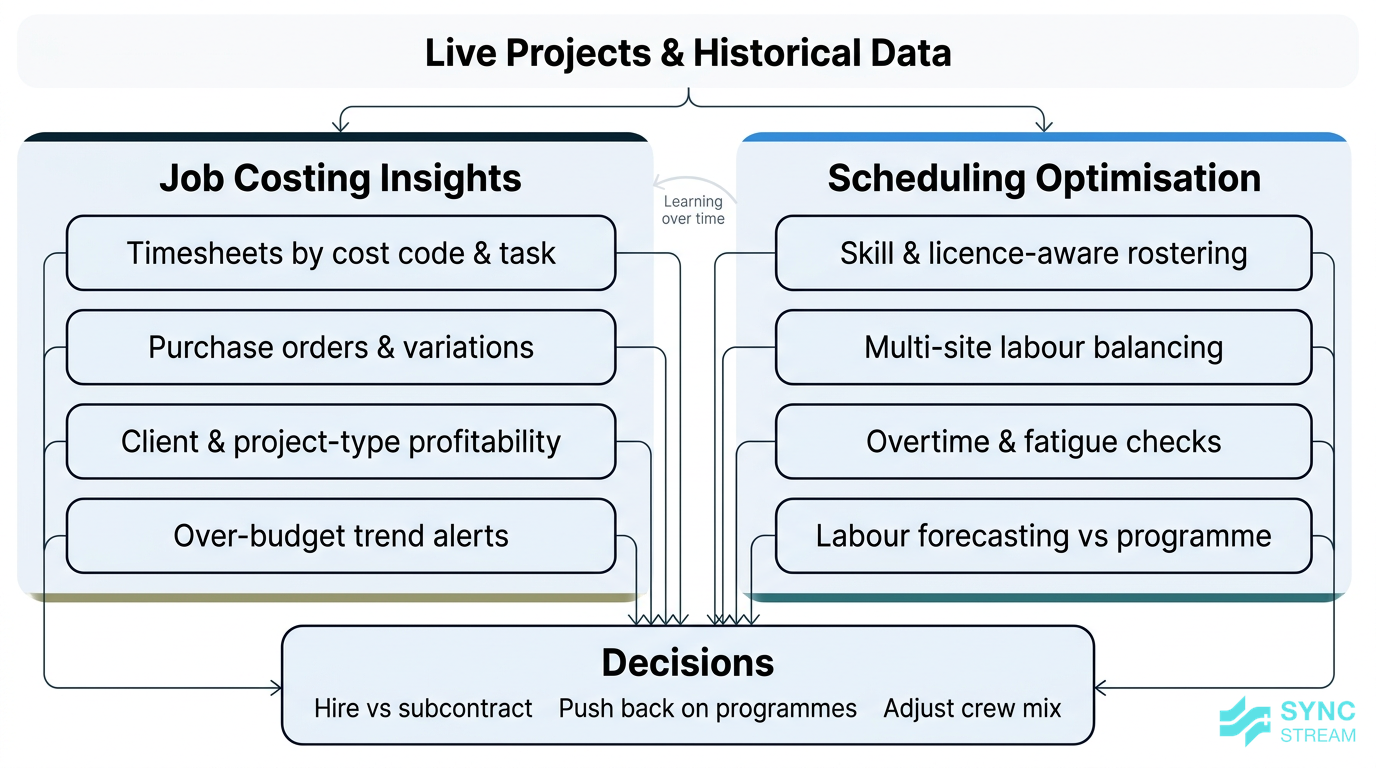
AI-driven job costing insights feeding into smarter workforce scheduling decisions.
Once projects are live, controlling labour and material costs is critical. AI can give you clearer visibility and help prevent overruns.
Key features on the job costing side:
- Analysing timesheets, purchase orders, and variations by cost code and task
- Identifying which jobs, tasks, or clients regularly run over budget
- Spotting patterns such as:
- Certain builders always pushing late scope changes
- Specific work types (e.g., data cabling, switchboard installs) consistently under‑allowed on labour
On the scheduling optimisation side, AI can:
- Balance labour across multiple jobs based on:
- Skills (e.g., licensed electricians vs apprentices, data cabling, commissioning)
- Site locations and travel time
- Overtime limits and fatigue management
- Licensing, inductions, and site‑specific requirements
- Suggest roster changes to reduce overtime or avoid leaving crews idle while materials or other trades catch up.
- Forecast labour needs weeks ahead using:
- The programme and milestones
- Actual progress from timesheets and site reports
- Historical productivity on similar work
This forward view helps you decide when to:
- Bring in subcontractors
- Hire new staff or apprentices
- Push back on compressed programmes that would require excessive overtime or extra crews
When implemented on top of your job management, accounting, and HR/roster systems, these insights support tighter margin control and better workforce planning.
Implementation strategy
Prioritising use cases and quick wins
The fastest way to see value from AI is not to deploy it everywhere at once. Instead, pick 1–2 high‑impact areas where the pain is obvious.
For many commercial electrical contractors, those areas are:
- Tender tracking and estimating intelligence – if you bid heavily and often struggle to keep up with invitations, addenda, and short timeframes.
- Scheduling optimisation – if you run multiple live sites with frequent changes and rely heavily on a few key supervisors or PMs to juggle rosters.
A simple way to decide is to use an impact vs ease matrix:
- List use cases
- Input: Current workflows across tenders, costing, scheduling, reporting.
- Action: Write down specific candidate use cases (e.g. “tender logging from shared inbox”, “document summarising for tenders”, “job costing dashboards”, “AI scheduling”, “site report automation”).
- Output: A single list of 10–20 concrete AI opportunities.
- Score impact on margin/time
- Input: That list plus rough figures for hours spent and rework or overruns today.
- Action: For each use case, mark impact as Low / Medium / High based on potential hours saved and margin improvement.
- Output: Each use case tagged with an impact rating everyone agrees on.
- Score ease of implementation
- Input: Knowledge of your systems (job management, accounting, email) and data quality.
- Action: For each use case, mark ease as Easy / Medium / Hard depending on whether required data already exists in digital form and systems can talk to each other.
- Output: Each use case tagged with an ease rating.
- Prioritise High‑impact / Easy–Medium
- Input: The scored list.
- Action: Circle items that are High impact and Easy or Medium. Defer items in High impact / Hard (for example, full AI scheduling if rostering is still done on a whiteboard).
- Output: A shortlist of 2–4 starter use cases with clear rationale.
For example:
- If tenders all arrive via one email inbox and you already maintain a spreadsheet register, automating that logging is usually High impact / Easy.
- If your data is messy and your scheduling currently lives in multiple spreadsheets, full AI scheduling might be High impact / Hard, so you might start with job costing analysis instead.
The key is to stay focused on specific workflow pain points, not on “adding AI” for its own sake.
Practical rollout plan for contractors
A structured rollout reduces disruption and increases the chance your team will actually use the new tools. A practical sequence looks like this:
- Map current workflows
- Inputs:
- Example tenders, job cost reports, recent rosters.
- Key staff: one PM, one estimator, one supervisor, one finance/admin rep.
- Action:
- For tenders: sketch how invitations arrive, who logs them, what gets recorded (client, close date, value, status).
- For job costing: map where timesheets, purchase orders, and claims live, and how often they’re reconciled.
- For scheduling: document who builds rosters, what constraints they check (skills, licences, fatigue), and how changes are communicated.
- Expected output: 2–3 one‑page workflow maps that show current steps, systems, and pain points.
- Inputs:
- Choose tools and integration approach
- Inputs:
- Workflow maps.
- List of current systems (e.g. simPRO, AroFlo, MYOB/Xero, Microsoft 365).
- Action:
- Decide whether to start with AI features in existing platforms or introduce a focused add‑on.
- With a partner like Sync Stream, identify which system touchpoints (e.g. Outlook ↔ job management, job management ↔ accounting) need integration to remove re‑keying.
- Expected output: A simple implementation plan describing:
- Target workflows (e.g. “tender logging”, “site report drafting”)
- Selected tools
- Required integrations.
- Inputs:
- Run a 60–90 day pilot on 1–2 projects
- Inputs:
- Selected tools and integrations configured in a sandbox or limited production environment.
- 1–2 live projects chosen as pilots.
- Action:
- Define which tasks will use AI (for example: “AI drafts tender summaries; estimator reviews and finalises”).
- Track baseline metrics for 2–4 weeks (hours spent on admin, time to respond to RFIs, number of missed tender addenda).
- Run the pilot and log time saved, errors avoided, and any issues.
- Expected output:
- Before‑and‑after metrics.
- A short list of process tweaks needed (e.g. better prompts, tighter integration, slightly different hand‑off points).
- Inputs:
- Train staff and refine
- Inputs:
- Pilot results.
- Draft instructions or checklists for each AI‑assisted task.
- Action:
- Deliver short (30–60 minute) sessions for PMs, contract admins, and supervisors using live project examples.
- Show “inputs → AI output → human check → final output” for each use case so staff know exactly what to do.
- Collect feedback on where the workflow is confusing or slow and adjust prompts or automation steps.
- Expected output:
- Simple, trade‑friendly SOPs for 2–3 workflows.
- A small group of confident internal users.
- Inputs:
- Standardise and roll out further
- Inputs:
- Finalised SOPs.
- Agreed metrics for success (e.g. hours saved per week, reduction in missed deadlines).
- Action:
- Roll out the proven workflows to more projects and teams.
- Schedule periodic reviews (for example, quarterly) to tune prompts, adjust integrations, and add new use cases.
- Expected output:
- AI‑supported workflows embedded into day‑to‑day operations, with clear owners and documented steps.
- Inputs:
Throughout this process, it’s crucial to nominate an internal “AI champion”—often a PM, operations manager, or senior contract administrator—who will:
- Liaise with vendors or implementation partners
- Help tailor workflows to how your business actually operates
- Gather feedback from site and office teams and drive adoption
Data, integrations, and change management
Good AI outcomes depend on good foundations.
On the data side:
- Standardise cost centres and labour codes so analysis is meaningful.
- Clean up naming conventions for materials and jobs to reduce duplicates.
- Organise digital files logically (by job, stage, and document type) so tools can find what they need.
On the integration side:
- Start by mapping which systems must talk to each other: job management, accounting, HR/rosters, email, and cloud storage.
- Aim to avoid double handling, where staff still have to copy‑paste between systems.
- This is where Sync Stream uses orchestration tools like n8n to connect systems in a way that’s reliable, documented, and auditable.
On change management:
- Start small with a few users and one or two workflows.
- Involve supervisors and leading hands early so they understand how the tools help them—less paperwork, clearer schedules, fewer surprises.
- Use simple SOPs and short video walkthroughs so staff can quickly learn how to use the new tools.
The aim is to make AI and automation feel like a natural extension of existing processes, not an extra layer of complexity.
Comparing AI options for electricians
Categories of tools on the market
When you look at “AI for electricians,” you’ll generally encounter three categories:
- Trade‑focused job management platforms with AI features
- These are end‑to‑end systems that manage jobs, timesheets, invoicing, and sometimes basic estimating, with AI features added.
- Strengths:
- Deep industry features (cost codes, standard tasks, site documentation)
- Single source of truth for operations
- Weaknesses:
- Less flexible for unusual workflows
- You may need to adopt their way of working to get full value
- Standalone AI add‑ons (tender reading, scheduling, analytics)
- Tools that focus on a specific function, such as document analysis, labour scheduling, or cost analytics.
- Strengths:
- Can be very strong at one thing
- Often easier to pilot on a single project without changing core systems
- Weaknesses:
- Need good integrations to avoid extra admin
- May create another silo if not connected properly
- General AI assistants adapted to trade use
- Tools like chat‑style assistants or copilots tailored to your internal documents and data.
- Strengths:
- Very flexible; can assist with many small tasks
- Useful for drafting emails, RFIs, method statements, and summarising documents
- Weaknesses:
- Out‑of‑the‑box, they don’t understand your cost codes or business rules
- Need careful setup and governance to be reliable
Some tools are specifically localised for Australian standards, taxes, and terminology, which is a major advantage for compliance and for communicating with local builders and authorities.
Build vs buy vs hybrid approaches
When planning your AI approach, you’ll generally choose between:
- Buy (off‑the‑shelf SaaS)
- Use existing job management, estimating, or scheduling tools with built‑in AI features.
- Best when: You want faster time‑to‑value and are happy to work within the software’s standard workflows.
- Build (custom workflows)
- Use AI APIs and low‑code tools to design bespoke automations and assistants around your exact processes.
- Best when: You have unusual workflows, complex system landscapes, or specific compliance needs—and access to technical expertise.
- Hybrid (mix of both)
- Use off‑the‑shelf platforms for core operations, then layer custom AI workflows for high‑value use cases like tender analysis or job costing dashboards.
- Best when: You want the stability of proven systems plus the flexibility to differentiate how you operate.
For most SMB electrical contractors, buy or hybrid is the sensible place to start. Fully custom builds require skills, time, and budget that many growing contractors don’t have in‑house.
Working with a specialist implementation partner like Sync Stream means you can:
- Choose the right combination of tools
- Connect them cleanly to existing CRMs, accounting, and operations platforms
- Design AI assistants around clear commercial use cases, with defined ROI and proper documentation
Cost, ROI, and vendor questions
Costs vary, but common pricing models include:
- Per‑user – a monthly cost per seat (PMs, admins, supervisors).
- Per‑project – extra features or analytics attached to specific jobs.
- Usage‑based – charged by number of documents processed, AI calls, or data volumes.
Many tools aimed at small teams start in the low hundreds of dollars per month, especially if you begin with a limited feature set or pilot licence.
To think about ROI, compare:
- Time saved in admin (hours per week per PM or estimator)
- Improved tender hit rates (more wins from the same bidding effort)
- Reduction in budget blowouts and disputed variations
against the subscription and implementation cost.
When talking to vendors or partners, key questions to ask include:
- Data security and hosting
- Where is data stored? Is Australia‑based hosting an option if needed?
- How is client and project data protected?
- Integration capability
- Can it connect to your job management, accounting, HR, and email systems?
- Is there an open API or do they support tools like n8n for orchestration?
- Support and training
- What onboarding and training is provided for office and field staff?
- How quickly do they respond to issues that impact live projects?
- Product roadmap
- What features related to commercial electricians (e.g., AS/NZS standards, WHS reporting, complex variations) are planned?
- How do they gather input from customers like you?
Clear answers will help you avoid costly missteps and ensure the tools serve your business, not the other way around.
Hidden challenges to watch
Skills, training, and adoption issues
Most electrical contractors don’t have AI specialists on staff—and that’s fine. The bigger challenge is ensuring your team can actually use the tools you roll out.
Common issues include:
- Office teams unsure how to trust or verify AI outputs
- Supervisors and leading hands wary of “more tech” being pushed onto them
- Lack of time for proper training
You can counter this by:
- Choosing tools with simple, trade‑friendly interfaces
- Focusing training on benefits: less paperwork, fewer double‑ups, clearer schedules
- Providing hands‑on training sessions using current projects, not generic demos
- Creating basic SOPs and short video walkthroughs for common tasks
- Pairing early adopters with more sceptical team members so they can see the value in real work situations
The goal is to make AI feel like a helpful apprentice in the system—not a black box that adds more work.
Data quality, compliance, and governance
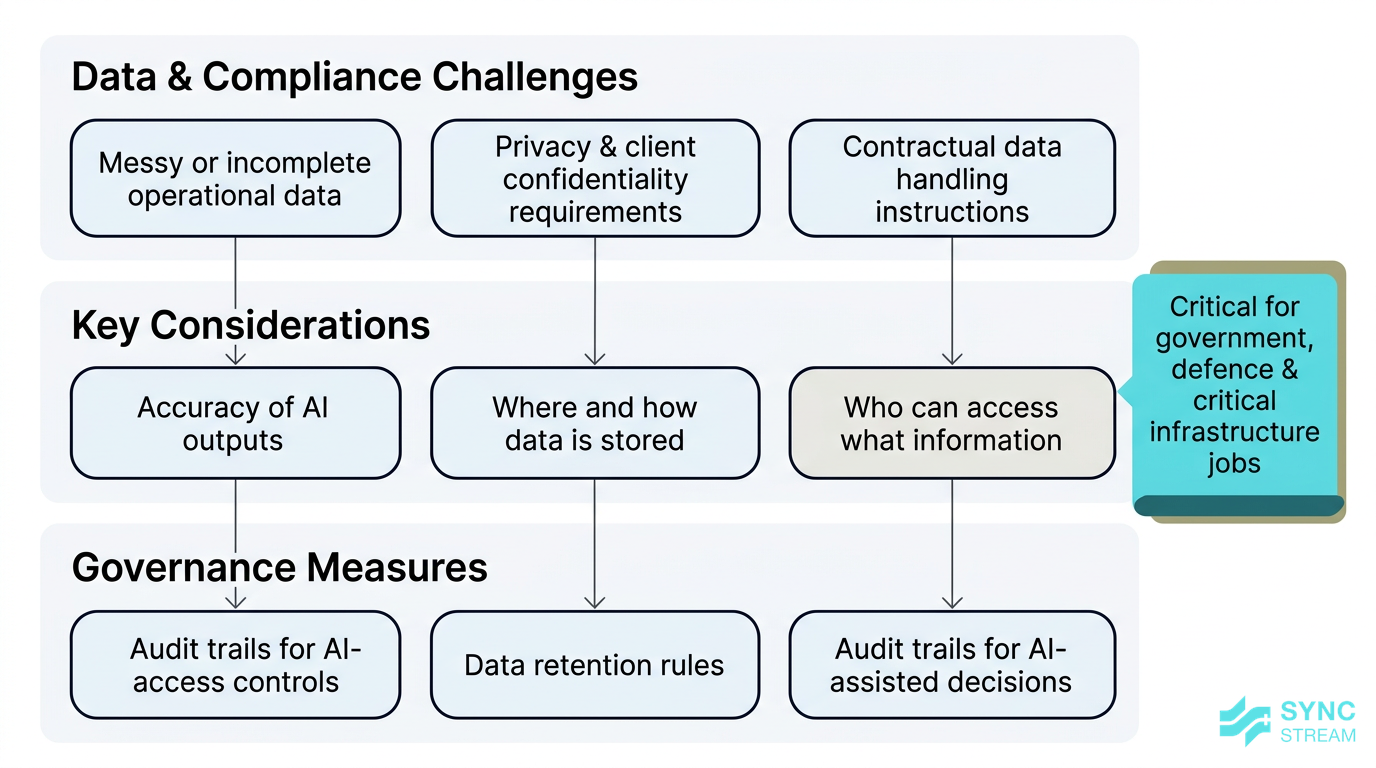
How data quality and governance practices support compliant, reliable AI use in electrical contracting.
AI is only as good as the data it works with. Messy or incomplete data leads to poor outputs and frustration.
Typical data problems include:
- Inconsistent naming for the same materials or tasks
- Incomplete or late timesheets
- Documents stored across personal drives, email inboxes, and USB sticks
Improving data quality and basic data governance will dramatically improve AI results.
For Australian contractors, there are also specific compliance considerations:
- Privacy law and how personal information about staff and clients is stored and processed
- Client confidentiality, especially on government, defence, or critical infrastructure jobs
- Contract instructions about where data can be stored and who can access it
To manage this, implement simple governance measures:
- Define who can access which data and for what purpose
- Set retention rules for project data and AI outputs
- Keep an audit trail of AI‑assisted decisions where they might be relevant to disputes, safety investigations, or audits
Sync Stream’s approach of documenting every workflow and designing within real‑world constraints helps ensure AI systems support, rather than undermine, your compliance position.
Financial and vendor dependency concerns
Upfront cost is a real concern, especially when margins are tight. There’s also the fear of becoming dependent on a single vendor or being locked into a system that doesn’t evolve with your business.
You can manage these risks by:
- Starting with phased rollouts and short pilots focused on high‑ROI use cases
- Targeting modules that are likely to pay for themselves quickly, such as tender tracking or document automation
- Avoiding long, inflexible contracts where possible
- Preferring tools with open integrations and export options so you can move or extend systems later
It’s also important to keep a balanced view: AI should augment, not replace, human judgement in estimating, safety, and design.
Licensed electricians and experienced PMs still sign off on:
- Final prices and margins
- Safety documentation and methods
- Critical design and coordination decisions
AI’s job is to surface information faster, reduce manual admin, and highlight risks—not to make unsupervised calls on matters that carry legal or safety responsibilities.
Conclusion
For Australian commercial electrical contractors, AI is no longer a distant concept. It’s a set of practical tools that can:
- Cut project admin and documentation workload
- Track and respond to tenders more effectively
- Provide clearer job costing insights and protect margins
- Optimise workforce scheduling across multiple sites
The contractors who benefit most won’t be the ones chasing every new tool. They’ll be the ones who:
- Start with specific, high‑impact use cases
- Integrate AI into existing systems and workflows
- Invest in data quality and simple, practical training
Sync Stream works with Australian construction and field service businesses to design and implement AI and automation on top of their current systems—CRMs, accounting, job management, and more—against clear business cases and ROI.
If you want to explore how electrician‑focused AI and automation could reduce admin, improve job costing, and stabilise scheduling in your business, book a discovery session with Sync Stream to map out a practical, low‑risk starting point with the right electrician AI contractors tooling for your operations.
FAQ
Q1: Will AI replace estimators or project managers in electrical contracting?
No. AI is best used to handle repetitive tasks—reading documents, pre‑populating take‑offs, generating draft reports—so estimators and PMs can focus on judgement calls, client relationships, and risk management. Final decisions on pricing, safety, and delivery should always remain with licensed professionals.
Q2: How hard is it to connect AI tools to my existing job management and accounting systems?
It depends on the systems you use and how clean your data is. Many modern platforms have APIs or native integrations. Partners like Sync Stream use orchestration tools such as n8n to connect email, job management, accounting, and HR systems without replacing them, and document each workflow so it’s maintainable.
Q3: What’s a realistic first AI project for a mid‑size commercial electrical contractor?
Common starting points include automating tender logging from a shared inbox, using AI to summarise tender documents into key scope items, or generating daily site reports from supervisor notes. These are contained, high‑impact workflows that typically deliver quick wins and are easy for staff to adopt.
Q4: How do we make sure AI doesn’t create compliance or privacy issues?
Work with vendors and partners who understand Australian privacy law and construction contracts. Keep sensitive data within controlled systems, define who has access to what, and maintain an audit trail for AI‑assisted decisions that impact safety, cost, or contractual obligations.
Q5: Do we need in‑house AI experts to get value from electrician AI tools?
Not necessarily. You need someone internally who understands your workflows and can act as an “AI champion,” plus external expertise to design and implement the solutions. Sync Stream fills that implementation role so your team can focus on projects while still getting the benefits of AI and automation.
Q6: How quickly can we see ROI from AI in our electrical contracting business?
If you target the right use cases—like tender admin reduction or automated reporting—you can often see time savings and smoother workflows within the first 60–90 days of a pilot. The full financial impact on margins and cashflow becomes clearer over a few project cycles as you collect before‑and‑after data.