

Introduction
Hardscape installation teams AI is no longer a sci‑fi idea – it’s a practical way to take care of the admin wrapped around every driveway, retaining wall, patio, or pool surround you install.
Across Australian construction, AI is already being used to tackle labour shortages, rising material costs, and project risk. Around a third of Australian construction companies are trialling or using AI in some form. Hardscape contractors can use the same technology for everyday work: takeoffs, job costing, scheduling, and customer follow‑ups.
This article focuses on how small to mid‑sized Australian hardscape teams can plug AI into existing systems to automate material planning, job costing, scheduling, and CRM follow‑ups – without ripping out what already works.
What is Hardscape Installation Teams AI
Defining AI for hardscape crews
When we talk about hardscape installation teams AI, we’re not talking about robots laying pavers. We’re talking about software that uses machine learning to automate and speed up admin‑heavy tasks like:
- Turning site measurements into material quantities
- Comparing quotes to actual costs
- Building and adjusting schedules
- Following up leads and past customers
In practice, that might look like:
- A foreman uploading a sketch or photos of a new driveway and the system suggesting quantities for pavers, base, bedding, drainage, and geofabric.
- An owner getting an automatic alert that a retaining wall job is drifting off budget because machine hours and labour are higher than allowed.
- An assistant that drafts a quote email and schedules a follow‑up task if the client hasn’t replied in a week.
AI doesn’t change how you install jobs onsite. It plugs into the quoting, planning, delivery, and follow‑up so you spend less time guessing quantities, chasing paperwork, or manually nudging leads.
The wider Australian construction sector is already moving this way, with many firms expecting AI to help reduce costs. For hardscape teams, this is now a practical way to stay competitive, not a fringe experiment.
How it fits into existing workflows
A typical job lifecycle for a small Australian hardscape team:
- Enquiry comes in.
- Site visit is booked and carried out.
- Quote is prepared and sent.
- Materials are ordered.
- Job is installed.
- Invoice is issued.
- Follow‑up or review request is sent.
AI can slot into these touchpoints:
- Enquiry → site visit (AI‑assisted CRM)
- Input: Email, call log, or web form
- Action: AI creates/updates a contact, tags the lead, proposes site‑visit times
- Output: A clean CRM record plus a draft calendar event, without double entry
- Site visit → quote (AI takeoff + draft)
- Input: Notes, photos, rough measurements
- Action: AI drafts scope and estimated quantities
- Output: A quote skeleton ready for you to price and approve
- Quote → material order (AI material list)
- Input: Accepted quote
- Action: AI generates a material list and draft purchase orders
- Output: Supplier‑ready orders you can tweak and send
- Install → invoice (AI job costing check)
- Input: Timesheets, variations, supplier invoices
- Action: AI compares actuals to the quote
- Output: Draft invoice plus a simple margin view for that job
- Invoice → follow‑up (AI CRM reminders)
- Input: Job completion date and value
- Action: AI schedules reminders to check in, request reviews, or send maintenance tips
- Output: A consistent follow‑up pipeline without relying on memory
These tools usually layer over what you already use – email, spreadsheets, Xero or MYOB, existing job apps – rather than replacing everything on day one. That’s the type of implementation Sync Stream focuses on: AI and automation on top of your existing stack so you keep control of data and infrastructure.
Why it Matters for Australian SMBs
Commercial pressures and upside for local teams
Most Australian hardscape businesses feel similar pressures:
- Labour shortages, especially experienced operators
- Rising material and fuel prices
- Tight margins and price‑sensitive customers
- Long drives between sites
- Owners and foremen doing quotes and paperwork after hours
AI is being used across construction to improve planning, reduce rework, and tighten cost control. For a hardscape team, that translates into:
- Time back for owners/foremen – faster takeoffs, quote drafting, and follow‑ups free a few hours each week.
- Less material waste – better quantity estimates mean fewer urgent re‑orders and less excess thrown out.
- More consistent margins – real‑time visibility into labour and material drift, not just an ugly surprise at BAS time.
Concrete examples:
- Avoiding a costly re‑order: An AI‑assisted takeoff suggests a slightly higher wastage allowance based on similar steep sites you’ve done nearby. You order once, instead of paying for an urgent top‑up.
- Winning an extra job a month: Automated CRM nudges remind you to chase unapproved quotes. Even one extra patio or driveway each month is strong upside for very little extra admin.
Key Components / Features
Material planning and takeoff automation
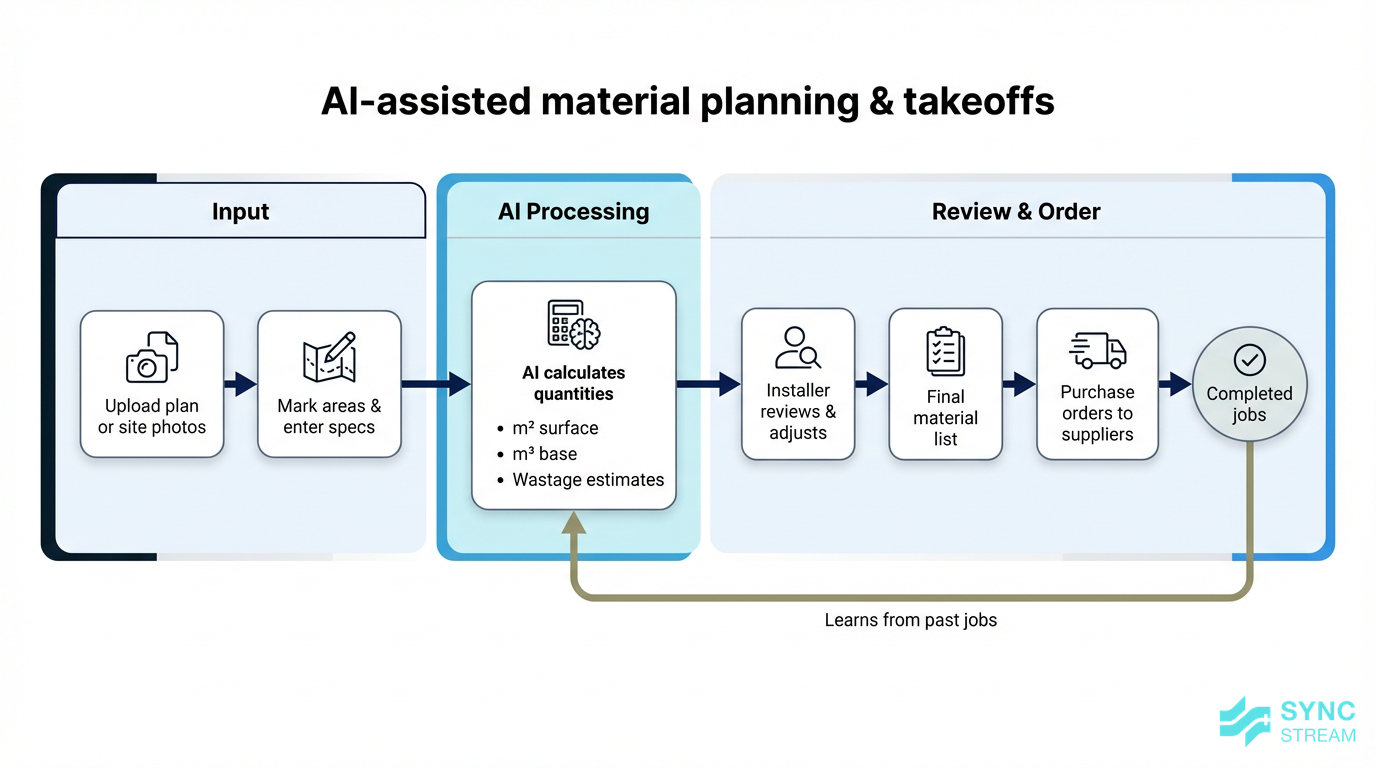
Workflow of AI-assisted material planning turning site information into a reviewed material takeoff.
AI‑assisted material planning tools can turn plans, photos, or simple measurements into estimated quantities for:
- Pavers or slabs
- Base (crushed rock/road base)
- Bedding sand or mortar
- Drainage components
- Geofabric and edge restraints
A simple workflow:
- Input: Upload a PDF plan or overhead photo of the area.
- Action: Mark out areas and enter basics (thickness, falls, product type).
- Output: AI estimates m², m³, and counts by material, ready for your review.
Over time, the system can learn from completed jobs – typical compaction, local soils, preferred products – so default estimates match your real‑world usage more closely.
Compared to jotting measurements in a notebook, re‑typing them into a spreadsheet, then manually emailing suppliers, AI takeoffs give you:
- Faster, more consistent quotes
- Fewer under‑ or over‑orders
- Better timing with suppliers when lead times are tight
Job costing and profitability insights
AI can help you see, in near real time, how each job is tracking against its quote by pulling together data you already have:
- Labour hours from timesheets or job apps
- Material invoices from suppliers
- Plant and equipment hire
- Variations and extras agreed onsite
Typical pattern:
- Input: Quote breakdown + live data (labour, materials, plant, disposal).
- Action: AI compares actuals to allowed amounts and spots patterns (e.g. retaining walls often overrun machine time).
- Output: Simple alerts and reports: which jobs are heading over budget, what’s causing it, and which job types are under‑quoted.
Instead of finding out at month‑end that margins are thin, you can:
- Adjust crew mix or sequence on live jobs
- Update pricing for certain job types
- Tighten how variations are captured and charged
Tools in the broader construction sector already do this at scale; the same principles can now be applied to smaller hardscape teams via integrations between your job app, Xero/MYOB, and AI analytics.
Scheduling, dispatch, and CRM follow‑ups

How AI supports scheduling, dispatch, and CRM follow-ups around hardscape jobs.
Scheduling is a constant juggle: crew size, job duration, travel time, weather, access, equipment, and client constraints.
AI can:
- Build draft daily/weekly schedules based on job size, location, and crew availability
- Factor in travel times to reduce back‑and‑forth across town
- Flag clashes for shared equipment
- Suggest reshuffles when weather forecasts change
A practical pattern:
- Input: Job queue, crew calendars, locations, weather.
- Action: AI proposes a schedule.
- Output: A draft plan your foreman adjusts and approves.
On the customer side, CRM automations can:
- Acknowledge new enquiries instantly
- Remind you to send quotes within a set timeframe
- Nudge you about unapproved quotes or dormant leads
- Schedule post‑job check‑ins and review requests
Here the pattern is similar:
- Input: Enquiry/quote dates and values.
- Action: AI sets and sequences reminders by value and urgency.
- Output: A steady flow of follow‑up tasks and, where appropriate, pre‑written emails ready for your review.
Implementation Strategy
Building the foundations for AI success
To get real value from AI, the groundwork matters. A simple sequence most hardscape teams can follow:
- Clarify business goals
- Input: Current pain points (late‑night quoting, margin surprises, missed follow‑ups).
- Action: Choose 1–3 priorities (e.g. faster quoting, better cost control).
- Output: Clear success criteria for any AI work.
- Clean up basic data
- Input: Existing job, customer, and cost records in your job app, Xero/MYOB, or spreadsheets.
- Action: Standardise job names, cost codes, and customer details.
- Output: A simpler, cleaner dataset AI can reliably work with.
- Select 1–2 AI use cases
- Action: Pick high‑impact, low‑risk areas like material takeoffs and lead follow‑ups.
- Output: A tight initial scope instead of a vague “AI everywhere” project.
- Standardise simple processes
- Action: Agree how quotes are structured, hours are logged, and variations are recorded.
- Output: Consistent inputs so AI outputs are predictable.
- Connect systems and test on real jobs
- Input: Your existing tools (email, job app, accounting).
- Action: Connect via integrations, then run a handful of live jobs through the new workflow.
- Output: Working automations, plus a list of tweaks based on real‑world behaviour.
Sync Stream’s role in this foundation phase is to design and document these workflows, clean up data flows, and ensure the result is stable and auditable – not dependent on one tech‑savvy person.
Rolling out AI on a single crew or job
Rather than changing everything at once, start with a single crew or job type (for example, standard residential driveways):
- Select a pilot scope
- Action: Choose one crew and one job type for 4–6 weeks.
- Output: A controlled test bed.
- Apply AI workflows only to that scope
- Examples:
- AI‑assisted takeoffs and quote drafts for all new driveway leads.
- AI‑suggested schedules for accepted driveway jobs.
- AI‑driven reminders for lead and job follow‑ups.
- Rule: Humans approve all key decisions.
- Examples:
- Track a small set of metrics
- Quote turnaround time
- Time spent per quote
- Material variance (ordered vs used)
- Job margin vs estimate
- Review field feedback and refine rules
- Action: Foreman and office staff compare AI suggestions to what actually happens onsite.
- Output: Adjusted templates, wastage rules, and approval thresholds.
- Decide to scale, extend, or pause
- If metrics and feedback are positive, roll the workflows to more crews or job types.
- If not, refine further or narrow the scope.
This approach keeps risk low while building trust in the tools.
Options Comparison
All‑in‑one platforms vs focused tools
When exploring hardscape installation teams AI, you’ll see two broad options:
- All‑in‑one job management systems with built‑in AI
- Focused tools plus integrations
In short:
- All‑in‑one platforms suit teams that want everything in one place and are prepared for a larger change project, higher cost, and more training.
- Focused tools plus integrations suit teams that like their current job and accounting software and mainly want smarter planning, costing, and follow‑ups added on.
Sync Stream typically works in the second mode: keeping the tools your crews already understand and layering AI and automation where it clearly pays off.
Off‑the‑shelf software vs tailored setups
You also need to decide between:
- Off‑the‑shelf AI features in tools you already use
- Tailored workflows and integrations designed specifically for your business
A simple guide:
- Use off‑the‑shelf if you’re a small team, want to start quickly, and have straightforward needs.
- Consider tailored setups if you run multiple crews, have complex scheduling or costing, or need niche integrations and Australia‑specific rules.
Whatever you choose, make sure workflows are documented so you’re not locked into a setup that can’t evolve as your business changes.
Common Pitfalls
Bad data, over‑reliance, and false confidence
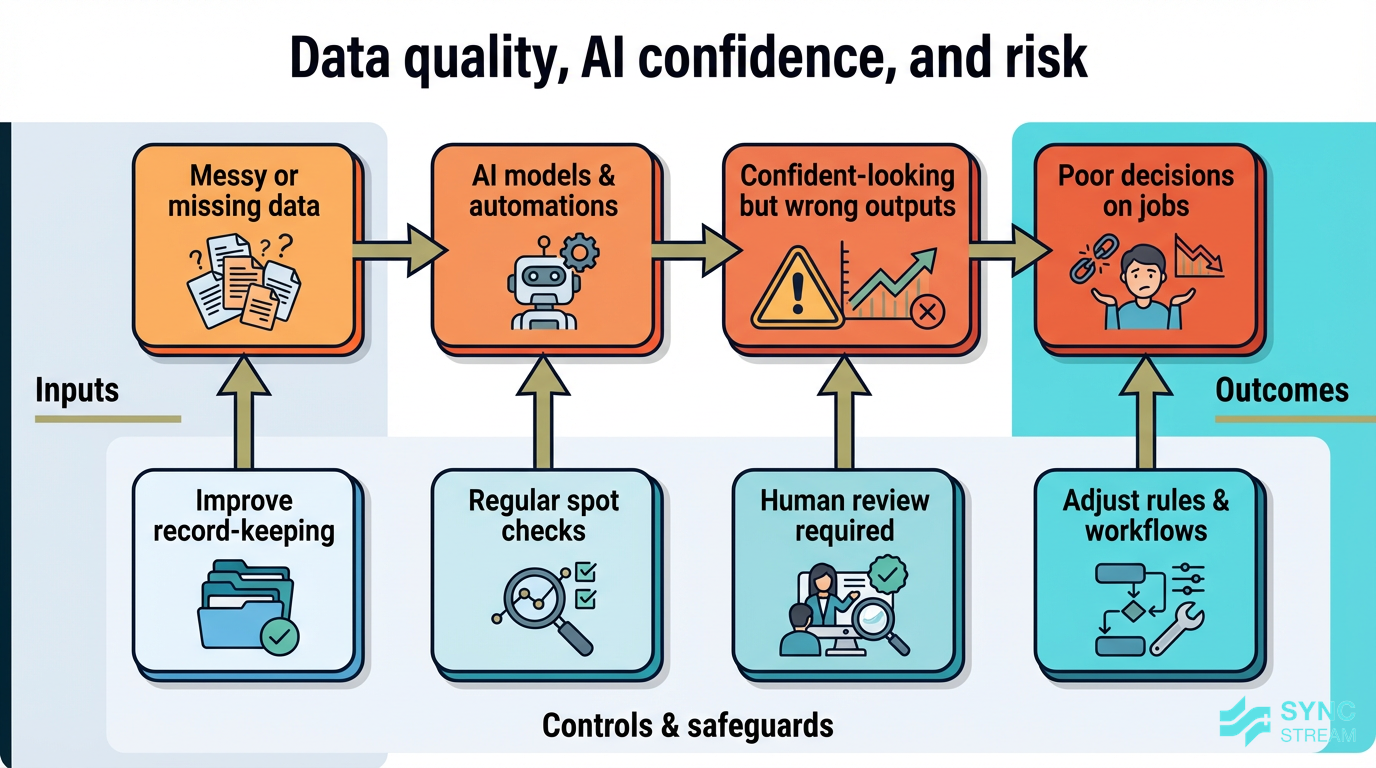
How bad data and over-reliance on AI can create false confidence in job planning and costing.
AI is only as good as the data you feed it. Common issues:
- Incomplete or incorrect timesheets
- Variations agreed onsite but never recorded
- Missing or mis‑coded material invoices
If this data is messy, AI‑driven costing or planning can produce outputs that look confident but are wrong.
Controls to put in place:
- Improve basic record‑keeping before relying on analytics.
- Spot‑check AI suggestions against real outcomes, especially early.
- Keep a human approving changes to schedules, materials, and pricing until you’re confident in the rules.
AI should provide fast suggestions; experienced installers still make the final calls, particularly on anything that affects safety, durability, or compliance.
Overlooking onsite realities and team buy‑in
Another pitfall is designing clever office workflows that don’t match how crews actually work on dusty, busy sites with limited connectivity.
To avoid this:
- Involve foremen and key crew members when designing new processes.
- Keep onsite tasks short: a few taps and photos, not long forms.
- Use quick toolbox talks and simple one‑pagers to explain changes.
- Roll out gradually and adjust based on field feedback.
Partners like Sync Stream typically favour incremental rollouts, tuned around onsite realities, so AI feels like help – not extra admin.
Conclusion
Hardscape installation teams AI isn’t about replacing skilled trades – it’s about stripping friction out of the work around every job: material planning, job costing, scheduling, and CRM follow‑ups.
As the wider Australian construction industry embraces AI to manage costs and risk, hardscape businesses that stay fully manual will find it harder to compete. By starting with a few focused use cases, cleaning up your data, and layering AI onto systems you already trust, you can:
- Quote faster and with more confidence
- Reduce material waste and costly re‑orders
- See job‑level profitability while there’s still time to act
- Keep leads and customers moving without constant manual chasing
If you want help mapping these opportunities and implementing reliable, documented AI workflows inside your existing tools, Sync Stream can work with your hardscape business to design and deploy a practical, commercially grounded setup.
FAQ
Do I need to replace my current job management or accounting software to use AI?
Usually not. Many AI workflows sit on top of tools like your existing job app, email, and Xero/MYOB, with data flowing between them via integrations.
Is AI worth it for a small hardscape crew?
Yes. If the owner or foreman is doing most of the quoting and admin at night, even saving a couple of hours a week on takeoffs, quoting, and follow‑ups is significant.
How do I make sure AI recommendations are safe and suitable for my jobs?
Treat AI outputs as suggestions that require approval, especially for material choices, structural elements, and schedule changes. Use field feedback to refine rules over time.
What does working with Sync Stream involve?
Typically: clarify your commercial goals, map existing systems, select 1–2 core use cases, then have Sync Stream design, implement, and document workflows so your team can operate and maintain them with confidence.