

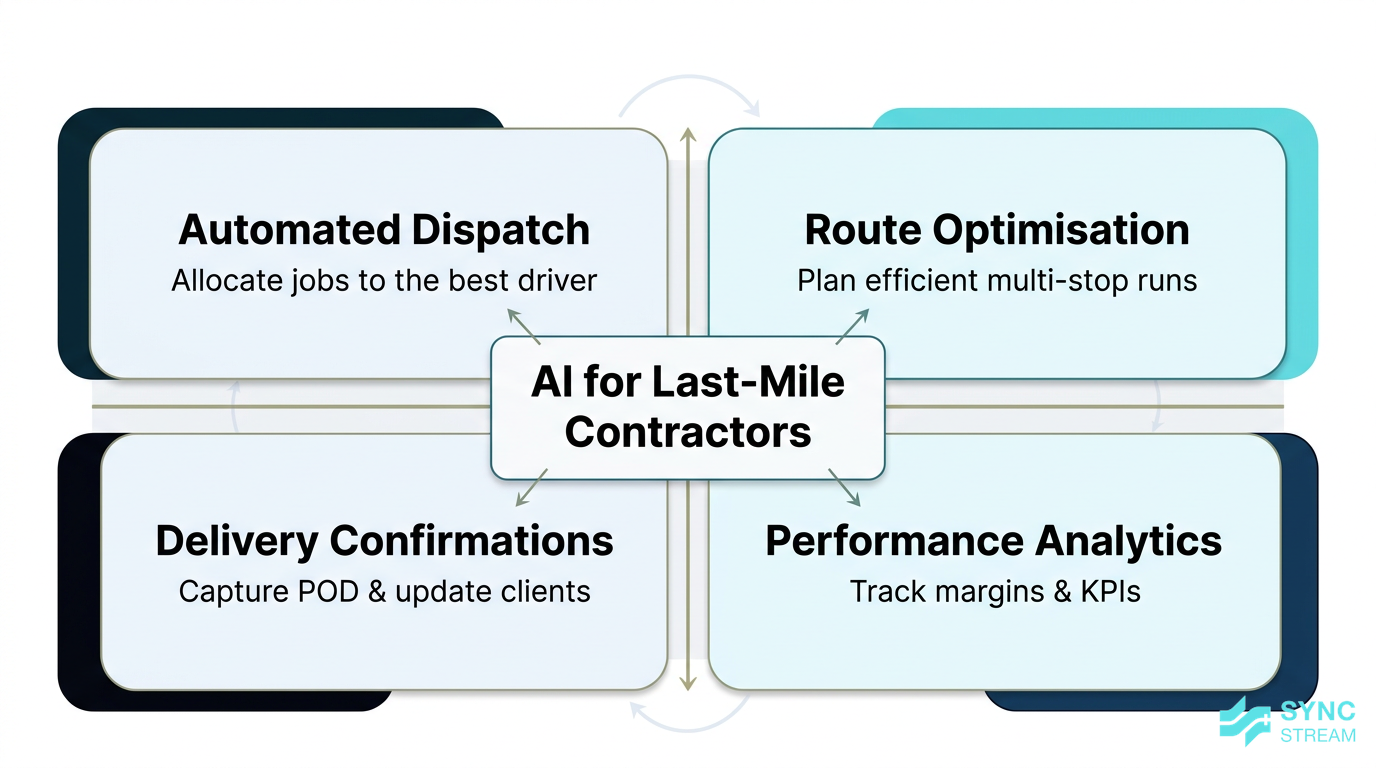
Introduction
Running last‑mile work as a subcontractor or small fleet in Australia is a grind: tight delivery windows, rising fuel and tolls, demanding platforms and retailers, and constant pressure on rates.
At the same time, bigger retailers, courier platforms, and national fleets are using AI to automate dispatch, sharpen ETAs, and squeeze more drops into every run. Those expectations and service levels flow straight down to contractors.
This article explains how last‑mile delivery contractors AI tools actually work in practice, and how contractors from a single owner‑driver to fleets of 10–20 vehicles can use them to:
- Automate dispatch and driver allocation
- Optimise routes in real time
- Streamline delivery confirmations and customer updates
- Track performance and margins with simple analytics
We’ll focus on practical steps, the Australian context, and how to roll out AI inside your existing systems without losing control of your data or your drivers.
What is last-mile delivery contractors AI
Defining AI in last-mile delivery
In the last‑mile world, AI is simply software that learns from your data to make better decisions automatically.
Instead of a planner juggling spreadsheets, maps, and text messages, AI tools:
- Look at jobs, addresses, time windows, and vehicle details
- Combine that with GPS, traffic, and sometimes weather data
- Then suggest or automatically apply decisions like: which driver gets which job, what route they should take, and what ETA should go to the customer
It’s not humanoid robots or sci‑fi. It’s cloud tools and mobile apps that plug into the phones and tablets your drivers already use, plus your existing dispatch/TMS systems.
In an Australian last‑mile context, that typically means:
- Subcontractors and owner‑drivers running for big courier platforms, eCommerce brands, and 3PLs
- Small fleets (1–20 vehicles) covering metro runs, regional shuttles, or same‑day work
- Contractors juggling work from multiple clients, each with their own portals and proof‑of‑delivery rules
AI in this space is about making that reality more manageable and profitable, without forcing you to rebuild your entire tech stack.
Core use cases for contractors
For most contractors, AI clusters into four practical applications:
- Automated dispatch Jobs are automatically allocated to the best driver or run based on location, load, skills, priority, and existing commitments. This reduces manual phone calls and whiteboard juggling.
- Route optimisation The system designs and continually refines the most efficient sequence of stops, considering traffic, delivery windows, vehicle capacity, and local constraints.
- Delivery confirmations Capturing proof of delivery (POD) via app photos, signatures, and GPS, then pushing confirmations back to shippers and customers without extra admin.
- Performance analytics Turning raw data into clear measures like on‑time rate, cost per drop, and utilisation so you can see which runs and drivers are profitable.
There are also secondary AI‑driven benefits that often come along for the ride:
- Predictive maintenance based on vehicle telemetry and usage patterns
- Automated customer communications (ETAs, delay notices, basic support queries)
- Emissions reduction through fewer kilometres and better load planning
Crucially, these tools are not only for national fleets. Many platforms work well for micro‑fleets and single‑vehicle operators, provided your data is clean enough and workflows are defined.
How AI tools typically work
Most last‑mile AI tools follow the same pattern:
- Ingest data They pull in:
- Job data (addresses, delivery windows, service levels)
- GPS locations from driver phones or in‑vehicle devices
- Traffic and sometimes weather feeds
- Vehicle data (capacity, type, maintenance status)
- Run optimisation or prediction models Using that data, AI models:
- Optimise routes and schedules
- Predict ETAs and likely delays
- Flag high‑risk runs or vehicles
- Output decisions and alerts The platform then:
- Pushes optimised runs and job allocations to driver apps
- Sends ETAs and notifications to customers
- Produces dashboards and reports for dispatch and management
For contractors, this usually appears as:
- A SaaS (cloud) platform you log into
- Or AI features embedded in systems you already use, such as a TMS, driver app, or telematics platform
You generally don’t need to build your own models. Australian providers (for example, Adiona Tech for route optimisation, Kodora for predictive maintenance, and notification tools similar in concept to Yes AI) and global platforms all offer usable options. The main job is choosing tools that fit your scale and integrating them cleanly into your current workflow.
Why it matters for Australian SMBs
Competitive pressures in Australian last mile
Australian customers now expect:
- Real‑time tracking and accurate ETAs
- Narrow delivery windows (often same‑day or next‑day)
- Easy redelivery, safe drop options, and clear communication
At the same time, contractors are facing rising costs:
- Fuel and AdBlue
- Tolls in major cities
- Wages, super, and insurance
Larger retailers and platforms are using AI behind the scenes to meet these expectations while keeping their own costs tight. Those same systems then push strict KPIs down onto contractors: on‑time performance, POD accuracy, emissions reporting, and more.
Industry research shows that roughly 35% of distribution businesses and 45% of retail trade businesses in Australia are already using AI in some form. Contractors who delay adoption risk:
- Being harder to integrate with client systems
- Struggling to meet service levels (and copping penalties)
- Losing out when contracts are renewed or retendered
AI for last‑mile contractors is increasingly about keeping pace with client expectations, not chasing a tech fad.
Impact on margins, time, and customer ratings
Margin in last‑mile work often comes down to a few key levers. AI helps you move those levers in your favour:
- Shorter, smarter routes Optimised runs reduce total kilometres per day and time spent in traffic. That lowers fuel use, tolls, and overtime, and helps drivers complete more drops within standard hours.
- Fewer failed deliveries Better ETAs and customer notifications reduce “not at home” scenarios and address issues before a run starts. Every avoided redelivery is less wasted distance and labour.
- Cleaner POD and fewer disputes Photos, signatures, and geotagged timestamps automatically attached to each job reduce arguments about missing or late parcels and can cut admin time chasing paperwork.
- Reduced “where is my parcel?” calls Proactive alerts and accurate tracking mean fewer inbound calls and emails to dispatch, freeing staff (or the owner) to focus on operations, not constant firefighting.
These improvements feed directly into customer satisfaction and ratings:
- Higher on‑time performance and reliable ETAs boost NPS and star ratings
- Fewer complaints and disputes protect your reputation with platforms and end customers
For contractors, strong performance data and ratings can mean:
- Better contract retention and less risk at renewal time
- More leverage to negotiate rates or win additional work
Sustainability and compliance benefits
Route optimisation and better utilisation don’t just reduce costs; they also support sustainability:
- Fewer kilometres driven = lower emissions and fuel consumption
- Smarter routing can reduce dead‑running between depots and delivery zones
Australian initiatives like collaborations between KPMG and Adiona highlight how AI‑driven routing can support eco‑logistics and net‑zero commitments. Many large shippers now have emissions targets and ESG reporting requirements.
Contractors who can provide:
- Emissions estimates per run or per parcel
- Evidence of optimised routes and reduced fuel use
are more attractive partners to these shippers.
On the compliance side, AI tools can also help with:
- Accurate logs of driving hours, rest breaks, and route histories
- Fatigue management support through alerts and better schedule planning
- Chain‑of‑responsibility documentation by keeping clear records of who planned what, when, and how
For Australian SMB contractors, that means less manual paperwork and better preparation for audits or client reviews.
Key components and features
AI route optimisation and planning
Modern route optimisation tools go beyond plotting the shortest path on a map. Key features typically include:
- Real‑time traffic and weather awareness to avoid congestion, incidents, and storms
- Delivery window constraints, so customers with strict time slots are prioritised and runs remain realistic
- Vehicle capacity and type, ensuring loads don’t exceed weight/volume limits and that the right vehicles service the right areas
- Driver skills or zones, so experienced drivers stay in familiar suburbs or handle sensitive deliveries
Unlike static morning planning, these tools continuously re‑optimise throughout the day:
- New jobs can be slotted into existing runs with minimal disruption
- Delays due to traffic or loading issues trigger adjusted routes and ETAs
- Cancellations or changes are reflected automatically, rather than via phone calls and guesswork
Local examples, such as Adiona Tech’s optimisation engine, have shown Australian fleets that smart planning can:
- Cut total distance travelled
- Reduce operational costs (fuel, tolls, overtime)
- Lower emissions and help meet client sustainability expectations
For a contractor, even a modest improvement in kilometres per drop can have a noticeable impact on weekly profit.
Automated dispatch and driver allocation
AI‑driven dispatch systems help answer the daily question: “Who should take this job?”
Instead of a dispatcher manually deciding based on gut feel and partial information, AI can:
- See each driver’s current location, load, and schedule
- Understand skills, zones, and service levels (e.g., dangerous goods, high‑value items, time‑sensitive deliveries)
- Consider job priority and promised delivery times
Using this, it automatically suggests or applies allocations that:
- Increase drops per run by grouping work efficiently
- Keep workloads balanced across drivers and vehicles
- Enable faster response to urgent or same‑day jobs, without chaos
In practice, this usually looks like:
- A dispatcher dashboard in the office or at home, showing live runs, unassigned jobs, and suggested allocations
- Driver apps on phones or tablets that receive jobs in real time, update routes, and collect POD
For contractors, automated dispatch reduces manual coordination and makes it easier to scale from a single van to a small fleet while keeping service levels high.
Delivery confirmations, ETAs, and communication
AI can significantly improve how you communicate with customers and shippers.
Key capabilities include:
- Accurate ETAs based on real‑time location, traffic, and stop sequence
- Automated SMS, email, or app notifications when:
- A parcel is out for delivery
- The driver is nearby
- A delay occurs
- Follow‑ups when deliveries fail (e.g., link to rebook or provide safe drop instructions)
On the ground, drivers use a mobile app to capture electronic proof of delivery:
- Photos showing where the parcel was left
- Signatures on glass
- Geotagged timestamps
These POD records are automatically linked to the job and pushed back to shippers and platforms, reducing:
- Manual data entry
- Lost paperwork
- Time spent responding to “we never received it” claims
Notification and support tools similar in concept to Yes AI can also:
- Handle basic customer queries ("Where is my parcel?" based on tracking data)
- Deflect calls and emails from dispatch
The net effect is fewer support calls, fewer disputes, and more trust between contractors, shippers, and end customers.
Analytics, forecasting, and predictive maintenance
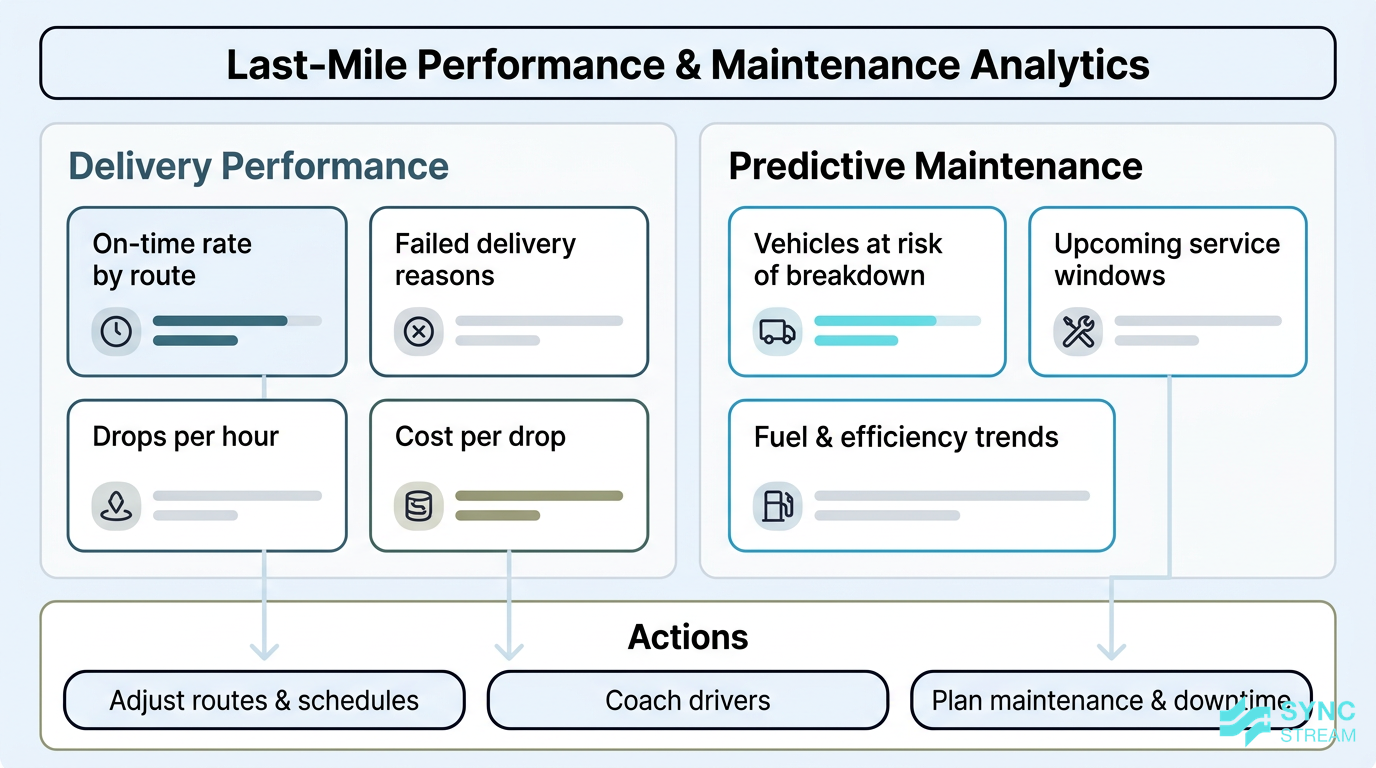
Example layout of performance analytics and predictive maintenance insights available to small fleets.
Once your jobs and routes are flowing through AI‑enabled systems, you can access performance analytics that were previously hard to see, such as:
- On‑time delivery rate by client, route, or driver
- Reasons for failed deliveries (no‑one home, access issues, incorrect address)
- Drops per hour or per shift
- Cost per drop, using distance, time, and known operating costs
- Driver benchmarking to understand who needs support or training
Predictive models can also highlight risky patterns, for example:
- Certain postcodes or runs that are consistently late
- Specific depot loading times that cause morning delays
- Overloaded runs on certain days of the week
With this information, you can adjust schedules, re‑design territories, or negotiate expectations with clients.
For fleets with telematics, AI can support predictive maintenance. Platforms like Kodora analyse:
- Vehicle telemetry (engine data, fault codes, fuel use)
- Odometer readings and driving patterns
- Historical maintenance records
to flag vehicles likely to experience breakdowns or performance issues. This lets you:
- Schedule maintenance before failures
- Reduce unexpected downtime on busy days
- Extend vehicle life and improve safety
For small fleets, even avoiding a single catastrophic breakdown during peak periods can justify the investment.
Implementation strategy for contractors
Clarifying goals and use cases first
Before touching any AI tools, it’s important to be clear about what you actually want to improve.
A practical approach for contractors is to define 2–3 specific objectives, such as:
- Cut total kilometres per week by 10%
- Increase on‑time deliveries by 5 percentage points
- Reduce inbound support calls or “where is my parcel?” messages by 30%
- Eliminate manual double‑entry of POD into client systems
Then prioritise your use cases:
- Start with routing and ETAs Get route optimisation, dispatch, and basic ETA notifications working. This is where most savings and service improvements come from.
- Layer in analytics Once jobs are flowing through the system, start using dashboards and reports to refine runs, coach drivers, and negotiate with clients.
- Add advanced features later Options like predictive maintenance or more complex AI agents can come once the core workflows are stable.
Throughout, align AI adoption with your contract requirements:
- Service levels and on‑time targets
- Proof‑of‑delivery standards
- Any emissions or sustainability targets
This ensures every automation step supports the work that actually pays the bills.
Practical rollout process for small fleets
For Australian SMB contractors, a staged rollout helps manage risk and driver impact. A simple implementation flow is:
- Audit current workflows and pain points Inputs:
- Recent weeks of jobs, routes, and POD records
- How jobs currently arrive (email, portal, spreadsheet, API)
- Fuel, toll, and overtime figures where available
Action:
- Map the current lifecycle of a job: received → scheduled → loaded → delivered → confirmed
- List specific pain points (e.g., manual routing, late runs, redeliveries, double data entry)
- Capture baseline numbers: average drops per vehicle per day, typical kilometres per run, on‑time percentage
Expected output:
- A one‑page summary of current workflow, 3–5 key issues, and baseline performance metrics
- Shortlist 2–3 AI tools that integrate with existing systems Inputs:
- Your current TMS/portals, telematics, accounting, and driver devices
- The goals and issues from step 1
Action:
- Identify tools that cover core last‑mile delivery contractors AI use cases: dispatch, routing, ETAs, POD, analytics
- Check for pre‑built integrations or APIs for your systems
- Verify driver app compatibility (Android/iOS, offline support, data usage)
Expected output:
- A shortlist comparing 2–3 tools on fit, integration effort, pricing model, and support
- Run a 4–6 week pilot on a subset of routes Inputs:
- Selected tool
- 1–3 representative routes or clients
- Pilot drivers and dispatchers
Action:
- Configure service areas, vehicles, driver profiles, and time windows
- Week 1: run AI plans alongside existing method; compare but keep old method live
- Weeks 2–4: switch to AI as primary plan, with manual override available
- Log any exceptions (bad routes, data issues, driver feedback)
Expected output:
- Side‑by‑side comparison of baseline vs pilot metrics, plus a list of configuration tweaks
- Train drivers and dispatch Inputs:
- Finalised pilot configuration
- Driver devices and logins
Action:
- Run short sessions showing:
- How jobs appear in the app
- How to follow routes and update status
- How to capture POD correctly
- Provide simple one‑page guides in the cab
- Set clear rules: when to follow the AI route vs when to use local judgement and how to flag issues
Expected output:
- Drivers and dispatch who can complete a full shift using the new tools without external help
- Measure results against baseline Inputs:
- Pilot data from the AI tool and your fuel/overtime records
- Baseline metrics from step 1
Action:
- Compare kilometres per run, drops per day, on‑time percentage, redelivery rate, and support call volume
- Calculate approximate savings in fuel, tolls, and overtime
- Review driver and dispatcher feedback on usability and reliability
Expected output:
- A simple ROI snapshot and a yes/no decision on broader rollout, plus any required process changes
- Roll out fully and fine‑tune Inputs:
- Pilot learnings and configuration
- Fleet‑wide driver and route list
Action:
- Extend the system to more routes, depots, and drivers in phases
- Regularly review:
- Routes that underperform
- Data quality issues (addresses, timestamps, GPS drop‑outs)
- Contract KPIs against client expectations
- Adjust rules, zones, and time buffers based on actual performance
Expected output:
- A stable, fleet‑wide AI‑enabled workflow with documented settings and clear responsibilities
Throughout rollout, focus on change management:
- Explain the benefits clearly: less paperwork, clearer runs, fewer last‑minute changes
- Set up weekly feedback loops in the first month so drivers and dispatch can surface issues
From a technical standpoint, include integration details in your plan:
- How driver phones or GPS devices will feed location data
- How telematics and fuel card data might be used for analytics
- What data needs to flow back to client platforms (POD, ETAs, status updates)
Partners like Sync Stream specialise in designing these workflows on top of your existing systems, so you don’t have to rebuild everything from scratch.
Data, integrations, and vendor selection
AI is only as good as the data it receives. At minimum, contractors should have:
- Accurate addresses and postcodes in a consistent format
- Timestamps for job creation, loading, departure, and delivery
- GPS location data from drivers or vehicles
- Vehicle details (capacity, type, registration) and basic maintenance records
When choosing vendors in an Australian context, useful criteria include:
- Local support and presence, so you’re not waiting overnight for help
- ANZ data hosting options and clear security policies
- Awareness of local compliance and chain‑of‑responsibility obligations
- Ease of integration with your current tools (CRMs, accounting, TMS, telematics)
- Mobile app quality for drivers: stability, ease of use, battery impact
It’s also sensible to ask for case studies relevant to Australian roads and conditions, including:
- Metro vs regional delivery profiles
- Heavy traffic corridors (e.g., Sydney, Melbourne, Brisbane) and how the system handles congestion
- Weather volatility and how that affects ETAs and routing
This helps ensure you’re not buying a tool designed purely for very different markets.
Comparing AI options for contractors
Types of AI solutions available
Broadly, last‑mile contractors will encounter four categories of AI‑enabled solutions:
- Dedicated route optimisation platforms Focused on planning and optimising routes across multiple vehicles and depots.
- All‑in‑one TMS with AI features Transport management systems that include dispatch, driver apps, invoicing, and built‑in optimisation.
- Notification/ETA add‑ons Tools that plug into your existing systems to enhance ETAs, tracking links, and customer comms.
- Telematics with predictive maintenance and analytics Vehicle‑centric platforms that add maintenance predictions, fuel analytics, and sometimes basic routing.
You’ll also see a split between off‑the‑shelf SaaS and customised solutions:
- Off‑the‑shelf tools
- Pros: Faster setup, proven workflows, lower upfront cost, continuous updates
- Cons: Less tailored to unique processes; you may need to adapt your workflow slightly
- Customised or semi‑custom solutions
- Pros: Can be closely aligned to your existing systems and specific client requirements
- Cons: Higher implementation effort; requires a reliable partner and ongoing support
For most SMB last‑mile contractors, proven off‑the‑shelf tools with light customisation offer the best balance between cost, speed, and reliability.
Cost, ROI, and scaling considerations

How different pricing models connect to ROI drivers and scaling considerations for AI in small fleets.
Vendors use a few common pricing models:
- Per vehicle (e.g., a monthly fee per truck or van)
- Per driver (licensing tied to individual users)
- Per stop or per job (usage‑based pricing)
- Flat monthly subscription (for smaller fleets or basic plans)
You may also face additional costs such as:
- Driver devices (if current phones aren’t suitable)
- GPS hardware or telematics units
- Integration or onboarding fees
To assess ROI, frame it in terms of:
- Fuel and toll savings from shorter routes and less idling
- Overtime reduction and better shift planning
- Higher route density (more drops per run)
- Fewer redeliveries thanks to better communication and POD
- Better contract retention and potential for winning new work
Even modest gains can compound. For example, saving a small amount per drop across hundreds or thousands of monthly deliveries quickly adds up.
When it comes to scaling from a couple of vans to a larger fleet, check:
- Whether there are user or vehicle caps on lower tiers
- How performance holds up with more jobs and routes
- How pricing tiers change as you add vehicles or drivers
This helps avoid growing out of a platform too quickly or facing unexpected cost jumps.
Build vs buy and local vs global tools
Contractors sometimes ask whether they should build their own AI tools.
In almost all cases, it’s more practical to buy and integrate existing systems rather than attempt to develop and maintain custom AI in‑house. Building your own means:
- Recruiting or contracting specialist data and software engineers
- Maintaining infrastructure, security, and updates
- Owning bug fixes and feature development forever
Buying or partnering, by contrast, lets you:
- Deploy faster with proven technology
- Focus on operations, not software development
- Leverage vendor roadmaps and support
There’s also a choice between Australian‑focused providers and global platforms:
- Local tools often understand Australian roads, regulations, and client expectations better, and can support you in local time zones.
- Global tools may offer broader feature sets but may be less tailored to local conditions or compliance.
A pragmatic approach is to:
- Start with a pilot on a ready‑made system that fits your size and clients.
- Once its value is proven, consider limited customisation and integrations—for example, via orchestration tools like n8n—to better connect it with your CRMs, accounting, and operations platforms.
This is where an implementation partner like Sync Stream can help you get the benefits of AI quickly while keeping control of data, infrastructure, and long‑term flexibility.
Avoiding common AI adoption mistakes
Over-automation and loss of local knowledge
One of the biggest risks with AI is over‑automation—trusting the algorithm blindly and ignoring local knowledge from drivers and dispatchers.
Issues can include:
- Routes that look efficient on a map but ignore school zones, weight limits, or low bridges
- Unsafe or slow streets being used because the system lacks local context
- Ignoring regular events (sport stadium traffic, markets, roadworks) that locals know well
To avoid this, design your system so that:
- Dispatchers and drivers can override AI suggestions where needed
- There’s a simple way to flag bad routes or locations so they’re avoided next time
- You review AI performance after major events or weather incidents and adjust rules
For example, during a big event in a CBD, dispatchers might temporarily block certain streets or windows and instruct drivers via the app, while feeding this information back into route planning settings.
Poor data quality and process fit

Why cleaning data and standardising processes is essential before relying on AI optimisation.
AI cannot fix poor data or broken processes. If your addresses are wrong or job details inconsistent, even the best optimiser will struggle.
Common data issues include:
- Bad or incomplete addresses and postcodes
- Inconsistent job naming and notes
- Unreliable GPS due to outdated devices or driver settings
Before full rollout:
- Clean your data: standardise address formats, check key client locations, and remove duplicates
- Standardise processes: set clear rules for job entry, driver check‑ins, POD capture, and maintenance logging
Also ensure the AI tool is configured to fit your real‑world workflow:
- Consider depot layouts, loading constraints, and access rules
- Reflect realistic loading and unloading times
- Align with how drivers actually move through zones or territories
Otherwise, you risk creating new inefficiencies by forcing operations to fit the software rather than the other way around.
Change resistance and training gaps
New technology can create pushback if drivers and dispatchers feel it’s there to monitor or replace them, rather than support them.
To manage change:
- Position AI as a way to reduce hassles: fewer last‑minute changes, clearer instructions, less paperwork
- Provide practical training, not just manuals:
- Short hands‑on sessions in the yard or depot
- In‑cab guides with screenshots and simple steps
- A clear contact point for issues in the first weeks
- Actively collect feedback from drivers and dispatch and show how it leads to improvements
Be open about privacy and monitoring:
- Explain what data is tracked (e.g., GPS during shifts, delivery times) and why
- Clarify how performance data will be used (coaching and planning, not micromanagement)
When teams understand the benefits and boundaries, adoption is smoother and systems perform better.
Conclusion
AI is rapidly becoming part of day‑to‑day operations for last‑mile work in Australia—not just for major transport companies, but for subcontractors, owner‑drivers, and small fleets.
By focusing on practical use cases—automated dispatch, route optimisation, delivery confirmations, and performance analytics—contractors can:
- Cut kilometres, fuel, and overtime
- Improve on‑time performance and customer communication
- Strengthen POD, compliance, and emissions reporting
- Protect and grow key contracts in a competitive market
The key is to start with clear goals, choose tools that integrate with your existing systems, and roll out in manageable stages with drivers and dispatch on board. Used this way, last‑mile delivery contractors AI becomes a set of reliable workflows, not a risky experiment.
If you’re ready to explore how AI and automation could work inside your current tech stack—without losing control of your data or workflows—book a call with Sync Stream. We’ll help you scope, implement, and document AI‑driven workflows that fit the reality of Australian last‑mile delivery.
FAQ
What is last‑mile delivery contractors AI in simple terms?
It’s software that learns from your operational data (jobs, routes, GPS, vehicle details) to automate planning, dispatch, communication, and reporting for last‑mile deliveries.
Is AI only useful for large fleets, or can owner‑drivers benefit too?
Owner‑drivers and small fleets can benefit significantly through better routing, simpler POD, and reduced admin—especially when working for multiple platforms or shippers.
Do I need to replace my existing systems to use AI?
Usually not. Most solutions are cloud tools or add‑ons that integrate with your current TMS, telematics, and client platforms. Implementation partners like Sync Stream focus on building AI on top of what you already use.
How long does it take to see results from AI route optimisation?
Many contractors see improvements in route efficiency and on‑time performance within a 4–6 week pilot, provided data is clean and drivers follow the new workflows.
What data do I need before starting with AI tools?
At minimum, you need accurate addresses, timestamps for key events, GPS data from drivers or vehicles, and basic vehicle details. Better maintenance and job history data enable more advanced analytics and predictive maintenance.
How much does AI for last‑mile delivery typically cost?
Pricing varies by vendor, but common models include per‑vehicle, per‑driver, or per‑stop fees, plus any hardware or integration costs. The investment is usually justified by fuel savings, reduced overtime, fewer redeliveries, and stronger contract performance.
Will AI replace dispatchers and drivers?
No. AI supports dispatchers and drivers by handling repetitive planning and admin tasks. Human judgment and local knowledge remain essential for safety, customer relationships, and handling exceptions such as road closures or special client requirements.
How can Sync Stream help my contracting business with AI?
Sync Stream works with Australian logistics and last‑mile businesses to design and implement AI and automation on top of existing systems. We focus on commercial outcomes: reducing manual admin, improving visibility, and building reliable, documented workflows that you control.