

Introduction
If your business runs on Simpro, the next logical step is joining it up with the rest of your systems. Done well, Simpro integrations can cut admin hours, reduce errors, and give you a clearer picture of margin and cash flow — without replacing tools that already work.
For Australian trade, construction, and field service businesses, that usually means connecting Simpro to accounting (Xero or MYOB), suppliers like Ideal Electrical or MMEM, document storage, CRMs, marketing tools, and sometimes property or estimating platforms.
This guide walks through the main Simpro integration options (native, Zapier/Make, and custom API), the most important workflows to automate, and step‑by‑step logic for designing and rolling out integrations that are reliable, auditable, and easy for your team to run day‑to‑day.
Integration options overview
Native Simpro integrations explained
Native (or “out‑of‑the‑box”) integrations are connections that Simpro has built and supports directly in the product. They’re usually the best starting point for small to medium businesses because:
- Lower cost: There’s little or no extra subscription cost beyond your existing software.
- Simpler setup: Configuration happens inside Simpro with guided settings rather than custom code.
- Vendor support: If something breaks, Simpro’s support and documentation usually cover it.
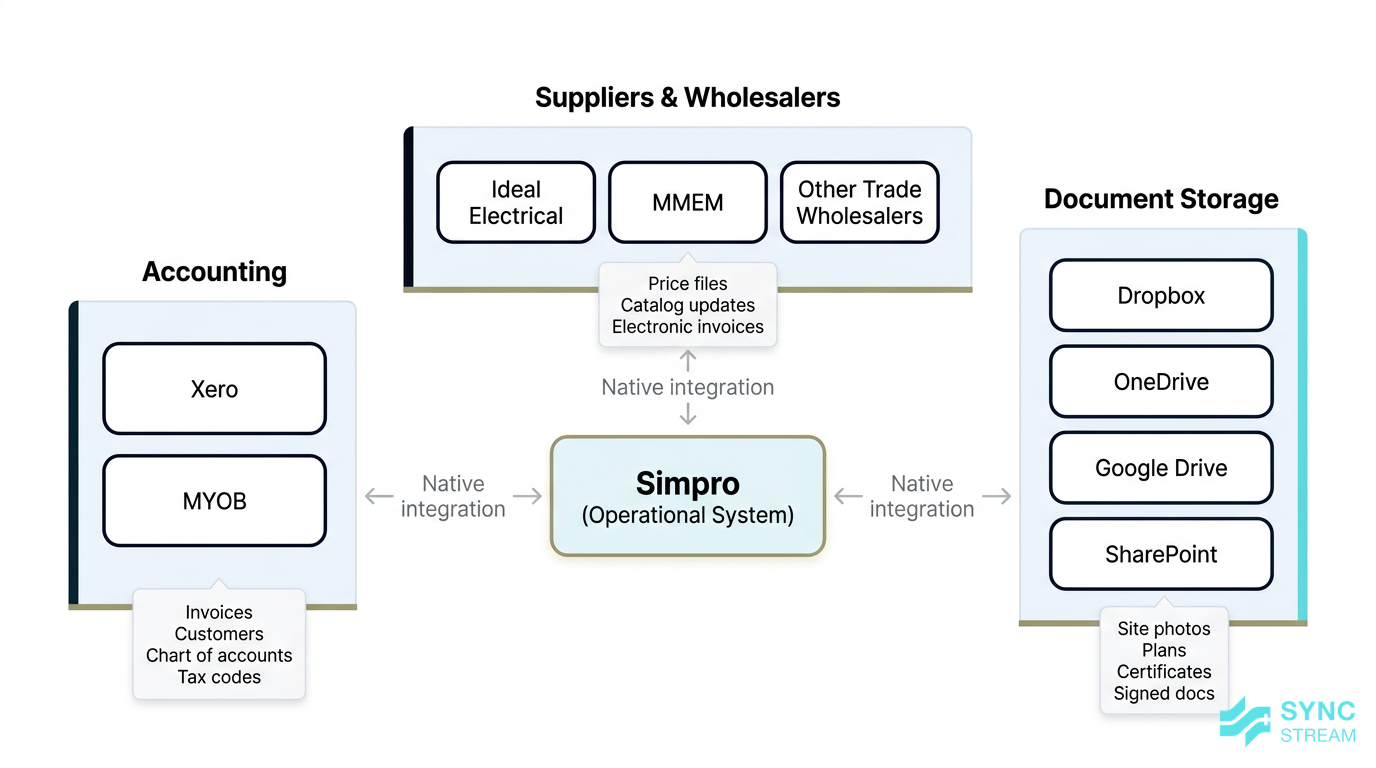
For Australian trade and construction businesses, the most relevant native Simpro integrations fall into a few core categories:
- Accounting – Xero and MYOB are the big two. These links handle:
- Exporting invoices and purchase orders from Simpro.
- Syncing customers and sometimes suppliers.
- Mapping Simpro revenue and cost centres into your chart of accounts.
- Suppliers and wholesalers – such as Ideal Electrical and MMEM, plus other trade wholesalers.
- Automatic price file imports so your catalogue pricing reflects your negotiated rates.
- Catalog updates when new items are added or codes change.
- Electronic invoices sent directly back into Simpro against the right jobs or purchase orders.
- Document storage – Dropbox, OneDrive, Google Drive, and SharePoint.
- Store site photos, plans, compliance certificates, and signed documents in a structured way.
- Link folders or files to Simpro jobs or projects so they’re easy to find later.
For owners and directors, the benefits of using these native integrations are straightforward:
- Less double‑handling of data: Staff aren’t re‑typing customer details, invoices, or materials into multiple systems.
- Clearer financials: Revenue and costs flow through to Xero/MYOB correctly, so P&L and job margin reports are more trustworthy.
- Easier GST/BAS compliance: When Simpro and accounting are aligned, you’re not fixing tax codes at BAS time.
- Fewer admin hours: The team can spend more time scheduling, supervising, and managing projects — not chasing paperwork.
No‑code connectors: Zapier and Make
Zapier and Make are “no‑code automation” platforms. In plain English, they are online tools that let you say:
“When X happens in System A, automatically do Y in System B.”
without writing traditional code. Instead, you use a visual interface to pick triggers and actions.
In the Simpro context, they’re useful when there isn’t a native integration for the systems you want to connect, such as specific CRMs, marketing tools, or project management apps.
Typical “lightweight” use cases for Zapier or Make include:
- Send Simpro job updates to project/task tools – e.g., when a job moves to a certain status in Simpro, create/update a task in Asana for the office team.
- Update your CRM when a quote is accepted – e.g., if a quote status changes to ‘accepted’ in Simpro, update the opportunity stage in your CRM.
- Push contacts into email marketing platforms – when a new customer is created or a job is completed in Simpro, add that contact to a nurture or review‑request campaign.
For owners, the rough pros and cons look like this:
Pros
- Fast to experiment and test ideas.
- Low upfront cost — you usually pay a monthly fee based on task volume.
- Good for tying together 2–3 systems for simple, clear workflows.
Cons
- Can become messy or fragile if you build lots of inter‑dependent automations.
- Harder for non‑technical staff to understand if the logic isn’t documented.
- Not ideal for high‑volume or mission‑critical processes where failure would directly impact cash flow or compliance.
In practice, Zapier/Make are best treated as a middle layer for smaller automations, not the backbone of your entire operations.
Custom API and bespoke builds
Simpro provides an API (Application Programming Interface), which is a structured way for software systems to talk to each other. Using the Simpro API, developers or integration partners can build tailored connections between Simpro and:
- ERPs and finance systems beyond Xero/MYOB.
- Custom customer or contractor portals.
- Property and facility systems that don’t have existing ready‑made connectors.
- Data warehouses and reporting/BI tools.
Custom API work becomes the right choice when you’re dealing with:
- Complex data flows – multiple entities, retention, variations, different billing models.
- Multi‑branch operations – several regions, entities, or franchises that share some data but not all.
- High volumes – thousands of jobs, invoices, or transactions per month.
- Stricter compliance needs – audit trails, data residency, or detailed approvals.
This path usually involves:
- Higher upfront investment – scoping, design, development, and testing.
- More rigorous planning – data models, error handling, and security need to be defined up front.
- Ongoing maintenance responsibilities – someone must own updates, monitoring, and changes when Simpro or connected systems release new versions.
Partners like Sync Stream approach custom Simpro API integrations with a commercial lens first: which workflows justify that level of investment because they materially affect margin, cash flow, or risk.
Common trade workflows to connect
Job to invoice to accounts
A typical trade job journey in Simpro looks something like this:
- Lead or quote created – via phone, email, or website enquiry entered into Simpro.
- Input: New enquiry details (customer name, contact info, site address, brief scope).
- Action: Admin or sales staff create a lead/quote record in Simpro.
- Output: A Simpro lead/quote ready for pricing and scheduling.
- Quote sent and accepted – scope finalised, pricing confirmed.
- Input: Completed quote in Simpro.
- Action: Send quote from Simpro to the customer and monitor status; mark as accepted when approved.
- Output: Accepted quote linked to the customer and site in Simpro.
- Job scheduled – technicians or crews are booked, and site details confirmed.
- Input: Accepted quote.
- Action: Convert quote to job in Simpro and assign technicians, dates, and times.
- Output: Scheduled job with clear allocations.
- Materials and labour captured – staff record time, materials, and variations against the job.
- Input: Work performed on site.
- Action: Field staff use Simpro to log hours, materials, and any variations, following your coding rules.
- Output: Accurate job costs captured in Simpro.
- Invoice raised in Simpro – based on actuals, contract stages, or combinations.
- Input: Completed job with all costs recorded.
- Action: Office staff generate an invoice in Simpro using your pricing rules.
- Output: Approved invoice in Simpro, ready to export.
- Invoice sent to accounts – pushed into Xero or MYOB, where payments and reconciliation occur.
- Input: Approved Simpro invoice.
- Action: Run the Simpro–Xero/MYOB export, ensuring mappings are correct.
- Output: Matching invoice in accounting, ready for sending and reconciliation.
To make this seamless, key data should flow cleanly between Simpro and your accounting platform:
- Customers – usually created in Simpro and pushed to Xero/MYOB so you’re invoicing the same accounts your bookkeeper sees.
- Suppliers – may be managed in accounting or Simpro; the important part is consistent names and ABNs.
- Chart of accounts mapping – Simpro cost centres and sales accounts need clear mappings to revenue and expense accounts in Xero/MYOB.
- Tax rates – GST codes must match between systems so totals agree.
- Invoices – details (customer, date, line items, tax) flow from Simpro to accounting.
- Purchase orders – often raised in Simpro and pushed through for matching against supplier invoices.
- Payments – typically entered and reconciled in Xero/MYOB, then optionally fed back to Simpro to update job or customer status.
In the Australian context, getting this right is critical because:
- BAS preparation depends on clean data. If Simpro and Xero/MYOB disagree on GST or invoice totals, you’ll waste hours reconciling every quarter.
- Up‑to‑date P&L and cash‑flow views depend on timely, accurate invoice flows.
- Owners and directors need clear job margin visibility to make decisions about pricing, staffing, and which work to prioritise.
Purchasing, suppliers and price files
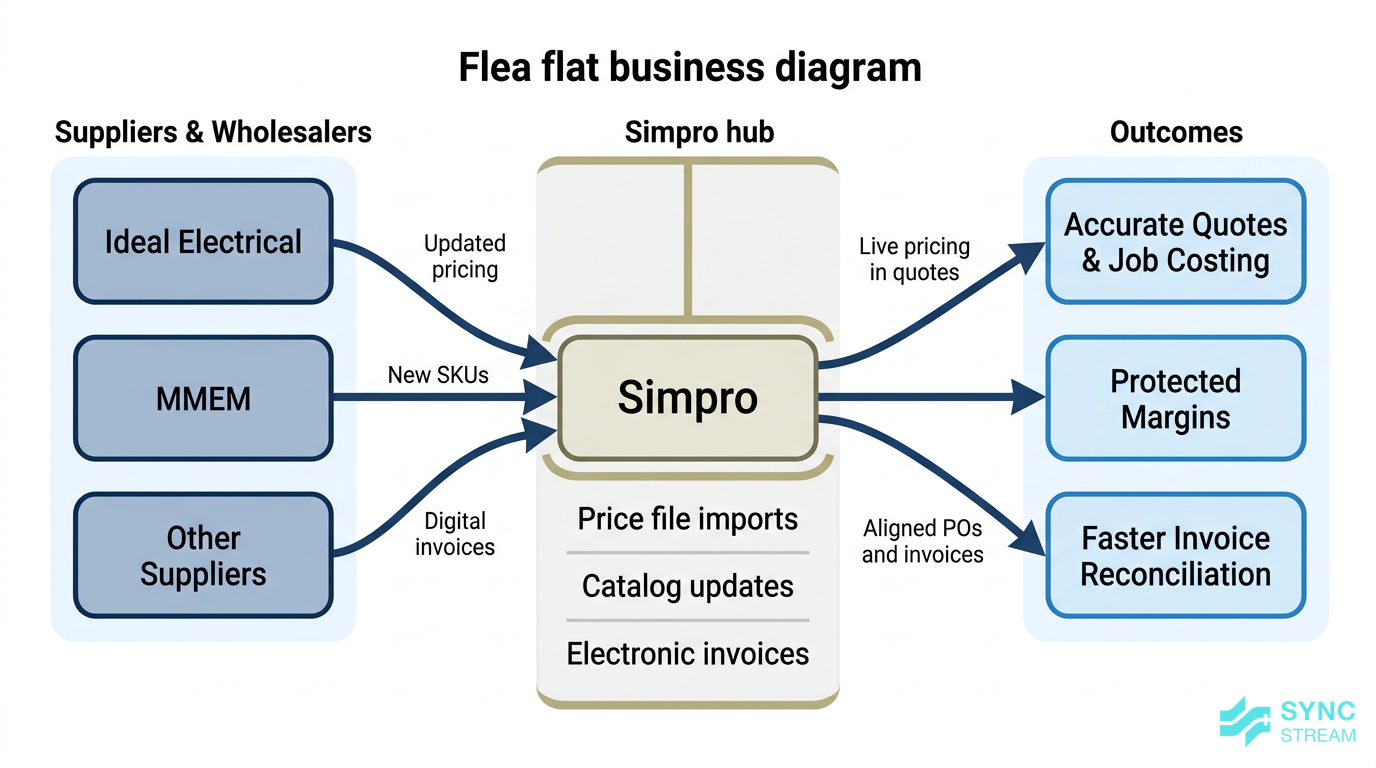
A workflow view of Simpro syncing price files and electronic invoices with supplier systems like MMEM or Ideal Electrical.
Supplier integrations are where Simpro really shines for material‑heavy trades.
In practice, links with suppliers like Ideal Electrical, MMEM, and similar wholesalers typically handle:
- Automatic price file imports – Simpro pulls updated price lists that match your negotiated rates.
- Catalog updates – new SKUs, discontinued items, and description changes are synced.
- Electronic invoices back into Simpro – invoices are sent digitally and can be matched to purchase orders and jobs.
The business impact is substantial:
- Accurate quotes and job costing – your estimators and technicians are working off live supplier pricing, not a list from 18 months ago.
- Less margin leakage – outdated pricing often means you under‑quote or fail to adjust charge‑out rates when supplier costs rise.
- Faster reconciliation of supplier bills – because invoice line items already match Simpro POs and jobs.
A simple before/after scenario makes this clearer:
- Before:
- Office staff download CSV price files from MMEM every few months.
- Import attempts fail due to format changes; someone cleans the file manually.
- Quotes are based on guesswork or old prices, and supplier invoices frequently don’t match.
- After:
- Simpro pulls updated MMEM price files automatically each week.
- New products and price changes flow in without manual handling.
- Quotes and purchase orders align with actual supplier invoices, and margin is protected.
Field operations, documents and project tasks
Field operations generate a lot of paperwork: photos, plans, SWMS, test sheets, and sign‑offs. Integrations between Simpro and document platforms like Dropbox, OneDrive, Google Drive, or SharePoint help you:
- Store site photos and videos per job or site.
- File compliance certificates and test reports in a way that’s easy to retrieve for audits or client queries.
- Keep drawings and plans in sync for the whole team, not scattered across email chains.
Typically, you’ll set rules such as:
- Create a folder structure per job or project in your document platform when the job is created in Simpro.
- Input: New job in Simpro with job number, client, and site address.
- Action: Automation creates a standard folder structure (e.g., Photos, Certificates, Plans) and names it using the job number and site.
- Output: A linked folder ready for field and office staff.
- Link that folder back into Simpro so office and field staff can access it from one place.
- Input: Newly created folder URL.
- Action: Store the URL in the Simpro job record.
- Output: One‑click access from Simpro to all documents.
You can also connect Simpro with tools like Asana (often via a connector) so that:
- When a job reaches certain stages in Simpro (e.g., ‘Practical Completion’), tasks are created in Asana for:
- HSEQ checks.
- Handover document packs.
- Warranty and maintenance follow‑ups.
This reduces:
- Lost paperwork – documents aren’t scattered across personal drives.
- Missed steps – compliance or handover tasks are automatically triggered.
- Confusion between office, site, and management – everyone sees the same status and documentation.
Marketing, CRM and property workflows
Lead capture and CRM sync
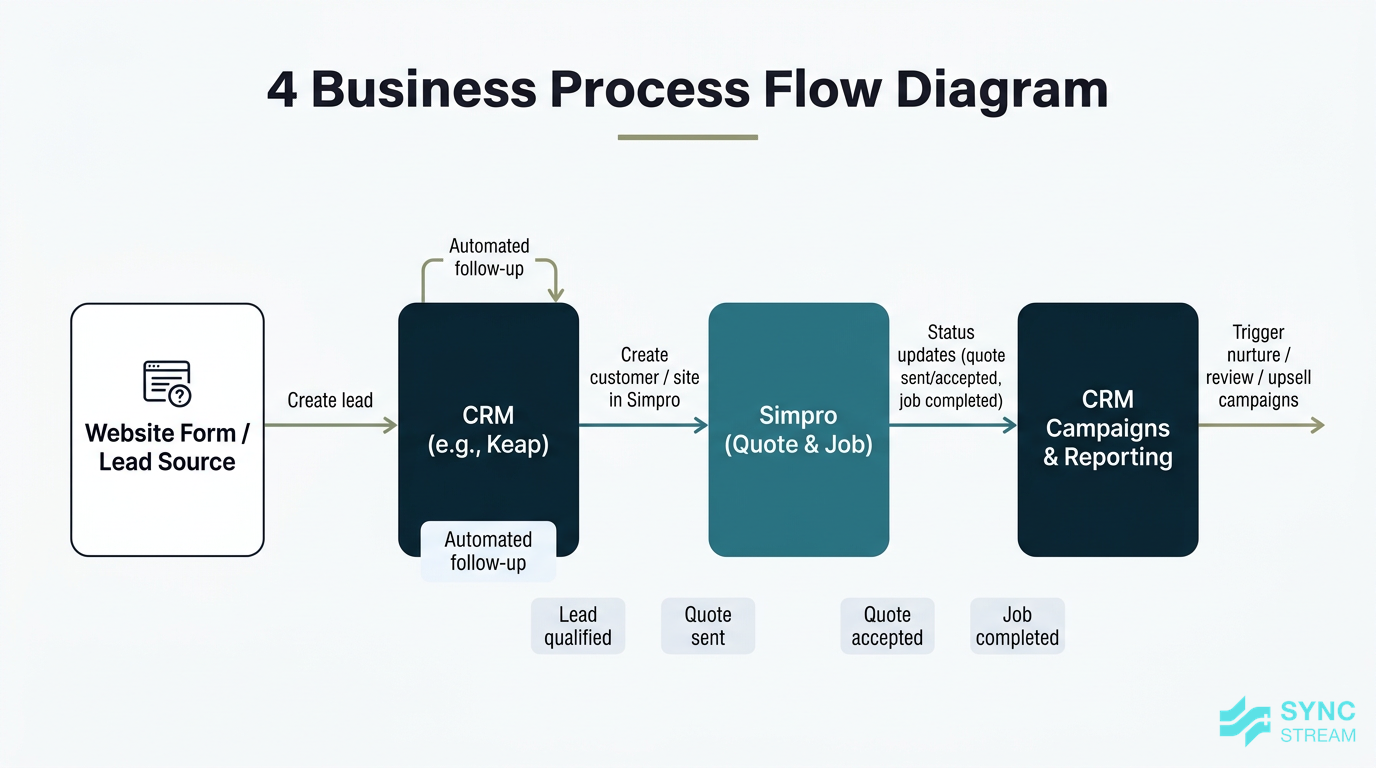
A lead lifecycle diagram where website enquiries flow into a CRM, sync into Simpro for quoting, and send status updates back to drive follow-up.
If you run marketing campaigns or manage a sales pipeline in a CRM, connecting it with Simpro helps keep leads moving smoothly into operations.
Using tools like Zapier or Make, you can:
- Capture enquiries from web forms (or other lead sources) into a CRM such as Keap/Infusionsoft.
- Input: New form submission (name, email, phone, suburb, enquiry type).
- Action: CRM creates a lead record and assigns it to a salesperson.
- Output: Lead visible in your sales pipeline.
- Sync key details into Simpro when a lead is qualified, so a quote can be created without re‑typing data.
- Input: Lead marked as “qualified” in the CRM.
- Action: Automation creates/updates a customer and site in Simpro.
- Output: Ready‑to‑use customer/site in Simpro for quoting.
- Send status updates back to the CRM when quotes are sent, accepted, or jobs completed.
- Input: Status changes in Simpro (quote sent/accepted, job completed).
- Action: Automation updates the opportunity stage in the CRM and triggers any follow‑up campaigns.
- Output: Accurate pipeline and marketing actions tied to operational reality.
A typical flow might look like:
- Website form submitted → record created in CRM.
- Sales team qualifies the lead → automation creates or updates a lead/customer in Simpro.
- Quote prepared in Simpro and marked as ‘sent’ → CRM is updated to track the opportunity.
- Quote marked ‘accepted’ → CRM stage moves to ‘won’, and a post‑job nurture or upsell campaign is scheduled.
- Job completed in Simpro → CRM triggers review requests or maintenance reminders.
For owners and directors, the benefits are:
- Better lead tracking – fewer enquiries fall through the cracks because they’re all captured and visible.
- Higher conversion – statuses aren’t stuck in someone’s inbox; follow‑up is systemised.
- More consistent follow‑up – campaigns are triggered by Simpro events, not staff memory.
Property management and real estate links
Many trade businesses in Australia work closely with real estate and property management agencies. Using PropertyMe as an example, an integration with Simpro typically syncs:
- Rental properties – addresses, unit numbers, and property details.
- Landlords and tenants – contact details and relationships to each property.
Once this data is feeding into Simpro:
- Work orders from agencies arrive with the correct site and contact info.
- Jobs can be scheduled faster because addresses and key contacts are already known.
- Invoices can be issued back to the agency with the right property references and owner details.
This pattern applies to other property or facility systems as well. The key principle is:
Decide which system is the source of truth for properties and contacts, and integrate everything else around that.
When that’s in place, you see:
- Fewer errors in site addresses.
- Less back‑and‑forth to clarify who is responsible for payment.
- Clearer reporting on which properties or agencies are most profitable.
Estimating, takeoff and quoting
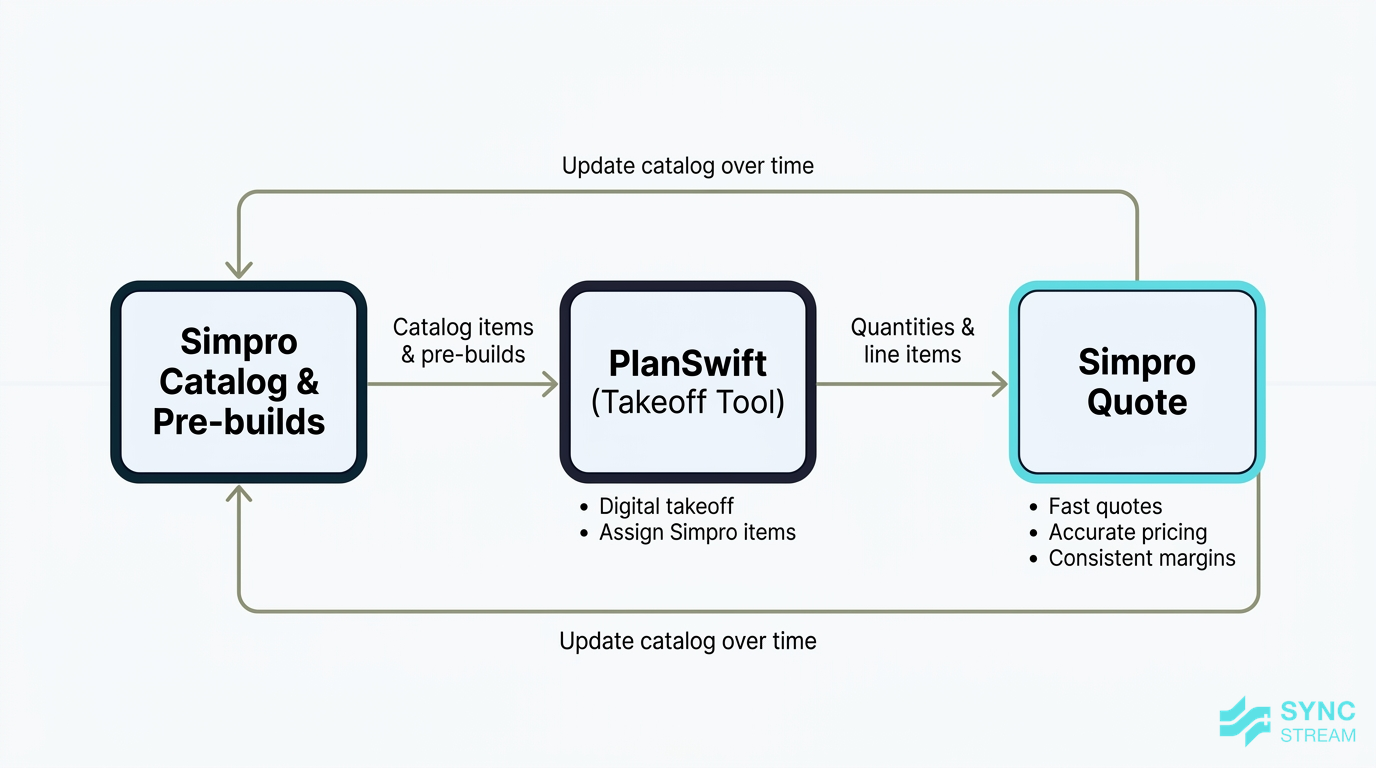
A process diagram of PlanSwift using Simpro catalog data for takeoff and sending structured line items back into Simpro for quoting.
Estimating tools like PlanSwift integrate with Simpro to bridge the gap between takeoff and quoting.
In a typical setup:
- Your Simpro catalog items and pre‑builds are available inside PlanSwift.
- Input: Current Simpro catalogue and pre‑builds.
- Action: Sync or export these into PlanSwift so estimators can select them during takeoff.
- Output: Takeoff environment that uses Simpro codes and pricing.
- Estimators complete their takeoff in PlanSwift, assigning Simpro items to quantities.
- Input: Project plans and drawings.
- Action: Estimator completes digital takeoff and maps each measurement to a Simpro item or pre‑build.
- Output: Structured list of Simpro items with quantities.
- The quantities and items are pushed back into Simpro as a new quote or an update to an existing one.
- Input: Completed takeoff data.
- Action: Use the integration to create or update a quote in Simpro.
- Output: Detailed Simpro quote ready for review and issue.
The upside for construction and fit‑out jobs is significant:
- Faster quotes – especially where dozens or hundreds of line items are involved.
- More accurate pricing – because you’re using Simpro’s catalog and pre‑builds, not ad‑hoc pricing.
- Consistent margin assumptions – estimating and operations are working from the same cost base.
Imagine a commercial fit‑out with 150+ electrical line items. Without integration, an estimator or administrator might:
- Export from PlanSwift.
- Manually re‑key or copy/paste every line into Simpro.
- Fix errors when codes don’t match or descriptions change.
With a proper PlanSwift–Simpro integration, that transfer is automated, freeing up time and reducing data entry mistakes.
Designing your integration approach
Map processes before choosing tools
Before you pick tools or build anything, map how work actually flows through your business today.
Start by diagramming a few key processes, for example:
- Sales and delivery: lead → quote → job → invoice → accounts.
- Purchasing: purchase order → supplier invoice → job costing.
- Maintenance: recurring job → site visit → report → invoice.
For each step, pinpoint where manual handoffs occur, such as:
- Re‑typing data from emails into Simpro.
- Exporting CSVs from Simpro into spreadsheets or accounting.
- Copying job details into separate project tools.
Then decide on integration points based on business outcomes you care about, such as:
- Reducing days‑to‑invoice after job completion.
- Cutting admin hours on purchasing and reconciliation.
- Tightening margin control on materials and labour.
A simple checklist of questions to focus your thinking:
- Which systems are involved in this process? (e.g., website → CRM → Simpro → Xero.)
- What data must match between them? (customers, jobs, materials, tax codes, site details.)
- Where do errors currently hurt the most? (cash flow delays, rework, compliance risk.)
- Which steps are repetitive and rule‑based? (prime candidates for automation.)
- Who owns the process? (so someone is accountable for decisions and sign‑off.)
Having this mapped means any Simpro integrations — whether native, Zapier/Make, or API — are tied back to clear outcomes, not just “connecting everything because we can.”
Decide between native, connector, or API
With your processes mapped, you can choose an integration approach using a simple decision logic:
- Start with native where available.
- Use Simpro’s built‑in connectors for Xero/MYOB, major suppliers, document storage, and supported tools.
- This gives you stability, vendor support, and lower setup overhead.
- Use Zapier/Make for light–medium complexity.
- Good when there’s no native integration but the workflow is straightforward.
- Ideal for connecting Simpro with CRMs, marketing tools, or simple project tasks.
- Move to custom API when volumes or complexity demand it.
- Necessary when you’re handling high transaction volumes, multiple entities, or detailed compliance rules.
When selecting your approach, consider:
- Transaction volume – how many jobs, invoices, or records per month?
- Number of systems – the more platforms involved, the more you need robust architecture.
- Data sensitivity – financials, personal information, and site details may demand stricter controls.
- Budget and timeframe – native and no‑code approaches are faster to deploy; custom API work takes longer but can scale better.
For non‑technical owners, you can think of the options like this:
- Native:
- Cost: Low setup, included in your subscription.
- Flexibility: Moderate, within what Simpro supports.
- Support: Strong; covered by Simpro documentation and support.
- Reliability: High when configured correctly.
- Zapier/Make:
- Cost: Low–medium monthly cost based on task volume.
- Flexibility: High for small, targeted automations.
- Support: Platform support, but logic is your responsibility.
- Reliability: Good for simple flows; weaker if heavily layered.
- Custom API:
- Cost: Higher upfront project spend.
- Flexibility: Very high; tailored to your exact processes.
- Support: Depends on your integration partner and internal capability.
- Reliability: Very high if properly designed, tested, and maintained.
When to bring in specialists
As soon as you involve multiple systems or complex business rules, it’s worth considering specialist help.
Scenarios where a Simpro‑savvy integration partner like Sync Stream adds value include:
- Multi‑entity accounting setups – where different branches or entities need separate ledgers and reporting.
- Tiered or contract‑specific pricing – especially in construction and facilities maintenance.
- Retention, variations, and staged billing – where invoicing rules are complex.
- High‑volume operations – where failures or delays in syncs directly hit cash flow.
Specialists can:
- Design integration architecture – deciding which system is the source of truth for each data type.
- Configure Simpro settings and mappings correctly for accounting, tax, and suppliers.
- Build and test automations using tools like n8n, Zapier/Make, or direct APIs.
- Train staff so they understand what the integrations do and how to use them.
- Monitor and refine integrations over time to keep them reliable.
The aim isn’t just to “nice‑to‑have” more automation. It’s to avoid:
- Costly downtime if a core integration fails.
- Data corruption from poorly designed sync logic.
- Expensive rework when a quick DIY setup can’t scale with your business.
Building a Simpro integration in practice
Clarify objectives and data ownership
Before you configure anything, define what success looks like in concrete terms. For example:
- “Invoices are in Xero on the same day as job completion.”
- “We eliminate duplicate client entry between our CRM and Simpro.”
- “Supplier pricing is current every week, not every quarter.”
Next, decide which system is the source of truth for each type of data. Typical patterns are:
- Customers and sites: Simpro as the operational source, synced into accounting.
- Product catalogue and pricing: Simpro or supplier systems feeding into Simpro.
- Financial records and payments: Xero/MYOB as the source for payment status and reconciliations.
- Documents: a cloud drive (e.g., SharePoint) as the master, linked into Simpro.
Being explicit about data ownership prevents:
- Sync conflicts – like one system overwriting another unexpectedly.
- Duplicate records – the same customer appearing multiple times with slight name variations.
- Finger‑pointing when numbers don’t match – because everyone knows which system is authoritative.
Configure and test a pilot workflow
Rather than “doing everything at once”, pick one narrow, high‑value process as a pilot. For example:
- Simpro → Xero invoice export for service jobs.
- MMEM price file updates into Simpro.
- New Simpro jobs creating Asana tasks for handover.
For that pilot, work through these steps:
- Configure settings carefully.
- Inputs:
- Your current accounting setup (tax codes, chart of accounts, tracking categories).
- Simpro cost centres, customers, suppliers, and item codes.
- Actions:
- In Xero/MYOB: confirm tax codes and accounts match what you want to see from Simpro.
- In Simpro: align cost centres and tax codes with accounting.
- In Zapier/Make (if used): map fields exactly (name, email, job number, amounts, GST) and set error notifications.
- Expected outputs:
- A configured integration where each Simpro field has a clear destination and accounting entries post to the right accounts.
- Inputs:
- Define test cases.
- Inputs:
- 5–10 real jobs, invoices, or POs representing normal and edge cases (discounts, variations, different GST).
- Actions:
- List each test, note the expected result in both Simpro and the other system.
- Expected outputs:
- A simple test script you can follow step‑by‑step.
- Inputs:
- Run tests and verify both sides manually.
- Inputs:
- Configured integration and your test cases.
- Actions:
- Push each test record through the integration.
- Compare amounts, GST, dates, references, and statuses between Simpro and the target system.
- Expected outputs:
- A pass/fail result for each case and a list of any mapping or configuration issues to fix.
- Inputs:
Taking the time to run a controlled pilot greatly reduces the risk of messy data once you roll out more broadly.
Roll out, train and refine
Once the pilot is behaving reliably, you can roll the integration out to the wider team.
Key steps:
- Update internal procedures.
- Inputs:
- Existing SOPs for jobs, invoicing, purchasing, and document handling.
- Actions:
- Rewrite steps that change because of the integration (e.g., where invoices are created, who checks sync reports).
- Expected outputs:
- Clear procedures that match the new integrated workflow.
- Inputs:
- Train your team.
- Inputs:
- Updated procedures and a demo environment or real examples.
- Actions:
- Walk office and field staff through “before vs after”.
- Highlight mandatory fields and common errors that will break syncs.
- Expected outputs:
- Staff who understand how their data entry affects Simpro integrations and downstream systems.
- Inputs:
- Monitor and log issues.
- Inputs:
- Integration logs, error emails from Zapier/Make (if used), feedback from staff.
- Actions:
- Review logs daily or weekly.
- Record each issue with example, cause, and fix.
- Expected outputs:
- A running log that makes patterns obvious and speeds up troubleshooting.
- Inputs:
- Review after 30–60 days.
- Inputs:
- Your original objectives, monitoring log, and basic KPIs (e.g., days‑to‑invoice, admin hours).
- Actions:
- Check if objectives have been met and where friction remains.
- Expected outputs:
- A decision on tweaks to the current setup and which workflow to integrate next.
- Inputs:
Partners like Sync Stream typically provide documentation for each workflow and integration so new staff and external advisors can understand how things are meant to work.
Things to watch out for
Data quality and consistency issues
Integrations don’t fix bad data; they replicate it faster.
Common examples include:
- Inconsistent customer names (e.g., “ABC Pty Ltd” vs “ABC Electrical”).
- Missing ABNs or incorrect contact details.
- Wrong or inconsistent tax codes.
- Poorly structured cost centres and item codes.
Before turning on syncs, it’s worth doing a basic data clean‑up:
- Tidy customer and supplier records – standardise names and fill in missing ABNs.
- Align tax codes – ensure Simpro and Xero/MYOB use the same GST treatments.
- Standardise naming conventions – for customers, jobs, cost centres, and items.
Then schedule periodic audits, such as:
- Comparing invoice and revenue totals between Simpro and accounting each month.
- Spot‑checking random jobs for correct pricing and GST.
- Reviewing old or duplicate records and cleaning them up.
Over‑automation and hidden complexity
It’s possible to automate too much, too fast.
If you stack many Zapier/Make flows or build very complex API logic, you can end up with a system that:
- Is brittle — one change in a field name or process breaks multiple automations.
- Is hard for non‑technical staff to support.
- Encourages silent workarounds when staff don’t understand what’s happening.
A safer principle is “automate what’s stable”:
- Only automate processes that are well‑defined and not changing every week.
- Document each automation in plain language: what triggers it, what it does, and why.
It also helps to keep a simple integration map that shows:
- Which systems are connected.
- What data flows between them.
- Which tool (native, Zapier/Make, n8n, API) is responsible for each connection.
This makes onboarding new staff and working with external advisors much easier.
Security, access and compliance
Integrations involve sharing data between systems, so security and compliance can’t be an afterthought.
Key considerations for Australian businesses include:
- Protecting customer personal information and site details.
- Safeguarding financial data.
- Meeting obligations under the Privacy Act and any client contracts.
Practical tips:
- Restrict admin access – only trusted staff and partners should manage integrations and API keys.
- Rotate API keys and passwords periodically, and when staff leave.
- Use reputable platforms with clear security documentation.
- Ensure backups or export options exist – so you can recover or move data if something fails.
Partners like Sync Stream design integrations with these constraints in mind, ensuring operational improvements don’t create unnecessary risk.
Conclusion
Connecting Simpro with your accounting, suppliers, document storage, CRM, and property systems is one of the most effective ways to reduce admin, tighten margin control, and improve visibility across your trade or construction business.
You have a spectrum of options: start with native Simpro integrations where possible, use no‑code tools like Zapier or Make for smaller gaps, and consider custom API work for complex, high‑volume, or compliance‑heavy workflows. The key is to map your processes, be clear about data ownership, pilot carefully, and keep an eye on data quality, complexity, and security.
If you want Simpro integrations that are designed around real business outcomes — not just technology for its own sake — Sync Stream can help you scope, implement, and document reliable workflows that fit your existing systems.
FAQ
What are the easiest Simpro integrations to start with?
For most Australian SMBs, the easiest starting points are native integrations with Xero or MYOB for accounting, major suppliers like Ideal Electrical or MMEM for price files, and a document platform such as OneDrive or SharePoint. These have clear configuration steps and immediate impact on admin time and financial clarity.
Do I need a developer to integrate Simpro with my other tools?
Not always. Many common integrations are available natively in Simpro, and others can be handled with no‑code tools like Zapier or Make. You typically only need a developer or specialist partner when dealing with custom APIs, multi‑entity setups, or high‑volume and compliance‑sensitive workflows.
How long does it take to set up a Simpro integration?
Simple native integrations (e.g., Simpro → Xero invoice export) can often be configured and tested within a few days, provided your data is in good shape. More complex, multi‑system or API‑based projects can take several weeks to design, build, test, and roll out properly.
Will Simpro integrations change how my team works day‑to‑day?
Yes, but in a positive way if managed well. Staff may need to follow clearer rules for data entry (e.g., always selecting correct cost centres or tax codes) and rely on Simpro as the central operational system instead of spreadsheets. Good training and updated procedures are important during rollout.
What happens if an integration fails or goes offline?
Most platforms will queue or retry failed syncs, but you should still have monitoring in place. It’s good practice to check daily for errors, keep a log of issues, and have clear escalation paths. A structured setup with documentation — the approach Sync Stream follows — makes it much easier to diagnose and fix problems quickly.
How do I know if I’m ready for custom API work with Simpro?
You’re usually ready when native and no‑code options can’t handle your transaction volumes, multi‑entity structure, or compliance needs, and when the manual work or risk of staying as‑is clearly outweighs the cost of a bespoke project. At that point, working with a specialist integration partner to scope a business case and ROI is the logical next step.