

Introduction
Running a small building or fitout crew in Australia usually means wearing every hat at once: quoting, supervising, doing the work, chasing payments, and staying on top of compliance. The tools are often a mix of whiteboards, WhatsApp, spreadsheets, and a couple of cloud apps that never quite talk to each other.
That’s where Small building and fitout crews AI comes in—not as robots on site, but as practical tools that sit inside your existing systems to cut admin, automate compliance tracking, and keep multi-job schedules under control.
This article shows what AI actually means for small crews, where it can make a real difference on and off site, and how to roll it out over 90 days without disrupting jobs. It also compares your options, from built-in AI in current software to working with an implementation partner like Sync Stream, so you can decide what fits your crew and margins.
What is small building and fitout crews AI
How AI actually works for crews
For small building and fitout crews, AI is best understood in simple, practical terms:
- Pattern-spotting from data: AI looks at information you already have—past jobs, quotes, time sheets, schedules—and finds patterns. For example, it can notice that bathroom fitouts usually take your crew 2.5 days, not 2, and suggest more realistic durations when you schedule or quote.
- Automating repetitive decisions: When you do the same thing over and over (copying job details into invoices, sending similar quote follow-up emails, filling out the same SWMS sections), AI can learn the pattern and do the first draft for you.
- Generating text and documents: AI is strong at turning rough notes into clean text—quotes, emails, site reports, toolbox talk summaries, or variation descriptions.
For small crews, this doesn’t usually mean buying a “big AI system.” Instead, AI shows up inside tools you already use:
- Job management apps that draft quotes or job notes from quick bullet points.
- Email and document tools that suggest replies, write polite follow-ups, or format site notes into client-ready PDFs.
- Accounting tools like Xero or MYOB that help pre-fill descriptions, allocate costs, or flag missing data.
AI is there to support humans, not replace them. On a building site, the foreman, builder, or owner still makes the final calls—especially on safety, quality, and client commitments. AI is useful for:
- Suggesting wording
- Filling out most of a form
- Reminding you what’s due or missing
You still review, adjust, and approve before anything goes to a client, regulator, or upstream builder.
Where small crews feel the pain today
Most small building and fitout crews share the same daily headaches:
- Chasing paperwork: Hunting for SWMS, inductions, or insurance certificates across email threads and gloveboxes.
- Late or missed quotes: Scope is clear, but the quote waits until after hours—or gets forgotten completely.
- Lost SWMS and site docs: Paper copies go missing, or the latest version never makes it from the office printer to the site.
- Double entry of data: Job details are written on a sheet, then retyped into job management, then retyped again into invoices.
- Messy scheduling: A whiteboard or spreadsheet tries to track multiple jobs, call-outs, and variations, but it quickly goes out of date.
In Australia, many construction businesses still haven’t adopted AI in a structured way. That means a lot of small crews are doing all this manually—even as upstream builders and larger contractors start to automate.
The impact is real:
- Owners and foremen spend evenings and weekends catching up on quotes, invoices, SWMS, and emails.
- Revenue is lost when quotes go out late, follow-ups don’t happen, or variations aren’t documented clearly enough to bill.
- Jobs run on gut feel instead of data, leading to overbooked weeks, underused days, and more stress than necessary.
AI doesn’t remove these responsibilities, but it can take over a big chunk of the repetitive work around them.
Why it matters for Australian crews
Time, margin, and cashflow gains
Every hour spent on admin is an hour not spent on chargeable work or supervising quality. AI helps by:
- Drafting quotes and invoices from job notes so you’re not starting from a blank page.
- Chasing missing info automatically—for example, emailing a client for selections or sending a reminder to a supplier.
- Simplifying time sheets, turning quick daily check-ins or voice notes into structured time entries.
When quoting, invoicing, and paperwork take less time:
- You free up hours in the week for billable work or supervision.
- Quotes and variations go out faster, so you win more work and bill more of what you’ve already done.
- Invoices are more accurate, reducing disputes and rework.
AI-driven scheduling can also look at your jobs and:
- Suggest sequences that reduce unbilled travel between sites.
- Highlight gaps where a small job or service call could be slotted in.
- Flag days where you’ve overloaded the crew, risking call-backs or overtime.
That leads to more stable cashflow, because work, materials, and invoices are better aligned. As AI adoption in construction slowly increases, crews that move early can gain an edge on speed, responsiveness, and professionalism, even if they stay small.
Compliance, safety, and reputation
Compliance is a constant burden for Australian building and fitout crews—especially when you’re dealing with multiple builders, sites, and states or territories.
AI can help by:
- Auto-generating and updating SWMS based on typical tasks, like demolition, framing, or office fitout activities.
- Drafting toolbox talk notes from dot points into clear, dated records.
- Turning rough notes into incident reports that capture key details consistently.
- Maintaining licence, induction, and training registers, so you know who is allowed on which site and when renewals are due.
Instead of relying on someone’s memory or a stack of folders, AI-enabled systems can:
- Prompt you about expiring inductions or tickets.
- Remind you to log plant inspections and maintenance.
- Help double-check that your QBCC licence details and insurances are up to date before starting work.
Consistent documentation and faster, clearer communication also improve your reputation with:
- Builders and head contractors
- Strata and property managers
- Commercial and government clients
When your quotes, SWMS, and reports arrive on time and in a professional format, you’re far more likely to get repeat work and preferred supplier status.
Key AI uses on and off site
Cutting admin and paperwork
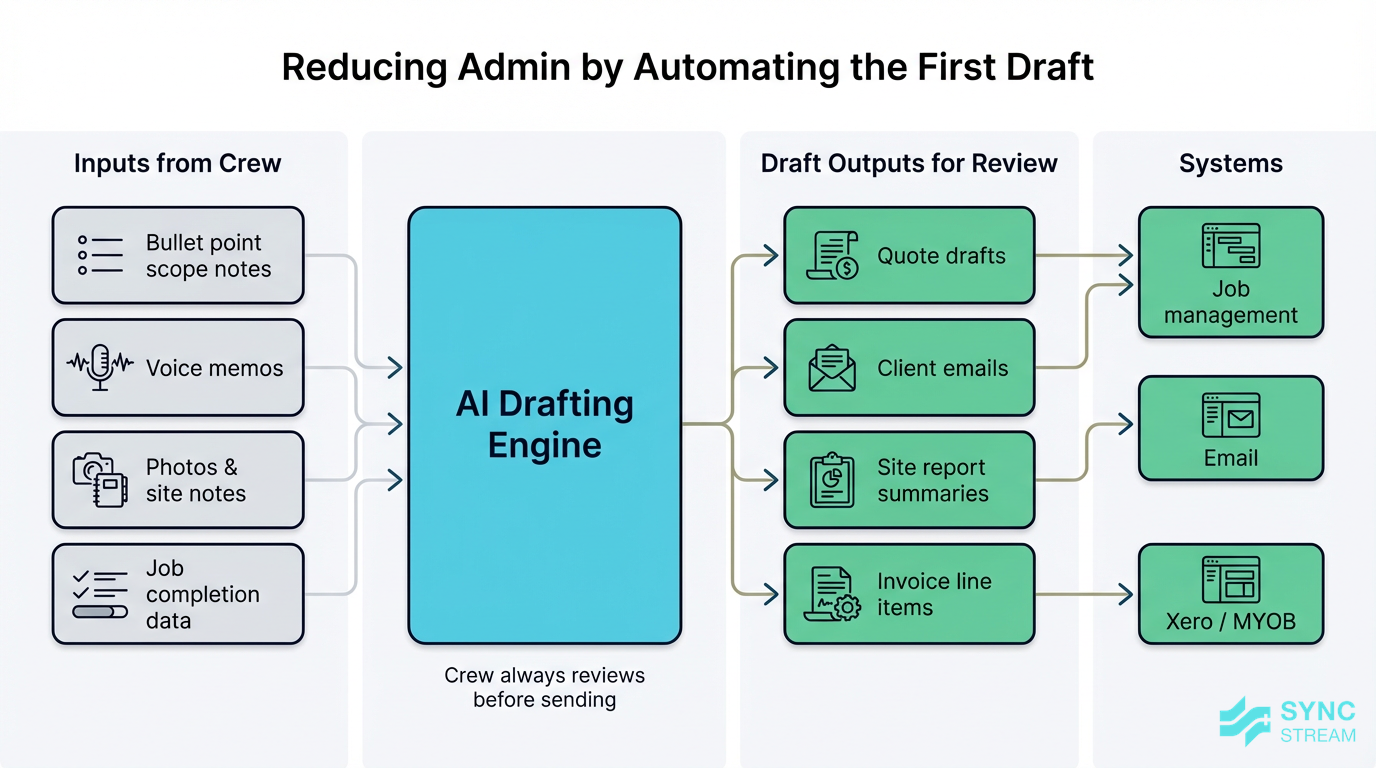
How AI turns rough notes from small crews into drafted quotes, emails, reports, and invoice line items.
On the admin side, AI can handle a lot of the “first draft” work that slows crews down:
- Drafting quotes from scope notes: Take bullet points or a quick voice recording about a job, and AI can turn it into a structured quote with line items and clear inclusions/exclusions for you to review.
- Turning text or voice notes into professional emails: Instead of typing long emails on your phone, you speak a rough message, and AI formats it into clear, polite Australian English.
- Summarising site reports: AI can condense long site notes or defect lists into clear summaries for clients or builders, while keeping all key details.
- Preparing invoice line items from job data: Once a job is marked complete, AI can suggest invoice descriptions and quantities based on time sheets and materials used.
Crews can also use AI chat tools to:
- Turn rough bullet points, photos, or voice memos into job reports, variation descriptions, and client updates.
- Standardise terminology so communications feel consistent and professional, regardless of who wrote the first draft.
When these tools integrate with your existing stack—job management plus accounting tools like Xero or MYOB—AI can:
- Pre-fill client and job details
- Reduce double entry between systems
- Catch missing ABNs, addresses, or purchase orders before invoices go out
That reduces not just admin time, but also manual data mistakes that cause delays or rework.
Automating compliance and safety tracking
Compliance and safety paperwork is repetitive, but also critical. AI can streamline it while keeping a competent person in control.
- Standardising SWMS, JSAs, and risk assessments: For common tasks like demolition, framing, suspended ceilings, or office fitout, AI can pre-fill a SWMS template with typical hazards and controls. A supervisor or foreman then reviews and adjusts it for the specific site, client requirements, and project scope.
- Analysing past incidents and defects: Feed AI with past incident reports, near-miss notes, or defect lists (even if they’re in PDFs or emails), and it can surface patterns—such as recurring issues with certain tools, locations, or times of day. These insights can inform your next toolbox talks or supervision focus.
- Tracking inductions, tickets, and equipment: AI-enabled systems can watch dates and documents, then send reminders for:
- Site and builder-specific inductions
- High-risk work licences
- Electrical test and tag due dates
- Plant and equipment service intervals
All of this documentation can be stored in a searchable way, so if a regulator, builder, or auditor asks for proof, you can pull it up quickly instead of digging through cartons of paperwork.
Smarter multi-job scheduling and resourcing
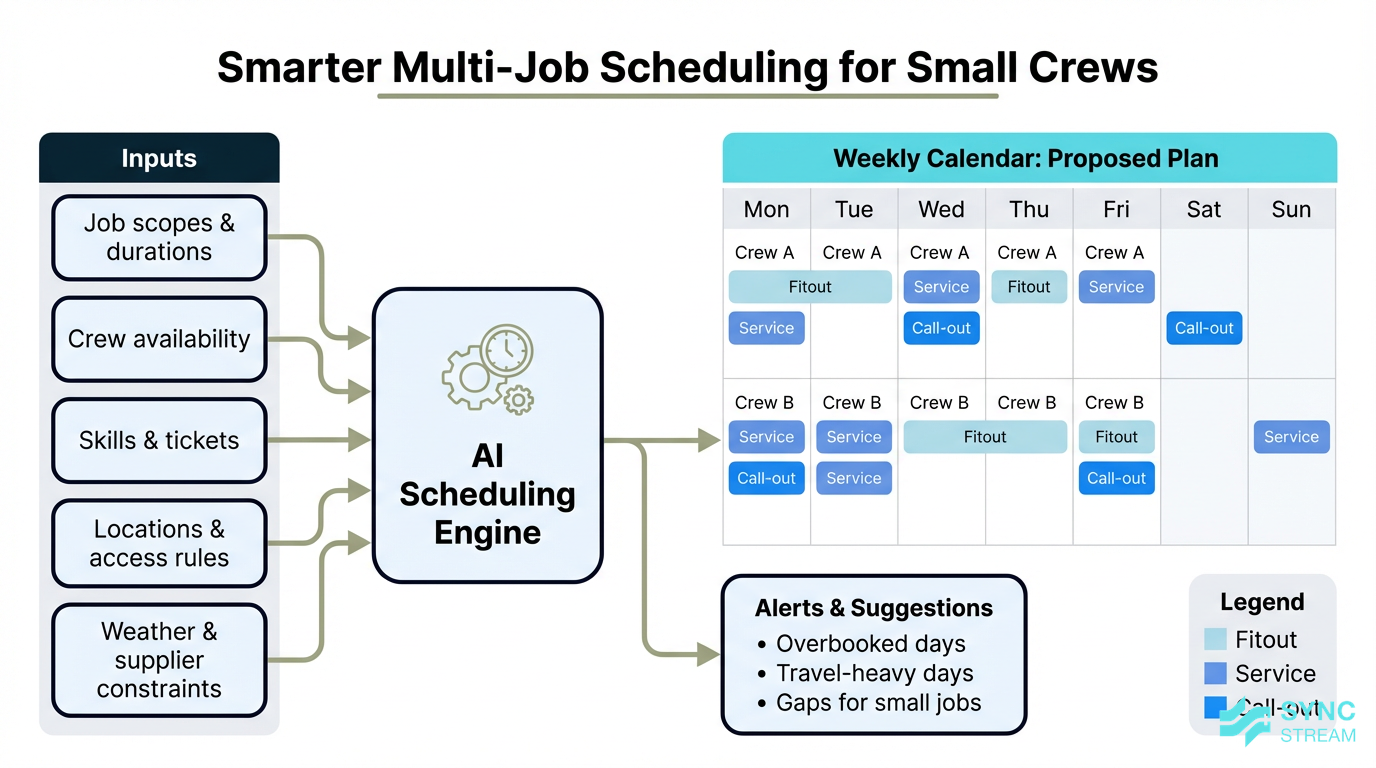
AI-assisted scheduling that balances multiple jobs, crew capacity, skills, and travel time.
Multi-job scheduling is where many small crews feel constant pressure. AI can help move you beyond whiteboards and guesswork.
Key capabilities include:
- Forecasting crew capacity (2–6 weeks): Based on job durations, public holidays, and typical delays, AI can estimate whether you’re over-booked or have capacity gaps coming up.
- Suggesting job sequences: AI can group nearby jobs, factor in access times or noisy work restrictions, and propose a sequence that reduces travel and downtime.
- Routing optimisation: For service-heavy or multi-site days, AI can suggest the best order to visit sites, reducing unbilled drive time and fuel.
- Automatic re-allocation: When a job blows out, materials are delayed, or weather hits, AI can propose updated allocations—who moves where and when—to keep critical paths moving.
- Skill and ticket-based assignment: By looking at skills, tickets, and past performance, AI can suggest which team members to place on which jobs, and how to balance urgent call-outs against larger fitout work.
The result is fewer days where everything lands on one or two people, and more weeks where work is spread realistically across the crew.
Implementation strategy for small crews
Map workflows and pick one use-case
The fastest way to see value from Small building and fitout crews AI is to start small and focused.
A practical sequence is:
- List everyday workflows
- Inputs: Last 2–4 weeks of jobs, your current whiteboard/spreadsheet, and existing forms (quotes, SWMS, invoices).
- Action: Write down key workflows: quoting, scheduling, compliance (SWMS, inductions), site reporting, time sheets, invoicing.
- Expected output: A simple list of 5–8 repeatable workflows you run every week.
- Roughly time each one
- Inputs: That workflow list plus a quick chat with the owner, foreman, and office admin.
- Action: For each workflow, estimate minutes per job or per week per person (no need to be perfect).
- Expected output: A rough table like “Quoting: 3 hrs/week (owner), SWMS: 2 hrs/week (foreman)”.
- Identify pain points
- Inputs: The time estimates and recent examples where things went wrong or late.
- Action: Mark where work is delayed, redone, or pushed into evenings/weekends.
- Expected output: 2–3 workflows clearly marked as “high pain”.
- Score impact and effort (1–5)
- Inputs: The short list of high-pain workflows.
- Action: For each, give:
- Impact score (1–5): time saved, errors reduced, or cash impact if improved.
- Effort score (1–5): how hard it is to change the process and systems.
- Expected output: A simple score for each workflow (Impact ÷ Effort or similar) that highlights quick wins.
- Pick one use-case to start
- Inputs: Scored list and your current capacity to change things.
- Action: Choose one workflow such as quote drafting, SWMS templates, or turning voice notes into emails/reports.
- Expected output: A clearly defined “first AI project” with a short description (what it does, who uses it, when).
Involve at least one leading hand or supervisor in mapping the current process. They know how work actually happens in utes and on site, not just what’s written in a procedure.
Select tools and connect your systems
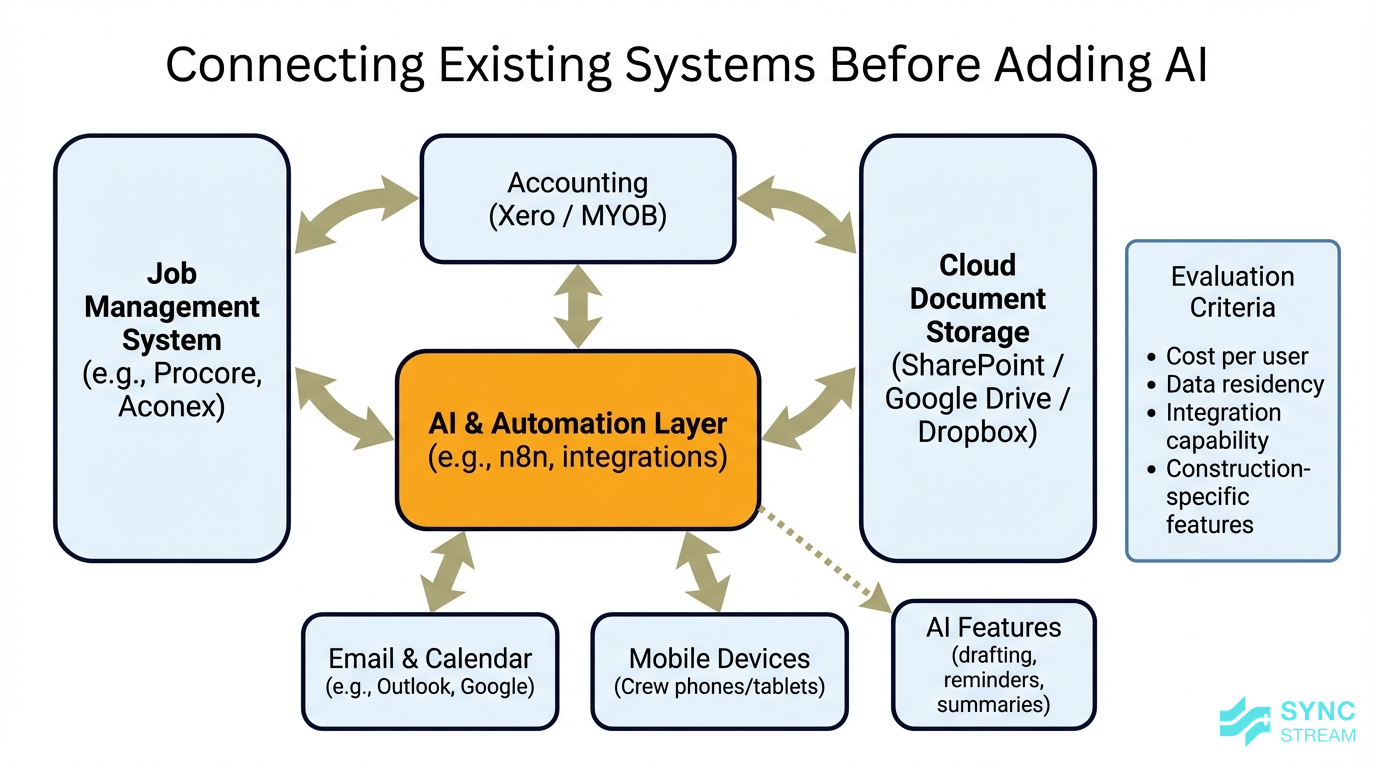
A simple architecture where AI and automation connect existing job management, accounting, and document systems.
Before buying new software, check what you already have.
Step 1: Review existing tools
- Inputs: Current job management, accounting (Xero/MYOB), email, calendar, and document storage.
- Action: List what each system is used for today and whether it already has AI features (drafting, summarising, reminders).
- Expected output: A short map of your stack and any AI features you’re already paying for.
Step 2: Check mobile usability
- Inputs: Crew phones/tablets and the short-listed tools or features.
- Action: Test key tasks on a phone with average reception: dictating notes, approving drafts, checking schedules.
- Expected output: A yes/no view of which tools are actually usable from a ute or live site.
Step 3: Compare options on key criteria
- Inputs: 2–3 realistic tool options (including “stay with what we have”).
- Action: Compare:
- Cost per user and any AI usage fees
- Where data is stored and how it’s secured
- Integration with Xero, MYOB, email, calendars, and job management
- How well it handles jobs, stages, cost codes, and variations
- Expected output: A preferred stack that can support your first AI use-case without major rework.
A simple starting stack is:
- Job management system to hold jobs, tasks, and schedules
- Accounting software (e.g., Xero, MYOB) for invoices and payments
- Cloud document storage (e.g., SharePoint, Google Drive, Dropbox) for SWMS, reports, and registers
Once this is in place, you can layer in AI-driven automation, such as:
- Auto-drafting client emails when a job status changes
- Compliance reminders for SWMS reviews, inductions, and licence renewals
An implementation partner like Sync Stream can also use orchestration tools such as n8n to build reliable, documented workflows across your existing systems without locking you into a single vendor.
Train the crew and improve over 90 days
AI works best when the crew actually uses it. A 90-day rollout keeps things controlled while you improve.
Weeks 1–2: Pilot and basic training
- Inputs: One clear use-case, a small pilot group (owner, one foreman, one admin), and real jobs.
- Actions:
- Configure the workflow for that use-case only.
- Run short toolbox-style demos on real examples.
- Create simple prompt examples in the shed/office (e.g., how to dictate a site report).
- Expected output: A working pilot used by 2–3 people on live work.
Weeks 3–8: Measure and refine
- Inputs: Pilot usage data plus feedback from the pilot group.
- Actions:
- Track 2–3 metrics: time to send quotes, number of late invoices, time spent on SWMS.
- Note where the AI drafts are wrong, slow, or confusing.
- Adjust templates, prompts, and workflow steps.
- Expected output: A tuned workflow that clearly saves time or reduces errors.
Weeks 9–12: Standardise and roll out wider
- Inputs: Refined workflow, agreed metrics, and crew feedback.
- Actions:
- Document the “new way” (screenshots, 1-page guides, short videos).
- Train the rest of the crew in short, focused sessions.
- Set rules and approvals, for example:
- AI-drafted SWMS are always checked and signed by a competent person.
- AI-drafted client emails are reviewed by a supervisor before sending.
- Schedule quick check-ins (about 15 minutes fortnightly) to fix issues.
- Expected output: A standardised, documented workflow that the wider crew uses consistently.
Once this first Small building and fitout crews AI use-case is bedded in, you can repeat the process for the next workflow.
Comparing AI options for crews
Using AI features in existing software
Many crews will get the best early results by turning on AI features in software they already use.
Pros include:
- Familiar interfaces: The crew doesn’t have to learn a whole new system.
- Less training effort: AI feels like an extra button or option, not a new platform.
- Bundled pricing: AI features are often included in existing licences or as simple add-ons.
- Managed complexity: Vendors handle which AI models to use, security, and updates.
The trade-off is that these features may be less customisable. You get what the vendor provides, which may not perfectly match your workflows.
When assessing built-in AI, ask vendors:
- How well does it handle Australian data and terms, including WHS concepts, local materials, and measurement units?
- Where is data stored and processed, and how is it secured?
- Can they run a demo using your real workflows—for example, generating a SWMS for a specific builder or drafting a quote from your standard scope notes?
Starting here can give you quick wins without a big project.
Bringing in dedicated AI tools or partners
Beyond built-in features, there are standalone AI assistants and automation platforms that sit across email, documents, and job systems. They can:
- Turn email approvals into variations in your job system automatically.
- Generate standardised reports for builders or clients from scattered notes and photos.
- Orchestrate multi-step workflows, like: site completion → draft invoice → attach SWMS and photos → email client.
The trade-offs:
- More flexibility and savings potential, because workflows are tailored to how your crew actually operates.
- But more setup effort, clearer processes, and ongoing maintenance are needed.
Working with a partner such as Sync Stream can make this manageable. You should expect support with:
- Mapping your processes (quoting, scheduling, compliance, reporting) in detail
- Selecting the right tools that work with your existing systems, budgets, and WHS obligations
- Designing and documenting workflows so they’re reliable and auditable
- Measuring ROI—time saved, error reduction, and improved cashflow—so you know the implementation is paying for itself
This approach suits crews that want to embed AI and automation deeply into operations without handing control of their data or infrastructure to a single software vendor.
Common Pitfalls
As small building and fitout crews start using AI, a few common mistakes appear again and again:
- Trying to “AI everything” at once: Spreading effort across quoting, scheduling, and compliance from day one usually leads to half-finished setups. Start with one high-impact workflow, prove the benefit, then expand.
- Skipping process mapping: If you don’t clearly define who does what, when, and in which system, AI just automates chaos. Even a simple handwritten flow on a whiteboard is better than nothing.
- Relying blindly on AI outputs: SWMS, incident reports, and client emails still need a competent person to review. Treat AI as a junior assistant whose work must be checked, not a supervisor.
- Ignoring the crew’s input: If leading hands and tradies feel tools are forced on them, they’ll work around them. Involving them early ensures the system fits real site conditions.
- Underestimating data quality: AI is only as good as the information it can see. Incomplete job records, inconsistent naming, and scattered documents will limit its value. Cleaning up key data fields (job names, stages, client details) pays off quickly.
- Locking into a single vendor without thinking ahead: Choosing tools that don’t integrate or export data easily can create headaches later. Prioritise options that work with your existing stack and avoid unnecessary lock-in.
Being aware of these pitfalls makes it easier to design a rollout that actually sticks.
Conclusion
AI for small building and fitout crews in Australia is less about flashy tech and more about making everyday work smoother—less admin, stronger compliance, and better multi-job scheduling.
By starting with one clear use-case, using the tools you already have, and rolling changes out over 90 days, you can turn Small building and fitout crews AI into a practical assistant rather than a distraction. Early adopters are already gaining an edge on speed, professionalism, and cashflow, while many competitors still rely on whiteboards and late-night paperwork.
If you want help mapping your workflows and implementing small building and fitout crews AI on top of your existing systems, Sync Stream focuses on practical, ROI-driven automation for construction and trades across Australia.
FAQ
1. Do we need to buy brand new software to start using AI?
Not always. Many job management, accounting, email, and document tools already include AI features. A good first step is to check what’s available in your existing stack and turn on a small number of features—like email drafting or note summarisation—before considering new platforms.
2. Is AI safe to use with our client and job data?
It can be, if configured correctly. Focus on tools and partners that explain where your data is stored, how it’s secured, and whether it’s used to train public AI models. Asking about Australian data centres and backup practices is important for builders and fitout crews handling sensitive project information.
3. Can AI handle Australian WHS and local standards?
AI can help structure SWMS, JSAs, and safety documents around Australian WHS concepts, but it doesn’t replace your legal obligations. A competent person must always review and approve safety documents to ensure they match current regulations, site conditions, and builder requirements.
4. How much time can AI realistically save a small crew?
The exact number varies, but many small crews can recover several hours a week per supervisor or owner by automating quoting drafts, emails, SWMS templates, and scheduling admin. Starting with one workflow makes it easier to measure and prove the time saved.
5. Will AI replace office staff or supervisors?
For construction and fitout, AI is more likely to augment people than replace them. It handles repetitive drafting and reminders, while humans still manage relationships, site decisions, and approvals. Many crews use AI to free office staff and supervisors to focus on higher-value tasks instead of data entry.
6. What’s a good first project for small building and fitout crews AI?
Two common starting points are: (1) using AI to draft quotes from scope notes and (2) generating SWMS templates for typical tasks that supervisors then review and finalise. Both are high-impact, relatively low-effort, and easy for the crew to understand and adopt.