

Introduction
Running a small earthmoving business in Australia is a constant balancing act: keeping machines moving, keeping clients happy, and keeping enough margin after fuel, labour, and travel. The problem is that most of the data you need to make good decisions lives in paper dockets, text messages, and a whiteboard in the shed.
That’s where small earthmoving operators AI comes in—not as robots replacing operators, but as practical tools that automatically track machine use, help you quote accurately, and keep your schedule under control.
In this article, we’ll walk through what AI actually means for small fleets, why it matters in the Australian context, the key components you need, and a realistic rollout plan. We’ll also compare different options and common pitfalls, so you can decide what makes sense for a 1–5 machine operation without wasting money or losing control of your data.
What is small earthmoving operators AI
How AI fits earthmoving workflows
For small earthmoving businesses, AI isn’t sci‑fi robots or fully autonomous excavators. Think of it as software that learns from your job, machine, and cost data, then uses that learning to automate repetitive admin and improve decisions.
Instead of flicking through old invoices or trying to remember how long a similar cut took last year, AI‑powered tools:
- Read machine hour data from GPS/telematics.
- Link it to specific jobs, sites, and operators.
- Spot patterns in how long work really takes, what it costs, and where time is being lost.
- Suggest better quotes and smarter schedules based on that history.
In day‑to‑day terms, that looks like:
- Tracking hours on excavators, skid steers, and tippers automatically instead of relying on handwritten dockets.
- Matching jobs to machines based on machine size, availability, and travel distance.
- Quoting work using typical hours, fuel, and cartage from similar past jobs so you don’t underprice.
- Invoicing faster, with hours and travel pre‑filled from tracked data instead of re‑keying everything.
For small operators, this usually means cloud apps, telematics devices, and integrations with your existing systems—your accounting platform, job sheets, or CRM. You’re not throwing out what you already use or buying a whole new fleet. You’re adding smarter layers on top of it so the data flows without as much manual effort.
Core use-cases: utilisation, costing, scheduling
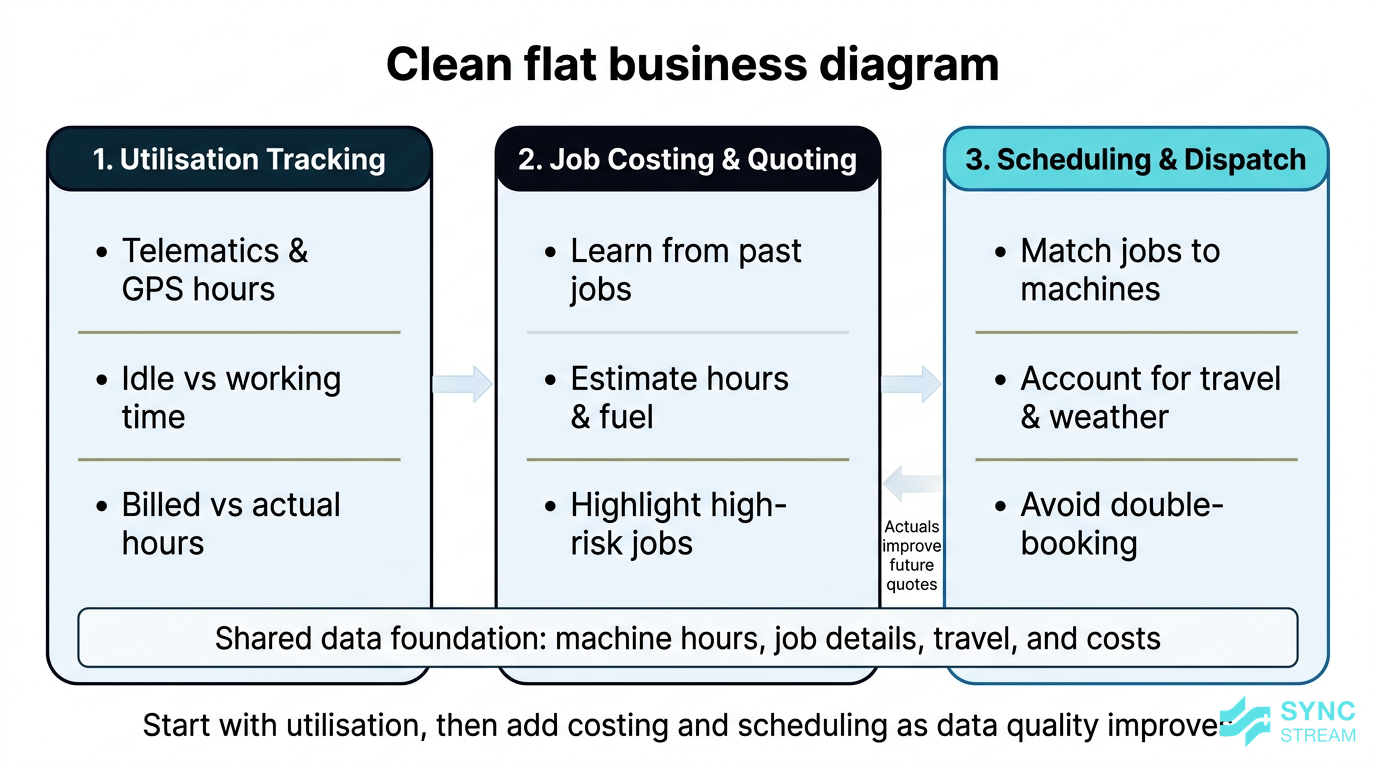
There are three core ways small earthmoving operators can use AI today:
- Tracking machine utilisation
- Automating job costing and quoting
- Managing scheduling and dispatch
They’re closely connected.
Imagine a two‑machine operator in regional NSW doing residential cuts and small civil jobs: a 5–8 tonne excavator and a tipper.
- Utilisation tracking
- Input: GPS/telematics units logging engine status and movement on each machine.
- Action: Configure the system so each day’s tracked hours are tagged to the correct job and machine.
- Expected output: Daily and weekly summaries showing engine hours, idle vs working time, and billed vs actual hours per job and per machine.
- Job costing and quoting
- Input: History of completed jobs with machine hours, travel time, fuel, and cartage recorded.
- Action: Use an AI‑assisted quoting tool that pulls from that history when you enter a new job type, location, and machine requirements.
- Expected output: A pre‑filled quote with realistic hours, fuel estimates, travel, and suggested contingencies based on similar past jobs.
- Scheduling and dispatch
- Input: Confirmed jobs (with dates, locations, and machine needs), current bookings, and operator availability.
- Action: Let the scheduling system assign machines and operators, then review and approve the suggested calendar.
- Expected output: A daily/weekly schedule that avoids double‑bookings, minimises travel, and can be reshuffled quickly when rain or site changes hit.
You don’t need to implement all three at once. Many small operators start with utilisation tracking (because it’s tangible and quick to value), then add costing once they have a few months of good data, and finally bring in smarter scheduling when the workload gets busier. As data quality and comfort with the tech improve, each layer becomes more accurate and more valuable.
Why it matters for Australian SMBs
Competitive pressures and tight margins
Australian earthmoving operators are dealing with:
- High and volatile fuel costs.
- Rising labour and subcontractor rates.
- Clients—especially builders and small civil contractors—who are price‑sensitive and often shop around.
- Pressure from larger contractors using sophisticated systems to track every hour and kilometre.
When you don’t know your true machine utilisation and job costs, you’re flying blind:
- You underquote to win work, then wear the overrun.
- You do a long day on site but only bill for part of it because travel, delays, and variations weren’t captured properly.
- You struggle to see which machines and job types are actually profitable.
By contrast, operators who can see accurate utilisation and cost data can:
- Price work with enough margin to cover fuel, travel, and risk.
- Push back confidently on disputes because they have digital records of hours and locations.
- Decide when to move a machine, hire extra gear, or say no to unprofitable work.
Construction SMEs in Australia generally lag behind other sectors in AI adoption (around 14.3% vs 19.8% overall). That gap means small earthmoving operators who move early—using AI for utilisation, costing, and scheduling—can run tighter operations and present more professionally than competitors still relying on paper and memory.
Australian context and regulation
The Australian operating environment adds extra complexity that AI tools can help manage:
- Long travel distances to regional and outer‑metro sites mean travel time and fuel burn matter as much as on‑site hours.
- Variable weather—especially rain events—can shut down sites or change ground conditions overnight, throwing schedules out.
- Safety and environmental obligations, including fatigue management, load limits, erosion controls, and site access rules, all impact machine time and costs.
With AI‑assisted utilisation tracking and digital job records, you can:
- Maintain clear logs of hours, locations, and load movements to support chain‑of‑responsibility, fatigue, and site compliance.
- Provide evidence to insurers or principal contractors if there’s a dispute about damage, delays, or access restrictions.
- Show regulators or auditors that you have systems in place to track machine use and operator hours.
There’s also broader reassurance that you’re not on your own. The Australian Government has set up the National AI Centre and related programs to help SMEs adopt AI responsibly—focusing on data security, transparency, and practical use cases. That backing, plus working with implementation partners who understand local regulations and systems, helps de‑risk adoption for smaller operators.
Benefits beyond efficiency
AI for small earthmoving operators isn’t just about squeezing more work into a week. It also improves quality of life and business stability.
- Less after‑hours paperwork: When hours, locations, and jobs are captured automatically and flow into quotes and invoices, you’re not spending nights rebuilding the week from text messages.
- Fewer disputes: With time‑stamped records of when machines were on site and working, it’s easier to resolve disagreements with builders or clients about hours, rain delays, and variations.
- Clearer cash flow: Faster, more accurate invoicing and fewer write‑offs improve cash flow predictability.
On the operations side, AI‑assisted scheduling:
- Reduces idle time and last‑minute cancellations, because you can reshuffle jobs intelligently when the weather or site readiness changes.
- Prevents double‑booking machines or operators across multiple builders and subcontractors.
- Improves reliability and communication, with clients getting clear updates when schedules move.
Over time, the data you collect supports bigger decisions:
- Should you buy vs hire another excavator or tipper?
- Is it time to add another operator or subcontract out more work?
- Which job types (e.g., tight‑access residential vs small subdivisions) consistently deliver better margins, and which should you drop or reprice?
AI doesn’t replace your judgement—it gives you solid numbers so you’re not guessing.
Key components and features
Machine utilisation tracking tools
The foundation of most AI setups for earthmoving is machine utilisation tracking.
For small fleets, that normally involves:
- Telematics and GPS devices on excavators, skid steers, and tippers to capture:
- Engine on/off and total engine hours
- Idle vs active working time
- Location and movement between sites
AI capabilities sit on top of this raw sensor data. Instead of just a list of hours, smarter systems can:
- Auto‑detect operating states—"working", "idling", or "travelling"—by analysing RPM, hydraulic pressure, movement, and time patterns.
- Flag unusual usage, such as machines running outside normal hours, unexpected locations, or excessive idle time on a particular job.
For a small earthmoving operator, practical must‑haves are:
- Mobile access: An app or mobile‑friendly site so you can see where your machines are and what they’re doing from the ute.
- Simple dashboards: Clear daily/weekly summaries—hours by machine, hours by job, idle time, and travel—rather than complex analytics you’ll never use.
- Exportable reports: Easy export to CSV/PDF for your accountant, or to attach to invoices when a client questions hours.
- Integration with timesheets and invoicing where possible, so tracked hours can flow through to job records and bills without double entry.
AI-driven job costing and quoting
Once you’re collecting solid utilisation data, AI can help you cost and quote jobs far more accurately.
These systems learn from your past work:
- How many hours similar jobs took by machine type.
- Typical fuel use, materials, and cartage involved.
- Patterns in delays—weather, access issues, hold‑ups with other trades.
- The real cost of long‑distance travel to certain areas.
From there, AI tools can:
- Pre‑fill quotes with estimated hours for machines and operators, standard travel allowances, and typical tip runs based on the job type and location.
- Suggest contingencies—for example, adding a wet‑weather allowance during certain seasons or building in extra time for known access‑challenged suburbs or rural blocks.
- Highlight high‑risk jobs, such as those with long travel, tricky access, or weather‑sensitive work, where a fixed price may not be wise.
The real power comes from linking costing back to actuals:
- After the job is completed, actual machine hours, fuel, and delays flow back into the job record.
- The AI model updates its understanding, so the next time you quote a similar job it’s based on reality, not wishful thinking.
- You can see where you made or lost money—too much idle time, underestimated travel, under‑allowed for cartage—so you adjust either your pricing or how you run that type of work.
Even simple setups—say, an AI‑assisted quoting tool sitting on top of your current job log and accounting system—can materially reduce underquoting and help protect your margin.
Smart scheduling and dispatch
With better data on how long jobs really take, AI can dramatically clean up scheduling and dispatch.
Key features include:
- Automatic matching of machines and operators to jobs based on:
- Availability and existing bookings
- Proximity to the site
- Job type (e.g., tight access needing a smaller excavator vs bulk earthworks)
- Dynamic reshuffling when conditions change, such as:
- Rain making cut and fill work impossible, so the system pushes those jobs back and pulls forward drier‑site work or cartage.
- Grouping several small, nearby jobs on the same day to cut dead travel.
- Avoiding clashes when you’re working for multiple builders or sharing operators across your own and hired machines.
Operationally, it should also handle:
- Calendar syncing with your existing calendars so you can see commitments at a glance.
- SMS or app notifications to operators and subcontractors when jobs are booked, moved, or cancelled, including key details (site address, start time, special access notes).
- Route optimisation for tippers where relevant, reducing unnecessary kilometres between jobs, tips, and quarries.
The goal isn’t a perfect, fully automated system—it’s reducing manual juggling, cutting double‑booking, and making it easier to keep everyone in the loop when plans inevitably change.
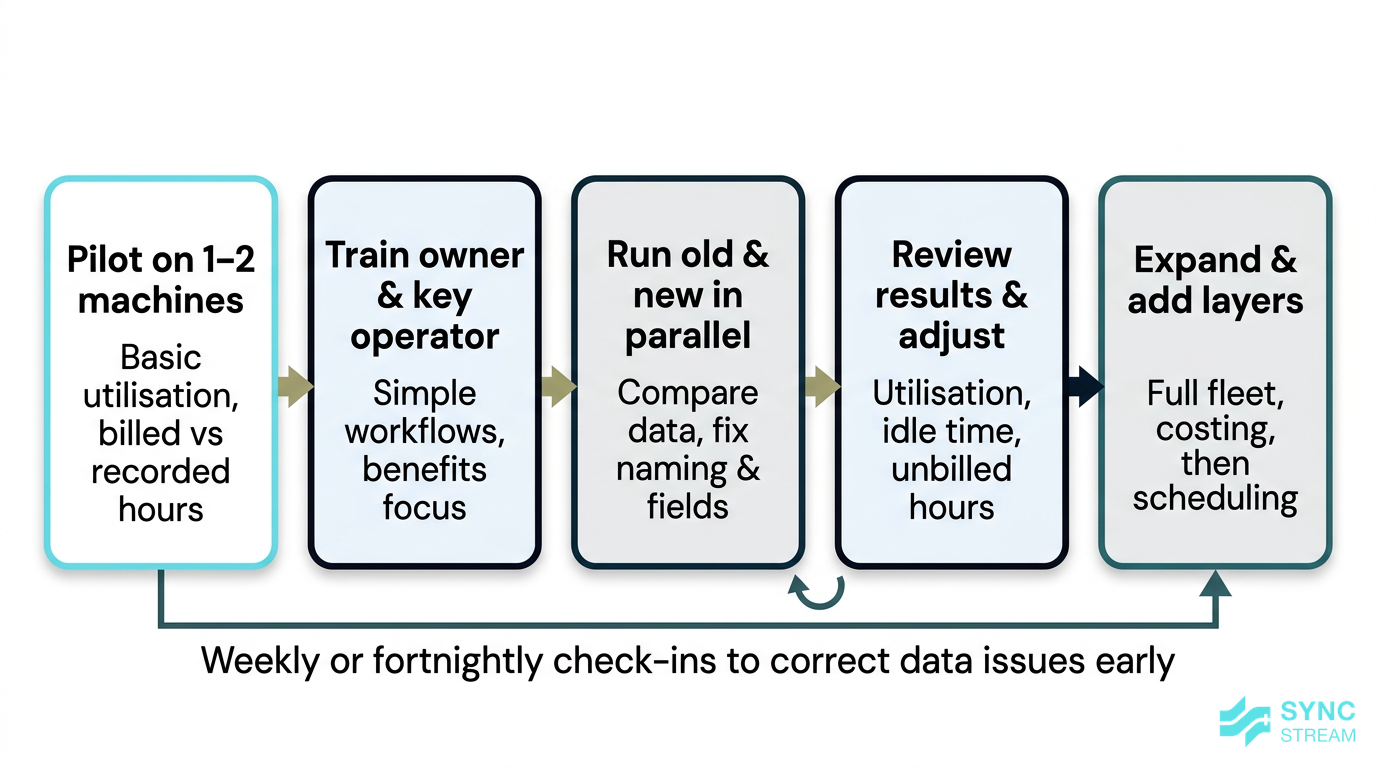
A staged rollout plan for implementing AI-driven utilisation, costing, and scheduling in a small earthmoving fleet.
Implementation strategy
Clarify goals and metrics first
Before you choose any tools, get clear on why you’re adopting AI and what success looks like.
Start by picking one or two concrete goals, such as:
- Increase average machine utilisation by a certain percentage.
- Cut unpaid hours (unbilled travel, delays, and variations) each week.
- Reduce underquoting on a particular type of job.
Then decide how you’ll measure progress. Simple, practical metrics include:
- Machine hours billed vs machine hours recorded by telematics.
- Jobs completed on time vs planned schedule.
- Hourly profit by machine or job type (revenue minus direct fuel, labour, and cartage costs).
It also pays to document your current manual processes:
- Input: Existing scheduling tools (whiteboards/calendars), dockets, and message threads.
- Action:
- Take photos of current whiteboards.
- Collect a week’s worth of paper dockets and timesheets.
- Export or screenshot typical text and email chains for bookings and variations.
- Expected output: A simple record of how work is actually scheduled, tracked, and billed today.
- Action:
- Input: The above records plus your knowledge of typical jobs.
- Action: Sketch a basic flow from enquiry → quote → schedule → site → invoice, noting where info gets lost or delayed.
- Expected output: A one‑page workflow map highlighting bottlenecks like lost dockets, missing hours, or double‑bookings.
The gaps and bottlenecks will highlight where automation and AI will give you the biggest return.
Getting data foundations right
AI is only as good as the data you feed it. For small earthmoving operators, that doesn’t mean big IT projects; it means getting the basics consistent.
Key foundations:
- Clean job names: Use standard naming like "Builder – Suburb – Lot/Stage" instead of free‑text descriptions that change every time.
- Consistent site addresses and GPS pins: Helps with travel calculations and route optimisation.
- Accurate machine IDs: Each excavator, skid steer, and truck should have a clear ID that’s used the same way across dockets, telematics, and invoices.
Good basic practices include:
- Setting up standard job codes for common job types (e.g., driveways, house cuts, footings, trenching).
- Capturing start and finish times for machines on each job.
- Logging delays and reasons (weather, waiting on other trades, access, mechanical issues).
- Defining a small set of minimum fields required on every job: client, site, job type, machine(s), operator(s), and agreed rate structure.
To put this in practice:
- Input: Your current docket or job sheet template (paper or digital).
- Action:
- Add or standardise fields for job name, site address/GPS, machine ID, operator, job code, start time, finish time, and delay reason.
- Brief operators on which fields must be filled in every time.
- Expected output: Consistent, AI‑ready records that can be imported or synced into future tools.
It’s better to:
- Start with a few disciplined fields in a spreadsheet or simple app that everyone actually uses, than
- Jump straight into a complex system that no one keeps up to date.
Once the data is consistent, AI tools can reliably learn from it and automate more of the admin without constant fixing.
Practical rollout plan for small fleets
A realistic rollout plan for a 1–5 machine operator might look like this:
- Pilot on one or two machines
- Inputs: Your main excavator and tipper, a chosen telematics/GPS solution, and a list of active jobs.
- Action:
- Install devices on 1–2 machines.
- Set up a basic dashboard and link each day’s tracked hours to current jobs.
- Expected output: A simple view of utilisation and billed vs recorded hours for those machines over a few weeks.
- Train the owner and a key operator
- Inputs: The live system from step 1 and one or two typical workdays.
- Action:
- Run a short, on‑site session showing how to start/stop jobs, check summaries, and flag issues.
- Capture any confusion and adjust labels or steps.
- Expected output: At least two people who can use the system confidently and help others.
- Run old and new systems in parallel for a month
- Inputs: Paper dockets/whiteboard plus the new telematics or job system.
- Action:
- Keep using existing methods while also using the new tools on pilot machines.
- Each week, compare: total hours per job, travel time, and any missing records.
- Expected output:
- A list of mismatches (e.g., naming differences, missed clock‑ons).
- Adjusted workflows and naming rules that reduce errors.
- Review results and adjust
- Inputs: 3–4 weeks of pilot data and your original goals ( utilisation, unpaid hours, underquoting).
- Action:
- Calculate changes in billed vs recorded hours and identify obvious idle time or scheduling clashes.
- Decide which settings or habits to change (e.g., enforce job selection before engine start).
- Expected output: A short summary of gains and a refined process ready to scale.
- Expand to the full fleet and add layers
- Inputs: A working pilot, documented process, and remaining machines.
- Action:
- Roll telematics or job tracking to all machines.
- Turn on AI‑assisted costing in your quoting process once you have enough history.
- Add smart scheduling features when the team is comfortable.
- Expected output: Fleet‑wide utilisation tracking with AI‑supported costing and, over time, automated scheduling across your jobs.
Build in weekly or fortnightly check‑ins to:
- Review dashboards for odd data (e.g., machines working at midnight).
- Fix data quality issues quickly before they become habits.
- Adjust how jobs are set up in the system so it stays simple and usable.
This staged approach keeps risk low, lets you prove ROI early, and avoids overwhelming the team.
Options comparison
Point solutions vs integrated platforms
When adopting AI and automation, small earthmoving operators generally face a choice between:
- Point solutions – single‑purpose tools like standalone GPS tracking, separate quoting software, or a basic scheduling app.
- Integrated platforms – job management systems that bundle tracking, quoting, scheduling, and sometimes invoicing.
Point solutions tend to offer:
- Pros:
- Lower upfront cost and simpler setup.
- Easier to test one problem area (e.g., utilisation) without changing everything.
- The ability to swap out tools if they don’t fit.
- Cons:
- More manual data transfer between systems (e.g., copying hours into invoices).
- Multiple logins and apps for you and your operators.
- Harder to get a single view of jobs, machines, and money.
Integrated platforms tend to offer:
- Pros:
- One place for jobs, machines, operators, quotes, and invoices.
- Better automation and AI, because all the data lives together.
- Fewer double entries and less chance of things falling through the cracks.
- Cons:
- Higher subscription costs.
- More complex to implement initially.
- Greater risk of vendor lock‑in—it’s harder to move away once everything is built around one system.
For 1–5 machine operators, the sweet spot is often lightweight, cloud‑based, mobile‑friendly tools—whether as well‑chosen point solutions with good integrations or a small, simple integrated platform that doesn’t try to do everything.
OEM systems vs aftermarket add-ons
Most new machines come with some form of OEM (manufacturer‑supplied) telematics. Older gear or mixed fleets often rely on aftermarket add‑on devices.
OEM systems:
- Pros:
- Often include deeper diagnostics—fault codes, fuel burn, and detailed machine health.
- Tight integration with the machine’s electronics, sometimes with dealer support.
- May be included for free or at a discount for a period when you purchase the machine.
- Cons:
- If you run a mixed fleet (different brands, older machines), you end up with multiple portals and fragmented data.
- Integrations and exports might be limited or require extra work.
- Licensing can get expensive once the initial trial periods end.
Aftermarket platforms and devices:
- Pros:
- Can be fitted to almost any machine—excavators, skid steers, tippers—so you can unify data across brands and ages.
- Often designed with SMEs in mind: simpler interfaces and more flexible pricing.
- One dashboard for the whole fleet, which makes it easier to run AI across all machines.
- Cons:
- May not offer as deep machine diagnostics as OEM tools.
- Require installation and sometimes calibration.
- Quality varies, so selection and setup matter.
For small operators, a common approach is to use OEM data where it’s strong, but pull it into an aftermarket or central platform that can combine data from all machines for utilisation, costing, and scheduling.
DIY spreadsheets vs AI-powered tools
Many small earthmoving operators currently run everything on paper dockets and spreadsheets.
DIY spreadsheets and manual processes:
- Pros:
- Very low cost.
- Familiar—no new apps to learn.
- Full control over structure.
- Cons:
- Highly error‑prone—easy to mistype hours, dates, or rates.
- Hard to share live information between the yard, cab, and office.
- No automatic link between utilisation, costing, and scheduling.
- No predictive insight—spreadsheets don’t learn from past jobs.
AI‑powered tools:
- Pros:
- Automate data capture (hours, locations, job links) and reduce manual entry.
- Provide predictions and suggestions for quotes and schedules based on real history.
- Save multiple hours a week in admin once set up properly.
- Make it easier to scale from a couple of machines to a small fleet.
- Cons:
- Require upfront time to set up and train the team.
- Ongoing subscription and, in some cases, hardware costs.
- Need sensible configuration so they fit how you actually work.
Entry‑level AI tools don’t have to be expensive, especially if they’re implemented on top of systems you already use. The key is setting them up correctly so they genuinely reduce workload rather than creating more.
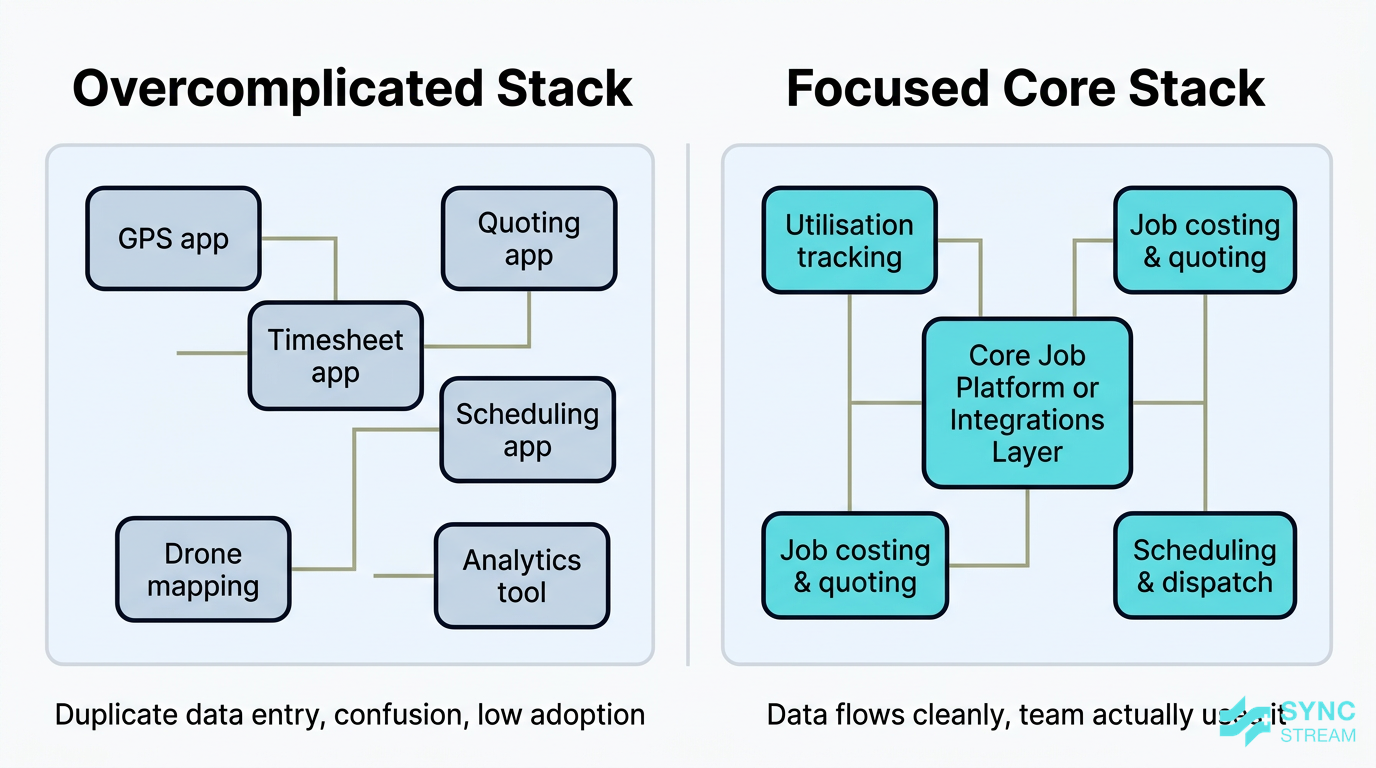
The difference between an overcomplicated tech stack and a focused core of utilisation, costing, and scheduling tools.
Common pitfalls for operators
Underestimating change management
The biggest implementation risk is rarely the tech—it’s people and habits.
Operators and admin staff may resist new systems because they worry about:
- Being "tracked" too closely.
- Extra work entering data on top of their normal tasks.
- Looking silly if they’re not tech‑confident.
To reduce resistance:
- Involve operators early—get their input on what’s painful today and show how the new system addresses those issues.
- Explain the direct benefits for them: less paperwork, fewer arguments over hours, clearer schedules, and fewer last‑minute changes.
- Keep data entry minimal—automate what you can and only require a few essential fields from operators.
A simple way to structure rollout from a people perspective:
- Input: List of team members and their roles.
- Action:
- Identify one or two "champions" to test the system first.
- Run short toolbox talks focused on how AI will reduce disputes and paperwork.
- Collect feedback weekly and adjust workflows.
- Expected output: Operators who feel consulted, understand the purpose, and are more likely to adopt the new tools.
Avoid rolling out too many features at once. Start small—like tracking hours on one machine and using that data on a couple of jobs—then expand once people can see the payoff.
Overcomplicating the tech stack
It’s easy to be sold on feature‑rich platforms that promise everything from drone mapping to automated take‑offs. For most small earthmoving operators, that’s overkill.
Buying systems that are too complex for your current size and processes can lead to:
- Confusion and low adoption—people revert to the old ways.
- Money wasted on unused modules and licences.
- Fragmented data spread across multiple apps.
Instead, focus on core functions first:
- Utilisation tracking.
- Job costing and quoting.
- Scheduling and dispatch.
Leave advanced analytics or semi‑autonomous features until the basics are running smoothly.
Also watch out for multiple unconnected apps—one for GPS, one for quotes, another for timesheets, a different one for scheduling. This creates duplicate data entry and confusion. When evaluating tools, put integration high on your checklist so information can flow across your systems without constant copying and pasting.
Ignoring costs, risk, and compliance
Even when AI tools are relatively affordable, there are still hidden costs and risks to manage:
- Hardware purchase and installation for telematics and GPS.
- Training time for you and your team.
- Data SIMs and connectivity for devices.
- Ongoing subscription fees that can stack up over multiple tools.
It’s important to track these against the benefits—recovered billable hours, reduced admin, better pricing—so the ROI stays positive.
On the risk side:
- Consider data security and Australian data residency—where is your data stored, and how is it protected?
- Set access controls so staff and subcontractors only see what they need.
- Clarify data ownership and export options in case you want to change systems later.
A practical checklist here:
- Input: Shortlist of AI, telematics, or scheduling vendors.
- Action: For each, confirm pricing (hardware, install, monthly), data hosting region, export options, and permission controls.
- Expected output: A comparison that shows true total cost and risk, not just the headline subscription fee.
Finally, remember that AI outputs are not infallible. Recommendations around time estimates, routes, or job risk should support your judgement, not replace it. Safety, load limits, and on‑site decisions must still rest with experienced operators and supervisors.
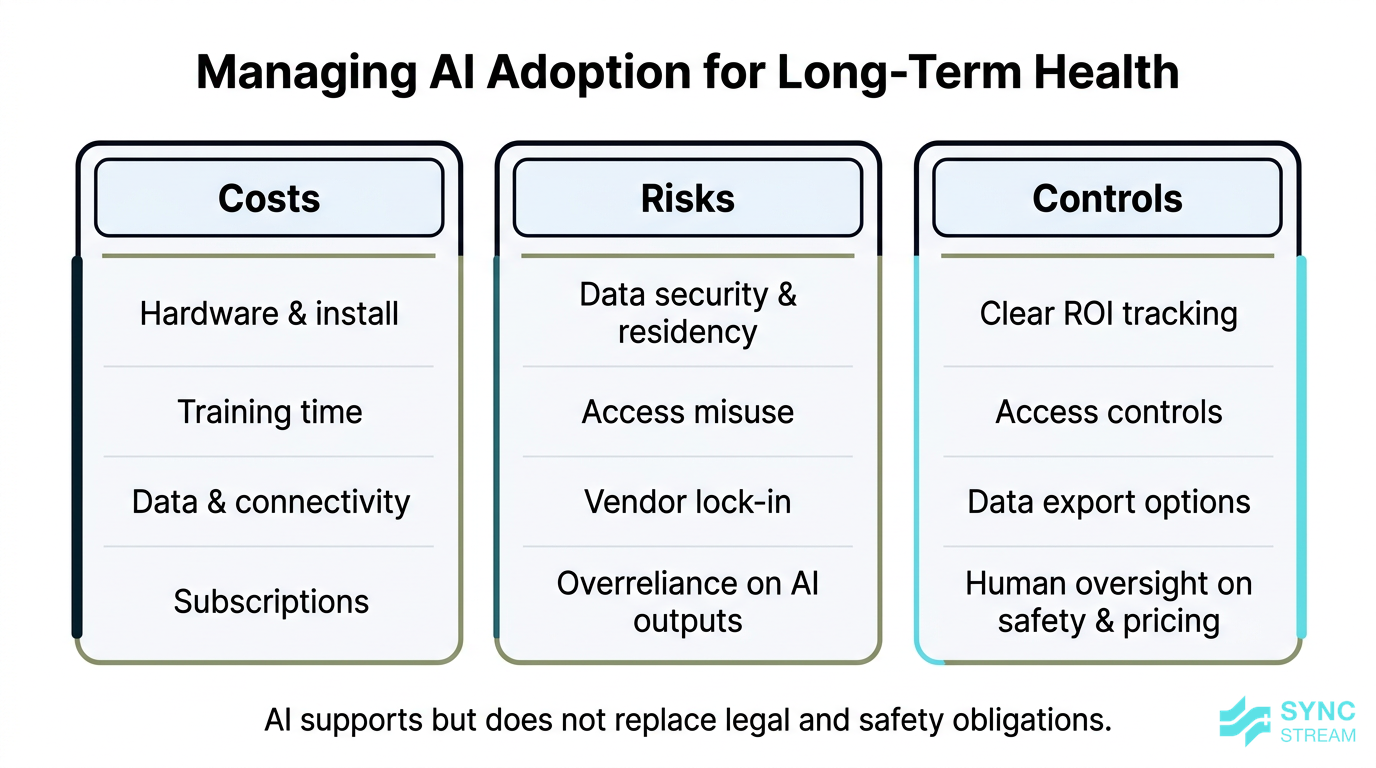
Key cost, risk, and compliance factors to manage when adopting AI and telematics in a small earthmoving business.
Conclusion
AI for small earthmoving operators is not about replacing skilled people or buying a brand‑new fleet. It’s about using the data you already generate—machine hours, jobs, travel, and costs—to automate admin and make better decisions.
By starting with machine utilisation tracking, then adding job costing and smart scheduling as your data and confidence grow, you can protect margins, reduce disputes, and take back hours each week from paperwork.
The key is a staged, practical rollout: clear goals, clean data foundations, simple tools that integrate with your existing systems, and a focus on operator buy‑in. Approached this way, small earthmoving operators AI becomes a lever for better utilisation, more accurate job costing, and more reliable scheduling—not another shiny toy.
If you want help designing AI‑driven utilisation, costing, and scheduling workflows on top of the systems you already use—without losing control of your data or getting sold hype—Sync Stream can work with you to scope, implement, and document a solution that fits your size and fleet.
FAQ
Even very small operators can benefit from AI by automatically tracking hours and locations, improving quote accuracy, and keeping a clear schedule. You don’t need a big fleet—starting with telematics on one excavator and linking that data to basic quoting and invoicing can quickly reduce unbilled time and admin.
Do I need new machines to use AI and telematics?
No. Aftermarket GPS and telematics devices can be fitted to older machines and mixed fleets. Many new machines do have OEM telematics, but you can also pull that data into a central platform so all your machines are managed together.
Is AI too expensive for small earthmoving businesses?
Costs depend on the tools and hardware you choose, but entry‑level setups can be relatively affordable, especially compared to the value of just a few extra billable hours per week or avoiding a couple of badly underquoted jobs. A staged rollout—starting with one or two machines—keeps both risk and cost down.
What data do I need to get started with AI for utilisation and costing?
At minimum, you’ll need consistent job names, site addresses, machine IDs, and start/finish times for each job. Logging key delays and reasons also helps. You can start capturing this in a spreadsheet or simple app, then plug AI tools in once the data is reliable.
Will AI replace my office admin or bookkeeper?
AI and automation can reduce repetitive admin—like copying hours into invoices or chasing missing dockets—but it doesn’t replace the need for human oversight. You’ll still want someone checking exceptions, handling client relationships, and making financial decisions.
How long does it take to see results from AI in a small fleet?
Most small operators who implement basic utilisation tracking and link it to invoicing can see benefits within a few weeks—fewer missed hours, less manual admin, and better visibility. For costing and scheduling improvements, expect a few months of good data before the AI suggestions become noticeably sharper.
Is my data safe when I use AI tools?
Data security depends on the providers and setup you choose. Look for tools that support secure logins, clear data ownership terms, and (where possible) Australian or reputable regional data hosting. Working with an implementation partner who understands both your operational needs and security requirements can further reduce risk.