

Introduction
For many small Australian waste collection operators, margins are tight, contracts are demanding, and admin never seems to end. Small waste collection operators AI is not about robots taking over your trucks – it’s about using smarter software to make each run, invoice, and report easier and more profitable.
In this article, we’ll look at how AI can plug into the systems you already use to:
- Optimise routes and scheduling
- Automate billing and invoicing
- Track and prove service compliance for councils and commercial customers
You’ll see where AI fits in a typical day for a 3–15‑truck operator, what tools are available to Australian SMBs, and a practical rollout path that doesn’t overwhelm your team.
What is Small Waste Collection Operators AI
How AI fits waste collection workflows
In plain terms, AI is software that learns from your data – GPS traces, bin locations and fill levels, job history, weights, and invoices – to recommend better decisions. Instead of a dispatcher manually shuffling runs, AI route engines suggest the best sequence of stops. Instead of a bookkeeper combing through run sheets, AI reads job data and drafts invoices for you.
In this context, “Small waste collection operators AI” means AI features that sit inside routing tools, telematics platforms, and billing workflows, not a single standalone product.
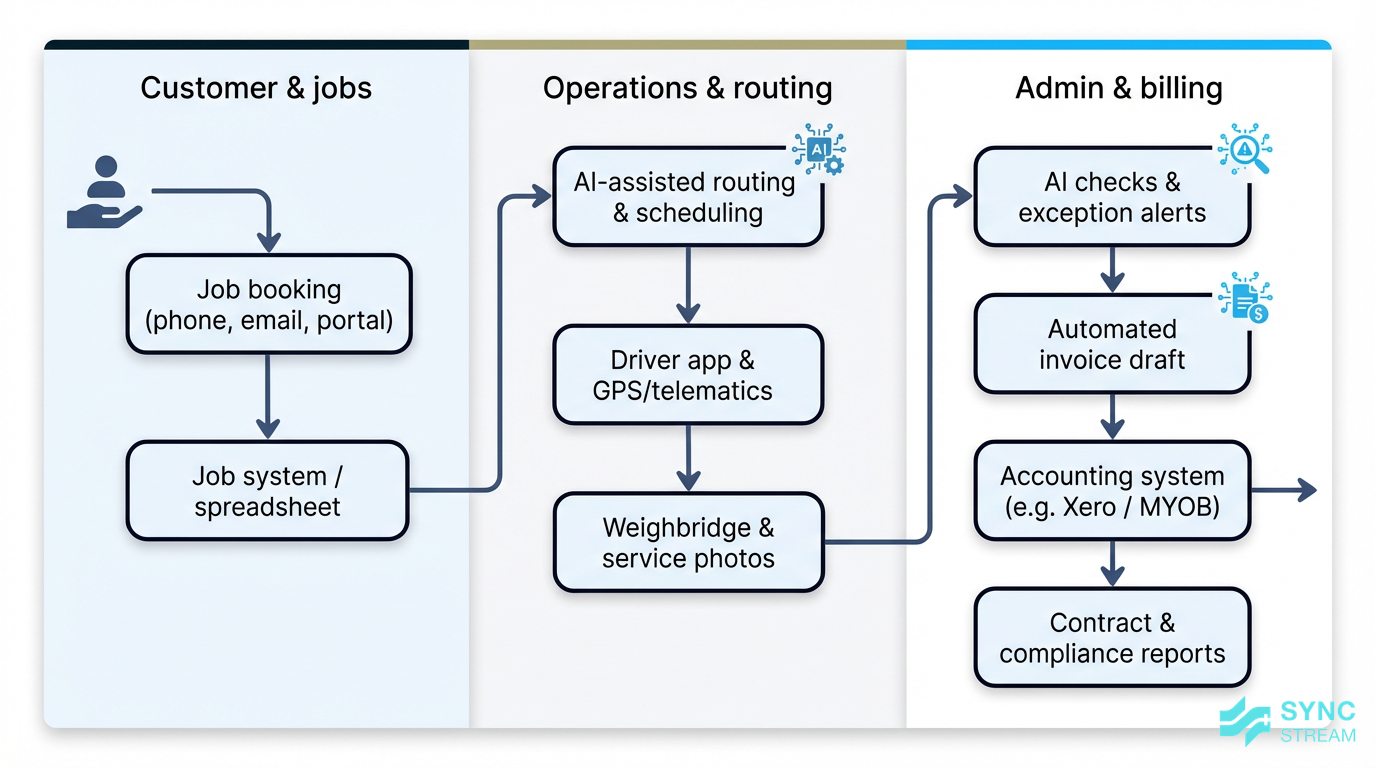
For a small Australian operator with 3–15 trucks, a typical day might look like:
- Jobs are booked via phone, email, a web form, or council portal.
- Routes are set in a planning tool or spreadsheet.
- Drivers follow run sheets or a mobile app, with GPS/telematics capturing movements.
- Weights come from the weighbridge, and notes/photos from drivers.
- Admin staff turn all of that into invoices and monthly reports.
AI slots into these existing tools: job booking systems, route planners, truck telematics, weighbridge software, billing, and reporting. Most of the time, you’re using AI without a separate “AI product” – it’s built into routing apps, GPS trackers, smart bin sensors, or invoice automation tools that talk to your accounting system.
Typical AI tools used today
Most small waste fleets that use AI are tapping into a few common tool categories:
- Route optimisation engines that use traffic patterns, historical collection data, and time windows to arrange stops in the most efficient order.
- IoT sensor platforms (for example, smart bin lids) that report real‑time fill levels so you can avoid driving to half‑empty bins.
- Anomaly detection that flags likely missed services or unusual patterns in GPS traces and service logs.
- Automated document and data processing that reads job data, dockets, or run sheets and feeds clean information into your billing system.
An emerging area is predictive maintenance. Here, AI monitors engine hours, vibration, fuel usage, and fault codes from truck telematics to highlight likely breakdowns before they stop a truck mid‑run – useful even for fleets of just a few vehicles.
Most of these tools are cloud‑based and subscription priced. Drivers use mobile apps; managers use web dashboards. You don’t need in‑house data scientists – but you do need clear processes and basic digital data for the tools to work well.
Why it Matters for Australian SMBs
Financial and operational gains for small fleets
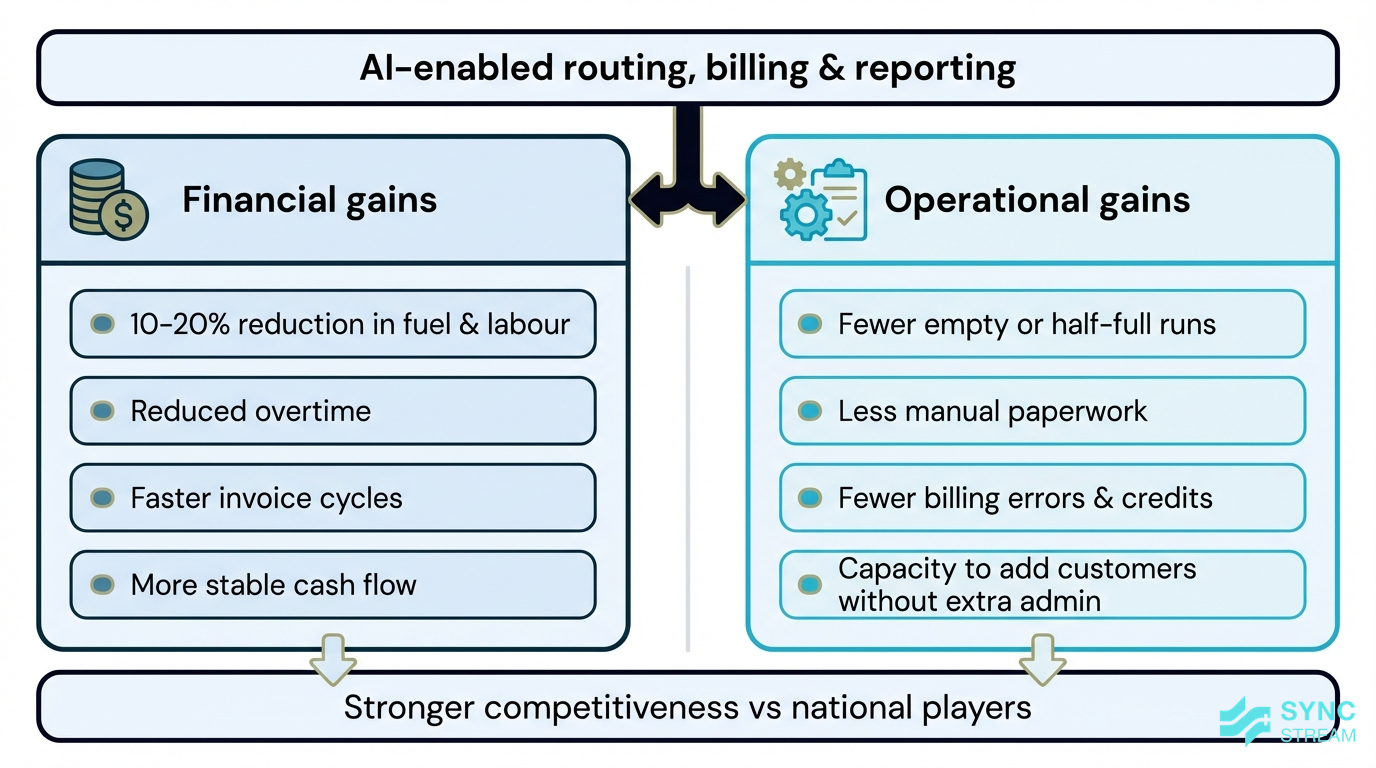
Financial and operational improvements a 3–15-truck operator can gain from AI-enabled routing and billing.
When routes are optimised based on bin locations, fill levels, and traffic, operators can often cut fuel and labour costs by around 10–20%. Fewer kilometres driven, better truck utilisation, and reduced overtime flow straight to your bottom line.
AI also helps small operators compete with larger national players by:
- Reducing “empty runs” to half‑full sites
- Eliminating manual paperwork and double entry
- Freeing admin staff to focus on sales, tenders, and customer care instead of chasing run sheets
Consider a 5‑truck operator in regional NSW. By using AI‑driven routing on two commercial runs and automating invoicing from job data, they can stabilise cash flow (invoices go out weekly instead of monthly) and add new customers without hiring extra admin staff. The owner spends more time on relationships and pricing, and less time fixing billing errors.
Meeting Australian regulatory and customer demands
Australian operators face increasing pressure from councils, commercial clients, and regulators. Council contracts come with strict service level agreements. Environmental regulations and safety expectations are tightening. Larger commercial customers and local governments are asking for ESG and diversion‑from‑landfill reporting.
AI‑enabled systems support this by:
- Capturing accurate service verification: GPS time stamps, bin scans, driver photos
- Tracking contamination and recycling data
- Producing audit‑ready records that simplify council reporting and tenders
Customer expectations are also rising. People want to know, “When was my bin collected?” and “Can you prove you were there?” AI‑backed portals, SMS or email notifications, and proof‑of‑service evidence help small operators provide this transparency without adding manual admin.
Key Components / Features
Route optimisation and smart scheduling
AI route engines analyse bin locations, historical fill patterns, traffic data, and customer time windows to propose efficient runs. Instead of a dispatcher manually rearranging stops, the system suggests the best day and time to service each customer to keep trucks full and kilometres low.
Dynamic routing goes a step further. Using bin sensors or historical patterns, the system can:
- Skip under‑filled bins that don’t need a lift yet
- Prioritise near‑full or high‑risk sites
- Re‑route drivers in real time if there are delays or breakdowns
In practice, this looks different by segment:
- Residential runs: smoother sequences that reduce backtracking and improve on‑time performance.
- Commercial skips: visit frequency based on actual fill trends, not guesses.
- Construction sites: rapid rescheduling when site access changes or urgent exchanges are requested.
Many routing tools integrate directly with GPS and telematics so dispatch can see route progress, delays, and completion in real time.
Automated billing, invoicing, and AR

Automated billing workflow that converts job and weighbridge data into invoices in systems like Xero or MYOB.
AI can read and reconcile job data – service type, frequency, extra pick‑ups, weights, contamination fees – and automatically generate accurate invoices that sync with accounting platforms like Xero or MYOB.
Behind the scenes, the system:
- Detects anomalies such as sudden weight changes, duplicate charges, or missed services
- Categorises line items correctly
- Applies contract‑specific pricing rules without relying on complex spreadsheets
For small teams, the benefits are significant:
- Fewer billing errors and credits
- Faster invoice cycles, improving cash flow
- Less time spent disputing invoices with customers and councils
Partners like Sync Stream design these automations on top of your existing job systems and accounting tools, so your team keeps control over data and can still understand how every invoice is produced.
Service verification, reporting, and analytics
“Proof of service” features combine GPS points, time stamps, before/after photos, and bin barcodes or RFID scans. AI can automatically reconcile this with the planned route to flag suspected missed lifts, out‑of‑sequence stops, or partial services.
Managers can access dashboards showing:
- On‑time performance and duration of each run
- Missed or partial services and repeat problem sites
- Contamination events and diversion‑from‑landfill metrics
AI analytics surface patterns, such as:
- Repeated missed services in a particular lane
- Bins consistently overfull or underutilised
- Specific customer segments causing high contamination
With this insight, operators can adjust routes, change bin sizes, or run customer education campaigns, improving both service quality and contract performance.
Implementation Strategy
Map your data and process foundations
Before adding AI, it’s vital to understand how work currently flows and where data lives. Work through these steps:
- Job booking & capture
- Inputs: Last 2–4 weeks of job requests (emails, call logs, portal exports, paper forms).
- Action: List every way a job can arrive and where it gets recorded (spreadsheet, job system, notebook).
- Expected output: A simple list showing all booking channels and one agreed “source of truth” for jobs.
- Route planning & dispatch
- Inputs: Current run sheets, route spreadsheets, whiteboard photos, dispatcher notes.
- Action: Document who builds routes, how often they are updated, and how drivers receive them (paper, SMS, app).
- Expected output: A clear description of how a job becomes a run and reaches each truck.
- Driver recording and weighbridge data
- Inputs: Blank and completed run sheets, driver apps, weighbridge tickets, photo folders.
- Action: Map how drivers record work, where photos and tickets are stored, and how exceptions (blocked access, contamination) are noted.
- Expected output: A flow showing how on‑road activity turns into data your admin team can use.
- Billing and checks
- Inputs: Sample invoices, credit notes, pricing schedules, current billing checklist (formal or informal).
- Action: Trace how job and weighbridge data are turned into invoices, who reviews them, and where double entry occurs.
- Expected output: A step‑by‑step outline of your billing process, including current pain points.
As you map these, highlight manual handoffs and double entry – for example, retyping jobs from email into spreadsheets, or from run sheets into invoices. These are prime candidates for automation.
AI works best on top of basic digital infrastructure: GPS on trucks, a straightforward job management tool, and consistent customer records. Focus on data hygiene:
- Inputs: Customer lists, addresses, service codes.
- Action: Fix incorrect addresses, standardise service codes and naming.
- Expected output: Clean, consistent data so route suggestions, alerts, and invoices are more trustworthy.
You don’t need to replace every system. Start with the tools you already use and make sure they capture data consistently.
Phased rollout across routing, billing, and compliance
A phased approach reduces risk and helps staff adapt. One practical sequence is:
- Audit and clean your data
- Inputs: Customer master list, current routes, example invoices and weighbridge records.
- Action: Validate addresses, service types, and route lists with dispatch and admin; fix obvious errors.
- Expected output: A cleaned dataset ready to load into routing and billing tools.
- Pilot route optimisation on 1–2 runs
- Inputs: Cleaned customer list for a small set of residential or commercial runs.
- Action: Configure a routing tool, load these customers, and generate AI‑suggested routes alongside your current routes.
- Expected output: Side‑by‑side comparison of km per lift, run duration, and driver feedback for manual vs AI routes.
- Extend routing to more runs with rules
- Inputs: Results from the pilot, additional routes, contract requirements (time windows, weight limits, access rules).
- Action: Roll routing out to more runs and add rules for time windows, bin sizes, and weights.
- Expected output: Reduced overtime and fuel on a larger portion of the fleet, plus better on‑time performance.
- Introduce automated billing
- Inputs: Job data feed (from your job system or spreadsheet), weighbridge data, pricing rules for one contract or product line.
- Action: Connect job and weighbridge data to your accounting system (e.g. Xero, MYOB) via an automation layer; generate draft invoices.
- Expected output: Accurate draft invoices produced automatically, with a human review step before sending.
- Layer in service verification analytics
- Inputs: GPS data, bin scans or barcodes, driver photos, planned route data.
- Action: Enable proof‑of‑service capture in your tools and set up dashboards/alerts for missed or partial services.
- Expected output: A live view of service performance, with exceptions you can investigate daily.
- Refine and document workflows
- Inputs: Experience from pilots, staff feedback, performance metrics (km per lift, invoice cycle time, disputes).
- Action: Update SOPs, driver guides, and admin checklists so AI‑enabled routing, billing, and verification become the standard way of working.
- Expected output: Documented, repeatable workflows that new staff can follow and you can audit.
When working with vendors or partners like Sync Stream, ask about Australian hosting options, integrations with your existing tools, support for driver training, and flexibility for small fleets. You want systems that fit into your current operation, not force a complete rebuild.
Upskilling staff and embedding new habits
AI tools only deliver value if drivers, dispatchers, and supervisors trust and use them. To embed new habits:
- Run short toolbox talks explaining what’s changing and why, focusing on reduced paperwork and clearer routes.
- Schedule ride‑along sessions where a supervisor or partner sits with drivers using the new app and collects feedback.
- Appoint a couple of “champion” drivers and dispatchers to test features and share tips with others.
Supervisors can bring AI dashboards into daily and weekly routines by:
- Reviewing exception alerts (missed lifts, anomalies) each morning.
- Using reports in toolbox meetings to discuss recurring issues and improvements.
- Checking route performance weekly to tweak schedules.
For the first month, keep a simple loop:
- Inputs: Yesterday’s exception list and route performance.
- Action: 10‑minute stand‑up with dispatch and a supervisor to review issues and agree changes.
- Expected output: Small, continuous improvements and growing confidence in the AI tools.
Address common worries directly. Make it clear AI is there to cut paperwork, guesswork, and frustration – not to replace people. Focus on benefits drivers can feel: fewer last‑minute changes, clearer instructions, and proof‑of‑service data that backs up their work.
Options Comparison
Weighing SaaS, custom solutions, and expert help
There are three main paths to bringing AI into a small waste operation:
- Off‑the‑shelf SaaS platforms
- Best for: Small fleets wanting quick wins with limited internal IT.
- Costs/timelines: Monthly or annual subscriptions; setup in weeks rather than months.
- Integration effort: Uses standard connectors to popular accounting and telematics tools; limited deep customisation.
- Flexibility: You work within the features provided, but benefit from regular product updates.
- Specialised partners like Sync Stream to tailor solutions
- Best for: Operators with several systems already in place (CRM, job tools, accounting) who need them to talk to each other.
- Costs/timelines: Project‑based implementation with clear business cases and ROI; staged over a few weeks to a few months.
- Integration effort: Deep integration of workflows into your existing tools using orchestration platforms like n8n.
- Flexibility: Processes and AI assistants can be shaped to your contracts and reporting requirements while keeping your data in your own systems.
- Building custom tools with internal or contracted developers
- Best for: Larger or highly specialised operators with strong internal tech capability.
- Costs/timelines: Higher upfront spend and longer timelines; ongoing maintenance is your responsibility.
- Integration effort: Can be very deep, but requires strong technical oversight.
- Flexibility: Maximum control but also maximum responsibility.
For most small waste collection operators, the sensible starting point is SaaS plus light tailoring. Use proven products, then bring in expert help to integrate them cleanly and document workflows so you’re not locked into any single vendor.
Common Pitfalls
Issues that derail AI projects for small operators
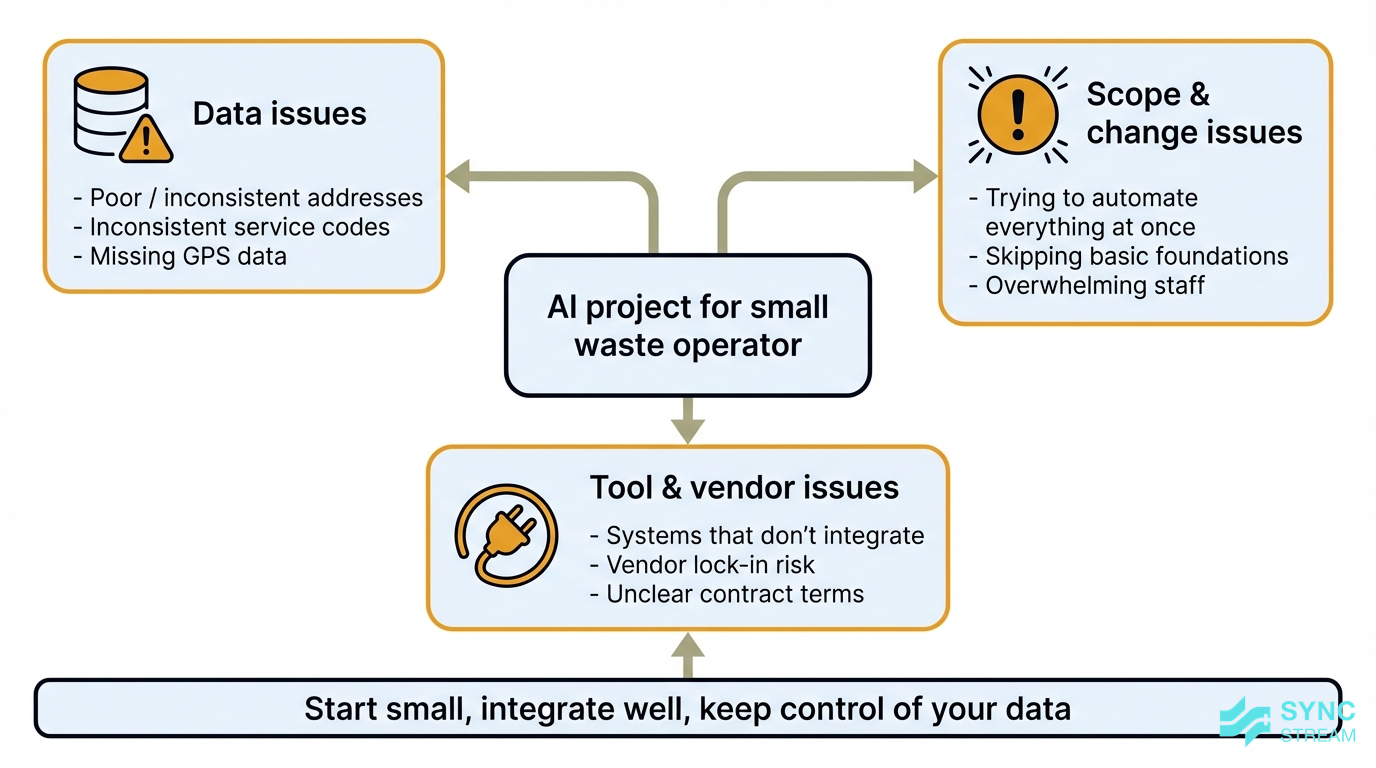
Common data, scope, and integration issues that can derail AI projects for small waste operators.
Several common issues can derail AI projects:
- Poor or inconsistent data – Inaccurate addresses, inconsistent service codes, and missing GPS data make route suggestions and reports unreliable.
- Trying to automate everything at once – Big‑bang projects overwhelm staff and stretch owners’ time. It’s better to start with one or two high‑impact workflows.
- Tools that don’t integrate – Choosing systems that can’t talk to your job, GPS, or accounting platforms leads to more double entry, not less.
Chasing fancy features like complex predictive models before nailing basics such as GPS tracking, clean customer lists, and reliable job capture often results in frustration and abandoned systems.
Be wary of vendor lock‑in and unclear contracts. Before signing, ask:
- How can we export our data if we leave?
- What is the contract length and exit process?
- Is local support available during our operating hours?
- How transparent are the AI decisions (for example, why routes change)?
The goal is to use AI to strengthen your operation while retaining control over your data and choices.
Conclusion
For small Australian operators, Small waste collection operators AI means practical tools to optimise routes, automate billing, and prove service compliance without replacing existing systems or people. By starting with clean data, piloting route optimisation, and layering in billing and verification, you can reduce costs, improve reliability, and meet growing regulatory and customer expectations.
If you want help designing AI and automation that fits your current systems and contracts, Sync Stream works with Australian operators to build reliable, documented workflows that deliver clear commercial outcomes.
FAQ
Do I need new trucks or hardware to start using AI?
Not necessarily. Many AI features come through software you can use with your existing trucks and GPS units. Over time, you might add extras like bin sensors or upgraded telematics, but you can start by using the data you already collect.
Can AI help if we still use paper run sheets?
Yes, but you’ll get more value as you digitise. You can start by scanning and extracting data from paper run sheets into your systems, then move drivers onto simple mobile apps so route and service data is captured automatically.
How much does AI cost for a small waste operator?
Most tools are subscription‑based, with pricing tied to the number of trucks, users, or bins. The bigger question is whether they reduce kilometres, overtime, and admin hours enough to pay for themselves. A good partner will scope this business case with you upfront.
Will AI replace my drivers or admin staff?
For small fleets, AI is more about taking the repetitive admin and route planning load off people than removing roles. Drivers still need to service bins safely and deal with customers; admin staff still handle exceptions and relationships. AI helps them do that with less manual data entry and guesswork.
How long does it take to see results from route optimisation?
If your data is reasonably clean, you can usually see differences within a few weeks on the first pilot runs – shorter routes, fewer backtracks, and clearer schedules. Deeper benefits, like improved contract performance and smoother billing, build over a few months as you refine settings and staff get comfortable.
What if my systems are old or don’t talk to each other?
You don’t need to rip everything out. Partners like Sync Stream specialise in connecting existing CRMs, job tools, GPS systems, and accounting platforms so data can flow between them. From there, AI can sit on top of those connections to automate workflows and surface insights.