

Introduction
If you run a trade or construction business in Australia, Simpro often sits at the centre of your operations. But Simpro only reaches its full value once it’s properly connected to your other systems – accounting, CRM, estimating, supplier portals, and document storage.
This guide walks through the main Simpro integrations options – native add-ons, Zapier, Make, and custom API builds – and shows how they support real trade workflows like lead capture, scheduling, purchasing, and invoicing.
You’ll see where to use Simpro’s built-in features, when to add low-code automation, and when a custom integration is worth the investment. The aim is to give owners and directors a practical roadmap so integrations reduce admin and errors without creating technical headaches.
Integration options overview
Native Simpro add-on integrations
Native or built-in Simpro integrations are connections that Simpro itself supports and documents. They are usually the best starting point because:
- They’re officially supported by Simpro and the other vendor.
- They’re updated when either platform changes.
- They tend to be more stable and less fragile than custom builds.
For Australian trades and construction businesses, the most relevant native Simpro integrations typically include:
- Accounting: Xero, MYOB, QuickBooks
- Suppliers/wholesalers: Tradelink, Ideal Electrical, MM Electrical and other major catalogs
- Estimating and take-offs: PlanSwift, Groundplan
- Cloud storage and documents: Dropbox, OneDrive, Google Drive, SharePoint
These cover large chunks of your day-to-day work:
- Accounts and finance: Sync invoices, payments, customers, and suppliers between Simpro and Xero/MYOB/QuickBooks so you’re not re-keying data.
- Pricing and purchasing: Import supplier catalogues and price files from Tradelink, Ideal, MM Electrical, and others so quotes and purchase orders use current pricing.
- Estimating: Use PlanSwift or Groundplan for take-offs, then push quantities straight into Simpro quotes.
- Document storage: Automatically store job photos, plans, and compliance certificates in cloud storage, linked back to Simpro jobs.
Often, you can solve 60–80% of integration needs with these native options before you consider anything more complex.
Zapier-based Simpro workflows
Zapier is a cloud automation tool that connects Simpro (typically via webhooks, email parsing, or supported intermediary apps) with hundreds of other tools. It’s ideal for simple, event-driven automation, where something happens in one app and you want a straightforward reaction in another.
Think along the lines of:
- "When a new lead comes in, create something in Simpro."
- "When a job changes status, notify someone."
- "When an invoice is raised, tell another system."
For Australian trade businesses, practical examples include:
- Lead capture from web forms: When someone submits your website form (e.g., Gravity Forms, Typeform, Webflow forms), Zapier creates or updates a contact/lead in Simpro and notifies your sales or admin team.
- Facebook Lead Ads to Simpro: New Facebook lead → Zapier parses the details → creates a Simpro lead or customer record and sends a confirmation email.
- Job status updates to Teams/Slack: When a Simpro job moves to "In Progress" or "Completed," Zapier posts a message to a Microsoft Teams or Slack channel for supervisors.
- Finished jobs or invoices to CRM/marketing tools: Job marked as completed or invoice raised in Simpro → Zapier updates a contact in your CRM (e.g., Zoho, HubSpot) or adds them to an email marketing list for follow-up.
While Zapier is low-code, it still requires:
- Clear logic (what triggers, what actions, and under which conditions).
- Careful field mapping and testing.
- Monitoring of usage limits and task volume to avoid surprise costs or hitting caps during busy periods.
Make and advanced automation platforms
Make (formerly Integromat) and similar tools sit a step above Zapier in flexibility. They’re better suited to multi-step, branching workflows where one event in Simpro needs to update several systems, sometimes with complex logic.
Use Make when you need to:
- Sync Simpro with multiple CRMs, project tools, or databases at once.
- Implement complex approval workflows (e.g., project quote approvals across operations and finance).
- Run overnight or scheduled data syncs instead of purely real-time triggers.
Examples where Make shines for trade and construction SMEs:
- Multi-system updates on job stage changes: When a Simpro job moves from "Quoted" to "In Progress," Make can update a deal in your CRM, add tasks to a project board (e.g., Monday.com), and log entries in a reporting database.
- Complex approval flows: A high-value quote created in Simpro triggers a workflow in Make that routes the quote to managers for approval, tracks decisions, and updates Simpro with approval status.
- Batch nightly syncs: Every night, Make reads new and updated invoices from Simpro and pushes summarized data to a Google Sheet or BI tool for margin and cashflow dashboards.
These platforms are more technical than Zapier. They suit businesses that either:
- Have some internal technical capability, or
- Work with a specialist implementation partner like Sync Stream that can design the orchestration, data transformations, and error handling for long-term reliability.
Custom API integrations
Simpro provides an API – a set of secure endpoints that let approved software read and write Simpro data such as jobs, customers, invoices, assets, and more. In practical terms, this means developers can:
- Pull data from Simpro into another system.
- Push data from other tools into Simpro.
- Keep systems in sync automatically instead of via manual exports and imports.
A custom API integration is worth considering when:
- You use niche industry tools or in-house systems that don’t have existing Simpro connectors.
- You have high volumes of jobs, invoices, or assets where manual workarounds or low-code tools won’t scale reliably.
- Native, Zapier, or Make-based options can’t meet your reliability, performance, or security requirements.
However, this path comes with extra responsibilities:
- Planning: Clear scope, data flows, and success metrics.
- Development budget: Discovery, build, and testing.
- Security reviews: Credential management, permissions, and compliance with Simpro and your own policies.
- Ongoing maintenance: Handling API changes, new fields, and edge cases over time.
Because of this overhead, custom API work should be reserved for clearly defined, high-value use cases where the benefits justify the investment.
Core trade workflows to connect
Lead capture and quoting flow
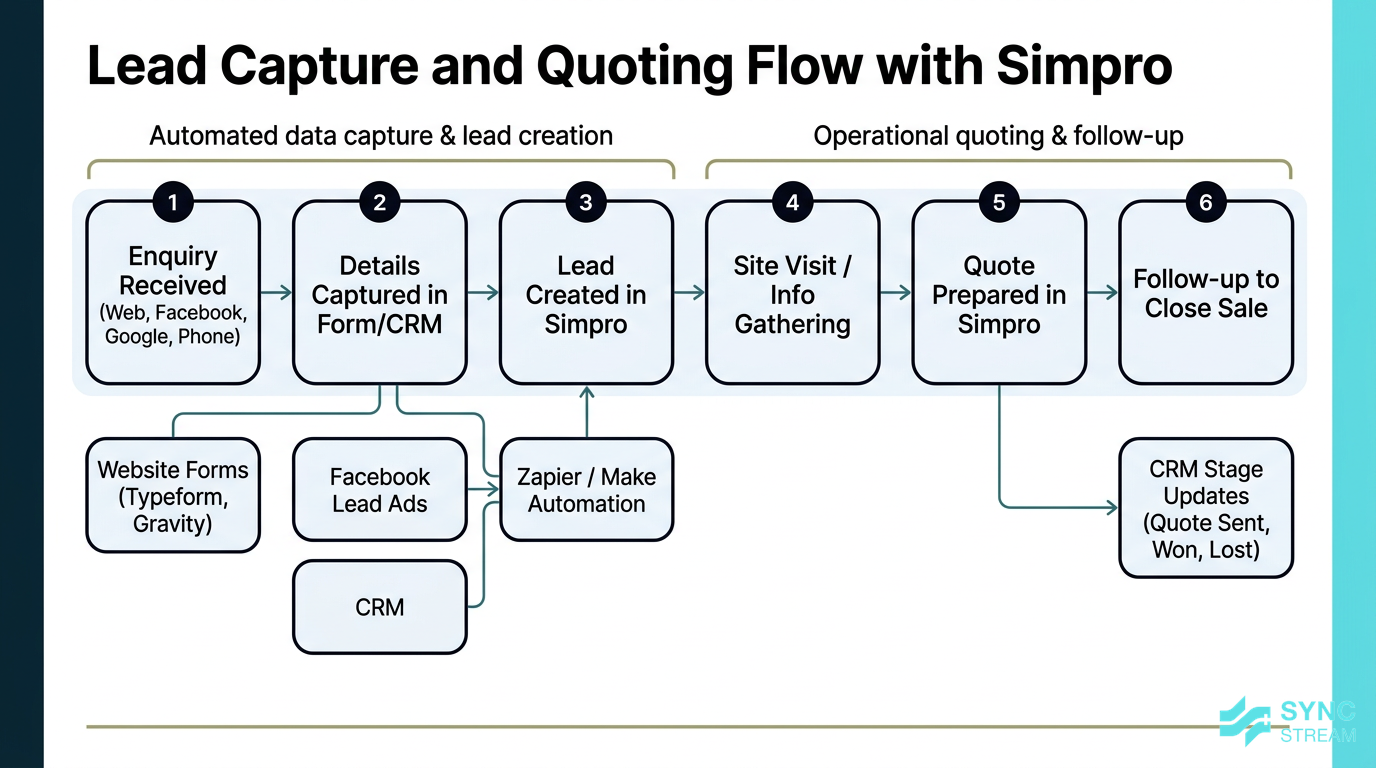
End-to-end lead capture and quoting workflow showing how enquiries flow from web forms and ads into Simpro and connected CRM systems.
For most Australian trade businesses, the lead-to-quote process looks like this:
- Enquiry received: From your website, Facebook, Google Ads, or phone.
- Details captured in a form or CRM: Name, address, job type, urgency, budget.
- Lead created in Simpro: Admin or sales log the opportunity.
- Site visit or information gathering: Tech or estimator collects details.
- Quote prepared in Simpro: Line items, labour, materials, margins.
- Follow-up: Phone, email, or SMS to close the sale.
When these systems aren’t connected, leads fall through the cracks – especially when admin staff are busy or away.
Useful integrations here include:
- Web forms → Simpro: Website forms (or Typeform, Jotform, Gravity Forms) feed directly into Simpro via Zapier or Make, creating a lead or customer and assigning a follow-up task.
- Facebook Lead Ads → Simpro: New ad leads automatically create Simpro leads so they’re seen in the same pipeline as website and phone enquiries.
- CRM ↔ Simpro: If you use a separate CRM like Zoho, Simpro quote status can update the CRM stage (e.g., "Quote Sent," "Won," "Lost") so sales and operations see the same picture.
The outcomes for owners and directors are:
- Faster response times – enquiries get acknowledged and logged automatically.
- Consistent follow-up – every lead is visible with a clear status.
- Better pipeline visibility – you can see quotes by stage, value, and probability, making staffing and cashflow planning far easier.
Jobs, scheduling, and field mobility
A standard operations flow from quote to completion often looks like:
- Quote approved by the customer.
- Job created in Simpro from the quote.
- Scheduling and dispatch: Jobs are assigned to technicians or crews.
- Field work: Techs use Simpro Mobile or similar to see job details, record labour, and capture photos and forms.
- Job completion: Data is finalised, ready for invoicing.
Integrations can support this end-to-end process by:
- Calendar sync: Connecting Simpro schedules with Outlook or Google Calendar so techs see their day in the tools they already use and changes flow through automatically.
- Document and photo storage: Field photos, site reports, and signed forms can be auto-saved into cloud storage (Dropbox, OneDrive, Google Drive, SharePoint) and linked back to the Simpro job, instead of being buried in email threads or personal phones.
Benefits include:
- Reduced double-entry: Schedules and job details are entered once and reflected everywhere.
- Clearer daily schedules: Techs know exactly where they need to be, with up-to-date info.
- Better office–field communication: Everyone is looking at the same source of truth in Simpro and connected calendars.
Purchasing, suppliers, and inventory
Material handling is a major admin load in trades:
- Keeping catalogue pricing up to date.
- Raising and tracking purchase orders.
- Matching supplier invoices to jobs and POs.
- Managing stock levels for vans and warehouse.
Simpro’s supplier integrations are built to address exactly these pain points. Using suppliers like Tradelink, Ideal Electrical, and MM Electrical, you can:
- Import or sync catalogues and price files so your Simpro items match your real buying costs.
- Automatically import supplier invoices into Simpro against the right jobs and POs.
- Update pricing regularly to keep quotes and estimates accurate.
When set up correctly, this delivers:
- Fewer invoice mismatches – less back-and-forth between operations and accounts.
- Real-time margin visibility – you can see which jobs and customers are actually profitable.
- Faster reconciliation in Xero/MYOB – invoices line up cleanly, reducing time spent in the accounting file.
- Less time chasing pricing updates – catalog imports do the heavy lifting instead of manual spreadsheet work.
Invoicing, accounting, and compliance
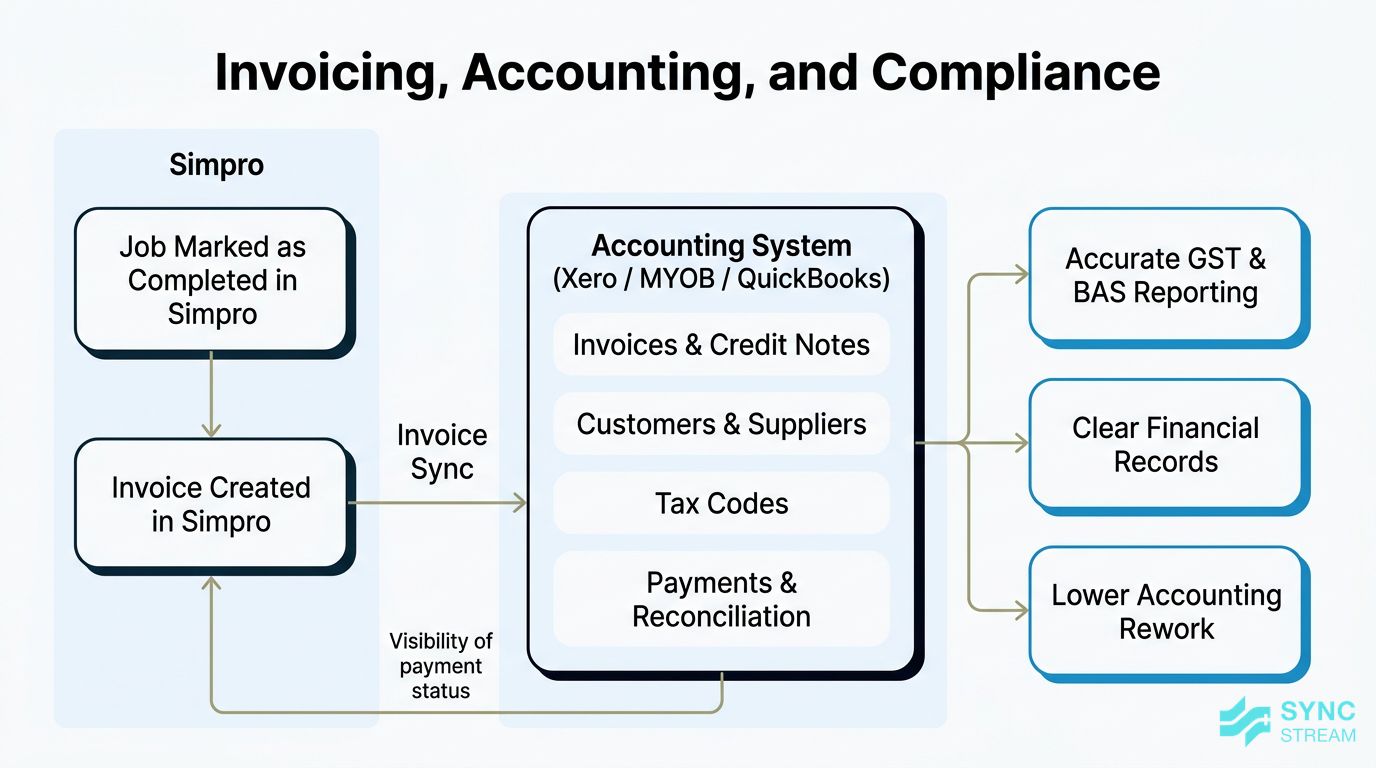
Financially, the common workflow is:
- Job marked as completed in Simpro.
- Invoice created in Simpro.
- Invoice syncs to Xero/MYOB/QuickBooks via the accounting link.
- Payment and reconciliation happen in the accounting platform.
- BAS and GST reporting and end-of-year accounts use that same data.
Accounting integrations automate the transfer of:
- Invoices and credit notes from Simpro into your accounting file.
- Customers and suppliers (or link to existing ones) to avoid double entry.
- Tax codes so GST is handled correctly.
Simpro usually remains the operational source of truth for jobs, while the accounting system is the financial source of truth for actual payments, bank feeds, and reporting.
For Australian businesses, this tight integration helps with:
- GST accuracy – correct tax codes reduce mistakes that show up at BAS time.
- BAS preparation – sales and purchase data flows cleanly into Xero/MYOB reports.
- ATO expectations – clearer, more consistent records, and reduced need for manual adjustments.
- Lower accounting fees – your accountant spends less time fixing errors and more time providing advice.
Planning your integration approach
Clarify business goals and bottlenecks
Before touching any settings, step back and identify your top 3–5 pain points. Common ones include:
- Double-entry between Simpro, Xero/MYOB, and spreadsheets.
- Lost or delayed leads and quotes.
- Late or inconsistent invoicing.
- Stock and pricing issues leading to margin surprises.
- Lack of reliable reporting on jobs, teams, or branches.
Then prioritise. Rather than trying to connect everything at once, choose 1–2 workflows to automate first, such as accounting sync or lead capture.
Simple framing questions that help:
- "Where is information being typed twice?"
- "Where do delays cost us money or reputation?" (e.g., slow quotes, slow invoices, missed service calls).
Audit your current systems and data
Next, map your current ecosystem. List:
- Core systems: Simpro, Xero/MYOB/QuickBooks.
- CRM and marketing tools: Zoho, HubSpot, Mailchimp, etc.
- File storage: Dropbox, OneDrive, Google Drive, SharePoint.
- HR/payroll: Employment Hero, Xero Payroll, etc.
- Niche trade apps: manufacturer portals, compliance tools, asset registers.
Then note how data currently flows between them: manual exports, CSV imports, email attachments, or ad-hoc scripts.
Within Simpro itself, check:
- Data quality and structure: Are customer names consistent? Addresses complete? Job types and cost centres used properly? Are tax codes correct?
- Custom fields: Are they actually used or just clutter?
Messy data becomes messy integrations. Cleaning the worst issues upfront will save time and frustration later.
Also confirm user permissions and roles:
- API connections and integration users should have the access they need (e.g., to read jobs and create invoices) but not more than necessary.
- This reduces security risk and accidental changes by automated processes.
Choose the right integration path
A simple decision logic for Simpro integrations:
- Use native where available. If Simpro offers a built-in connection (e.g., Xero, Tradelink, Groundplan), start there.
- Use Zapier or Make for light-to-medium automation between cloud tools – particularly around leads, notifications, and basic syncing.
- Go custom API only when the use case is high-value and cannot be met reliably by native or low-code options.
When choosing a path, consider:
- Scale: How many jobs, invoices, and records will move each day?
- Budget: Initial setup plus ongoing maintenance.
- Internal technical comfort: Do you have staff who can own these tools?
- Long-term plans: Are you standardising on certain platforms or planning acquisitions/expansion?
Where possible, stage your journey:
- Start with one low-risk integration (e.g., accounting link or simple lead capture).
- Prove the value and stabilise.
- Then extend to more complex or custom builds.
Setting up Simpro native integrations
Connecting Simpro to Xero or MYOB
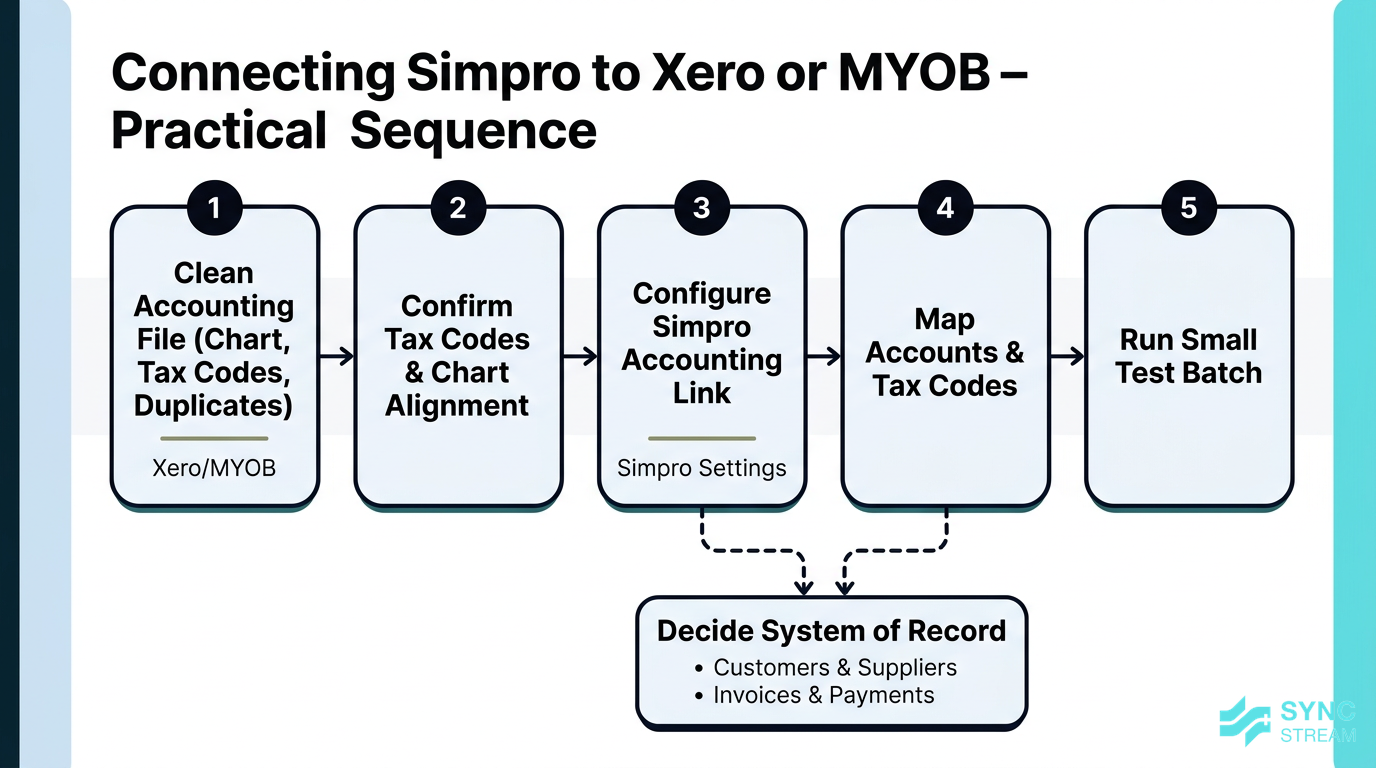
Sequential steps for cleaning data, configuring, mapping, and testing the Simpro to Xero/MYOB accounting link.
A practical sequence for configuring the Simpro accounting link is:
- Inputs: Xero/MYOB file, current chart of accounts, tax codes, and customer/supplier list. Action: Clean duplicates, merge obvious double-ups, and archive unused accounts and codes. Expected output: A tidy accounting file with a clear, current chart and tax code set.
- Inputs: Clean accounting file and Simpro tax settings. Action: Confirm that GST, GST-free, and any special tax codes line up between Simpro and Xero/MYOB, and that revenue/cost accounts exist for major Simpro cost centres. Expected output: Documented list of which Simpro items/cost centres map to which accounts and tax codes.
- Inputs: Simpro admin access and accounting system login. Action: In Simpro, open the accounting link settings, connect to Xero or MYOB, and choose basic sync preferences (e.g., which data types can sync, default behaviours). Expected output: Live connection established between Simpro and the accounting system.
- Inputs: Mapping decisions from step 2. Action: Complete the in-product mapping: link Simpro tax codes to accounting tax codes, and map cost centres or categories to revenue and cost accounts. Expected output: Saved mapping configuration ready for a test sync.
- Inputs: Small, controlled set of records (e.g., 3–5 customers, 3–5 suppliers, 5–10 invoices). Action: Run a test sync for this limited set, then review how records appear in Xero/MYOB (names, tax, amounts, dates). Expected output: Confirmed, accurate sync behaviour – or a short list of mapping issues to correct before wider rollout.
Decide early who is the "master" for key records:
- For customers and suppliers, many businesses treat the accounting system as the master for financial details, while Simpro is the master for operational details. Agree which system creates new records and how updates flow.
- For invoices and payments, Simpro usually creates invoices, while payments and reconciliations live in Xero/MYOB.
Common issues to watch for:
- Mismatched tax codes – GST-free vs GST, export vs domestic.
- Incorrect date ranges – accidentally syncing old or test data.
- Duplicate contacts – minor spelling differences causing multiple customer records.
Always test with a limited dataset before running a full sync.
Enabling supplier and wholesaler feeds
To enable supplier integrations in Simpro:
- Inputs: List of current major suppliers and price files you rely on. Action: Check Simpro’s supported supplier list and match it against your active suppliers (e.g., Tradelink, Ideal Electrical, MM Electrical). Expected output: Shortlist of suppliers to connect via native feeds.
- Inputs: Supplier account details, portal logins, or API keys. Action: In Simpro’s supplier settings, enter and save the credentials for each supported supplier. Expected output: Verified connection between Simpro and each supplier account.
- Inputs: Supplier catalogues/price file options and your internal pricing rules. Action: Choose which catalogues to import, set frequency (e.g., weekly, monthly), and decide whether imports overwrite existing items or add new ones. Expected output: Scheduled catalogue import configuration that aligns with your pricing policy.
- Inputs: Supplier invoice delivery options (e.g., electronic feeds, EDI). Action: Turn on automatic invoice capture where available so invoices flow into Simpro and link to matching POs and jobs. Expected output: Automated invoice ingestion pipeline from supplier to Simpro.
After setup, validate by:
- Pulling a sample of recent invoices and confirming totals, GST, and item lines match.
- Checking that item codes and descriptions line up with your Simpro catalogue.
- Fixing anomalies (wrong GST, duplicated items, unexpected price changes) before enabling for all suppliers.
Linking estimation and document tools
For estimation tools like PlanSwift and Groundplan:
- Inputs: Estimation tool accounts and Simpro admin access. Action: Enable the native integration in both systems and authenticate the connection. Expected output: Estimation tools authorised to push data into Simpro.
- Inputs: Existing Simpro catalogue items and pre-builds. Action: Configure take-off templates in PlanSwift/Groundplan to use Simpro item codes and assemblies. Expected output: Take-off environment aligned with Simpro’s item structure.
- Inputs: Live project plans and drawings. Action: Perform take-offs in the estimation tool using the configured templates. Expected output: Accurate quantities tied to real Simpro catalogue items.
- Inputs: Completed take-off data. Action: Push quantities into Simpro as a draft quote, then add labour, margins, and final adjustments within Simpro. Expected output: Ready-to-send Simpro quote backed by detailed take-off data.
For document and file storage (Dropbox, OneDrive, Google Drive, SharePoint):
- Inputs: Chosen storage platform and preferred folder structure (by job number, client, or site). Action: Configure Simpro’s document storage integration and set naming rules so uploaded photos and documents automatically land in the right folders. Expected output: Consistent, searchable folder structure where office and field staff can quickly find job files.
This is particularly powerful for project-based trades (electrical, plumbing, HVAC, construction) handling multi-stage projects, as-built documentation, O&M manuals, and compliance records.
Building automations with Zapier
Designing simple event-triggered automations
Zapier works on a simple model:
- Trigger: An event in one app (e.g., new form submission, new invoice, status change).
- Action: A result in another app (e.g., create a record in Simpro, send an email, post to Teams).
Simpro can be the source (trigger), the destination (action), or both, often using webhooks or intermediate tools.
Tangible examples for trades:
- New Simpro customer → CRM contact: When a new customer is created in Simpro, Zapier creates or updates a contact in your CRM for marketing and follow-up.
- Job status change → notifications: When a job moves to "Completed" in Simpro, Zapier sends an internal email/SMS or posts in Slack/Teams so finance knows it’s ready to invoice.
- New quote created → email alert to sales manager: Ensures larger quotes get timely review.
When starting out:
- Begin with non-critical, read-only automations such as notifications or basic record creation.
- Avoid automations that update or delete data until you’re comfortable with testing and error handling.
Common Zapier workflows for trades
High-value, low-complexity Zapier use cases include:
- Web enquiries to Simpro leads:
- Trigger: New Typeform/Gravity/Webflow form submission.
- Actions: Create a contact or lead in Simpro; send a confirmation email via Mailchimp; notify the sales or admin team in email or Teams.
- CRM/form submissions creating Simpro customers:
- When a sales rep adds a new contact in a CRM (e.g., Zoho) or a partner referral form is submitted, Zapier creates a customer in Simpro ready for quoting.
- Invoice events notifying teams:
- Trigger: New invoice created or paid (via accounting system or Simpro).
- Actions: Alert finance, update a CRM deal stage, or add a tag for future marketing.
These automations:
- Reduce admin workload for small office teams.
- Help owners and supervisors stay in the loop without logging into multiple systems.
- Ensure important events (large quotes, overdue invoices) don’t go unnoticed.
Testing, monitoring, and scaling Zaps
To keep Zaps reliable:
- Use Zapier’s test features at each step to confirm field mappings, especially dates, amounts, and tax-related fields.
- Review Zap history and live logs for errors after go-live.
- Monitor task usage and limits, particularly if you process a high volume of leads or jobs.
To avoid runaway automations:
- Add filters and conditions (e.g., only send alerts for jobs over a certain value, or only create contacts if an email address is present).
- Disable or clone Zaps before making major changes.
Document for each Zap:
- Its purpose and business owner.
- Which systems and fields it touches.
- Any risks if it fails or misfires.
This reduces dependence on a single staff member “who set it up years ago” and makes it easier to hand over to a partner like Sync Stream if needed.
Orchestrating flows with Make
When Make is a better fit than Zapier
Make is typically a better fit than Zapier when one Simpro event needs to:
- Trigger multiple downstream actions across several systems.
- Follow branching logic (e.g., if commercial vs residential, handle differently).
- Perform data transformations along the way.
Examples in a trade or construction context:
- Complex commercial project workflows: A new project in Simpro triggers creation of records in a project management tool, generates folders in SharePoint, sets up reporting entries, and notifies multiple departments.
- Multi-brand businesses: One Simpro environment serving multiple brands, where Make routes data to different CRMs or finance systems based on brand or region.
- Custom data transformations: Converting codes, merging fields, reformatting dates, or aggregating line items before sending to another system.
Make can also be more cost-effective at scale, with powerful visual mapping that helps you see exactly how data moves. The trade-off is usually more technical setup and maintenance.
Example multi-system automation scenarios
Two practical scenarios:
- Job completion orchestration
- Trigger: Simpro job status becomes "Completed."
- Make scenarios:
- Update the linked CRM deal to "Won" and record final value.
- Create a new folder in SharePoint or OneDrive named with job number and site.
- Log job metrics (labour hours, margin, dates) into a reporting sheet or BI tool.
- Queue a customer satisfaction email or SMS in your marketing system.
- Scheduled ageing invoices dashboard
- Schedule: Nightly.
- Make reads all unpaid Simpro invoices over certain age thresholds.
- It then writes summary data to a Google Sheet or database powering a simple dashboard for directors.
In both cases, Make’s strengths are:
- Handling scheduled runs as well as event-driven triggers.
- Managing data transformation – formatting dates, mapping tax codes, combining multiple fields, or splitting records into multiple outputs.
Governance and maintainability for complex automations
For any substantial Make setup, treat it like core infrastructure:
- Use clear naming conventions for scenarios, variables, and connections.
- Document each scenario’s purpose, triggers, and dependencies.
- Build in error handling – for example, send an alert to an admin inbox or Teams channel if a scenario fails.
Organise scenarios by area, such as:
- Finance (invoicing, reconciliations, aged debtors).
- Operations (jobs, scheduling, purchasing).
- Sales and marketing (leads, quotes, follow-ups).
Review scenarios at least quarterly to ensure they still:
- Match your current processes.
- Reflect any new Simpro fields, suppliers, or pricing rules.
- Comply with any updated internal policies or external requirements.
An implementation partner like Sync Stream can help design this governance from day one so you don’t end up with a tangle of automations that no one understands.
Planning a custom API build
Defining a clear use case and scope
Before writing any code, define your custom API integration in plain English:
- What must it achieve? (e.g., "Sync our in-house asset portal with Simpro so field techs always see current asset data.")
- Who will use it? (office staff, techs, finance, customers).
- How will we measure success? (hours saved per week, reduced error rate, faster invoicing, increased revenue).
Then list the Simpro objects involved:
- Customers, sites, jobs, assets, invoices, quotes, stock, etc.
And for each object, define the direction of data flow:
- Read from Simpro, write to Simpro, or both.
Start with a narrow, high-impact scope for version 1 instead of trying to replace entire systems in one hit. You can always extend later once the core integration is proven.
Technical, security, and compliance considerations
API access brings technical and regulatory responsibilities:
- Secure credential management: Store API keys and tokens securely, not in spreadsheets or emails.
- Permission scoping: Integration users should only access the data they genuinely need.
- Rate limits and API guidelines: Design your integration so it respects Simpro’s limits and error responses.
For Australian businesses, also consider:
- Customer privacy and how personal data flows between systems.
- Financial data security – especially invoices, bank details, and payment records.
- Any industry or contractual obligations (e.g., for government or large commercial clients).
Involving an experienced integration partner like Sync Stream helps ensure:
- Sound architecture decisions.
- Robust authentication and token handling.
- Proper logging and error handling so issues can be diagnosed quickly.
Budgeting, timelines, and ownership
When budgeting for a custom API integration, include:
- Discovery and design: Requirements, mapping, and scoping.
- Build and configuration: Development, environment setup, and integrations with other systems.
- Testing and training: Edge-case testing and staff training on new processes.
- Ongoing maintenance: Adjusting for system updates, new fields, and business changes.
Define an internal owner for the integration, even if Sync Stream does the technical work. This person understands the business process, gathers feedback, and helps drive adoption.
When assessing providers, ask for:
- Examples of similar work in electrical, plumbing, HVAC, or construction.
- Clear project milestones and deliverables.
- A plan for documentation and handover so you’re not locked into a black-box solution.
Hidden challenges and what to watch for
Data quality, duplication, and field mapping
Integrations don't magically fix bad data. Common issues include:
- Inconsistent customer names and addresses.
- Duplicate records for the same client or site.
- Misaligned tax codes across Simpro and accounting systems.
- Custom fields used differently by different staff.
To reduce problems:
- Set data standards – naming conventions, mandatory fields, and rules for new records.
- Clean up obvious issues in Simpro and your accounting system before switching on integrations.
- Carefully design field mapping so each field has a clear purpose and destination.
Plan periodic audits of integrated systems, especially after structural changes such as new Simpro fields or a chart-of-accounts rework, to catch duplicates and mapping drift early.
Change management and team adoption
Any integration changes how people work. If staff aren’t brought along, they may:
- Bypass new processes (e.g., using spreadsheets instead of Simpro).
- Enter data inconsistently, breaking automation logic.
- Lose trust if early issues aren’t addressed.
Mitigation steps:
- Involve key staff from office and field early in the design.
- Document "before vs after" processes so changes are clear.
- Provide short, role-based training for admin, techs, and managers.
After go-live, collect feedback and iterate. Small adjustments to fields, naming, or notifications can significantly improve adoption and reduce frustration.
Over-automation and operational risk

Risk view comparing low-risk starter automations with complex, interlinked flows that can increase operational risk if not governed.
It’s tempting to automate everything at once. That can backfire:
- Too many interlinked automations make it hard to diagnose issues.
- A small error can be amplified across multiple systems.
To manage risk:
- Start with low-risk use cases that are easy to monitor.
- Only enable write-back or destructive updates (deletes, overwrites) after extensive testing and with good logging.
- Maintain a rollback plan – know how to disable integrations quickly and how to correct records if anything goes wrong.
Clear logs and audit trails are essential so you can see what changed, when, and via which automation.
Integration rollout process for SMEs
1. Prioritise use cases and quick wins
First, list all potential integrations, then rank them by value vs complexity. Typical quick wins include:
- Accounting sync between Simpro and Xero/MYOB.
- Supplier invoice and catalogue integrations.
- Basic lead capture automations.
Involve both finance and operations leads when choosing first targets so you balance admin reduction with cash-flow impact.
For each chosen use case, document expected benefits such as:
- Hours saved per week.
- Reduction in manual entries.
- Faster invoice turnaround or fewer errors.
This makes it easier to assess results and justify further investment.
2. Configure, test, and pilot in stages
A robust staged approach looks like this:
- Configure in a sandbox or with limited scope: Connect systems with either a test environment or a small subset of customers/jobs.
- Test thoroughly: Include edge cases like credits, variations, multi-tax scenarios, large projects, and multi-location jobs – not just simple residential work.
- Pilot with selected staff: Run the integration in real conditions with a small team, gathering issues and feedback.
During the pilot, adjust:
- Field mappings.
- Naming conventions.
- Business rules and filters.
Address issues before rolling out across the entire business.
3. Go live, review, and iterate
Once live, owners and directors should review key metrics over the first 30–90 days:
- Invoice turnaround time.
- Hours spent on data entry.
- Error rates and rework in finance and operations.
Set up a recurring review cadence (e.g., quarterly) to:
- Refine existing automations.
- Add new workflows where the value is clear.
- Retire or simplify flows that no longer help.
An integration partner like Sync Stream can provide periodic health checks and help you move from simple native + Zapier setups to more advanced orchestration or custom API builds as your needs grow.
Conclusion
Done well, Simpro integrations turn your systems into a connected, reliable backbone for your trade or construction business. Native links to accounting, suppliers, estimating, and cloud storage handle much of the heavy lifting. Zapier and Make add flexible automation for leads, notifications, and multi-system workflows. Custom API builds close the remaining gaps where high-value use cases demand it.
For Australian SMEs, the priority is not fancy tech – it’s reducing manual admin, improving margins, and staying compliant with GST and BAS requirements while keeping your team focused on the work that matters.
If you want support planning, implementing, or cleaning up your Simpro integrations, Sync Stream works alongside your existing systems and team to design robust, documented workflows that fit your real-world operations.
FAQ
What’s the best way to start with Simpro integrations?
Begin by clarifying your top pain points and mapping existing systems. Then implement one or two high-value, low-risk native integrations such as accounting sync and supplier feeds, test them thoroughly, and build from there.
Should I use Zapier, Make, or a custom API for Simpro?
Use native integrations first wherever possible. Choose Zapier for simple, event-driven workflows like lead capture and notifications. Use Make for multi-step, branching, or scheduled scenarios. Consider a custom API only when you have a high-value use case that can’t be met reliably any other way.
How do Simpro–Xero or Simpro–MYOB integrations handle GST and BAS?
The accounting link maps Simpro tax codes to those in Xero or MYOB, so GST is carried through on invoices and bills. Ensuring your tax codes and accounts are correctly configured in both systems helps produce accurate BAS and GST reporting with less manual adjustment.
What data quality steps should I take before integrating Simpro?
Clean up duplicates, standardise customer and site names, confirm tax codes, and review key custom fields. Set simple data-entry rules for staff so new records are consistent. This reduces sync errors and makes field mapping more predictable.
Can integrations help my field techs, or are they just for the office?
Yes. Calendar sync, automated document storage, and mobile-friendly workflows all help technicians. They see clearer schedules, spend less time on paperwork, and know that photos and forms are automatically filed against the right jobs.
How long does a typical Simpro integration project take?
Timelines vary. A straightforward native integration (like accounting) can be configured and tested in days to a few weeks. More complex Make scenarios or custom API builds may take several weeks to design, build, test, and roll out in stages.
Why work with an integration partner instead of doing it all in-house?
A specialist like Sync Stream brings experience across Simpro, accounting platforms, CRMs, and automation tools. That reduces trial and error, improves reliability, and ensures everything is documented so your business isn’t dependent on one internal “tech person” for critical workflows.