


Introduction
Strata groundskeeping teams across Australia are feeling the squeeze: more buildings to service, tighter margins, and rising expectations from committees and managers. At the same time, Strata groundskeeping teams AI tools are starting to move from theory into day-to-day use.
This isn’t about self-driving mowers. It’s about using practical AI features inside the software you already use to keep on top of contract schedules, asset maintenance logs, and the constant flow of reporting that strata demands.
In this article, we’ll break down what these tools actually are, why they matter for Australian strata groundskeeping businesses, the key features to look for, and a simple, low-risk way to roll them out. The focus is on real workflows: weekly runs, work orders, photos, and emails — not hype.
What is strata groundskeeping teams AI
How AI fits into strata groundskeeping
When people hear "AI" in maintenance, they often think robots and futuristic gear. For strata groundskeeping, AI is much simpler and more practical: it’s software with built-in intelligence that helps you organise contracts, weekly runs, maintenance logs, and reporting.
Think about the work you already do:
- Allocating crews to different buildings on different days
- Tracking recurring jobs like bin days, pool tests, gardening, pressure cleaning, and fire stairs
- Closing out work orders and sending updates to strata managers and committees
AI-enabled tools help with the admin and decision-making around these tasks. For example, they can:
- Read a service contract and highlight what needs doing each week, month, or quarter
- Turn a list of jobs into an efficient run sheet based on location and crew capacity
- Convert crew notes and photos into a clean report that strata managers can forward straight to owners
The Australian strata sector is already adopting AI. According to Macquarie Bank’s 2026 Strata Industry Benchmarking Report, around 80% of strata businesses are using AI tools, mainly for communication drafting, templates, and workflows. Groundskeeping and maintenance are the logical next areas to benefit from the same tech.
Types of AI tools you’ll encounter
For a strata groundskeeping team, AI usually shows up in three broad forms:
- AI built into existing strata/maintenance platforms Many modern maintenance and strata platforms — Bricks and Agent–style systems, for example — now include AI features. These might help triage incoming requests, suggest priorities, or auto-generate updates and reports.
- Standalone AI assistants These are tools that sit alongside your current systems and help with tasks like:
- Drafting emails to strata managers and committees
- Turning crew notes into reports or quotes
- Scheduling reminders or calendar events for recurring work
- Custom setups with an implementation partner like Sync Stream Here, your AI and automation is designed around your actual tech stack — your current job management system, accounting package, and strata portals. An implementation partner configures AI agents and workflow automation so everything talks to each other, without you needing to "build AI" from scratch.
Across these paths, three core capabilities matter most for grounds teams:
- Natural language processing: reading emails and job requests, understanding what’s being asked, and turning that into structured tasks.
- Pattern recognition in maintenance data: noticing repeated issues, rising fault rates, or assets that keep breaking down.
- Workflow automation: handling recurring jobs and routine steps without manual data entry every time.
You don’t need to invent new systems. You choose tools that plug into your existing job management, accounting, and strata portals, so data stays where it is and crews can keep using familiar apps.
Why it Matters for Australian SMBs
Lifting efficiency under cost pressure
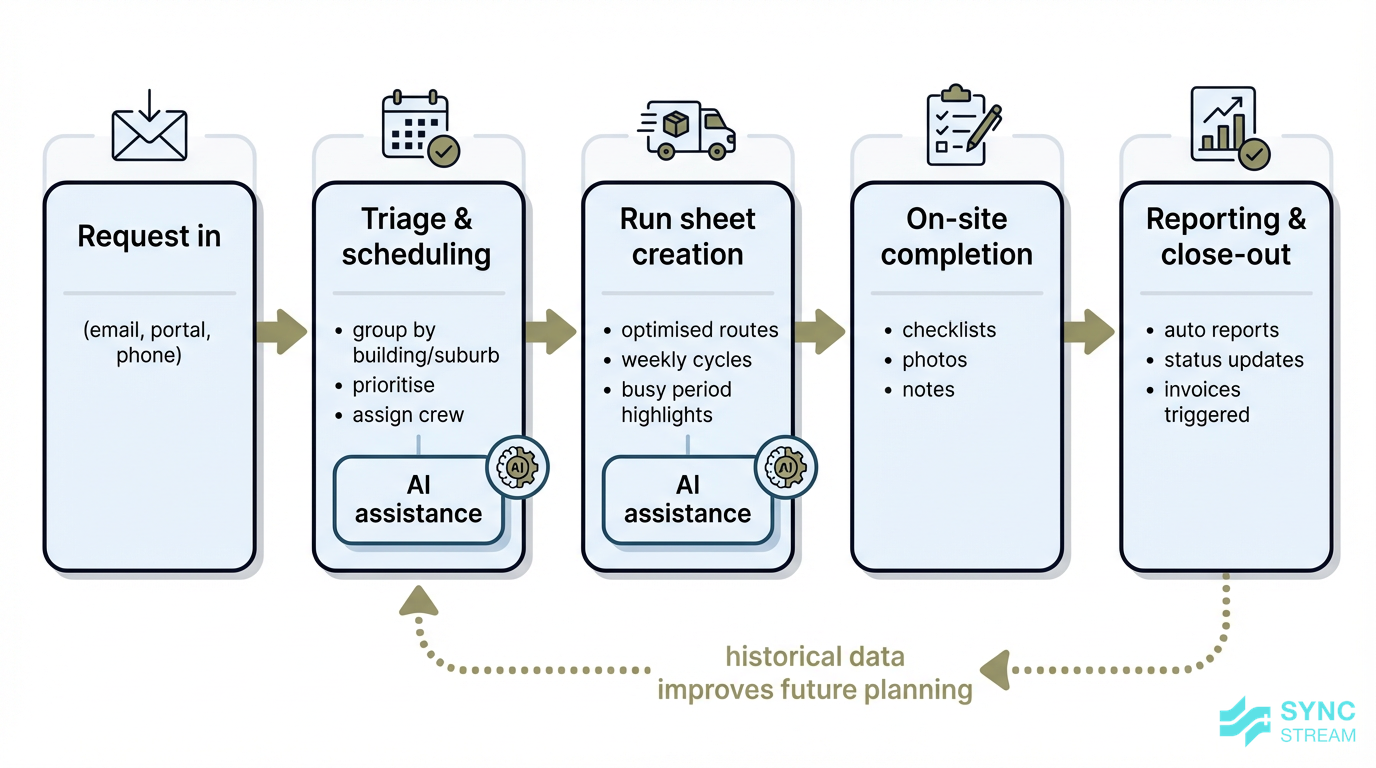
How AI streamlines the flow from incoming requests to completed work and reporting for strata groundskeeping teams.
Australian strata groundskeeping businesses are dealing with rising wages, fuel costs, insurances, and tighter compliance requirements. Many operators run lean crews and can’t simply add more admin staff to keep up with the paperwork.
AI helps by reducing the manual effort between a request coming in and a crew closing the job out:
- Automating run sheets so work is grouped smartly by location and frequency
- Grouping jobs by suburb or building cluster to cut down on drive time
- Highlighting busy periods based on historical data (e.g., spring gardening surge, summer pool testing)
- Reducing admin time spent on hand-writing notes, typing up reports, and manually updating spreadsheets or portals
On platforms similar to Bricks and Agent, AI-assisted triage and workflow automation have led to task completion times being up to 70% faster. For a small groundskeeping team, the effect is simple: more time on tools, less time chasing emails and paperwork.
Protecting compliance and service standards
Strata sites carry a lot of compliance obligations across:
- WHS (slip hazards, access ways, contractor inductions)
- Fire safety checks
- Pool water and safety checks
- Testing and maintaining gates, lighting, pumps, lifts, and other common property assets
AI-backed systems support compliance by:
- Scheduling and reminding you about required checks at the right intervals
- Prompting crews to complete structured checklists on-site
- Attaching time-stamped photos and GPS data to visits
- Generating summary reports that strata managers can keep on file for audits or incidents
These accurate, time-stamped records protect both your business and the body corporate when questions arise about what was done and when.
However, even with AI-generated logs and reports, legal responsibility stays with the body corporate and the service provider. AI is support infrastructure, not a legal shield. You still need clear procedures, human review of critical reports, and solid WHS practices.
Key Components / Features
Smarter contract and schedule management
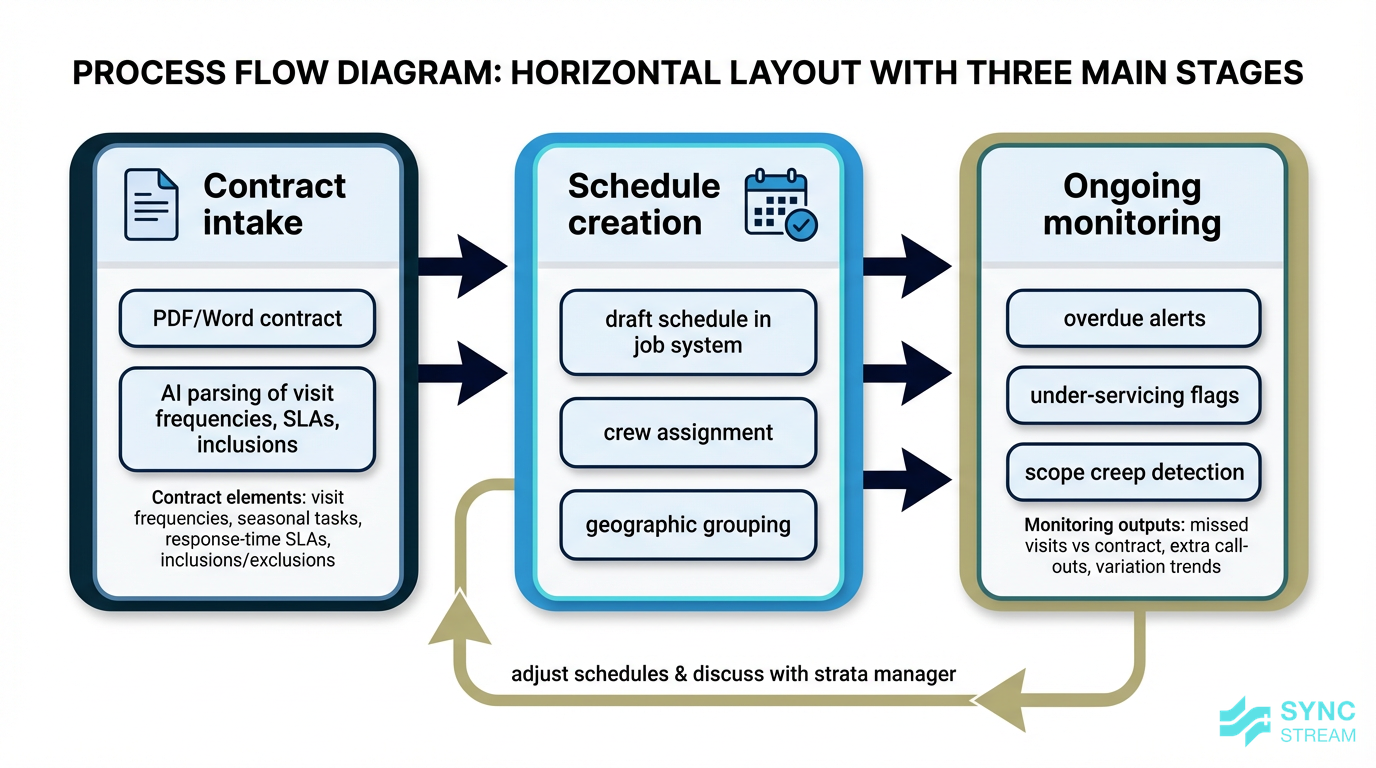
How AI reads strata groundskeeping contracts, builds schedules, and monitors delivery against scope.
Most strata groundskeeping contracts contain a lot of detail: visit frequencies, seasonal variations, special conditions, and response times. AI can help you actually use that detail.
- Parsing contract documents
- Inputs: PDF or Word contracts, existing job list for the site.
- Action: AI reads the contract and extracts how often each area must be serviced, seasonal tasks, SLAs, and inclusions/exclusions.
- Output: A structured list of required visits and tasks that can be loaded into your job management system.
- AI-powered scheduling
- Inputs: Structured contract rules, crew capacity, locations, and working hours.
- Action: AI proposes schedules that group jobs by geography, balance workloads, and factor in things like weather forecasts.
- Output: Draft weekly and monthly run sheets for each crew, plus alerts for overdue or at-risk tasks.
- Contract health monitoring
- Inputs: Completed job history, contract rules, and variations.
- Action: AI compares actual visits and call-outs against the contract and looks for patterns.
- Output: Flags for under-servicing (missed visits) and scope creep (extra call-outs or variations), so you can discuss changes with the strata manager using data, not guesswork.
Asset logs, sensors, and predictive care
For strata groundskeeping, "assets" typically include:
- Irrigation systems and controllers
- Pumps (pool, stormwater, fountains)
- Automatic gates and doors
- Common-area lighting
- Playground and outdoor fitness equipment
- Pools and water features
- High-use garden equipment you maintain for the site
When crews capture structured logs plus photos for these assets, AI can analyse the history and spot patterns.
- If you have sensor or meter data (e.g., pump run hours, energy use, water consumption), AI can combine that with visit logs to predict when an asset is likely to need servicing or replacement.
- Without sensors, consistent logs (dates, fault types, time-to-fix) are still enough for AI to highlight emerging problems.
Example:
- Over six months, an estate’s booster pump shows repeated minor failures logged in your system.
- AI notices the pattern of frequent call-outs and rising repair time.
- The system prompts a proactive inspection and suggests you recommend an overhaul or replacement to the strata manager.
The result is fewer urgent breakdowns, less after-hours work, and more strategic conversations about asset life and budgets.
Reporting, communication, and dashboards
Reporting is where many strata groundskeeping teams burn time. AI can streamline this without forcing crews to write essays.
- Auto-generated site visit reports
- Inputs: Tick-box checklists, notes, photos, GPS and timestamps from the mobile app.
- Action: AI compiles a summary of what was done, highlights follow-up items or safety issues, and formats it in a consistent layout.
- Output: A ready-to-send PDF or email report that strata managers can file or forward.
- Email and message drafting AI assistants can:
- Summarise works completed since the last visit
- Draft variation quotes based on extra tasks noted on-site
- Draft replies to common questions from managers or committees
Your team reviews and edits these drafts before sending, so AI reduces typing but people stay in control.
- Dashboards for actionable insight Dashboards give you and strata managers a clear view of:
- Upcoming scheduled services by building
- Overdue tasks and open issues
- Request trends (e.g., recurring drainage complaints at one complex)
For owners’ corporations and managers, this makes the value of your service more visible and easier to justify at budget time.
Implementation Strategy
Planning your AI rollout
A practical rollout for a small Australian groundskeeping business can follow a simple sequence:
- Define your main pain points
- Inputs: List of current headaches (missed tasks, messy asset logs, slow reporting).
- Action: Rank them and choose one primary focus (e.g., run sheets) and one secondary (e.g., reports).
- Expected output: A clear, written problem statement you can share with your team and any vendor or partner.
- Audit your current tools and data
- Inputs: Your job system, accounting platform, strata portals, shared drives/folders.
- Action: Note where contracts, asset lists, photos, and job histories live, and whether they’re complete and up to date.
- Expected output: A short inventory (one page is enough) of systems, data locations, and any obvious gaps.
- Choose 1–2 priority use cases
- Inputs: Problem statement and system/data inventory.
- Action: Select specific, narrow use cases such as "automate weekly run sheets for two large complexes" or "auto-generate pool visit reports".
- Expected output: 1–2 clearly defined use cases with example sites and what "good" looks like.
- Select a tool or partner
- Inputs: Use cases, budget range, and preferred way of working.
- Action: Decide whether to:
- Turn on AI features in your existing platform
- Add a standalone assistant for emails and reports
- Work with an implementation partner like Sync Stream to connect AI across multiple systems
- Expected output: A chosen approach, vendor/partner, and a rough start date.
- Set basic success metrics
- Inputs: Baseline numbers (e.g., average time to prepare a report, number of missed or late tasks).
- Action: Agree on 2–3 simple measures such as hours of admin saved per week, fewer missed tasks, or faster report turnaround.
- Expected output: A short list of metrics with targets for the pilot period.
- Run a 1–3 month pilot on a single site or contract
- Inputs: Selected properties, tools configured for the new workflow, staff briefings.
- Action: Use the new AI-supported process on those sites for at least one full cycle (e.g., a quarter), then review what worked and what didn’t.
- Expected output: A go/no-go decision to roll out more broadly, plus a punch list of tweaks and training needs.
Embedding AI into daily workflows
AI delivers value when it quietly supports the way you already work.
- Keep data capture simple on-site
- Inputs: Existing mobile app or portal.
- Action: Crews tick off tasks, add short notes, and attach photos as they go — no long essays.
- Output: Clean, structured data that AI can use for schedules and reports without extra admin time.
- Use changes as triggers Whenever a contract is updated, assets change, or a new building comes on:
- Check visit frequencies and SLAs in your system still match the contract.
- Update asset lists and labels.
- Refresh any AI-generated schedules, prompts, or templates that rely on that data.
- Create light-weight SOPs (standard operating procedures) Write down, in a single shared document:
- Who reviews AI-generated reports and emails before they go out
- How staff flag and correct errors (e.g., wrong asset name, missed task)
- What must never be automated (serious incidents, major contract variations, safety escalations)
These habits keep Strata groundskeeping teams AI tools aligned with the real work on-site and reduce the risk of "set and forget" problems.
Training your crew and contractors
Technology only works if people are comfortable using it.
- Practical, on-the-job training Focus training for supervisors and leading hands on:
- Using the mobile app to capture checklists, asset IDs, and photos every visit
- Reviewing and editing AI-generated reports and emails before sending
- Flagging when jobs in the system don’t match what actually happens on-site
- Address change management early Make it clear to staff that:
- The goal is to reduce paperwork and retyping, not reduce hands-on work
- Better logs and photos protect them when something was never requested or never in scope
- Appoint an internal "AI champion" Choose someone interested in the tools to:
- Liaise with your vendor or with Sync Stream
- Log recurring issues and improvement ideas
- Share quick tips and mini refreshers at toolbox talks
This keeps knowledge in-house and helps new staff get up to speed quickly.
Options Comparison
Comparing platforms, plugins, and partners
Most strata groundskeeping teams will follow one of three main paths:
- Full maintenance/strata platforms with built-in AI
- Best when you want an all-in-one system and are happy to adapt to how it works.
- Often easier to set up initially, with AI features already integrated into job intake, scheduling, and reporting.
- May be less flexible if you have unusual workflows or multiple existing systems.
- AI plugins and assistants on top of current tools
- Best when you already have solid job management and accounting, and just want help with emails, documents, and scheduling.
- Typically lower upfront cost and faster to trial, but may require some manual glue between systems.
- Tailored setup with an implementation partner like Sync Stream
- Best when you run a multi-site operation, work across several strata portals, and need everything to connect cleanly.
- Higher design effort upfront, but workflows are built around your exact processes and tech stack.
- Gives you more control over data, security, and how things are documented.
When weighing these options, consider:
- Ease of setup: Can your team configure it, or do you need support?
- Integration: Does it connect to your current strata portals, accounting platform, and job system?
- Costs: Look at both subscription fees and the time needed for setup, training, and ongoing tweaks.
- Data control and hosting: Where is data stored, and how is it secured under Australian privacy laws?
- Fit for your size: Very small teams may prefer lighter tools; larger operators often benefit from deeper integrations.
Ask any vendor or partner:
- How does your system handle Australian strata-specific workflows and terminology?
- How are schedules created and updated when contracts change?
- How do asset logs work in practice on a mobile device?
- Where is data hosted, and how is it secured?
- What support and training do you provide during and after rollout?
- How do we export our data if we ever decide to move platforms?
Common Pitfalls
Where strata AI projects go wrong
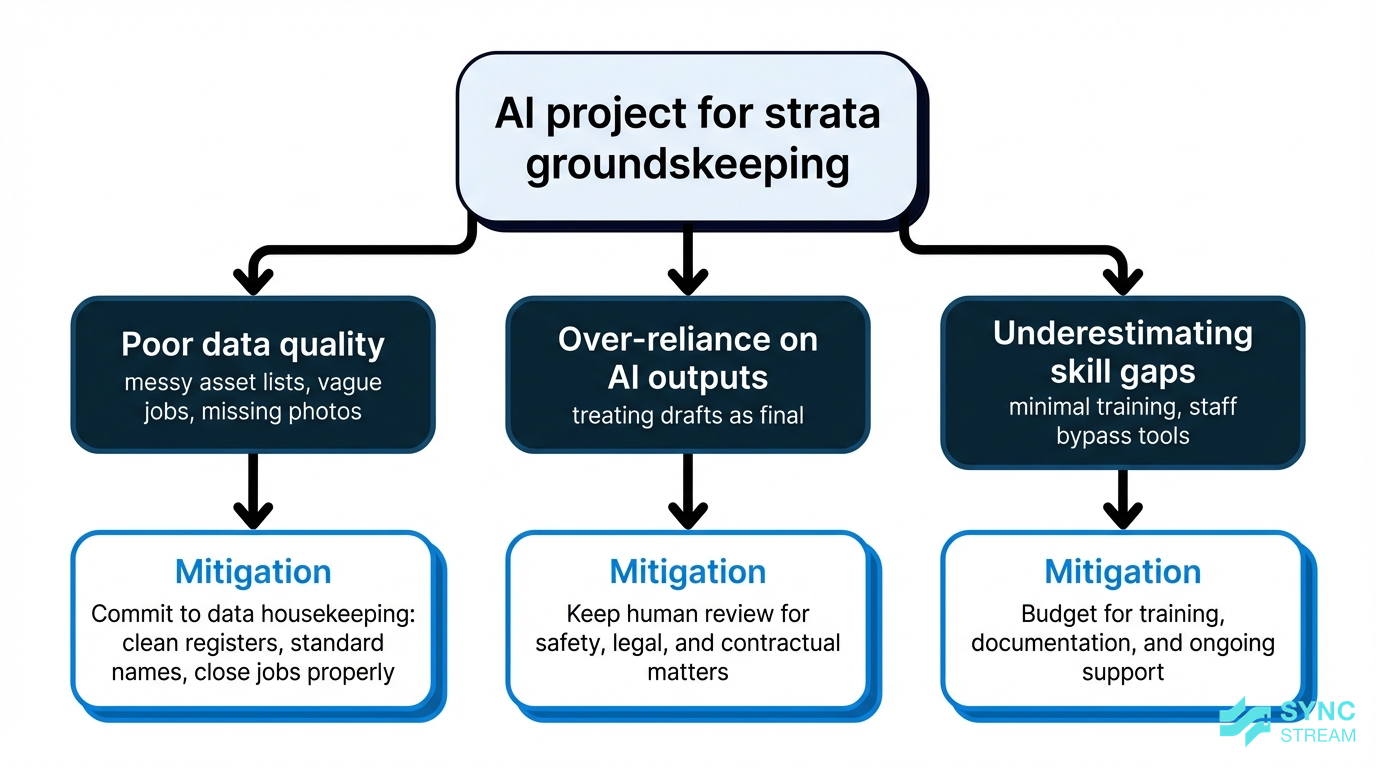
Common reasons AI projects fail in strata groundskeeping and the practices that prevent them.
AI projects in strata and groundskeeping often stumble for avoidable reasons:
- Poor data quality Incomplete asset lists, vague job descriptions, and missing photos lead to weak recommendations and unreliable schedules. Commit to regular data housekeeping: clean up asset registers, standardise naming, and close jobs properly.
- Over-reliance on AI outputs Treat AI-generated reports and emails as drafts, not final truth — especially for safety, legal, or contractual matters. AI doesn’t remove your legal responsibilities as a service provider or those of the body corporate.
- Underestimating skill gaps Rolling out tools without enough training, documentation, or support drives staff to bypass the system and revert to old habits. Budget time and money for onboarding, refreshers, and ongoing refinement of workflows.
By anticipating these pitfalls, you can keep your AI rollout grounded and sustainable.
Conclusion
Strata groundskeeping teams AI is not about replacing crews; it’s about taking the friction out of schedules, asset logs, and reporting so your people can focus on quality on-site work.
By starting with clear pain points, using the tools you already have, and layering in AI where it genuinely saves time or reduces risk, Australian strata groundskeeping businesses can lift efficiency, improve compliance, and make their value more visible to managers and committees.
If you’re ready to explore a practical, low-risk approach tailored to your existing systems, Sync Stream can help you scope, implement, and document AI-powered workflows that support your contracts for the long term.
FAQ
Do we need to replace our current job management system to use AI?
Not necessarily. Many groundskeeping teams start by turning on AI features in their existing platform or adding assistants that sit on top for emails and reporting. Partners like Sync Stream can also connect AI tools to the systems you already use.
Is AI suitable for very small strata groundskeeping businesses?
Yes. Small teams often benefit the most from reducing admin. Starting with one or two simple use cases — like automated run sheets or visit reports — can deliver value without major change.
How much training will our crews need?
Most field staff only need to learn how to use a mobile app consistently for checklists, photos, and notes. Supervisors and office staff need extra training on reviewing AI-generated outputs and managing exceptions.
Will AI help with compliance for WHS and safety checks?
AI can remind you about required checks, structure your checklists, and keep time-stamped records. It supports your compliance processes but doesn’t replace your legal obligations or professional judgment.
What does a typical rollout timeline look like?
For a focused pilot on one or two sites, many businesses see workable results within 1–3 months. Larger, integrated setups take longer but can usually start showing value within a single contract cycle.
How does Sync Stream work with our existing systems?
Sync Stream specialises in implementing AI and automation on top of your current CRMs, accounting platforms, operations tools, and strata portals. Workflows are designed, tested, and documented so you retain control of data, security, and long-term maintainability.